Buy-now-pay-later orders go missing because your purchase conversion almost always fires on the WooCommerce thank-you page, and Tabby or Klarna put an approval step off your site between checkout and that page. If the buyer doesn’t come back, or comes back before the provider confirms, the event is lost or fires too early. The order still exists. The page load didn’t happen.
That is the whole problem, and it is fixable. The conversion needs to come from the order, not from a page.
It matters more than it looks. Installment buyers often have bigger baskets, since splitting the cost is the point. When those sales vanish from Meta, the campaigns that bring in your highest-value buyers look like your weakest ones, and the algorithm learns the wrong lesson.
Why do Tabby and Klarna orders go missing from your ad platform?
Because the browser pixel needs the buyer to finish on your order-received page, and a BNPL checkout routes them through the provider first. The buyer leaves your store, gets approved for the installment plan, and is only then sent back. Any break in that return trip means the pixel never runs, so Meta never hears about a sale your store did make.
Here is the path in outline. The exact screens vary by provider, country and device:
- The buyer picks Tabby or Klarna at checkout. WooCommerce creates the order.
- They are sent to the provider to log in, confirm their details and accept the installment plan. On a phone this can hand off to the provider’s app.
- The provider tells your store the payment is approved, and the order moves to processing.
- The buyer is sent back to your order-received page, where the pixel fires Purchase.
Step 4 is where it breaks. The buyer has already agreed to pay, so from their side the job is done. They close the tab, the provider’s app doesn’t hand back to the browser that started checkout, or the return page loads slowly and they leave.
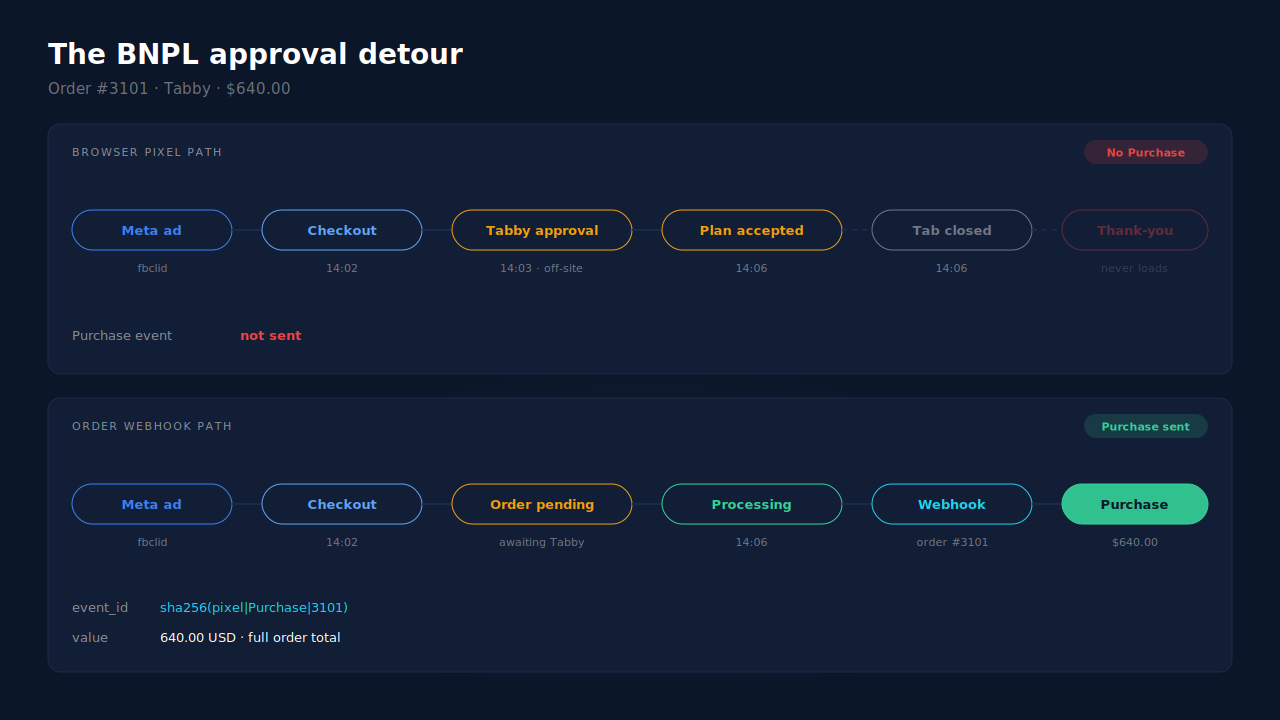
None of this touches the order. WooCommerce still holds a real order with the buyer’s email, phone and total. Only the browser event is gone. When a buyer does make it back but in a different browser, the event that fires may carry none of their ad-click identifiers; attributing WooCommerce orders when the checkout is on another page covers that half.
Why is buy-now-pay-later harder to track than a card payment?
Because a BNPL checkout has more steps off your site, and one of them is a decision. A card payment usually completes on your own checkout. An installment plan adds an approval that can take longer, can happen in another app, and can end in a decline. Each of those breaks a thank-you-page event differently.
The detour is longer. Signing in and accepting a plan takes more time and screens than typing a card number. More time off-site means more buyers who don’t come back.
The approval can be pending. Depending on the provider and the gateway plugin, an order can wait in pending or on-hold until the provider confirms. If the buyer lands on the thank-you page during that wait, a page-based pixel fires Purchase for an order that isn’t paid yet.
The approval can be declined. A buyer who is turned down for the plan leaves behind an order that ends up failed or cancelled. A pixel that fired on the way through has already counted it as a sale.
So BNPL fails in both directions. Paid orders go missing, and unpaid ones can get counted. A page load is the wrong trigger for either.
Which WooCommerce order statuses should count as a BNPL purchase?
Processing and completed. Those are the statuses WooCommerce uses for an order it treats as paid. Pending and on-hold mean the store is still waiting; failed and cancelled mean the sale didn’t happen. A Purchase sent on processing or completed waits for the provider’s confirmation, which is exactly the signal an ad algorithm should learn from.
If an installment approval takes a while, the Purchase still arrives when the order turns paid. Meta accepts server events whose event_time is up to seven days old. The 7-day event time window in Meta CAPI explains what happens to anything older.
What value should the Purchase carry for an installment order?
The full order total, not the first installment. The buyer pays the provider in parts, but the order in your store is for the whole amount, and that is the sale your ads produced. Sending the first installment would make your BNPL buyers look like a fraction of their real value.
This is an easy mistake with a custom setup that reads a “payment amount” from the gateway’s callback rather than the order total. Check what your current events carry: pick one BNPL order, then compare its total in WooCommerce with the value Meta received in Events Manager. Sending purchase value and currency to Meta covers the fields in detail.
How do you check whether BNPL orders are the gap on your store?
Compare paid WooCommerce orders with Meta’s received Purchases for the same dates, split by payment method. If card orders line up closely and Tabby or Klarna orders fall short, the thank-you page is your leak. You need one order export and one Events Manager view.
- Export paid orders for a fixed window, say 14 days, with the payment method on each. Count only processing and completed orders.
- Pull Purchase events for the same window from Events Manager, not Ads Manager. Ads Manager applies attribution windows; Events Manager shows what Meta actually received.
- Compare by method. In an illustrative example, a store with 80 card orders and 30 BNPL orders that sees about 90 Purchases in Events Manager has a gap sitting mostly in BNPL.
- Look for the reverse too. Check whether any failed or cancelled BNPL orders have a Purchase against them. That is the early-fire problem.
- Run one real test order with Events Manager’s Test Events tab open. Complete the installment approval, then close the window instead of returning. If the order turns processing and no Purchase arrives, you have reproduced it.
Match the time zones on both sides, or orders near midnight land on different days and skew the count.
How do you fix BNPL purchase tracking without a new tool?
Move Purchase off the thank-you page and onto the order’s status change. You can nudge buyers back to the store, which narrows the gap without closing it, or send the event server-side through Meta’s Conversions API when the order turns processing. Only the second removes the dependency on the buyer’s browser.
Nudge the return. Look in your BNPL gateway plugin’s settings for anything that controls how the buyer comes back after approval. It helps. It can’t stop a buyer closing the provider’s window once they’ve been approved.
Fire from the order, server-side. WooCommerce triggers an action whenever an order changes status. A developer can send Purchase to the Conversions API at the moment the order moves to processing. That fires once per paid order, whether or not the buyer returns, and never for a declined one. The cost is maintaining it: hashing, retries, the right value and error handling.
Keep one owner per event. If your pixel plugin still fires a browser Purchase on the thank-you page, card orders will now count twice unless both events share the same event_id. The Meta CAPI deduplication debug guide walks through that failure. Keep the Meta base pixel installed for page events either way; it sets the _fbp cookie that server events use for matching.
How does PartialLeads track buy-now-pay-later orders on WooCommerce?
By sending Purchase from the WooCommerce order webhook, not from the thank-you page. When an order reaches processing or completed, PartialLeads records it once and sends a server-side Purchase to Meta, TikTok and Pinterest. Whether the buyer came back from Tabby or Klarna, and when, no longer matters. The order is the trigger.
Paid orders only. Pending, on-hold, failed and cancelled orders are not sent. A BNPL order waiting on the provider sends as soon as it turns paid, and a declined one never sends. A confirmation that arrives more than seven days after the order is still sent, with its event time clamped to Meta’s window.
The full order total. The value is WooCommerce’s order total, tax and shipping included, after discounts. An order is recorded once, so a later edit to it doesn’t change the value or send again.
The ad click is captured before the detour. The PartialLeads tag records the fbclid and UTMs on the buyer’s first landing. The order is matched to that earlier session by visitor id, email or phone, so the Purchase carries the click identifiers even when the buyer returns from the provider’s app in a different browser. When the _fbc cookie is missing, it is rebuilt from the fbclid.
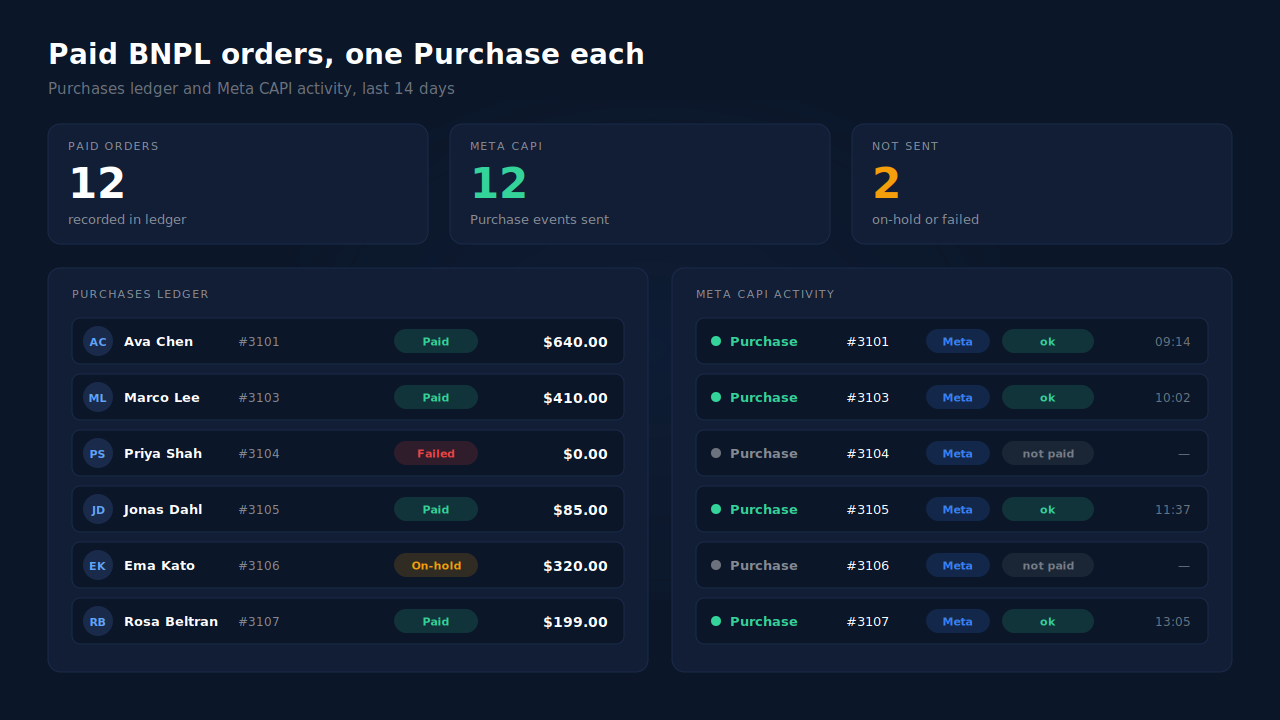
Where you see it working. The Purchases ledger lists every paid order PartialLeads recorded, matched or unmatched to a session, so the BNPL orders missing from Events Manager appear there. The CAPI activity log shows the server Purchase delivered for each. In the Leads list, the API column shows which conversion APIs each buyer was sent to.
The honest constraints. PartialLeads’ event ids are its own, and it doesn’t deduplicate against another plugin’s browser pixel. Switch off Purchase in Meta for WooCommerce or PixelYourSite and keep one source. Delivery is the half PartialLeads controls. Whether Meta ties the sale to an ad depends on the identifiers captured and on Meta’s own matching. The pillar guide to tracking WooCommerce purchases server-side covers the full setup.
| What breaks | The mechanism | Where you see it in the dashboard |
|---|---|---|
| BNPL buyer never returns to the thank-you page | Purchase sent from the WooCommerce order webhook; nothing fires on the page | CAPI activity log, one Purchase per paid order |
| Order waits in pending or on-hold for approval | Only processing and completed orders are sent | Purchases ledger, paid orders only |
| Buyer declined for the installment plan | Failed and cancelled orders are never sent | No Purchase in the CAPI activity log for that order |
| Value arrives as one installment | Full order total, tax and shipping included | Purchases ledger value vs Events Manager value |
| Buyer returns from the provider’s app in another browser | Order matched to the landing session by visitor id, email or phone; _fbc rebuilt from fbclid |
Purchases ledger, matched rows |
| Another plugin still fires a browser Purchase | Not deduplicated; keep one source per event | Events Manager senders vs the Leads-list API column |
Tell us what's broken. We'll fix your tracking — free.
Describe the tracking/attribution problem you're stuck on and we'll map it to a fix: server-side conversions to Meta, Google, TikTok and Pinterest, plus first-party tracking that survives Safari. No code required.
Sources
- https://developers.facebook.com/docs/marketing-api/conversions-api
- https://developers.facebook.com/docs/marketing-api/conversions-api/parameters/server-event
- https://developers.facebook.com/docs/marketing-api/conversions-api/parameters/custom-data
- https://developers.facebook.com/docs/marketing-api/conversions-api/deduplicate-pixel-and-server-events
- https://developers.facebook.com/docs/marketing-api/conversions-api/parameters/fbp-and-fbc