Your analytics counts a returning customer as a new visitor because it never recognised the person. It recognised a value stored in one browser. When that value is cleared, capped, refused, or absent — a new phone, a private window, a second browser — the same human shows up with a blank history and gets counted again from zero.
This is not a reporting bug you can filter away. It changes which channel gets credit for the sale.
Why does analytics think a returning customer is new?
Almost every visitor counter works the same way: on the first visit it writes a random identifier into the browser, and on every later visit it reads that identifier back. Match found means returning. No match means new. The tool is not comparing people. It is comparing storage slots.
That distinction stays invisible while storage behaves. It becomes expensive the moment storage doesn’t — because nothing in the system is checking whether the identifier is actually gone or whether the person is actually new. Both look identical: an empty slot.
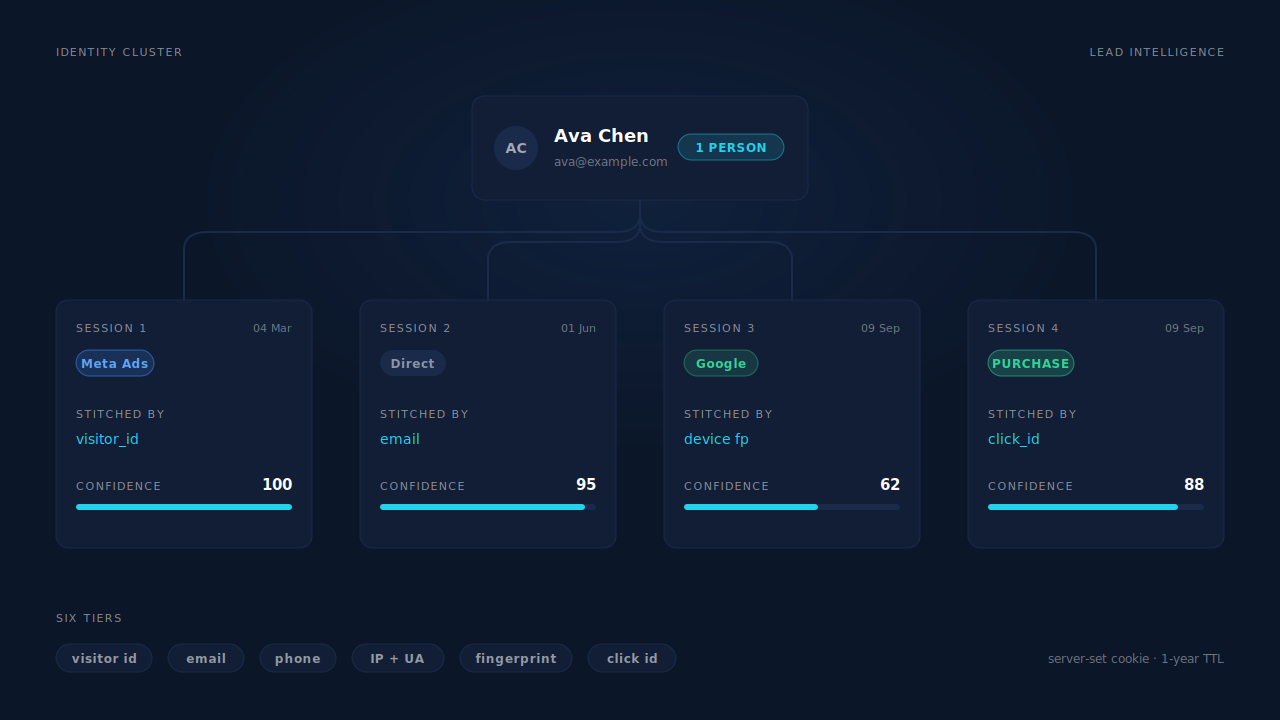
So one customer who bought from you in March, cleared her browser, then came back from a Meta ad in September is not one person with two visits. She is two unrelated rows, each with their own “first” visit, their own source, and their own conversion rate contribution.
The fix is not a better random identifier. It is resting recognition on something the browser doesn’t control.
What actually clears the identifier between visits?
Six things, and only one of them is the customer deliberately opting out.
Browser caps on script-written storage. Safari’s Intelligent Tracking Prevention limits how long a cookie written by JavaScript survives — the practical effect being that a visitor recognised on Monday can be unrecognised the following week, with no action from them at all. A cookie set by your server in the HTTP response is treated differently from one written by document.cookie in a script, which is why the same visitor can persist for a year under one implementation and a handful of days under another.
localStorage eviction. Many tags keep their identifier in localStorage because it is simpler than cookies. It is also discardable: browsers clear it under storage pressure, in cleanup sweeps, and whenever the person clears site data. It is a cache, not a record.
Private and incognito windows. Storage is created fresh and thrown away when the window closes. Every private-window visit is, by design, a first visit.
A second browser or profile. Chrome at work, Safari on the phone, a work profile and a personal profile in the same browser. Same person, three empty storage slots. No amount of cookie hardening merges them, because they never share storage in the first place.
Consent banners that block the first-party ID. If your banner gates your own first-party identifier behind acceptance, every visitor who ignores the banner is permanently new — including the ones who accepted last month and got a fresh banner because the consent record lived in the storage that just got cleared.
Domain and subdomain splits. A cookie scoped to www.example.com is not read on example.com, and a landing page on a separate domain shares nothing with your main site. This one is self-inflicted and the easiest to fix.
Note what is not on this list: the customer doing anything unusual. Every item above happens to ordinary people behaving normally.
What does a miscounted returning visitor cost you?
Four things, and the fourth is the one that actually costs money.
Your visitor count inflates and your conversion rate deflates to match. One person across four unrecognised visits is four visitors: the denominator grows while actual conversions do not. Illustrative arithmetic — if 2,500 real people produce 4,000 counted visitors and 100 orders, your reported conversion rate is 2.5% against a real per-person rate of 4%. The direction of that error never changes. It makes every channel look worse than it is, and the channels people research longest look worst of all.
Journey length disappears. If each visit is its own visitor, every path in your reports is a single touch. The research visit, the comparison visit and the buying visit stop being a sequence and become three strangers. Time-to-purchase collapses to “same day” for everyone, because the only visit you can see is the last one.
First-touch credit goes to the wrong channel — this is the expensive one. The paid click that introduced the customer happened during a visit that no longer connects to the purchase. The purchase happened in a later visit that the person reached by typing your name. So the sale is credited to Direct, or to branded search, and the Meta or Google campaign that actually created the demand shows a worse return than it earned. Ad conversions showing as Direct is usually this problem wearing a different label.
Budget follows those numbers. That is the real cost: not a wrong chart, a wrong decision about which campaign to cut.
How do you tell a real new visitor from an unrecognised returning one?
You cannot tell them apart one visit at a time — that is the whole problem — but you can measure the gap in aggregate, with four checks you can run today.
Compare new-vs-returning against what you already know. If your CRM says a third of your customers have purchased before, and your analytics says 94% of sessions are new visitors, the two are describing different worlds. The gap between them is your recognition loss, and you can size it without any new tooling.
Look at your Direct share. Direct is where unrecognised returning visits go to hide. A Direct share that rises when paid spend rises is not word of mouth. It is your own paid traffic coming back unrecognised.
Check whether any path has more than one touch. In a path or conversion-path report, a population where nearly every purchase is single-touch is not a population with short consideration. It is a population whose earlier touches were disconnected.
Run a known-identity cohort. Take people you can identify independently — anyone who clicked an email-campaign link, or logged in — and count how many of their visits your visitor tracking joined together. Whatever you lose on the group you can verify, you are losing at least that much on the group you cannot.
What can you fix without changing tools?
More than you would expect, and none of it is complete on its own. Work down this list in order.
Set your first-party identifier from the server, not from a script. A cookie written in the HTTP response by your own backend is not subject to the caps browsers apply to script-written cookies. This is the single highest-leverage change available to you, and it needs no vendor — only somewhere server-side in your stack to set it. Its limit: it recognises a browser, not a person, so it still cannot bridge a phone and a laptop.
Stop splitting your own domain. Serve one canonical host, redirect the other, and scope your identifier at the registrable domain so subdomains share it. Free, and it recovers visits you were losing to your own URL structure.
Do not gate your own first-party ID behind the banner if your legal basis doesn’t require it. Take advice on your jurisdiction and purpose — but many teams gate everything by reflex and lose their own returning-visitor recognition for no compliance gain. First-party attribution is the design worth protecting here.
Collect an identifier early and use it. An email address is the only durable join key most businesses actually have, because it travels across devices and survives every storage clear. Capturing it early in the form rather than only at submit is what makes that key available at all.
Put UTMs on every paid link, without exception. They will not survive a cleared browser, but they make the first visit classifiable, which is the visit that matters for first-touch credit.
Keep click IDs off the floor. Store gclid, fbclid and their equivalents server-side on the first visit. When the same click ID reappears later, it is a join key in its own right — and it is the one identifier that ties a visit directly to an ad. The difference between gclid, fbclid and UTM parameters matters here, because they behave differently on the return visit.
Do all six and you will still lose the person who researches on a phone and buys on a laptop. Bridging that requires joining identities rather than hardening storage — a different mechanism, covered in how to track leads across devices.
How does PartialLeads recognise a returning visitor?
By not depending on a single browser-held identifier. PartialLeads stores a durable visitor ID that the server sets as a first-party cookie, with localStorage as a backup on a one-year TTL — so the browser cap that shortens script-written cookies does not apply to it. That alone keeps a returning visitor on the same browser recognisable far longer than a typical tag.
When even that is gone, the identity cluster does the work. A resolver unions a person’s sessions across six tiers: visitor ID, normalised email, normalised phone, IP plus user-agent inside a window, a device fingerprint hash, and a click ID seen on more than one session. The fingerprint is cached for 30 days on the device and only considered inside a 90-day window, capped to bound false merges — it is a last resort, deliberately, because a fingerprint is the weakest of the six.
Two more mechanics matter for return visits specifically. Visit-sibling inheritance repairs attribution inside a single visit: a session on the same client, IP and user-agent within ±30 minutes inherits the strong attribution — UTMs and click IDs — from its sibling, and a narrower ±10-minute rule with a matching fbc cookie covers a phone switching from wifi to mobile data mid-checkout. And every matched purchase writes both a first-touch and a last-touch attribution row, so the introducing visit keeps its credit even when the buying visit looks Direct. How visitor identity resolution works covers the resolver itself in full.
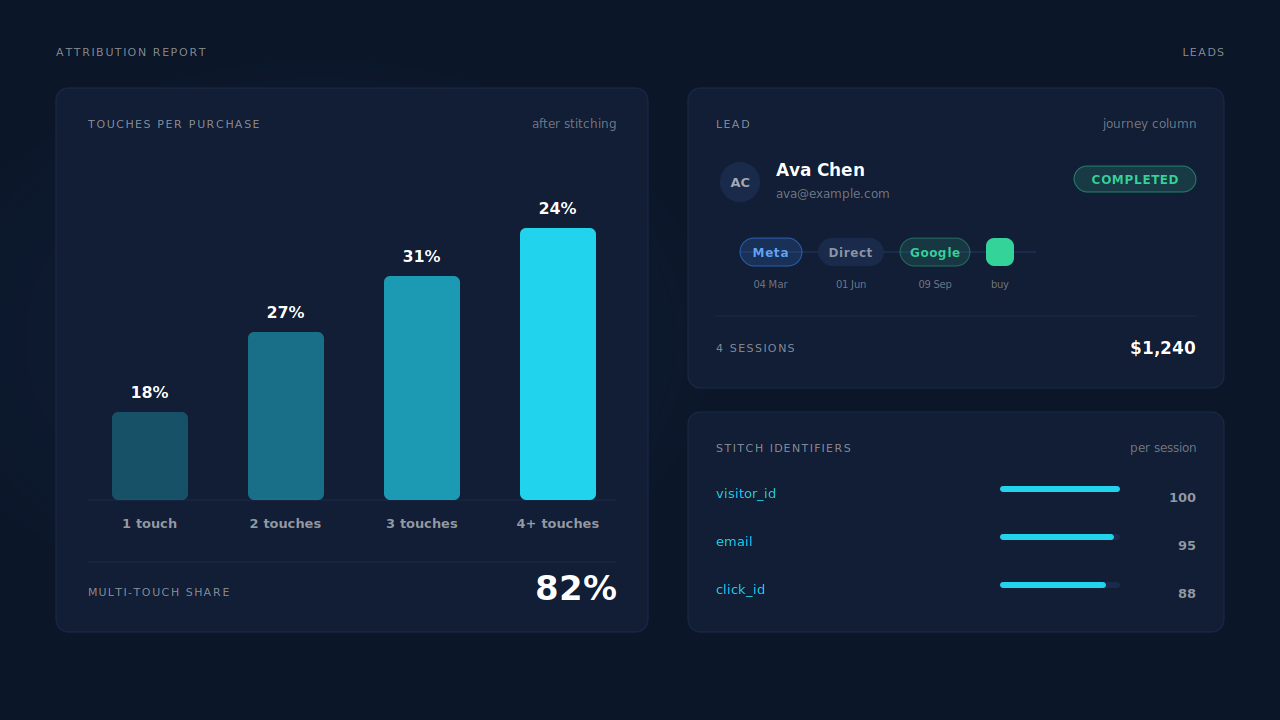
You can see recognition working in three places. The Journey column on the Leads list renders every touch as a badge, left to right, with a “N SESSIONS” label — a grey dot where the source is genuinely unknown, an emerald square for the conversion, and a ring treatment that encodes which identifier stitched that session into the person. You read a returning customer as a sentence without opening the record. The Customer Journey timeline does the same at full detail per lead. And in the Attribution report, the touches-per-purchase distribution (1 / 2 / 3 / 4+) and the days-to-purchase split tell you whether your buyers really decide in one visit or whether you have been reading unrecognised returns as single-touch conversions all along — while the Recovered Attribution panel itemises revenue a raw last-click view loses, including the sessions a classifier resolved to a real channel instead of Direct. Reading an attribution report honestly walks through those panels.
The honest constraints. Recognition across devices needs an identifier the person supplied — an email, a phone, or a purchase that carries one. A visitor who never types anything, clears storage, and returns on a different device stays two records, and no vendor can honestly claim otherwise. The fingerprint tier narrows that gap; it does not close it. And PartialLeads reconstructs Meta’s _fbc from an fbclid in the URL, but it does not invent an _fbp cookie that was never set — keep your platform base tags installed.
| What breaks | The mechanism | Where you see it in the dashboard |
|---|---|---|
| Script-written cookie capped by the browser, visitor looks new next week | Durable visitor ID set as a first-party cookie by the server, localStorage backup, 1-year TTL | Repeat sessions stay on one lead in the Leads list instead of forming new rows |
| Storage cleared entirely between visits | Six-tier identity cluster: visitor ID, email, phone, IP+UA, device fingerprint (30-day cache, 90-day window), click ID | Journey column “N SESSIONS” badge; the ring treatment shows which tier stitched each session |
| Two sessions in one visit, second one reads Direct | Visit-sibling inheritance: ±30 min same client/IP/UA, ±10 min fbc match for a wifi-to-mobile handoff |
Journey ribbon shows the real channel instead of a grey unknown dot |
| First-touch credit lost to the return visit | First-touch and last-touch attribution rows written on every matched purchase | Attribution report: first / last / resolved models side by side |
| Multi-visit journeys reported as single-touch | Sessions unioned before the purchase is attributed | Touches-per-purchase distribution (1 / 2 / 3 / 4+) and days-to-purchase split |
| Revenue a last-click view sends to Direct | Session classification and cluster resolution applied before crediting | Recovered Attribution panel, itemised by mechanism |
Tell us what's broken. We'll fix your tracking — free.
Describe the tracking/attribution problem you're stuck on and we'll map it to a fix: server-side conversions to Meta, Google, TikTok and Pinterest, plus first-party tracking that survives Safari. No code required.
Sources
https://developers.facebook.com/docs/marketing-api/conversions-api/parameters/customer-information-parameters https://developers.facebook.com/docs/marketing-api/conversions-api/deduplicate-pixel-and-server-events