You handle them by not depending on the IP address. iCloud Private Relay and VPNs replace the visitor’s real IP with a relay’s, so anything built on IP degrades: geo reports, IP-based session joins, IP as a match parameter. Everything else survives — your first-party cookie, the click ID in the landing URL, the email and phone the visitor types.
What do iCloud Private Relay and VPNs actually change?
They change one field: the IP address your server sees. They do not touch cookies, local storage, the URL, or the user agent.
iCloud Private Relay is an iCloud+ feature on Apple devices. When it is on, Safari browsing traffic and DNS lookups take two hops instead of connecting directly: the first relay sees the device’s real IP but not which site it is asking for, the second sees the site but not the device’s IP. Your server gets an address from the second relay’s egress pool. Apple’s setting lets the user choose between an egress address that preserves their general location and one that preserves only country and time zone — check Apple’s current documentation for the exact wording, which has changed before.
A VPN does the same with a blunter instrument and no regional guarantee. A corporate VPN funnels an entire company through a handful of office IPs; a consumer VPN puts a visitor in Frankfurt who is sitting in Brisbane.
What matters for attribution is what these tools leave alone:
- Cookies and local storage. A relay is a network layer. Your first-party visitor ID is still written, still read, still the same value on the next page.
- The URL.
gclid,fbclid,gbraid,wbraid,msclkid,ttclidandepikarrive on the landing URL exactly as the ad platform appended them. - The user agent. Unchanged.
- The form. Email and phone are typed by a human, not by a network.
A relayed visitor is not anonymous. They are a normal visitor with one field turned to noise.
Why does a relayed IP break attribution?
Because most stacks quietly use the IP for three separate jobs, and all three fail differently.
Geography. IP-to-city lookup is how nearly every analytics tool derives location. Behind a relay you get the relay’s location. Regional reports drift, sometimes subtly — a state-level shift that reads as a trend — and sometimes absurdly, with a cluster of “Dutch” conversions from an entirely Australian customer base.
Session joining. If your tool stitches sessions by IP plus user agent, a relay breaks it in both directions at once. It fails to merge: one person’s egress address can change between visits or mid-visit, so one buyer looks like two people. And it over-merges: thousands of unrelated people share one egress address, so an IP-plus-user-agent rule staples strangers together. Over-merging is the worse failure, because it produces confident wrong journeys rather than missing ones.
Match quality on conversion events. Server-side conversion events carry the client IP and user agent as customer-information parameters, sent unhashed alongside hashed email and phone (Meta, 2026). The IP is a real input to matching, and a relay address contributes close to nothing. It throws no error — the event is accepted and simply matches less well, which is why this one goes unnoticed for months.
A fourth job fails loudly rather than quietly: rate limiting and fraud rules keyed on IP, where a shared relay address looks exactly like an attack.
How do you tell how much of your traffic is relayed?
Measure it on your own data — the share depends entirely on how Apple-heavy and how corporate your audience is. Three checks, in order of effort:
- Count distinct visitors per IP. Group 30 days of sessions by IP and count the distinct first-party visitor IDs behind each. A residential address carries a handful; a relay or corporate VPN egress carries hundreds. Sort descending and the shared addresses are the top of the list.
- Look for IP changes within one visit. Take sessions from one visitor ID inside a 30-minute window and check whether the IP holds. Relayed and mobile visitors change mid-visit; a wired desktop generally does not.
- Compare derived geography with something you know. Shipping addresses, phone country codes, the currency people pay in. A gap between where your traffic is and where your customers are is usually a relay artefact, not a market.
You are not after a precise percentage. You are learning whether IP-based logic touches a sliver of your traffic or a third of it, because that decides how urgent the rest of this is.
Which identifiers still work when the IP is unreliable?
Rank them, and keep IP last. Each rung of the ladder identifies the same person with less certainty than the one above it, and a relayed visitor simply means you never reach the bottom rung.
- A server-set first-party cookie. The strongest rung, and one relays do not touch. It has to be server-set: Safari’s Intelligent Tracking Prevention caps the lifetime of cookies written by JavaScript, and the Apple visitors most likely to be on Private Relay are exactly the visitors ITP is hardest on.
- Email, normalised. Lowercased and trimmed, with quirks such as Gmail’s dots and plus-tags collapsed before you hash or compare. This is the identifier that travels across devices, browsers and cleared storage.
- Phone, normalised to E.164. Same idea, one rung down because fewer forms collect it.
- Click IDs from the landing URL.
gclid,fbclidand the rest are per-click, so they identify the session’s source rather than the person — but they survive relays, cookie clearing and blockers, and they are what an ad platform most wants back. - A device fingerprint hash. Weak, and honest tools treat it as weak — it belongs to a device, not a person, and it collides.
- IP plus user agent. Last. Good for a same-device, same-moment join and nothing more.
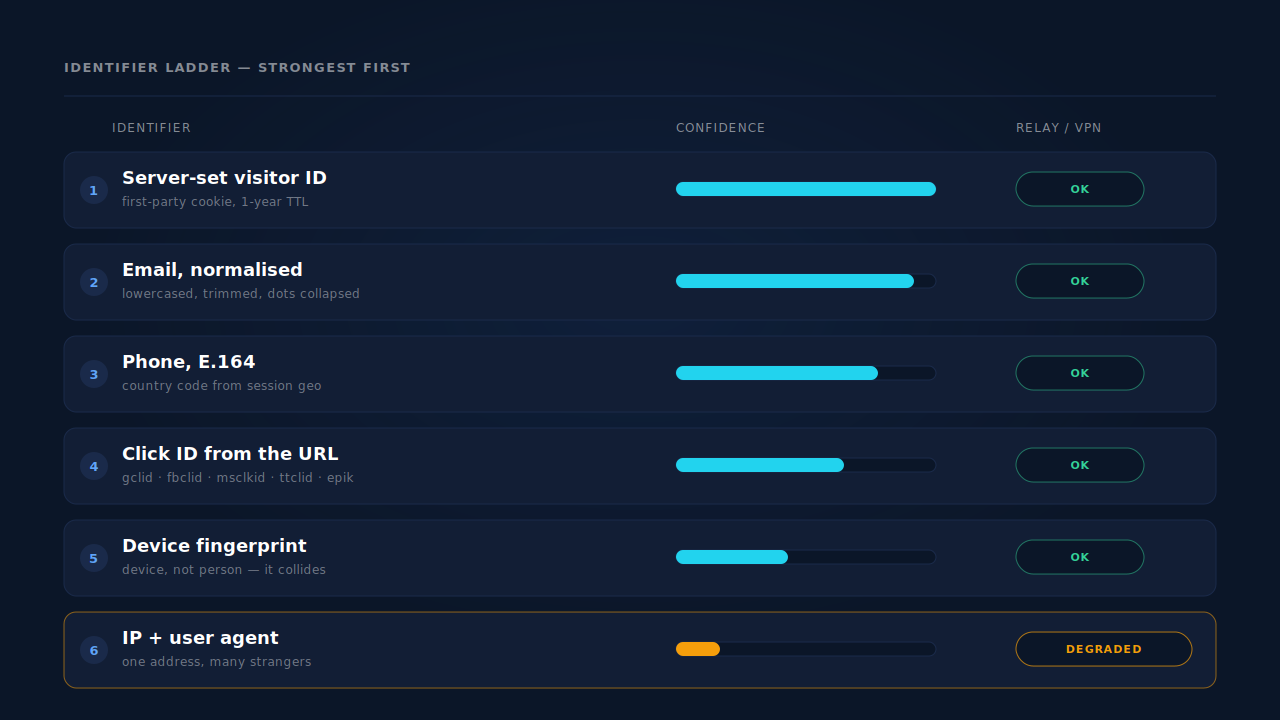
Two design rules fall out of the ladder. Any join that uses IP needs a corroborating signal — a matching user agent, a tight time window, an identifier from a higher rung; IP alone is not evidence. And a lower rung must never overwrite a higher one: if the email says this is Ava and the IP says it might be four hundred other people, the email wins, with no code path where it does not.
That is the first-party attribution argument in miniature — identifiers you collect and control survive privacy changes, identifiers the network hands you do not. Private Relay belongs to the same pattern that produced ad blockers breaking conversion tracking and ITP shortening cookie lifetimes.
Should you block or challenge Private Relay traffic?
No. Blocking a relay egress range blocks real customers on iPhones, and they see a broken site rather than an explanation.
The temptation is understandable — a shared address trips fraud heuristics, and blocking makes the alert stop. But the visitors behind Private Relay are disproportionately people on recent Apple devices paying for an iCloud subscription. That is not the cohort to lock out of your checkout to tidy up a report. The same goes for the softer versions: extra CAPTCHAs on shared IPs, “unusual activity” interstitials, dropping relayed sessions from reporting. Fix the rule that assumed one IP meant one person instead.
How does PartialLeads handle visitors on Private Relay or a VPN?
There is no Private Relay feature, and that is the point — the design already treats the IP as the weakest thing it knows.
The identity cluster ranks IP fourth of six. The resolver unions a person’s sessions across six tiers: durable visitor ID, email, phone, IP plus user agent, device fingerprint, and a click ID seen on more than one session. A relayed visitor loses one tier. The email typed into your form, the fbclid on the landing URL and the first-party visitor ID all still join — which is how visitor identity resolution keeps one person as one person.
The visitor ID is server-set. The pl_vid cookie is written by the server rather than by document.cookie, with local storage primary and the cookie as backup, on a one-year TTL. That matters more here than anywhere: Private Relay is a Safari feature, and Safari is the browser that caps script-written cookies. The Apple visitor gets a durable identifier precisely where most tags lose one.
Attribution inheritance already tolerates a changing IP. Visit-sibling inheritance heals a session that arrived with no source by borrowing attribution from a sibling session in the same visit. Its first tier requires a matching IP and user agent inside a ±30 minute window — its second, built for a phone handing off between wifi and cellular, matches on user agent and the Meta click cookie within ±10 minutes with the IP allowed to differ. A relay rotating its egress address mid-visit is the same shape of problem, and takes the same path.
Purchase matching is tiered, with IP at the bottom. An inbound order matches to a session by visitor-ID echo at the highest confidence, then normalised email, then phone, and only then IP. A relayed checkout still lands on the right session as long as the buyer’s email reached both systems.
Click IDs are captured from the URL, not from a cookie. gclid, gbraid, wbraid, fbclid, msclkid, ttclid and epik are read off the landing URL and stored on the session, and when the _fbc cookie is missing or malformed the backend reconstructs it from the fbclid in Meta’s documented format. A network layer between the visitor and your server never sees any of it.
Your form carries the match quality the IP can’t. Hashed email is Meta’s highest-weight match parameter and hashed phone is second; IP and user agent sit below them. With email and phone as required form fields, PartialLeads consistently delivers event match quality of 9 or above, observed across customer accounts — the condition is load-bearing, and the platform still owns its half, so a B2B audience of work emails can resolve lower on an identical payload. For relayed traffic the ordering is the point: when the IP contributes nothing, what you collected at the form is what remains.
Where you see it working. The Journey ribbon on the Leads list draws each touch as a badge, and its ring treatment encodes how that session was stitched into the person’s cluster — visitor ID, email, phone, IP plus user agent, fingerprint or click ID. You can read which identifier did the work off a relayed visitor’s row without opening the record.
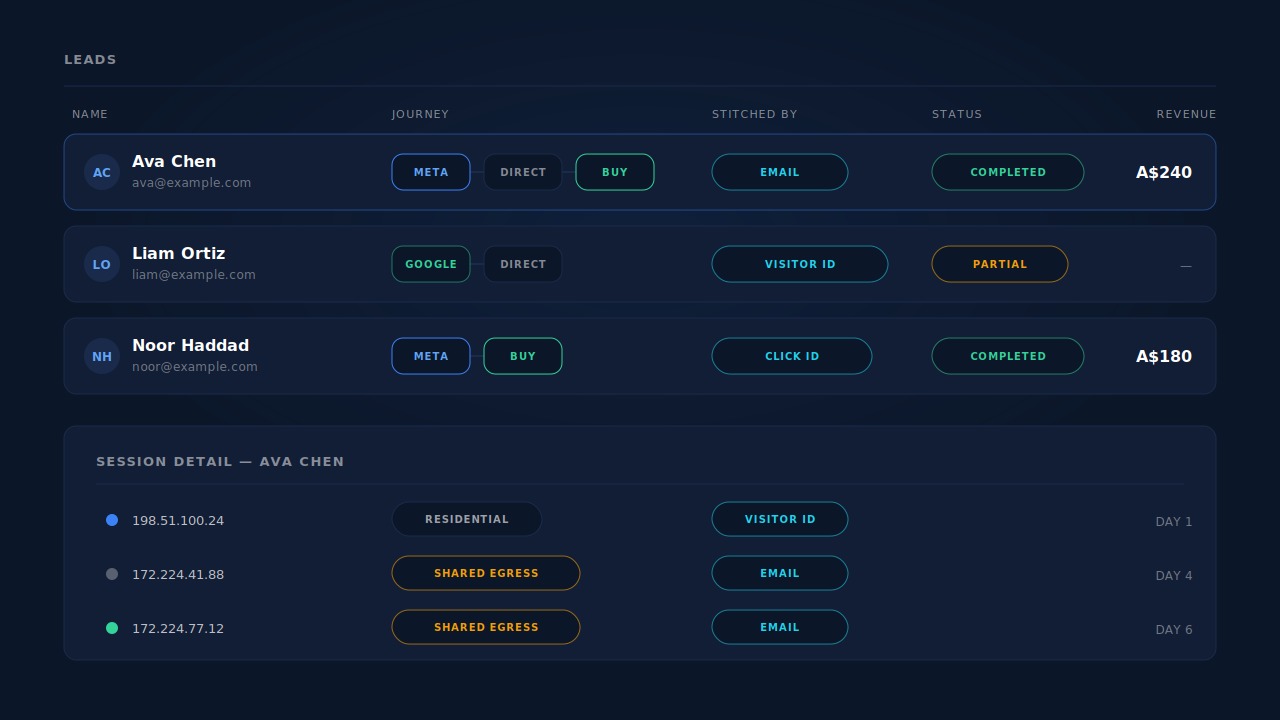
Honest constraints. PartialLeads does not detect, label or list relay egress addresses — a relayed session is simply a session whose IP tier is weak, and nothing in the dashboard says “this visitor was on Private Relay”. Geo enrichment is derived from the IP, so a relayed session’s city and region are the relay’s, and any geography report inherits that. A visitor who arrives with no click ID, types nothing and has no prior visitor ID leaves only the IP tier — weak for exactly the reason above. And dispatch is half the job: the Conversions API gets the event out reliably, but whether the platform resolves it to a person is the platform’s half, and no vendor controls that.
| What breaks | The mechanism | Where you see it in the dashboard |
|---|---|---|
| One person’s sessions split because the egress IP changed between visits | Six-tier identity cluster joins on visitor ID, email, phone, fingerprint and click ID before it ever reaches the IP tier | Journey timeline on the lead; one row instead of several |
| Strangers behind one relay address get merged into a single journey | IP plus user agent ranks fourth of six and never overrides a higher-confidence identifier | Journey ribbon ring treatment, which records how each session was stitched |
| A conversion session shows no source because the IP moved mid-visit | Visit-sibling inheritance tier 1B matches on user agent and the Meta click cookie within ±10 minutes with the IP allowed to differ | Source label on the lead; Attribution report recovered rows |
| Safari clears the identifier before the visitor returns | pl_vid written server-side as a first-party cookie on a one-year TTL, not by script |
Returning visitors staying on the same lead record |
| Conversion events match poorly because the IP parameter is noise | Hashed email and phone captured at the form and sent as the highest-weight parameters, with click IDs read from the landing URL | Event match quality in the platform’s Events Manager; CAPI activity log |
| An order can’t be tied back to the session that earned it | Purchase matching tiered visitor ID, then email, then phone, then IP | Purchases ledger; revenue on the lead |
What should you do this week?
- Find your IP dependencies. List every place an IP decides something: session stitching, geo reporting, deduplication, rate limits, fraud rules, “returning visitor” logic. Most teams find one they did not know about.
- Run the distinct-visitors-per-IP count. One query, and it sizes the problem.
- Make sure your visitor cookie is server-set. If JavaScript writes it, Safari is already shortening it — and Private Relay users are Safari users.
- Add a phone field, or at least ask for it. When the IP contributes nothing, the second-highest-weight match parameter is the one you chose to collect. If the conversion-rate cost worries you, capture what people type before they submit.
Tell us what's broken. We'll fix your tracking — free.
Describe the tracking/attribution problem you're stuck on and we'll map it to a fix: server-side conversions to Meta, Google, TikTok and Pinterest, plus first-party tracking that survives Safari. No code required.
Sources
https://developers.facebook.com/docs/marketing-api/conversions-api/parameters/customer-information-parameters https://developers.facebook.com/docs/marketing-api/conversions-api