Meta Ads Manager shows fewer purchases than your WooCommerce store because it counts something narrower. Your store counts every order. Ads Manager counts only the purchases Meta received and then credited to one of your ads. So the gap holds two things: sales that came from other channels, and sales that came from Meta but never reached it. Only the second one is broken tracking.
The question on the WordPress support forums is usually some version of this: “My site recorded 29 purchases, but Ads Manager shows 16. Is tracking broken, or is Meta just not crediting them?” The honest answer is “probably a bit of both,” and you can measure how much of each in about twenty minutes.
Is Meta’s lower purchase count a tracking problem or an attribution problem?
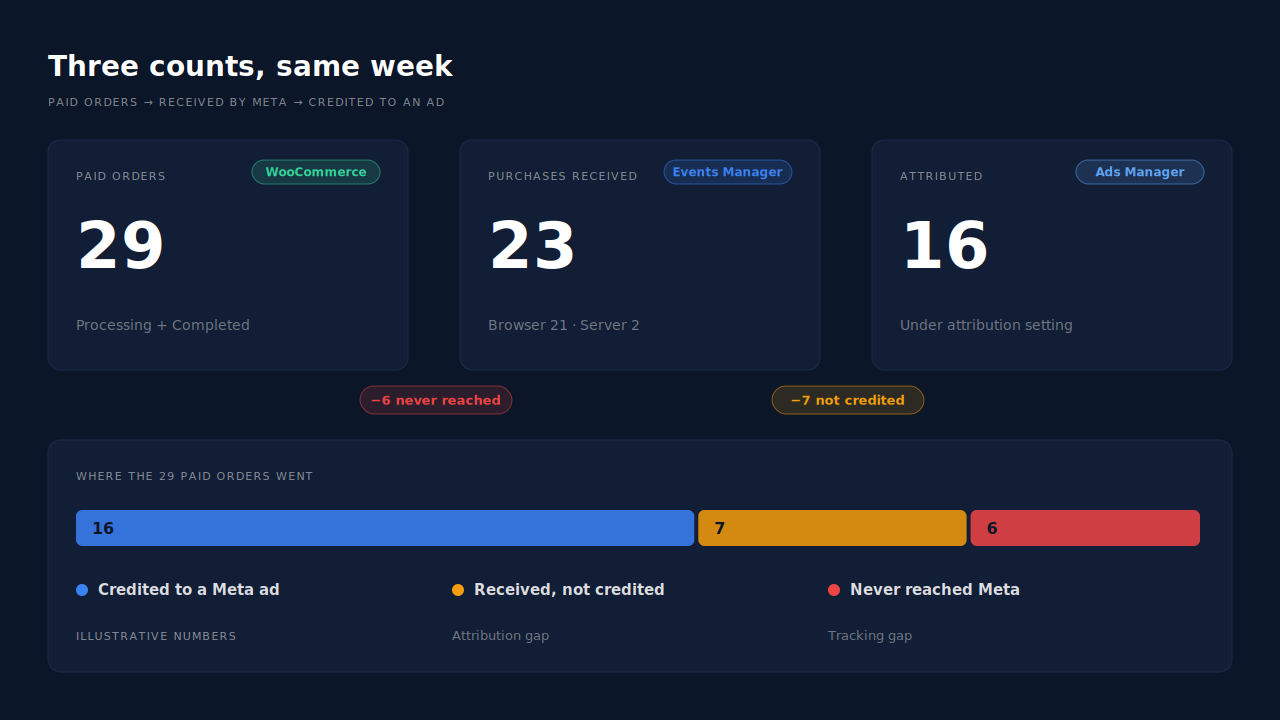
You find out by adding a third number between the two you already have. Count paid WooCommerce orders, then count the Purchase events Meta received in Events Manager, then count purchases in Ads Manager for the same dates. Orders minus events received is a tracking gap. Events received minus Ads Manager purchases is an attribution gap.
The three numbers mean different things:
- Paid WooCommerce orders. Everything in Processing or Completed for the date range. This is your ground truth.
- Purchase events received. Events Manager shows every Purchase your pixel and Conversions API sent, whether or not an ad gets credit for it.
- Purchases in Ads Manager. Only the purchases Meta attributed to an ad, under the attribution setting on each ad set.
With the forum numbers, it might look like this: 29 paid orders, 23 Purchase events received, 16 purchases in Ads Manager. Six orders never reached Meta. Seven reached it but weren’t credited to an ad. Those are different problems with different fixes, and treating the whole gap of 13 as “the pixel is broken” sends people chasing the wrong one.
Why doesn’t Ads Manager count every purchase Meta receives?
Because Ads Manager is an attribution report, not an order log. Meta credits a purchase to an ad only when it can tie the buyer to a click or view of that ad inside your attribution setting, which is counted in days after the click and can include views (Meta Business Help Center). Everything else stays out of Ads Manager.
Plenty of your orders have no reason to be there:
- Other channels. A buyer who came from Google Ads, a Klaviyo email, organic search or a bookmark never touched a Meta ad. Your store counts them. Ads Manager correctly doesn’t.
- Outside the window. Someone who clicked your ad weeks ago and came back today to buy may fall outside your attribution setting. Meta received the Purchase but has no ad to credit it to.
- Unmatched buyers. Meta has to recognise the person behind the event. If the event carries too little customer information, or the buyer opted out of tracking on their iPhone, Meta may not be able to link the purchase to the person who saw the ad.
- Different days. Your ad account and your store can run on different time zones, which moves late-evening orders across the date line. Compare a full week, not a single day.
The first bullet is usually the largest, and it isn’t a problem to fix. It’s the normal shape of a store with more than one channel. The third bullet is where you have some control: Meta can only match on what you send, which is the whole point of Event Match Quality (EMQ).
Why do some WooCommerce orders never reach Meta at all?
Because most WooCommerce pixel setups fire the browser Purchase when the order-received page loads. When that page doesn’t load, or loads in a browser that blocks the pixel, the browser event never exists. Unless something sends the order server-side, Meta never hears about it, and no attribution setting can credit a purchase Meta never received.
In the current Meta for WooCommerce source code, the browser Purchase is tied to the woocommerce_thankyou hook, the thank-you page. Server-side Purchase events come from earlier order hooks. The browser half breaks in familiar ways:
- Off-site payment. A buyer approves the payment with PayPal or another redirect gateway and never comes back to your store. The order is paid, but the page that fires the pixel never loads. That’s why Meta doesn’t record WooCommerce orders paid with PayPal on many stores.
- Closed tabs and slow connections. The buyer pays, sees the gateway’s own confirmation, and leaves.
- Ad blockers and consent banners. The page loads but the Meta Pixel script is blocked or held back, so the event never leaves the browser.
- Late payments. A bank transfer or cash-on-delivery order is paid days after checkout, long after the buyer saw the thank-you page. Server events for it must still land inside Meta’s 7-day event time window.
A server-side Conversions API (CAPI) event covers all of these, because it’s sent from your server when the order exists, not from the buyer’s browser. If your plugin’s server events are switched off, or its connection to Meta has lapsed, you’re running on the browser half alone.
Why don’t the test orders you place yourself show up?
Meta for WooCommerce skips them on purpose. Its Purchase function returns early for any user who can manage WooCommerce, so an order placed while you’re logged in as a shop manager or administrator sends no Purchase, browser or server. Test from a private window, logged out, or those orders will always look “missing”.
How do you reconcile Ads Manager against your WooCommerce orders?
Line up the three counts for the same seven days in the same time zone, then work down the gaps one at a time. Start with orders that never reached Meta, because those you can fix. Then look at which channel each paid order actually came from, because that tells you how much of the rest was ever Meta’s to claim.
- Pick a clean week. Seven full days, ending at least three days ago so late payments and delayed events have landed. Set Ads Manager and WooCommerce to the same time zone, or note the offset.
- Count paid orders. Filter WooCommerce orders to Processing and Completed. Leave out pending, on-hold, failed and cancelled orders; they aren’t sales yet.
- Count Purchase events received. In Events Manager, open your dataset’s Purchase event for the same dates. Note how many came from the browser and how many from the server.
- Count Ads Manager purchases. Use the account-level view across all campaigns, and write down the attribution setting you’re reading.
- List orders by payment method. If the tracking gap sits mostly on PayPal, Klarna or bank transfer, the thank-you page is your problem.
- List orders by source. WooCommerce’s order attribution column shows where each order came from, though it often says Unknown for a large share of orders. Orders from Google or email explain part of the attribution gap without any fix at all.
If step 3 shows almost no server events, fix that first. It’s the gap that’s costing Meta’s algorithm real signal.
How does PartialLeads show which missing purchases were Meta’s?
PartialLeads records every paid WooCommerce order in its Purchases ledger with the source it matched the buyer to, so you can see how many of your 29 orders came through a Meta ad and how many came from somewhere else. And because each paid order is sent to Meta server-side from the order webhook, the tracking gap stops depending on the thank-you page.
Where the Purchase comes from. The PartialLeads WooCommerce plugin listens to order webhooks. When an order reaches Processing or Completed, one server-side Purchase goes to Meta through the Conversions API, with the full order total including tax and shipping, after discounts. Nothing fires on the thank-you page, so a PayPal buyer who never returns, a closed tab or a blocked pixel no longer means a missing event. Pending, on-hold, failed and cancelled orders are not sent. A bank-transfer or cash-on-delivery order is sent when it’s marked paid.
How it splits the gap. Each order is matched to the buyer’s earlier visits by visitor ID, email or phone, and gets a first-touch and a last-touch source. That answers the forum question directly: if 19 of your 29 paid orders trace back to a Meta ad click, the other 10 were never Meta’s to claim, and the difference between 19 and Ads Manager’s number is the part worth chasing.
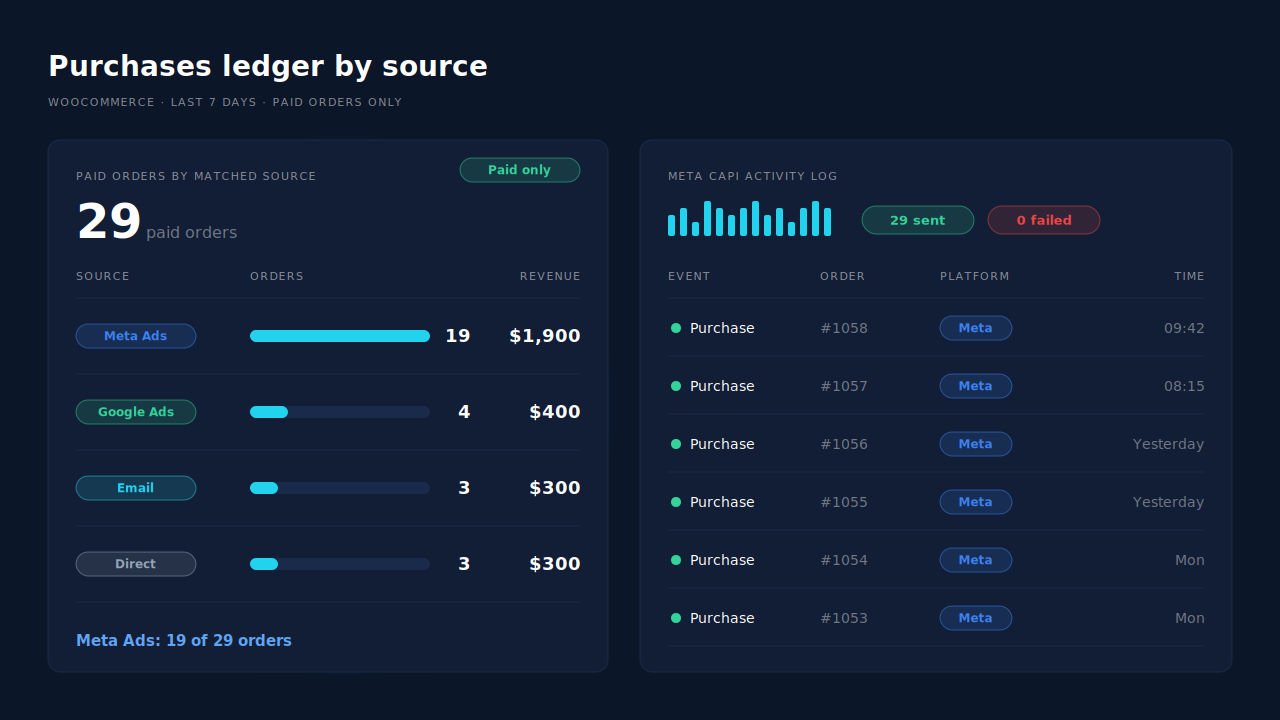
Where you see it working. The Purchases ledger lists every paid order with its value and matched source; its weekly count should equal your Processing plus Completed orders. The Attribution report groups the same orders by channel and campaign, with first-touch and last-touch side by side. The Meta CAPI activity log shows each Purchase sent and its status, so you can check that the number sent equals your paid orders, and compare it against Events Manager’s server count.
The honest constraints. PartialLeads controls what is sent: every paid order produces a Purchase. How Meta matches and attributes it is Meta’s half, and no tool controls that, so Ads Manager will still show fewer purchases than your store. PartialLeads’ own source and Meta’s attribution follow different rules, so the two won’t agree order for order. Its event ids are its own and it doesn’t deduplicate against another plugin, so if Meta for WooCommerce still sends Purchase, switch that off and keep one sender per event. Keep Meta’s base pixel on the site so server events carry the _fbp cookie. WooCommerce Subscriptions renewals are recorded but not sent. The full setup is in the guide to tracking WooCommerce purchases server-side to Meta.
| What breaks | The mechanism | Where you see it in the dashboard |
|---|---|---|
| Thank-you page never loads (PayPal, closed tab) | Purchase sent server-side from the order webhook when the order is paid | Meta CAPI activity log |
| Pixel blocked by an ad blocker | Server-side Purchase doesn’t depend on the buyer’s browser | Meta CAPI activity log vs Events Manager server count |
| Can’t tell Meta orders from other channels | Each paid order matched to the buyer’s visits, first and last touch | Purchases ledger by source, Attribution report |
| Late bank-transfer or COD payment | Sent when the order is marked paid | Purchases ledger |
| Two plugins both sending Purchase | One sender per event; switch the other plugin’s Purchase off | Leads list, API column |
Tell us what's broken. We'll fix your tracking — free.
Describe the tracking/attribution problem you're stuck on and we'll map it to a fix: server-side conversions to Meta, Google, TikTok and Pinterest, plus first-party tracking that survives Safari. No code required.
Sources
- https://raw.githubusercontent.com/facebook/facebook-for-woocommerce/main/facebook-commerce-events-tracker.php
- https://raw.githubusercontent.com/facebook/facebook-for-woocommerce/main/includes/fbutils.php
- https://www.facebook.com/business/help/458681590974355
- https://developers.facebook.com/docs/marketing-api/conversions-api