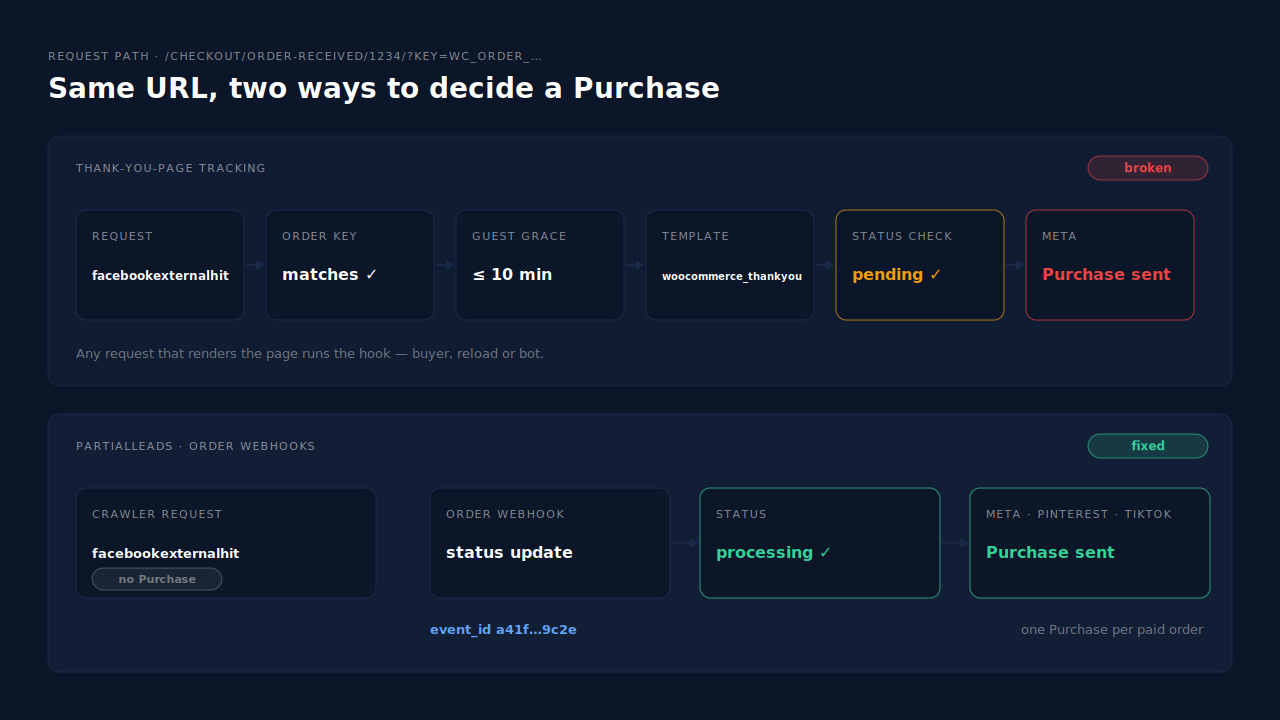
Meta’s crawler triggers Purchase events because your Purchase is attached to the WooCommerce thank-you page, and a crawler can load that page like anyone else. When a bot such as facebookexternalhit requests an order-received URL, WooCommerce renders the page, the woocommerce_thankyou hook runs, and any plugin that sends Purchase from that hook sends one — whether or not the order was ever paid.
The pattern was reported against Meta for WooCommerce in March 2026. The store’s log showed WooCommerce cancelling an unpaid order at 21:13:53, then, at 21:15:02, “facebookexternalhit crawler visits /checkout/order-received/16106/ — CAPI event fires.” A bot request turned into a Purchase.
Here’s the code path that makes that possible, how to prove it on your own store, and how to take the page out of the decision.
Why does a crawler visit count as a purchase?
Because in a thank-you-page setup, “the order-received page rendered” and “a purchase happened” are treated as the same thing. WooCommerce fires the woocommerce_thankyou action every time it renders the full order-received page, and it doesn’t check who the visitor is. A tracking plugin listening on that action can’t tell a buyer from a bot.
Walk through what WooCommerce actually does with a request for /checkout/order-received/1234/?key=wc_order_…:
- It checks the order key. If the key in the URL matches the order, the request is treated as legitimate. The key is in the URL, so anyone holding the URL passes.
- It checks who’s asking — with a grace period. A registered customer’s order needs them logged in. A guest order asks the visitor to verify their email, except within a grace period after the order is created, which defaults to 10 minutes. Inside that window, any request with the right URL sees the full page.
- It renders the thank-you template. The template fires
woocommerce_thankyouwith the order id — for any order it shows, paid or not. Only a Failed order gets a different message, and the action still runs.
So a crawler that requests a fresh guest order’s URL inside those 10 minutes gets exactly what the buyer would have got, including every tracking hook.
What does Meta for WooCommerce do on that hook?
Meta for WooCommerce, the official plugin, hooks its Purchase function to woocommerce_thankyou as well as three order hooks. In the plugin’s current source, that function treats four order statuses as valid for a Purchase: processing, completed, on-hold and pending. A pending order is one whose payment hasn’t arrived. So an unpaid order that reaches the thank-you hook passes the status check.
The plugin does have a crawler guard on its server-side (Conversions API) send. It skips user agents containing meta-externalagent, meta-externalads, meta-webindexer or the word crawler. facebookexternalhit — the agent in the March report — isn’t on that default list, and its user agent string doesn’t contain “crawler”. The guard also only covers the server copy; it doesn’t change which statuses count as a Purchase.
Why would Meta’s crawler visit an order-received URL at all?
Meta hasn’t published which URLs its crawlers choose, so treat this as the likely route, not a documented one. Meta runs several crawlers: facebookexternalhit fetches pages to build link previews, and others support Meta’s ads and indexing systems. An order-received URL stops being private as soon as it leaves the buyer’s browser — in a shared link, a chat message, or tracking data sent to Meta.
That last one matters. Every Conversions API event carries an event_source_url, the page the event happened on, and a browser Pixel event records its page too. A Purchase sent from the thank-you page therefore hands Meta the full order-received URL, key included. The March report also noted UTM parameters on the crawled order-received URLs, which points to a URL that travelled through ad tracking rather than one a person typed.
You don’t need to know the exact route to fix it. Any setup where requesting a URL can create a Purchase is exposed to every bot that can request it.
How do you prove the crawler is creating your Purchases?
Match a bot request to a Purchase for the same order at the same minute. You need three things: your server access log, the tracking plugin’s own log, and your paid order list. If a crawler request for an order-received URL lines up with a Purchase for an order that was never paid, you’ve found it.
- Search the access log. Look for requests to
/checkout/order-received/whose user agent containsfacebookexternalhitormeta-external. Note the order id and the timestamp of each. - Read the plugin log. In WooCommerce → Status → Logs, Meta for WooCommerce writes a line per Purchase naming the order and the hook, such as “Purchase event fired for order 1234 by hook woocommerce_thankyou.” A Purchase attributed to
woocommerce_thankyouat the crawler’s timestamp is the smoking gun. The same log records “Blocked CAPI event for crawler” when its guard catches one. - Check the order’s status and history. If the order is Pending, Cancelled or Failed, no money arrived. The order notes show when WooCommerce cancelled it.
- Reconcile a week. Count Processing and Completed orders for seven days, and compare with the Purchases Events Manager received for the same days — not Ads Manager’s attributed conversions, which depend on attribution windows. The same reconciliation is how you check your Meta CAPI is working.
If the counts are over but there are no crawler hits, look at the other page-load causes: shoppers returning from a payment redirect, reloads, and a second plugin sending Purchase with a different event id. A mismatched id is covered in the Meta CAPI deduplication debug guide.
Does blocking the crawler fix it?
Only partly. Blocking the bot stops that one visitor, but the Purchase is still tied to the page, so the next bot, link scanner or reload recreates the problem. Use a block as a stopgap while you move Purchase to the paid order. The durable fix is making sure no page request can send a Purchase at all.
What each option actually does:
- Add
facebookexternalhitto the plugin’s crawler list. Meta for WooCommerce exposes a filter,wc_facebook_crawler_user_agent_patterns, for exactly this. It stops the server copy for matching agents. It doesn’t stop a real person landing on the page of a pending order. - Disallow
/checkout/in robots.txt. It helps with crawlers that honour robots.txt. Don’t make your purchase count depend on which bots read a text file. - Shorten the guest grace period. WooCommerce’s
woocommerce_order_email_verification_grace_periodfilter controls the 10-minute window. Shorter means fewer anonymous full renders, but buyers on slow gateway redirects may hit the email-verification form. - Move Purchase to the order. Send it server-side when the order becomes Processing or Completed, and fire nothing on the thank-you page. That is the fix that removes the page from the question.
A minimal version of the stopgap, for a site-specific plugin or functions.php:
// Treat Meta's link-preview crawler as a bot in Meta for WooCommerce's CAPI guard.
add_filter( 'wc_facebook_crawler_user_agent_patterns', function ( $patterns ) {
    $patterns[] = 'facebookexternalhit';
    return $patterns;
} );
How do you make Purchase belong to the paid order instead of the page?
Send Purchase from the WooCommerce order record when its status becomes Processing or Completed, through the Conversions API, with an event id built from the order. Then switch off every thank-you-page Purchase. A page request — from a buyer, a bot or a browser restoring a tab — then has nothing to trigger.
The architecture is laid out in the guide to tracking WooCommerce purchases server-side to Meta. Three points matter for the crawler problem specifically:
- Trigger on the paid status, not on order creation. A server event on “order created” still counts pending orders. It just does it without a bot.
- One source per event. If the official plugin keeps its thank-you Purchase while another tool sends Purchase server-side, Meta receives two events with different ids and counts both.
- Test it with a bot. Place a test order, leave it unpaid, and request its order-received URL with a
facebookexternalhituser agent (curl -A). Events Manager’s test events view should show nothing. Mark the order Processing; one Purchase should arrive.
The same move fixes the opposite failure: buyers who pay but never see the thank-you page, like WooCommerce orders paid with PayPal.
How does PartialLeads stop crawlers from creating WooCommerce purchases?
PartialLeads ties the Purchase to the WooCommerce order, not to any page request. Its WooCommerce plugin fires nothing on the thank-you page; the Purchase comes from the store’s order webhooks and is sent only when the order is paid — Processing or Completed. A crawler loading an order-received URL, for a paid order or an unpaid one, creates no conversion.
What happens when the order is paid. PartialLeads sends one Purchase per paid order, server-side, to each connected platform — Meta, Pinterest and TikTok — and adds a row to the Google Sheet you import into Google Ads. The value is the full order total, including tax and shipping, after discounts. Each event carries a deterministic event_id, so a redelivered webhook can’t send the same order twice. Pending, On hold, Failed and Cancelled orders are not sent.
What the plugin does in the browser. It forwards view product, add to cart and begin checkout server-side to Meta, Pinterest and TikTok. It stops there. The order-received page has no Purchase to fire.
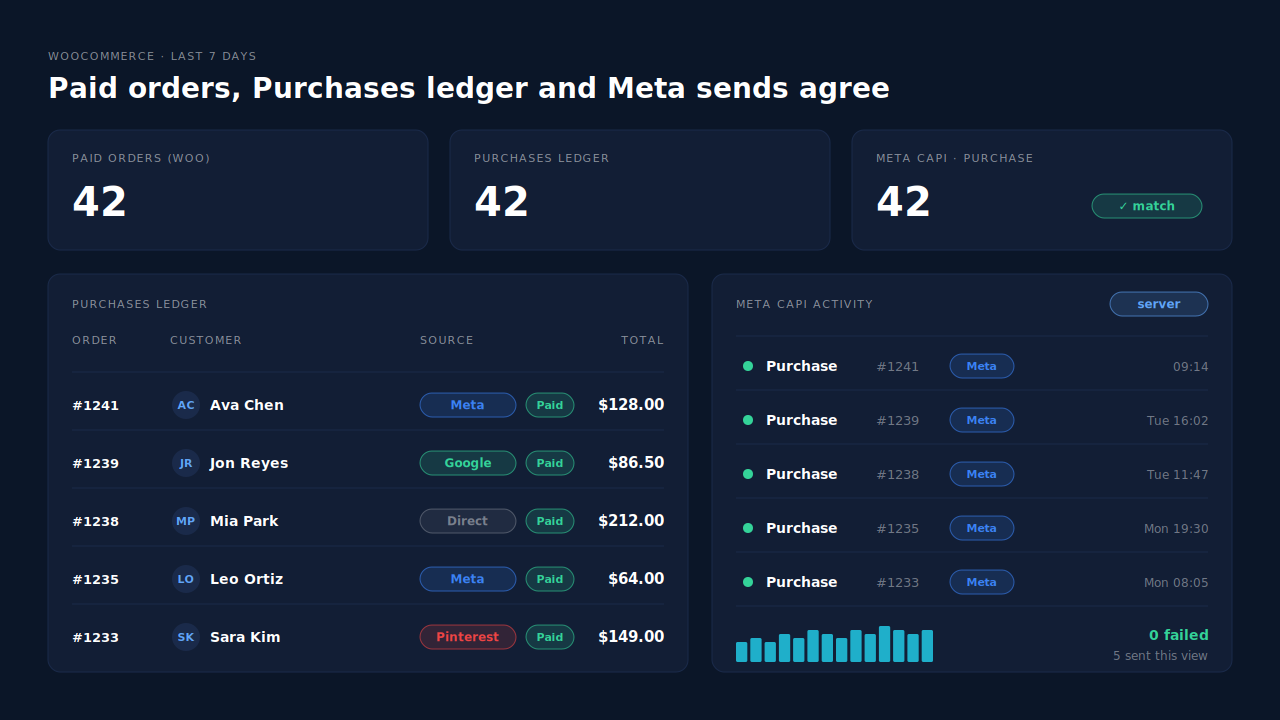
Where you see it working. The Purchases ledger lists each paid order with its value, source and session match; for any date range, its count should equal your Processing plus Completed orders. The Meta CAPI activity log shows each Purchase sent, with its status and timestamp. Compare both with Events Manager’s received Purchases for the same days: if Meta still shows extra Purchases, something other than PartialLeads is sending them.
The honest constraints. PartialLeads’ event ids are its own. It never double-sends, but it doesn’t deduplicate against Meta for WooCommerce or another plugin’s browser Purchase — keep one source per event and switch the other tool’s Purchase off, or the crawler problem continues through that tool. An order is recorded once; editing it later doesn’t re-send. WooCommerce Subscriptions renewals are recorded but not sent. PartialLeads controls which orders are sent and when; how Meta matches and attributes them is Meta’s side.
| What breaks | The mechanism | Where you see it in the dashboard |
|---|---|---|
| Crawler loads order-received and a Purchase fires | Plugin fires nothing on the thank-you page; Purchase comes from order webhooks | Meta CAPI activity log |
| Pending or cancelled orders counted as sales | Purchase sent only at Processing or Completed | Purchases ledger |
| Webhook redelivered, same order sent twice | Deterministic event_id per order | Meta CAPI activity log |
| Another plugin still sends a page-load Purchase | No cross-tool dedup — keep one source per event | Purchases ledger vs Events Manager received count |
Tell us what's broken. We'll fix your tracking — free.
Describe the tracking/attribution problem you're stuck on and we'll map it to a fix: server-side conversions to Meta, Google, TikTok and Pinterest, plus first-party tracking that survives Safari. No code required.
Sources
- https://github.com/facebook/facebook-for-woocommerce/issues/3890
- https://raw.githubusercontent.com/facebook/facebook-for-woocommerce/main/facebook-commerce-events-tracker.php
- https://raw.githubusercontent.com/facebook/facebook-for-woocommerce/main/facebook-for-woocommerce.php
- https://raw.githubusercontent.com/woocommerce/woocommerce/trunk/plugins/woocommerce/includes/shortcodes/class-wc-shortcode-checkout.php
- https://raw.githubusercontent.com/woocommerce/woocommerce/trunk/plugins/woocommerce/src/Internal/Utilities/Users.php
- https://raw.githubusercontent.com/woocommerce/woocommerce/trunk/plugins/woocommerce/templates/checkout/thankyou.php
- https://developers.facebook.com/docs/sharing/webmasters/web-crawlers
- https://developers.facebook.com/docs/marketing-api/conversions-api/parameters/server-event
- https://developers.facebook.com/docs/marketing-api/conversions-api/deduplicate-pixel-and-server-events