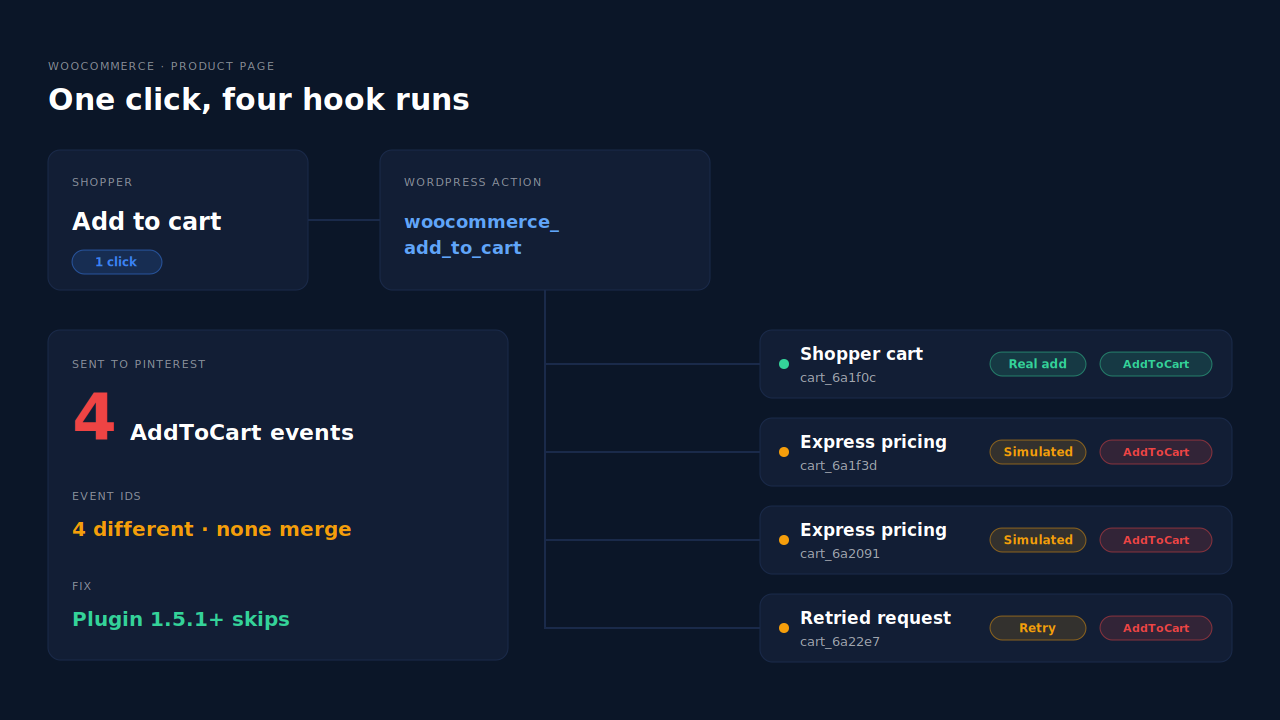
Pinterest for WooCommerce sends several AddToCart events for one cart addition because it reports AddToCart every time WooCommerce’s woocommerce_add_to_cart hook runs. Before version 1.5.1, that hook also ran when express checkout buttons priced a throwaway cart and when a request was retried. Each run got a fresh event ID, so Pinterest counted every copy as a real add.
The symptom is specific. One shopper adds one product. Pinterest’s Conversions API (CAPI) event history shows four AddToCart events, seconds apart, all for the same product. Your add-to-cart numbers in Pinterest Ads look healthy. Your WooCommerce cart abandonment numbers don’t agree.
Nothing is wrong with your theme or your Pinterest tag. This guide explains the hook behind it, what the plugin’s 1.5.1 release changed, how to confirm whether you’re still affected, and how to end up with one AddToCart per addition.
Why does one cart addition become several AddToCart events?
Because the plugin listens to a WordPress action, not to the shopper’s click. The woocommerce_add_to_cart action fires whenever WooCommerce’s add-to-cart code runs, for any cart. Express checkout buttons and retried requests run that code without the shopper’s cart changing. Each run looked like a new addition, so each produced its own AddToCart.
Pinterest for WooCommerce’s own source code spells this out. In the 1.5.1 tracking code, the comment above the new guard reads: “woocommerce_add_to_cart is a global action, so it also fires for carts that are not the customer’s.” It continues: “Express checkout buttons add products to a throwaway WC_Cart to price them, which runs add_to_cart() for real while WC()->cart is left untouched.”
Here’s how one click turns into four events on an affected store:
- The real add. The shopper clicks Add to cart. The hook runs once for their cart. That’s the event you want.
- Express checkout pricing. A PayPal, Apple Pay or Google Pay button on the product page builds a temporary cart to work out the price, shipping and tax it should show. That runs add-to-cart code again, on a cart nobody will ever check out.
- More than one express button. Each button that prices its own throwaway cart can run that code again.
- Retries. If an add-to-cart request is retried, the hook fires again for a cart that didn’t change. The plugin’s comment says: “Retried requests fire it again for a cart that did not change.”
The exact count depends on which buttons and plugins your product page loads. Four is common enough that it’s the number in the support thread title, but two or three follow the same logic.
Why doesn’t Pinterest merge the extra AddToCart events?
Pinterest only merges two events when they carry the same event ID. Pinterest for WooCommerce gives the browser tag event and the Conversions API event from a single hook run the same ID, so that pair merges. But every hook run creates a new ID, so four runs mean four distinct events. Pinterest has no way to know three of them were never a shopper’s action.
You can see this in the plugin. When it builds AddToCart data, it creates the event ID with uniqid( 'cart' ), a value that’s different on every call. The Checkout event is handled differently: a code comment in the same file explains it now uses a “Deterministic event id so Pinterest can deduplicate Tag/CAPI Checkout events”. The Checkout data class describes the event ID as “A unique event id as a requirement by Pinterest for deduplication purposes.”
That distinction is the whole problem in one line. Deduplication works on IDs. If the sender creates a new ID for something that isn’t a new action, no platform can undo that on its side. The same logic applies to every platform, which is why the Conversions API on Meta, TikTok and Pinterest all ask the sender to choose the ID carefully.
What did Pinterest for WooCommerce 1.5.1 change?
Version 1.5.1, released on 17 September 2026, added a guard that skips AddToCart when the shopper’s own cart didn’t change. Its changelog entry reads: “Stop sending AddToCart events for add-to-cart runs that do not change the customer’s cart, such as express checkout price simulations and retried requests.” If you’re on 1.5.0 or older, update first.
The guard works in three steps, all visible in the 1.5.1 source:
- Skip simulated carts. It checks a flag that WooCommerce PayPal Payments raises while its
ppc-simulate-cartendpoint is pricing an isolated cart. If the flag is up, no AddToCart. - Read the real cart. It looks up the item in the shopper’s actual cart rather than trusting the hook’s arguments. An add that landed in some other cart produces nothing.
- Ignore repeats. It records a signature of the cart item plus its quantity. The same signature within a 30-second window is treated as a repeat and dropped. A genuine second add raises the quantity, which makes a new signature, so it still counts. Removing the item, lowering its quantity or emptying the cart also clears the record.
Two honest limits are worth knowing. The simulation check reads a flag owned by PayPal Payments, so other express checkout plugins rely on the cart lookup and the repeat window instead. And the guard only covers this plugin’s own events. It can’t stop a second tool from sending AddToCart too.
How do you check whether your store still sends duplicate AddToCart events?
Add one product in a private window and count AddToCart in Pinterest’s event history or test tools. One is right. More than one means a hook is still firing extra times or a second tool is sending the event. Repeat the test on a product page with express checkout buttons and on a shop page without them.
Work through it in this order:
- Check the plugin version. In WordPress, go to Plugins and confirm Pinterest for WooCommerce is 1.5.1 or later.
- Test a product page with express buttons. Add one item in a private window. Count AddToCart events.
- Test a shop or category page. Express buttons usually don’t load there. If this page shows one event and the product page shows several, the extra copies come from pricing or retries.
- List every Pinterest sender. Look for a Pinterest tag in Google Tag Manager, a second Pinterest plugin, or a server-side tool that also forwards AddToCart. Each one adds its own copy.
- Switch one sender off on staging. Repeat the test. The duplicate that disappears belongs to whatever you just turned off.
If you already run Pinterest’s API alongside the tag, the guide to setting up the Pinterest Conversions API covers what a healthy setup looks like, and tracking Pinterest checkout events server-side covers the events further down the funnel.
Why do inflated AddToCart events matter if purchases are right?
Because AddToCart drives more than a report. Pinterest uses it for add-to-cart audiences, for campaigns optimised to add to cart, and for the funnel you read in Pinterest Ads. Four events per add make your cart rate look four times better than it is. Retargeting audiences and add-to-cart bidding then learn from numbers that never happened.
Three concrete costs:
- Funnel reports mislead. If AddToCart inflates and checkouts don’t, your add-to-cart-to-checkout rate collapses on paper. Teams go looking for a checkout problem that doesn’t exist.
- Bidding learns from noise. Newer stores often optimise for add to cart while purchases are too few to learn from. Inflated events give the algorithm signal that isn’t real.
- Cross-platform numbers disagree. Meta and TikTok may show one AddToCart per add while Pinterest shows four. Comparing channels on cart rate stops meaning anything.
How does PartialLeads send one AddToCart per cart addition to Pinterest?
The PartialLeads WooCommerce plugin sends one AddToCart per addition, from the shopper’s browser, and forwards it once to Pinterest server-side with an event ID. It catches classic AJAX buttons, the single-product form and the Blocks Store API, and guards against WooCommerce firing both its AJAX event and a form submit for the same click.
Why the hook problem doesn’t apply. The add is detected in the shopper’s browser, from what they actually did on the page. A throwaway cart built on the server to price an express checkout button isn’t a click, so it never becomes an event.
Where the events go. View product, add to cart and begin checkout are forwarded server-side to Pinterest, Meta and TikTok. Google doesn’t receive these funnel events. Purchase is separate: it comes from WooCommerce order webhooks for every paid order, with nothing fired on the thank-you page. PartialLeads never sends the same event twice.
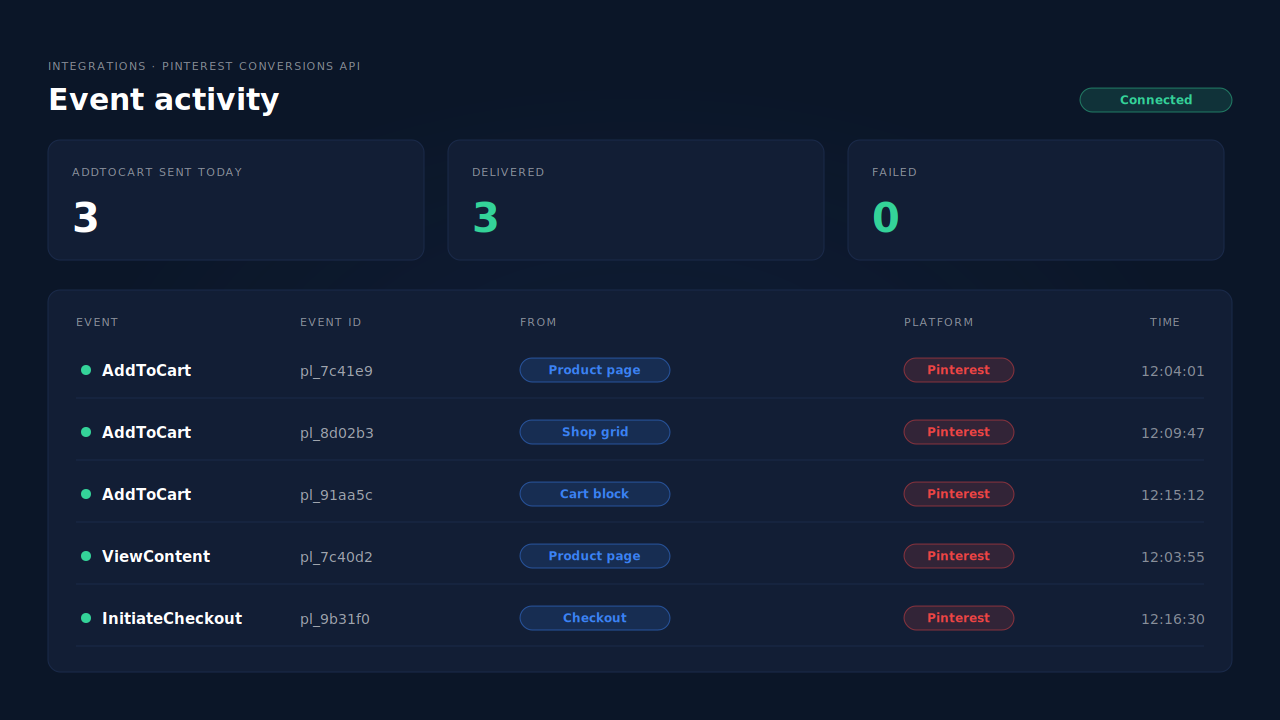
Where you see it working. The Pinterest config page lists each server send by event name, status and time. Add one product in a private window and you’ll see one AddToCart row. Then compare it with Pinterest’s event history.
The honest constraint. PartialLeads’ event IDs are its own. It doesn’t deduplicate against Pinterest for WooCommerce, a GTM tag or any other sender. If you keep the plugin’s tracking on while PartialLeads forwards AddToCart, Pinterest counts both. Choose one sender for Pinterest events. Pinterest’s match quality also depends on the click identifier, so keeping Pinterest attribution when the epik parameter disappears is worth reading before you switch anything off.
| What breaks | The mechanism | Where you see it in the dashboard |
|---|---|---|
| Express checkout pricing fires add-to-cart code | Add detected from the shopper’s action in the browser, not a server hook | Pinterest config page, one AddToCart row per add |
| One click fires form submit and added_to_cart | Plugin guard counts both signals as one addition | Pinterest config page, event activity |
| Shop grid, product form and Cart block adds | Plugin listens to classic AJAX, classic form and Store API | Pinterest config page, AddToCart rows |
| Retries or resends | Event sent once with an event ID, never twice | Pinterest config page, event activity |
| Another plugin or tag also sends AddToCart | No cross-tool dedup, so keep one sender per event | Pinterest config page vs Pinterest event history |
Tell us what's broken. We'll fix your tracking — free.
Describe the tracking/attribution problem you're stuck on and we'll map it to a fix: server-side conversions to Meta, Google, TikTok and Pinterest, plus first-party tracking that survives Safari. No code required.
Sources
- https://github.com/woocommerce/pinterest-for-woocommerce/blob/trunk/changelog.txt
- https://github.com/woocommerce/pinterest-for-woocommerce/blob/trunk/src/Tracking.php
- https://github.com/woocommerce/pinterest-for-woocommerce/blob/trunk/src/Tracking/Data/Checkout.php