Meta receives duplicate AddToCart events from a WooCommerce store when two things report the same cart addition. Usually that’s two tracking tools firing the same event, a browser and server copy with different event IDs, or one plugin that hears both the add-to-cart form submit and WooCommerce’s AJAX event for one click. Meta counts each copy it can’t match as a separate event.
The symptom is easy to spot. You add one product in a private window, open Events Manager’s test events, and two AddToCart rows appear, seconds apart. Your cart rate in Ads Manager looks too good. Retargeting audiences built on “added to cart” fill faster than your sales would suggest.
Nothing is wrong with Meta or your Meta Pixel (formerly Facebook Pixel). Something on your site is saying “added to cart” twice. This guide covers the four usual causes, how to identify yours in about ten minutes, and how to end up with exactly one AddToCart per addition.
What causes duplicate AddToCart events on WooCommerce?
Four causes cover almost every case: two plugins both sending AddToCart, a plugin plus a Google Tag Manager (GTM) tag doing the same, browser and server events whose event IDs don’t match, and a single listener that fires on two signals for one click. The first three are two sources. The fourth is one source counting twice.
Here’s how each one shows up:
- Two plugins. Meta for WooCommerce and PixelYourSite, or an old pixel plugin you never fully removed. Each fires its own AddToCart on every add.
- Plugin plus GTM. Someone added an AddToCart tag in GTM years ago, then installed a plugin that does the same. Both run on every page.
- Browser and server without a shared ID. A plugin sends AddToCart from the browser and through the Conversions API, but the two copies carry different event IDs, or one carries none.
- Double listener. One script reacts to both the product form submit and the
added_to_cartjQuery event for the same add.
The first three are a configuration problem. The fourth is a code problem, and it’s the one most people miss because only one tool is installed.
Can one plugin fire AddToCart twice for the same click?
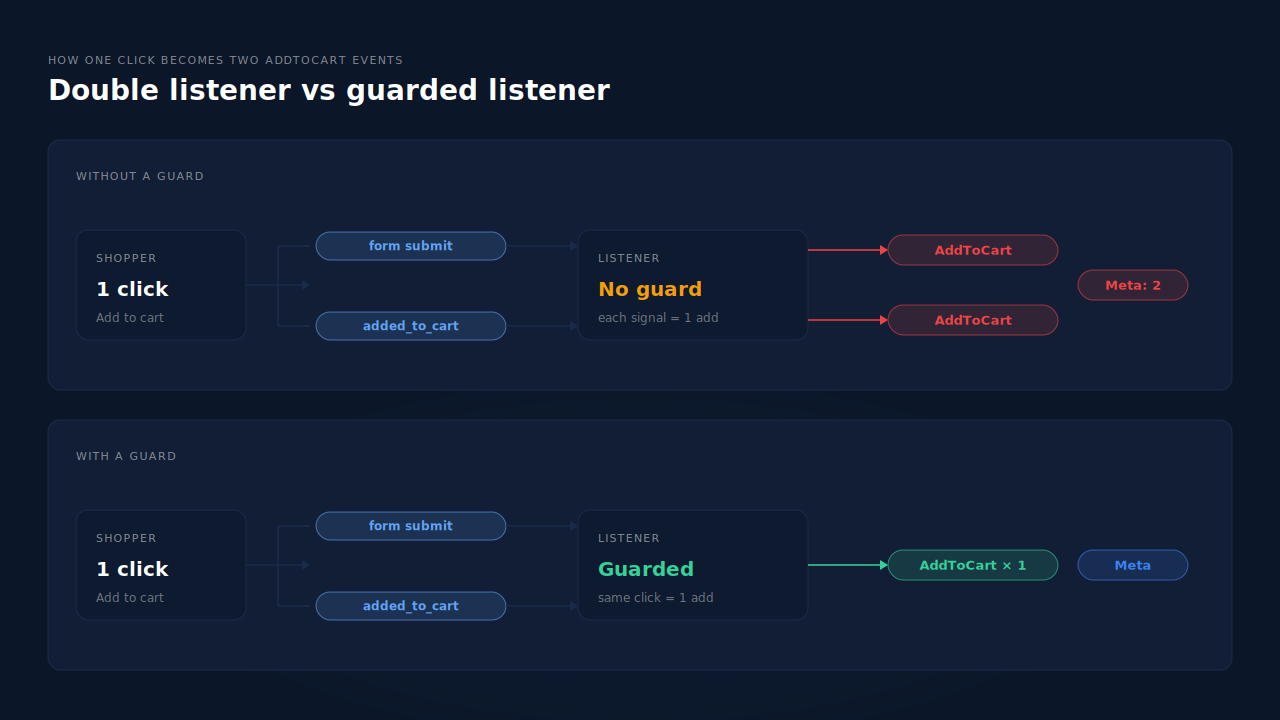
Yes. WooCommerce has two classic ways to add to cart, the AJAX button on shop and category pages and the single-product form, and many themes blur them. If a script fires AddToCart on the form submit and again when WooCommerce’s added_to_cart event arrives, one click becomes two events from one tool.
Look at how WooCommerce’s own add-to-cart script works. When a shopper clicks an AJAX button, it triggers adding_to_cart before the request and added_to_cart after a successful response, with the comment “Trigger event so themes can refresh other areas.” That’s the event most pixel plugins listen for.
The same file carries a second comment worth reading: “Some themes and plugins manually trigger added_to_cart without passing a button element.” Themes that make the single-product form add by AJAX, quick-view popups and side carts often do exactly that. So on those themes, one add from a product page can produce:
- a form submit, which a plugin may treat as an add to cart, and
- an
added_to_cartevent triggered by the theme, which the same plugin also treats as an add to cart.
The plugin isn’t broken in the usual sense. It’s listening to two real signals that happen to describe one action. Without a guard that says “I already counted this click,” Meta gets two.
Why doesn’t Meta deduplicate the two AddToCart events?
Meta only merges two events when it can tell they’re the same one. For a browser event and a server event, that means the same event name and the same event ID. Two plugins generate their own IDs, a GTM tag usually sends none, and a double listener often creates a fresh ID per fire. Nothing matches, so both count.
Meta’s deduplication guide describes the match on event_name and event_id, and it’s the whole reason the event_id you choose for Meta deduplication matters. If both copies of an AddToCart share a name but not an ID, Meta has no basis to call them one action.
That’s why “turn on deduplication” isn’t a setting you can flip. Deduplication is something the two senders have to agree on in advance. Two independent tools never agreed on anything. The debug guide for Meta CAPI that isn’t deduplicating walks through checking IDs on each copy in Events Manager.
How do you find which source is sending the duplicate?
Add one product while watching the browser’s network tab and Events Manager’s test events side by side. Each AddToCart that reaches Meta comes from a specific request, and the request tells you the sender. Two pixel requests from the page means two browser sources. One browser and one server row means a missing or mismatched event ID.
Work through it in this order:
- List what’s installed. Check WordPress plugins for anything with “pixel,” “Meta,” “Facebook” or “conversion” in its name. Check GTM for any tag that fires on add to cart.
- Open test events in a private window. Only your own activity shows, so the count is clean.
- Add from a shop or category page. Count the AddToCart rows. Note whether each says browser or server.
- Add from a product page. Count again. If the shop grid gives one and the product page gives two, you’re looking at a double listener on the product form.
- Compare event IDs. Expand each row in test events. Same ID on a browser and server pair means Meta should merge them. Different IDs mean it won’t.
- Switch sources off one at a time on staging. Disable one plugin or pause the GTM tag and repeat. The duplicate that disappears belongs to whatever you just turned off.
The same test events routine is how you know if your Meta CAPI is working after any tracking change, so it’s worth keeping as a checklist.
Why do duplicate AddToCart events matter if purchases are right?
Because AddToCart feeds more than a report. Meta uses it to build “added to cart but didn’t buy” audiences, to optimise campaigns that target AddToCart, and to show your funnel. Doubled events inflate all three. Your cart rate looks healthy, audiences fill with the wrong weight, and an AddToCart-optimised campaign learns from numbers that aren’t real.
Three concrete costs:
- Funnel reports mislead. If AddToCart doubles but purchases don’t, your add-to-cart-to-purchase rate looks half what it is, and teams go hunting for a checkout problem that doesn’t exist.
- Optimisation learns from noise. Newer stores often optimise for AddToCart while purchases are too few. Doubled events give the algorithm more signal than there really is.
- The same pattern spreads. Two tools that both fire AddToCart usually both fire InitiateCheckout and Purchase too. If Meta also counts more purchases than your WooCommerce orders, it’s likely the same root cause.
How do you get one AddToCart per cart addition?
Keep exactly one source for each event, and make sure that source counts each add once. Pick the tool you trust, switch AddToCart off in every other plugin and GTM, and confirm the remaining tool doesn’t double-fire on product pages. If you keep browser and server copies, both must carry the same event ID.
Should you remove one of the plugins?
Not necessarily the whole plugin. Many pixel plugins let you switch individual events off while keeping the rest. If you rely on Meta for WooCommerce for the catalog, for example, you can keep it for that and switch its AddToCart off. What matters is that one event has one owner.
What if only one plugin is installed?
Then you’re probably looking at a double listener. Test with your theme’s quick view, side cart and AJAX product form switched off on staging. If the duplicate disappears, report it to the plugin’s support with the exact steps. Ask whether it guards against counting a form submit and an added_to_cart event for the same click.
Does sending events server-side fix duplicates?
Only if the server-side source replaces the browser one for that event, or both share an ID. Adding a server sender on top of an unchanged browser plugin creates a fresh duplicate. That’s the most common way stores make this problem worse while trying to fix tracking.
How does PartialLeads send one AddToCart per cart addition?
The PartialLeads WooCommerce plugin catches all three ways WooCommerce adds to cart, the AJAX button on shop and category pages, the single-product form and the Blocks Store API, and sends one AddToCart per addition. It guards against WooCommerce firing both its AJAX event and a form submit for the same click, then forwards the event server-side to Meta.
What the guard does. When one click produces both a form submit and an added_to_cart event, the plugin treats them as one addition, not two. So themes with AJAX product forms, quick views or side carts don’t turn a single add into a doubled AddToCart.
Where the events go. View product, add to cart and begin checkout are forwarded server-side to Meta, Pinterest and TikTok. Google doesn’t receive these funnel events. Purchase is separate: it comes from WooCommerce order webhooks for every paid order, as covered in the guide to tracking WooCommerce purchases server-side to Meta. PartialLeads never sends the same event twice.
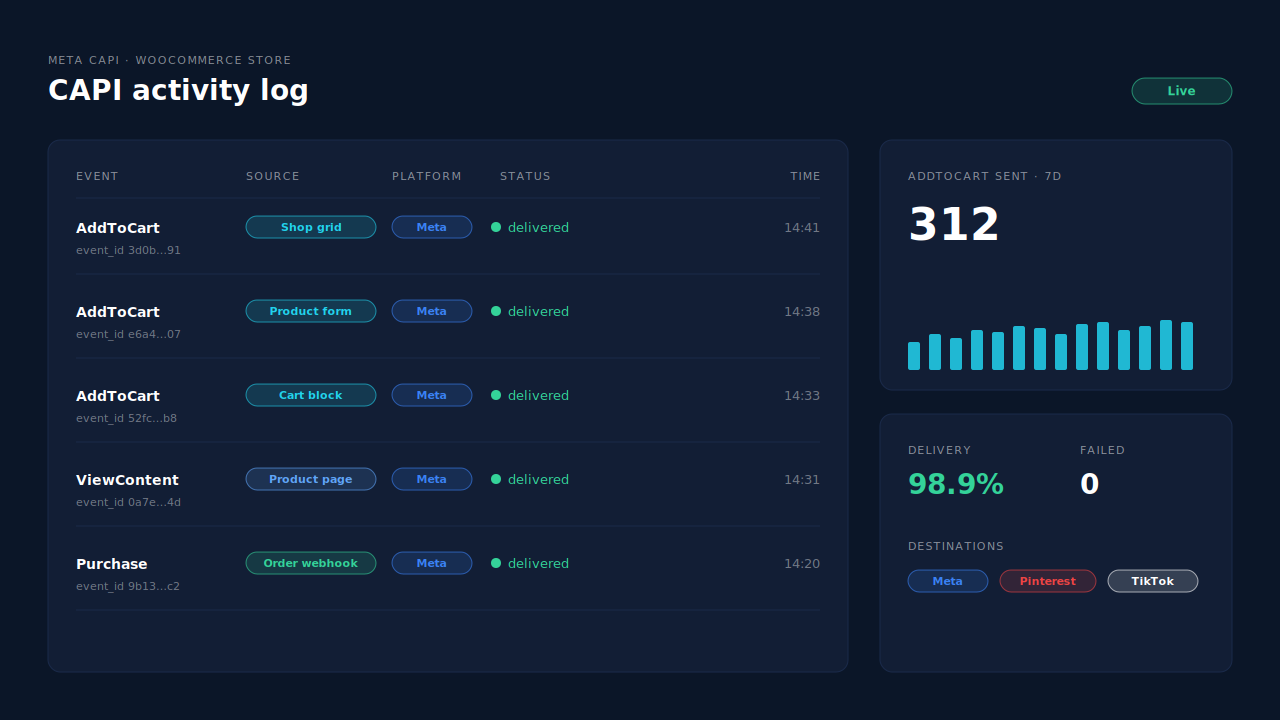
Where you see it working. The Meta CAPI page lists each server send by event name, status and time. Add one product in a private window and you’ll see one AddToCart row, then compare it with Events Manager.
The honest constraint. PartialLeads’ event IDs are its own. It doesn’t deduplicate against another plugin’s browser pixel. If Meta for WooCommerce, PixelYourSite or a GTM tag still fires AddToCart, Meta will count both. Switch AddToCart off there so PartialLeads is the one source. Keep a Meta base pixel on the site for the _fbp cookie, which PartialLeads can’t create from nothing.
| What breaks | The mechanism | Where you see it in the dashboard |
|---|---|---|
| One click fires form submit and added_to_cart | Plugin guard counts both signals as one addition | Meta CAPI page, one AddToCart row per add |
| Shop grid, product form and Cart block adds | Plugin listens to classic AJAX, classic form and Store API | Meta CAPI page, AddToCart rows |
| Browser pixel blocked or cut short | AddToCart forwarded server-side to Meta, Pinterest and TikTok | CAPI activity log |
| Retries or resends | PartialLeads never sends the same event twice | CAPI activity log |
| A second plugin or GTM tag also fires AddToCart | No cross-tool dedup, so keep one source per event | Meta CAPI page vs Events Manager |
Tell us what's broken. We'll fix your tracking — free.
Describe the tracking/attribution problem you're stuck on and we'll map it to a fix: server-side conversions to Meta, Google, TikTok and Pinterest, plus first-party tracking that survives Safari. No code required.
Sources
- https://github.com/woocommerce/woocommerce/blob/trunk/plugins/woocommerce/client/legacy/js/frontend/add-to-cart.js
- https://developers.facebook.com/docs/marketing-api/conversions-api/deduplicate-pixel-and-server-events
- https://developers.facebook.com/docs/meta-pixel/reference
- https://developers.facebook.com/docs/marketing-api/conversions-api/using-the-api