A 0% catalog match means Meta compared the product IDs in your events against the IDs in your catalog and found no overlap. Your events are arriving. Your catalog is live. They simply do not speak about products using the same identifier, so the join that powers dynamic product ads returns nothing at all.
That is a reassuring diagnosis and an annoying one. Nothing is offline. But until the two sides agree on what a product ID is, your catalog ads cannot retarget anyone with the item they looked at.
What Does a 0% Catalog Match Actually Mean?
It means the share of your catalog-relevant events whose product IDs Meta could find in your catalog is zero. The join is a plain string comparison: the values in an event’s content_ids against the retailer IDs of the items in your catalog. No fuzzy matching, no fallback to product name.
This is why the number is so often exactly 0% rather than a disappointing 14%. A partial mismatch shows as a partial rate. An exact zero means every event points at an ID space the catalog has never heard of — a systematic difference, not data-quality drift.
What you lose downstream is specific. Dynamic product ads and Advantage+ catalog ads build their creative by looking up the item a person viewed or added to cart. With no match, there is no item to show, so the campaign serves broad creative, under-delivers, or sits in learning without ever personalising.
The tell is healthy event volume beside a dead match rate. If your events were genuinely missing, both numbers would fall together.
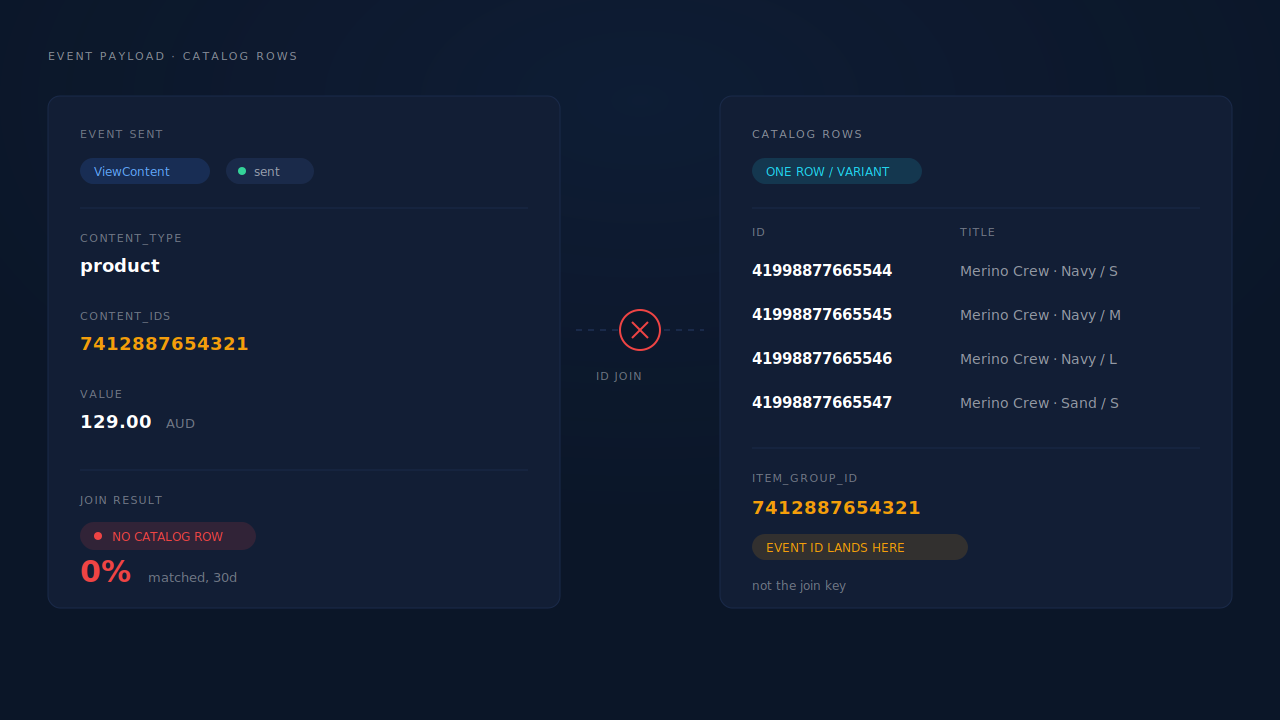
Why Do Your Events and Your Catalog Disagree About What a Product Is?
Because every store has at least two IDs for the same thing, and the two systems pick different ones. A product is the thing with a name and a page. A variant is the thing with a price, a stock level and a barcode — a specific size in a specific colour. Ad platforms transact at variant grain, so a well-built feed has one row per variant. Your storefront pixel fires from the product page, and that page’s most obvious identifier is the parent product. Nobody chose this mismatch; it falls out of where each piece of code sits.
Make it concrete. “Merino Crew” is one product with twelve variants. Your feed contains twelve rows, each with its own ID, all sharing an item_group_id that points back at the parent. A visitor opens the product page and ViewContent fires with content_ids: ["7412887654321"] — the parent product ID. That value appears in the item_group_id field of twelve rows and in the ID field of none of them. Match rate: zero.
Different events on the same store can therefore match at different rates — Purchase, built from order data, often knows the variant; ViewContent, fired from theme code, often does not.
Which ID Does Each Side Actually Use?
| Where | Typical identifier | What it describes |
|---|---|---|
| Catalog feed, ID field | Variant ID or variant SKU | One sellable item: size, colour, its own price and stock |
| Catalog feed, item_group_id | Parent product ID | The group the variant belongs to |
| Pixel ViewContent on a product page | Parent product ID, often | The page, before a variant is chosen |
| Pixel AddToCart / InitiateCheckout | Variant ID, usually | The item actually added |
| Server-side Purchase from order data | Variant ID or SKU, per line item | What was bought |
What Else Drives the Match Rate to Zero?
Grain is the most common cause, not the only one. Work down this list before you rewrite any code.
- Namespaced versus raw IDs. Some sales-channel apps write something like
shopify_US_7412887654321_41998877665544into the catalog while your events send the raw number. - SKU on one side, platform ID on the other. Both are legitimate identifiers; they are not the same string.
- The wrong
content_type. If you deliberately send parent IDs, declarecontent_type: "product_group"so the platform looks in the group field instead of the ID field. Parent IDs sent as"product"is the silent version of this bug. - The catalog is not linked to the pixel or the ad set. The IDs can line up perfectly while the campaign points at a different catalog.
- Items that no longer render. Feeds normally publish active items only. Archive a variant and its ID leaves the catalog while old events still reference it.
- Type and whitespace noise. A numeric ID on one side and a quoted string with a stray space on the other will not match, and nothing tells you why.
Checking whether your feed will be rejected is a different exercise from checking whether it matches your events. A feed can be perfectly approved and share no IDs with your pixel.
How Do You Diagnose This in Ten Minutes?
Take one event and one feed file and compare them by hand. The failure is a string comparison, and you can do a string comparison yourself.
- In Events Manager, open a recent ViewContent and copy its
content_idsvalue exactly — including quotes, prefixes and leading zeros. - Open the actual feed file your platform fetches, not the store admin. Search for that exact string.
- Read the result. Found in the ID field means the problem is elsewhere: catalog linkage,
content_type, or the ad set. Found only insideitem_group_idis the grain problem. Not found at all means two different ID spaces — usually a prefix or a SKU-versus-ID split. - Repeat for AddToCart and Purchase. They are often fired by different code and fail differently.
// The event Meta received
{
  "event_name": "ViewContent",
  "custom_data": {
    "content_type": "product",
    "content_ids": ["7412887654321"],   // parent product ID
    "value": 129.00,
    "currency": "AUD"
  }
}

// The catalog row that should have matched
{
  "id": "41998877665544",              // variant ID — the join key
  "item_group_id": "7412887654321",    // parent product ID lives here
  "title": "Merino Crew — Navy / M",
  "price": "129.00 AUD",
  "availability": "in stock"
}
Side by side, the bug is obvious: the event’s ID is present in the catalog, in the wrong field. That is the whole outage.
How Do You Fix It Without Changing Your Whole Stack?
Pick the canonical ID space first, then make everything follow it. Variant is almost always right, because price, availability and identifiers live at variant level, and those are the fields platforms rank and disapprove on.
Then change the events rather than the feed where you have the choice. Rewriting the ID field of an existing catalog effectively replaces those items, resetting their history and sending campaigns that were learning on them back to the start. Changing what your events send costs you nothing historical.
Where the page genuinely does not know the variant yet — a product page before anyone picks a size — send the parent ID and declare content_type: "product_group". That parameter exists for this case; it is a supported match path, not a workaround.
Use the same ID on every event in the funnel, or you will fix the match rate on ViewContent and leave it broken on AddToCart. If you send events through the Conversions API as well as the browser pixel, both paths need the same value.
Two honest expectations. The match rate recovers going forward, not backwards. And the catalog only changes when the platform fetches your feed, so give it a fetch cycle before deciding the fix failed.
How Does PartialLeads Solve This?
PartialLeads owns one side of the comparison outright: it builds the catalog at variant grain, so the ID space your feed publishes is knowable and stable rather than whatever an app decided.
The catalog table holds one row per variant, upserted on the variant ID, and any variant not seen in a completed sync run is swept out. That is the grain the ad platforms transact at, which removes the most common source of the mismatch from the feed side. The feed renders as RSS 2.0 with Google’s g: namespace at a single tokenised URL that both Meta Commerce Manager and Google Merchant Center ingest — one ID space to reconcile against, not two.
The Product Catalog page in the main nav shows what you are publishing: variants, products, stock, price range, top product types. A variant count sitting well above the product count is the fastest confirmation that your feed is at variant grain. Beside it is a 0–100 feed-health score built from six presence checks — missing image, missing identifier, out of stock, no GTIN, no product type, no description — with separate readiness counts per destination, because Meta needs an image and Google needs an image plus an identifier.
Only active variants render into the feed, which explains the disappearing-ID case above: archive a variant and it leaves the catalog while events still reference it.
Then the proof that the two halves line up. PartialLeads joins your order line items back to catalog items over a rolling 90-day window and shows which items sold and which never did. If the items that sell appear against catalog rows, the catalog’s IDs and your real order data are in the same space — the property a match rate is measuring.
On the events side, the Shopify path fires the full ecommerce funnel server-side rather than Purchase alone — ViewContent, AddToCart, Search, InitiateCheckout and AddPaymentInfo — so the events catalog ads personalise on exist even when a browser blocks the pixel. Each carries a deterministic event_id with a unique constraint behind it, so a server event and a browser event describing the same action cannot double-count. Getting purchase value and currency right matters for the same reason the IDs do.
Three constraints, plainly. The feed-health panel is Shopify-only — WooCommerce stores get the feed and the sync without the scoring. The checks test whether fields are present, not whether their values are valid, so the score is a first pass, not a Merchant Center pre-flight. And PartialLeads produces the feed; connecting it to a catalog and auditing what ID your storefront’s own pixel sends stay in your hands — that last one is the ten-minute job above.
Catalog sync is also optional and decoupled from tracking. It stays inert until you paste a Shopify Admin API token, so you can run server-side conversions and attribute ecommerce revenue to the ad that started it without ever connecting the catalog side. There is a full walkthrough of Shopify tracking, attribution and catalog, and a narrower guide to fixing Meta CAPI tracking on Shopify if events are the immediate problem.
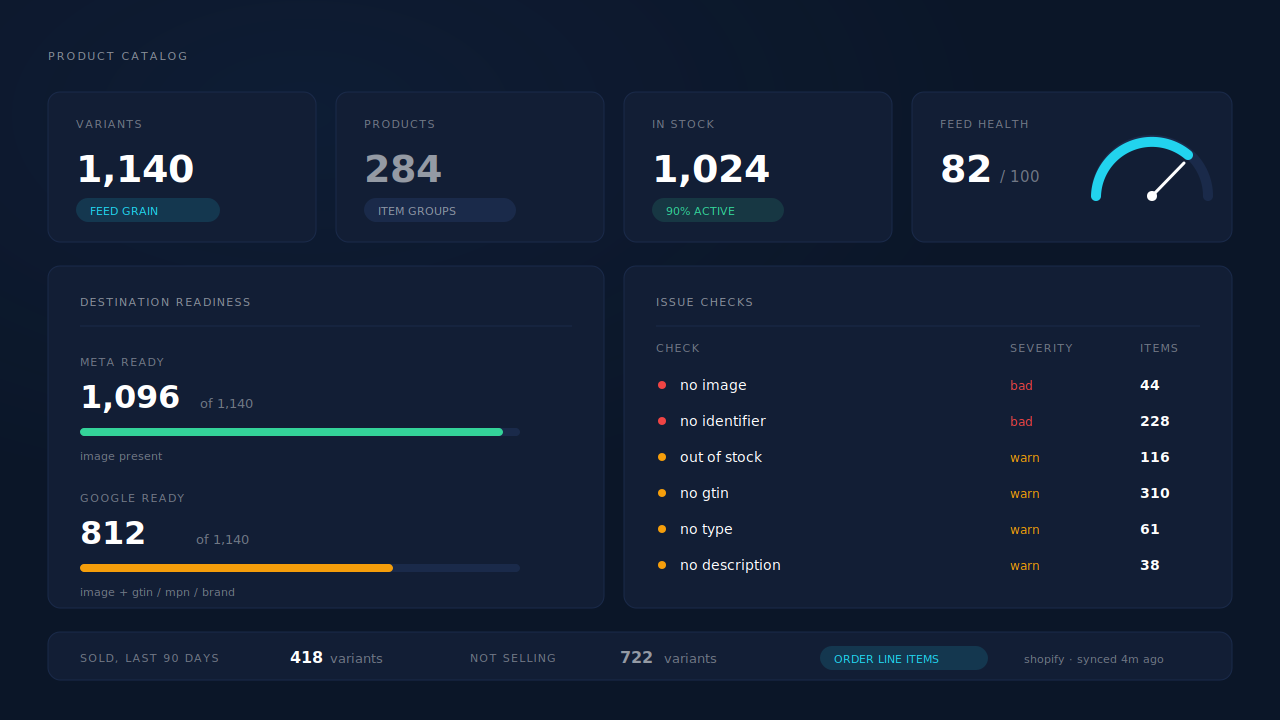
Numbers in the mockups are placeholder data.
| What breaks | The mechanism | Where you see it in the dashboard |
|---|---|---|
| Events name the parent product, catalog holds variants | Catalog built at variant grain, one row per variant, upserted on variant ID | Product Catalog, variant and product composition counts |
| Two feeds with two ID spaces for Meta and Google | One RSS 2.0 feed URL with the g: namespace, ingested by both platforms |
The hosted feed URL, one per connection |
| IDs that were valid last week and match nothing today | Active variants only, with unseen rows swept on each completed run | Product Catalog, in-stock and composition counts |
| No way to prove catalog IDs match real orders | Order line items joined to catalog items over a rolling 90-day window | Product Catalog, top products and not-selling |
| Catalog ads starved of the events they personalise on | Full ecommerce funnel fired server-side, deterministic event ID with unique dedup | CAPI activity log, per-event status |
Tell us what's broken. We'll fix your tracking — free.
Describe the tracking/attribution problem you're stuck on and we'll map it to a fix: server-side conversions to Meta, Google, TikTok and Pinterest, plus first-party tracking that survives Safari. No code required.
Sources
- https://developers.facebook.com/docs/meta-pixel/reference
- https://developers.facebook.com/docs/marketing-api/conversions-api/parameters/custom-data
- https://developers.facebook.com/docs/marketing-api/catalog
- https://developers.facebook.com/docs/commerce-platform/catalog/fields