You attribute them by matching the order to the landing-page session with something that survives the domain hop: the buyer’s email or phone, the same device on the same network inside the same visit, or a click ID you forwarded yourself in the link. Cookies do not survive it. Two registrable domains are two cookie jars, and the visitor ID written on one is invisible on the other.
That is the whole problem, and it catches people out because nothing looks broken. The tag fires on the landing page. The pixel fires on the store. Orders arrive. Only the join between the two is missing — and the join is the part you were paying for.
Why does Shopify say the order came from Direct?
Because by the time the order row is written, every trace of the ad click is gone. The click ID lived in the URL on yourfunnel.com. The buyer followed a plain link to yourstore.com, the browser opened a fresh storage bucket for the new domain, and the only clue the store received was a referrer reading yourfunnel.com — your own property, not Google and not Meta.
Analytics tools treat a referral from a domain you own as either a self-referral to be ignored or a real referrer to be credited. Neither is what you want. The first collapses the order into Direct; the second credits your landing page for a sale your ad paid for. This is the same failure that makes ad conversions show as Direct on a single domain, except here the cause is structural rather than incidental: the browser is doing exactly what it is supposed to do.
One distinction before anything else, because it decides how hard your version of this problem is.
Subdomains are not a second domain. shop.brand.com and www.brand.com share the registrable domain brand.com, so a cookie scoped to the apex is readable on both. That case is a configuration job.
Different registrable domains are a real boundary. brand-offer.com and brandstore.com — or anything ending in .myshopify.com — share nothing. No cookie, no local storage, no session. That case needs an actual bridge, and it is the case this article is about.
What actually breaks at the domain hop?
Three things, and they fail independently, so you can lose one and keep the other two.
Storage stops at the domain boundary
Cookies and localStorage are scoped to the origin that wrote them. A visitor ID minted on the landing page cannot be read by any script on the store. This is not a bug, a browser setting, or something a tag manager fixes — it is the same-origin rule the entire web security model rests on. Any vendor that claims a cookie follows a visitor across two unrelated domains is describing a third-party cookie, which is exactly the thing browsers have spent a decade removing.
The click ID never leaves the landing page URL
gclid, fbclid, msclkid, ttclid and epik are appended to the URL the ad sends traffic to, once. If the link from your funnel to your store is a plain href, those parameters are not on the URL the store loads. Nothing regenerates them. The store’s pixel fires an event with no click identifier attached, which is why the platform then reports the purchase as unmatched or attributes it on modelling alone. If the difference between the parameter and the cookie is still fuzzy, the breakdown of gclid, fbclid and UTM parameters is worth five minutes.
The checkout is a third environment
Shopify’s checkout and its pixel sandbox are not your page. Scripts there run under constraints you do not set, and identifiers minted inside that sandbox can churn — which is why Shopify’s Customer Events sandbox sends odd-looking session data even for merchants on a single domain. Add a domain hop in front of it and you now have three environments that each know a different fragment of one purchase.
What does the broken join actually cost?
Three specific things, in ascending order of expense.
Your reports lie in a consistent direction. Paid campaigns are undercredited and Direct is inflated, so every optimisation decision made from that table moves budget away from the channel that is working.
Your last-click model credits your own funnel. If the store treats your landing domain as a referrer, the winning “source” in the report is a page you already control, which tells you nothing you can act on.
The ad platform stops learning. A purchase event with no click ID and no strong identifiers is a purchase the algorithm cannot tie to an auction it won. Feed a campaign a month of those and bidding degrades on data you did have and did not send. Getting that signal back is the whole point of attributing ecommerce revenue to the ad click rather than to the last page a buyer touched.
How do you fix this without a vendor?
There is real work you can do yourself, and it is worth doing whether or not you ever add a tool.
1. Decorate every cross-domain link. Read the click IDs and UTMs from the landing page URL on first pageview, store them, and append them to every link pointing at the store. That single step recovers most of the loss for buyers who go straight through.
// On the landing page: capture once, forward on every store link.
const KEYS = ['gclid','gbraid','wbraid','fbclid','msclkid','ttclid','epik',
              'utm_source','utm_medium','utm_campaign','utm_content','utm_term'];
const url = new URL(location.href);
const carry = {};
KEYS.forEach(k => { const v = url.searchParams.get(k); if (v) carry[k] = v; });
// Persist so it survives later pageviews on this domain.
if (Object.keys(carry).length) sessionStorage.setItem('pl_carry', JSON.stringify(carry));

const stored = JSON.parse(sessionStorage.getItem('pl_carry') || '{}');
document.querySelectorAll('a[href*="yourstore.com"]').forEach(a => {
  const dest = new URL(a.href);
  Object.entries(stored).forEach(([k, v]) => dest.searchParams.set(k, v));
  a.href = dest.toString();
});
2. Land the identifiers on the order itself. Whatever your store platform lets you attach to a cart or an order — attributes, notes, hidden fields on a form that precedes checkout — put the campaign values there. Check your platform’s own documentation for the exact field names and their length limits before you build against them. An identifier written onto the order record is the one copy that cannot be cleared by a browser.
3. Exclude your own domains from referral credit. In whichever analytics tool you report from, tell it that your funnel domain is not a traffic source. This stops the self-referral from outranking the campaign that paid for the visit.
Now the honest limits, because these three steps do not close the problem.
Link decoration only covers links you control. It does nothing for the buyer who bookmarks your store, retypes the URL, taps a link in your abandoned-cart email, or comes back four days later on a laptop after seeing the ad on a phone. Redirect chains, link shorteners and some app browsers strip query parameters in transit. And every one of these fixes protects a single uninterrupted visit — the moment the journey spans two sessions, you are back to having no bridge at all.
That is the gap the identity layer exists to fill.
How does PartialLeads attribute Shopify orders across two domains?
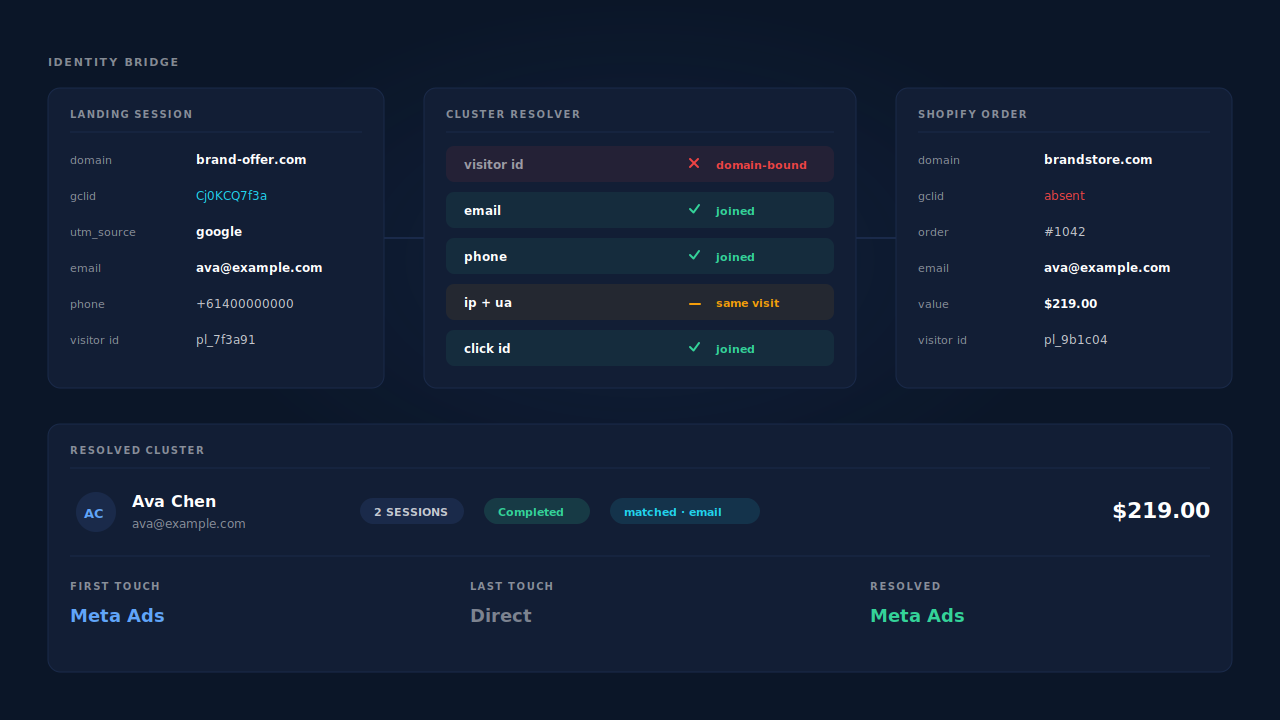
By never relying on the cookie to make the join. PartialLeads runs the same tag on both domains — the universal tag on the landing page, the Customer Events pixel on the Shopify store — and both register under your Authorized Domains, so the two sessions land in one account rather than two silos. The join is then made on identifiers that a domain boundary does not touch.
The cluster resolver unions a person’s sessions across six tiers: visitor ID, email, phone, IP plus user-agent, a device fingerprint hash, and click ID seen on more than one session. Only the first of those is blocked by the domain hop. The other five are exactly the bridge you need, and how they combine is covered in how visitor identity resolution works.
Visit-sibling inheritance handles the same-visit hop directly. When two sessions share a client, IP and user-agent within a ±30-minute window, the later session inherits the strong attribution — UTMs and click IDs — from its sibling. A second tier covers a phone switching from wifi to mobile data mid-journey, matching on user-agent and the Meta click cookie within ±10 minutes even when the IP changes. In practice this is the two-domain hop: the store session arrives blank and inherits the campaign from the landing session it belongs to.
Every inbound order runs through one matching ladder. Identity is normalised first (email lowercased, phone to E.164), then the order is matched to a session by visitor-ID echo, then email, then phone, then IP, in descending confidence. A match flips the lead to Completed with revenue attached, writes both a first-touch and a last-touch attribution row, and fans the conversion out server-side to Meta, Pinterest, TikTok and Google Ads — carrying the click ID recovered from the landing session, not the empty one the store had.
Partial capture is what makes the email tier fire. The email tier only works if an email exists on the landing side. Because the tag captures email and phone as they are typed, before the visitor hits submit, a buyer who filled in an opt-in on the funnel and bought two days later on a different network still joins by email. That is the difference between a bridge that needs one uninterrupted visit and a bridge that does not.
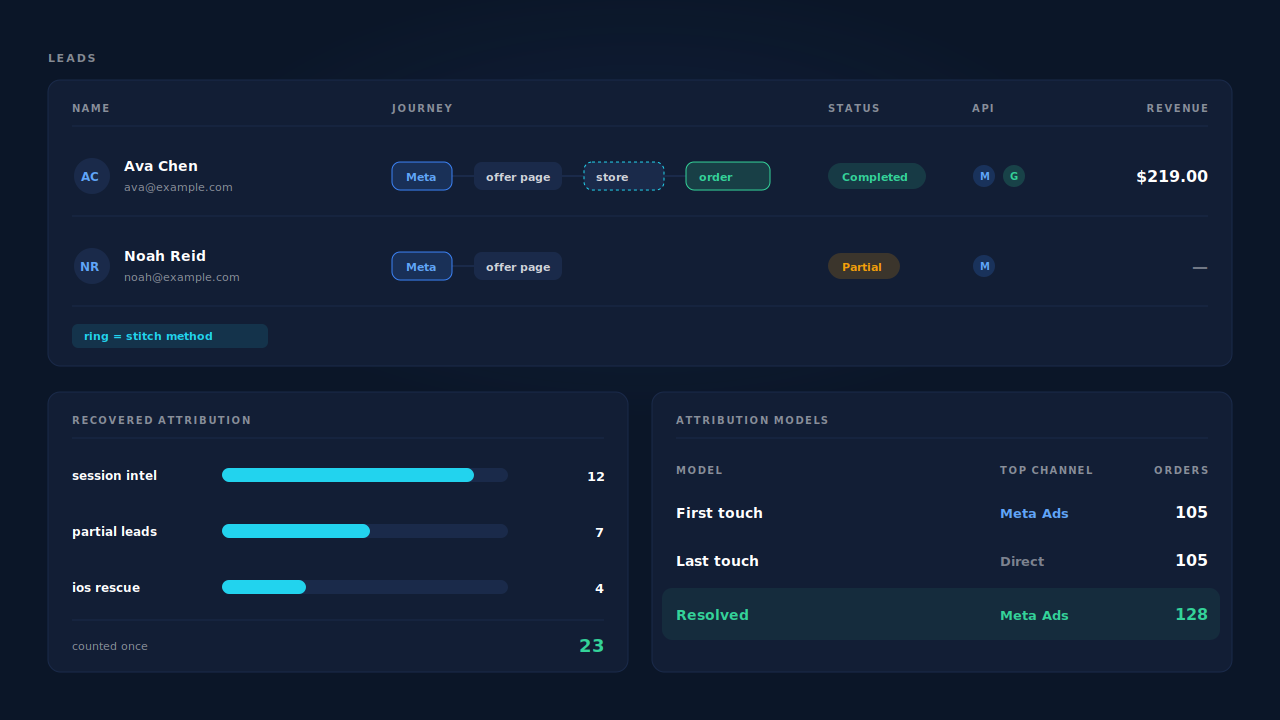
Where you check the work. The Journey column in the Leads list renders each touch as a badge, so a two-domain purchase reads left to right without opening the record, with a session count and a ring treatment showing how each session was stitched in. The Purchases ledger separates matched orders from unmatched ones. The Attribution report shows first-touch, last-touch and PartialLeads-resolved side by side, and itemises recovered revenue by mechanism — the “reclassified by session intelligence” bucket is where cross-domain orders that would otherwise read as Direct show up.
The honest constraints. A buyer who leaves no email or phone on the landing page, arrives at the store days later from a different network, and pays as a guest will not match — that order lands unmatched and stays recoverable later if identity arrives, with a manual re-match available. Match quality on the ad-platform side still depends on the platform’s own cookie being present on the store; the _fbc value can be reconstructed from an fbclid, but _fbp cannot be synthesised from nothing, so keep your base pixel installed. And if your store is on a subdomain rather than a separate domain, most of this is unnecessary — fix the cookie scope first, as covered in how to fix Shopify tracking, attribution and catalog.
| What breaks | The mechanism | Where you see it in the dashboard |
|---|---|---|
| Visitor ID does not cross domains | Six-tier cluster resolver joins on email, phone, IP+UA, fingerprint and click ID | Journey column, session count and stitch ring on the Leads list |
| Store session arrives with no campaign | Visit-sibling inheritance, ±30 min on client+IP+UA, ±10 min on UA+click cookie | Customer Journey timeline showing the inherited source |
| Order has no click ID to send back | Click ID captured on the landing session, _fbc reconstructed from fbclid, dispatched with the conversion |
CAPI activity log, per-lead API column |
| Order cannot be tied to a person | Purchase matching ladder: visitor ID, then email, then phone, then IP | Purchases ledger, matched vs unmatched |
| Revenue reads as Direct | First-touch, last-touch and resolved models scored on the same orders | Attribution report, recovered revenue by mechanism |
| Buyer never submitted a form | Email and phone captured as they are typed, before submit | Leads list, Partial badge with the order’s revenue attached |
Tell us what's broken. We'll fix your tracking — free.
Describe the tracking/attribution problem you're stuck on and we'll map it to a fix: server-side conversions to Meta, Google, TikTok and Pinterest, plus first-party tracking that survives Safari. No code required.
Sources
- https://developers.facebook.com/docs/marketing-api/conversions-api/parameters/fbp-and-fbc
- https://developers.facebook.com/docs/marketing-api/conversions-api/parameters/customer-information-parameters
- https://developers.facebook.com/docs/marketing-api/conversions-api/deduplicate-pixel-and-server-events