You join them on an identifier both devices produced, which in practice means the email address on the order. The click and the purchase happened in two separate browsers, so no cookie bridges them. The order itself can: a checkout collects an email, usually a phone number, and always creates a payment record. Match those back to the session that carried the click.
Worth saying plainly, because the instinct is to look for a better cookie, and there isn’t one. Cross-device matching is identity resolution, not tracking, and the identifiers that work are the ones a person types rather than the ones a browser stores.
The purchase case is the easier half of that problem. Joining a phone session to a laptop session to track a lead across devices depends on the visitor volunteering something before they leave. A buyer has no choice, and that obligation is the lever this article turns on.
Why can’t your ad platform connect a phone click to a desktop purchase?
Because the click and the sale are observed in two separate browsers, and the platform’s only certain link between them is a signed-in account on both.
Cookies are scoped to a browser on a device, by design. The _fbc value written when your visitor tapped the ad on her phone is not readable from her laptop, and nothing is supposed to make it readable. That is not a bug anyone will fix.
Ad platforms do run their own cross-device graphs, and they work — for people signed in to that platform on both devices who have not opted out of that use. On iOS, the permission prompt removes a large slice of exactly those people. The graph is real but partial, and a report will not tell you which half you are looking at.
Your own analytics is worse off, with no login graph at all. It sees a mobile visitor with an fbclid who left, and a desktop visitor who arrived with nothing and bought. Two visitors, one buyer, no mechanism.
And a quieter failure underneath all of it: if your Purchase event fires from the browser, it fires from the desktop browser — the one with no click ID in it. The event is dispatched correctly, arrives intact, and carries no evidence of the ad that caused it.
What does this look like in your reports?
Spend with no revenue on the mobile campaign, and revenue with no source on the desktop side. Every individual number is accurate, and all of them are wrong in the same direction — the dangerous kind of wrong.
The mobile prospecting campaign shows clicks, landing-page views, maybe an Add to Cart, and a return of zero. Your store reports the sale against Direct, or a branded search she only ran because she already knew the name. This is a large part of the reason ad conversions show as Direct at rates no media buyer believes.
Then you make the decision the report is pushing you toward. You cut the mobile campaign, move budget into the channels that appear to convert, and watch total revenue sag a fortnight later with nothing explaining why. The campaign you cut was generating the demand the “good” channels were harvesting.
An illustrative shape: 1,000 mobile clicks, twelve sales, all twelve completed on a laptop. Last-click reporting puts that campaign at zero and hands the twelve to Direct and branded search. Nothing is broken; the wiring is missing one join.
Which identifiers can actually join a phone click to a desktop order?
Only the ones a person carries between devices, not the ones a browser stores about itself. Email, phone number and a payment customer ID qualify. A cookie, a device fingerprint and a local visitor ID do not, because they describe a browser. That distinction decides which matches you can defend.
The identifiers that travel with the person
A normalised email address. The most useful one, because checkout cannot happen without it. Normalisation is not optional: lowercase and trim, and handle the fact that Gmail treats dots and +tags as noise, so Ava.Chen+shop@gmail.com and avachen@gmail.com are the same mailbox. Match raw strings and you will miss joins sitting right in front of you.
A normalised phone number. Second most useful, and fussier. 0412 345 678 and +61412345678 are the same person only if you know the country, so a number without a country code needs one inferred from somewhere — typically the session’s geography — before it is a key you can join on.
A payment customer ID. If she checked out with the same payment account both times, the processor already knows they are one customer. That ID is a strong, durable cross-device key, sitting in the order payload.
Your own account ID, if she logs in. The platforms’ trick, available on your own property: your account system has already done the join, so the work is only writing that ID onto the session.
The identifiers that look like they should work and don’t
A device fingerprint. It identifies a device, which is the thing that changed. Two devices produce two fingerprints. Fingerprinting genuinely helps re-find somebody whose cookie was cleared on the same laptop; for a phone-to-desktop join it is structurally incapable of helping, and any vendor implying otherwise deserves a question.
IP address plus user agent. Tempting, because one network often gives both devices the same public IP. But the strong version of this test also requires a matching user agent, and an iPhone and a Windows laptop never match. Drop the user agent and you are matching on a household, which will cheerfully merge two colleagues in one office. Treat it as a weak last resort and label it as one.
The same click ID appearing twice. Somebody mails themselves the link. Not rare enough to ignore, not common enough to plan around.
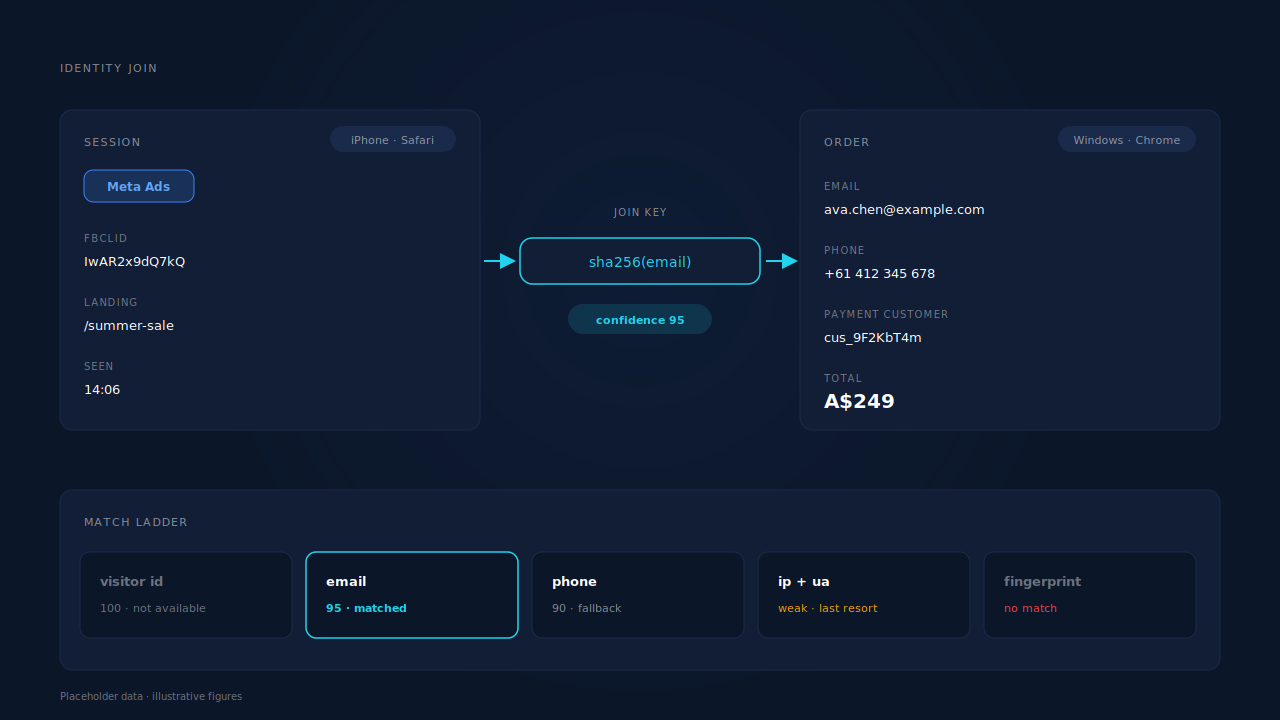
Why is a purchase easier to match across devices than a form lead?
Because a purchase is obliged to collect the thing you need. Checkout cannot complete without an email address — a receipt has to go somewhere — usually takes a phone number, and always creates a payment record. A form has no such obligation, and an abandoned form none at all.
That obligation flips the direction of the work. With leads, you unify sessions and hope one eventually carries money. With purchases, you start from money that already has identity attached and search backwards for the session holding the click.
The second advantage is where the order arrives from. A store webhook, a payment event or an order POST reaches your server without passing through a browser. No cookie is involved, no blocker can drop it, no consent banner sits in its path. Whatever else is broken in your tracking, the order still lands with an email on it — the foundation of being able to attribute ecommerce revenue to the ad that started it.
Not a free win, though. Guest checkout with a typo’d address, a wallet or private-relay email that differs from the one she uses everywhere else, or a work email on the order against a personal one on mobile all produce a purchase you cannot join. Those become unmatched revenue, and honest reporting shows them as unmatched rather than spreading them across your channels.
What can you do about this without a new tool?
Quite a lot, and most of it is worth doing regardless of what you buy afterwards.
- Judge mobile campaigns on first touch, not last click. Most reports offer an assisted or first-interaction view. If a campaign looks dead on last click and alive on first touch, you have diagnosed the problem without instrumenting anything.
- Capture the click ID server-side the moment somebody lands.
fbclid,gclidand their siblings only ever exist in the landing URL. Read them on arrival and store them against a durable identifier, instead of letting them expire in a cookie on the wrong device. - Collect the email before the device switch. A discount, a size guide, a quiz result, a saved cart — any honest reason to ask on mobile gives you the key you will need on desktop.
- Ask for a phone number where it is genuinely useful. It is the second-strongest identifier you can hold, and it costs some form completion rate. Pretending otherwise is how a best practice turns into a revenue cut.
- Send hashed identifiers with your conversions rather than depending on the browser to carry the association. Every major ad platform now accepts a server-side event with a hashed email and phone attached.
- Test with a holdout before reallocating off a device-blind ROAS number. A two-week geo holdout answers “does this campaign cause sales” without needing the join at all.
Where this runs out is the plumbing: sessions you can query backwards, a normaliser for emails and phone numbers, hashing that matches each platform’s spec exactly, and a retry queue. Small system, but it stops being a weekend project.
How does PartialLeads match a mobile ad click to a desktop purchase?
It starts from the order rather than the browser. Every inbound purchase — from Shopify, WooCommerce, Stripe, GoHighLevel or a universal webhook — goes through one pipeline: normalise the identity, dedup it, match it to a session through a tiered test, and attach the revenue to the person it belongs to.
The tiers run strongest first: a visitor-ID echo at confidence 100, then email at roughly 95, then phone, then IP. On a cross-device purchase the first tier is exactly the one that cannot fire, because the order was placed in a browser that never held that visitor ID. Email is the workhorse here, which is the honest description of how these matches get made.
Two things then matter for your reporting. The lead flips to Completed with revenue attached, and the purchase writes both a first-touch and a last-touch attribution row, each snapshotting the UTMs, click IDs, referrer, landing page and time to purchase. The mobile ad click keeps first-touch credit; the desktop session takes last touch. You are not asked to pick a model and live with it — you read the disagreement.
Underneath that, the identity graph unions a person’s sessions across six tiers — visitor ID, email, phone, IP plus user agent, device fingerprint and repeated click ID — so the two sessions land in one cluster rather than two visitor counts.
The repaired attribution is what gets sent back out. Server-side conversions fan out to Meta, Pinterest, TikTok and Google Ads through the Conversions API and its equivalents, carrying the hashed email and phone from the order plus the _fbc value reconstructed from the fbclid the mobile session arrived with. The platform receives a purchase event pointing at the click it lost.
Two honest constraints. Match quality still depends partly on a platform cookie captured client-side, so keep your base tag installed: _fbc can be reconstructed from a URL fbclid, but _fbp cannot be conjured from nothing. And dispatch is controllable where matching is not. Every order in your admin produces a conversion event, verifiable by reconciling order counts against dispatched events. Whether the platform resolves that event to a person depends on its own graph, consent and opt-outs — no vendor controls that half.
Payload quality is set by what the checkout collects, which is the same argument as event match quality generally. With email and phone both present as required fields, PartialLeads consistently delivers EMQ 9+, observed across customer accounts; email-only collection caps structurally lower, because that is one high-weight parameter instead of two. The platform-side component remains — a B2B audience of work addresses can resolve lower on a perfect payload.
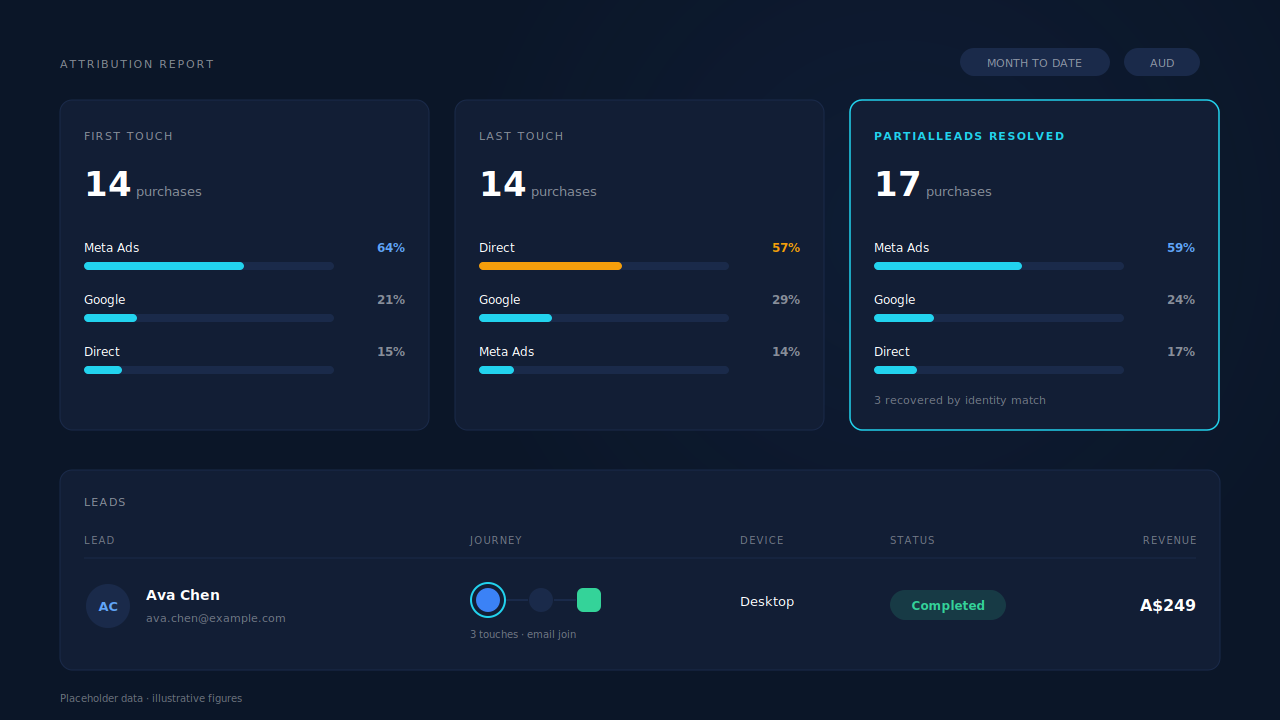
Three surfaces prove the join instead of asserting it. The Leads list carries a Device column and a Journey ribbon drawing each touch as a badge, with the ring treatment encoding how that session was stitched into the cluster — visitor ID, email, phone, IP and user agent, fingerprint or click ID — so an email-joined cross-device purchase is visible as such at list resolution. The Purchases ledger shows a matched-versus-unmatched wedge, so unjoined revenue is a number to work on rather than a silence, and those purchases stay matchable later or by hand. And the Attribution report puts FIRST TOUCH, LAST TOUCH and PARTIALLEADS RESOLVED side by side with their own purchase counts — the resolved model can legitimately show more purchases, because it recovers sales a single-model view drops.
| What breaks | The mechanism | Where you see it in the dashboard |
|---|---|---|
| The ad was clicked on a phone, the order was placed on a laptop, and no cookie connects them | Purchase matched to a session on normalised email, then phone, then IP — with the identity graph unioning both sessions into one person | Leads list: Device column beside the Journey ribbon, with the ring treatment showing the join was made on email |
| The mobile campaign shows spend and zero revenue | First-touch and last-touch attribution rows written for every matched purchase, so the mobile click keeps first-touch credit | Attribution report: FIRST TOUCH, LAST TOUCH and PARTIALLEADS RESOLVED side by side, each with its own purchase count |
| The Purchase event fires in the desktop browser, which never held a click ID | Server-side dispatch sends the conversion with the hashed email and phone plus _fbc reconstructed from the mobile session’s fbclid |
CAPI activity log, and the per-lead API column showing which platforms that lead was sent to |
| Revenue arrives with an email you cannot tie to any session | Unmatched purchases still land and stay recoverable when identity appears later, plus a manual re-match | Purchases ledger: matched versus unmatched wedge |
| A long gap between click and purchase looks like two unrelated events | Time to purchase snapshotted on the attribution row, first-touch and last-touch lag plotted separately | Attribution report: Time to Purchase panel, bucketed by lag |
Tell us what's broken. We'll fix your tracking — free.
Describe the tracking/attribution problem you're stuck on and we'll map it to a fix: server-side conversions to Meta, Google, TikTok and Pinterest, plus first-party tracking that survives Safari. No code required.
Sources
https://developers.facebook.com/docs/marketing-api/conversions-api/parameters/customer-information-parameters https://developers.facebook.com/docs/marketing-api/conversions-api/parameters/fbp-and-fbc https://developers.facebook.com/docs/marketing-api/conversions-api