WP Rocket’s Delay JavaScript setting breaks WooCommerce pixel tracking because it is built to stop scripts running until the visitor interacts with the page. Your Meta Pixel, TikTok pixel and Pinterest tag are scripts. Delay them, and every event waits for a key press, a click, a scroll or a touch. A visitor who never interacts never fires them.
That is why the symptom reads as “erratic” rather than “broken”. Desktop buyers who nudge the mouse on the thank-you page still send a Purchase. Mobile buyers who glance at the confirmation and close the tab often don’t. Your order count stays steady while Events Manager drifts.
This article explains exactly what the setting does to a script tag, the three ways it loses events, the exclusions that fix the browser side, and why the Purchase itself shouldn’t depend on a browser script running at all.
What does Delay JavaScript actually do to a pixel?
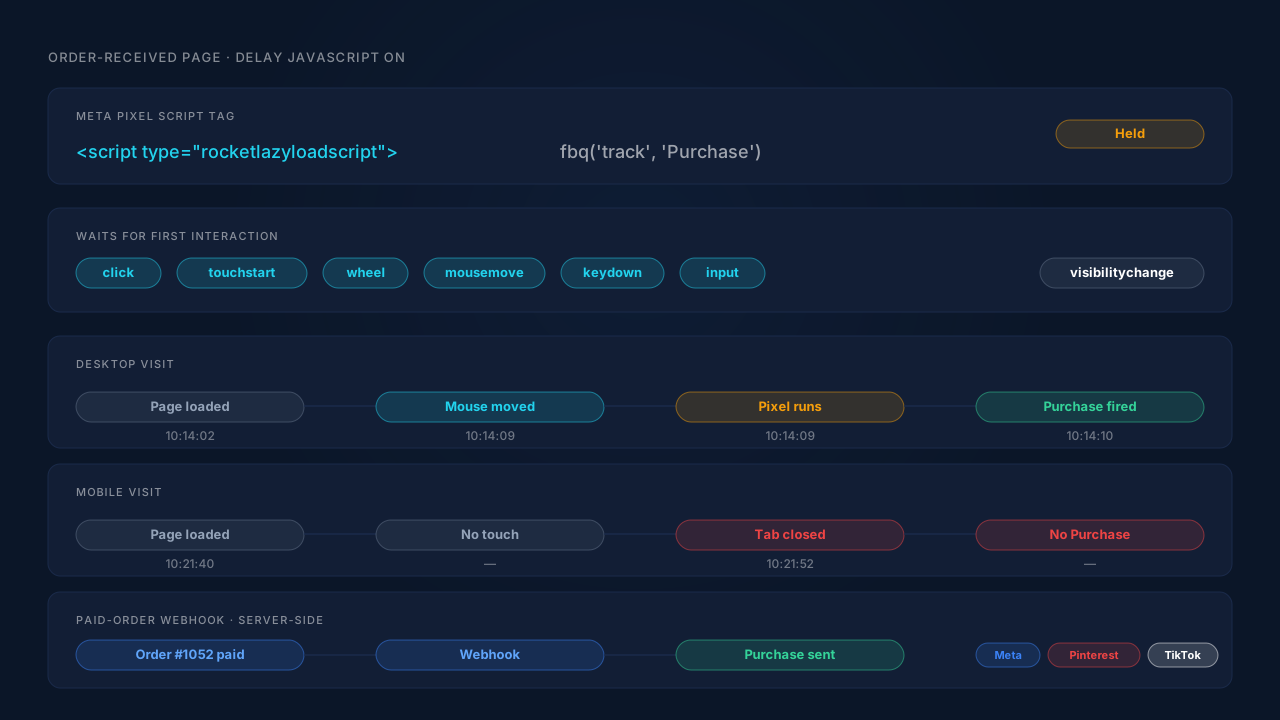
It rewrites the pixel’s script tag so the browser treats it as inert, then reruns it after the first user interaction. WP Rocket changes each script’s type to rocketlazyloadscript, a value browsers don’t execute, and moves the original type to a data-rocket-type attribute. A small loader script waits for interaction and only then turns the delayed scripts back into real ones.
You can see this in WP Rocket’s own source code. The DelayJS/HTML.php class scans the page’s HTML for every script tag. Any tag that doesn’t match an exclusion pattern is rewritten to the inert type. Inline snippets are included, so the fbq('track', 'Purchase', …) call a pixel plugin prints into the page is delayed too, not just the external file.
The loader, lazyload-scripts.min.js, lists the events it waits for: keydown, keyup, mousedown, mouseup, mousemove, mouseover, mouseout, touchmove, touchstart, touchend, touchcancel, wheel, click, dblclick and input. It also listens for visibilitychange, which fires when the tab is hidden or closed.
Why do events go missing instead of just firing late?
Because some visitors never give the page an interaction to wait for, and the rest give it one too late. Events attached to page load, like PageView, ViewContent and the Purchase on the order-received page, only fire after that first interaction. When the visitor leaves before interacting, the script starts too late to send anything, or never starts.
There are three ways an event goes missing.
The no-touch exit. A buyer pays, lands on the order-received page, reads the order number and closes the tab. On a phone that can happen without a single touch. The visibilitychange on close may start the delayed scripts, but the page is already being torn down. Whether the pixel’s network request finishes then is down to timing, not to your setup.
The split snippet. Pixel code usually arrives in two parts: a base script that defines fbq, and inline calls that use it. If an exclusion catches one part but not the other, the order breaks. The event call runs early, fbq doesn’t exist yet, and the browser logs an error instead of an event.
The late timestamp. A delayed PageView fires when the visitor first moves, not when the page loaded. For most reports that’s harmless. For a visitor who lands from an ad and leaves without interacting, it means the visit is never recorded at all, so the ad click has no page view to attach to.
None of this is a WP Rocket bug. Holding scripts until interaction is exactly what the setting promises, and it’s why it lifts PageSpeed scores. The cost lands on anything that needs to run whether or not the visitor touches the page.
How do you check whether Delay JavaScript is delaying your pixel?
View the source of the page where the event should fire and search for rocketlazyloadscript. If your pixel’s script tags carry that type, they are being delayed. Then load the page in a private window, don’t touch anything for ten seconds, and watch the network tab: a delayed pixel sends no request until you move the mouse.
- Place a cheap test order and stop on the order-received page.
- View the page source and search for
fbevents.js(Meta), your TikTok or Pinterest tag, and the inline event calls. Note which ones carrytype="rocketlazyloadscript". - Reload the page with the network tab open and keep your hands off the mouse and keyboard. A delayed pixel sends nothing.
- Move the mouse once. If the Purchase request appears now, the delay is the cause.
- Repeat on a phone, or in mobile emulation, and close the tab without touching it. That’s the buyer you’re losing.
At scale, compare browser Purchase events against paid orders for the week before and the week after you enabled the setting. The guide to what share of WooCommerce buyers never reach the thank-you page walks through the same order-count comparison for gateway redirects.
How do you stop WP Rocket from delaying the pixel?
Add your tracking scripts to WP Rocket’s Delay JavaScript exclusion list, both the external file and the inline calls, then clear the cache and test again. WP Rocket matches each exclusion as a pattern against the whole script tag, so a file name like fbevents.js catches the base script and an escaped call like fbq\( catches the inline events.
Exclude both halves of each pixel. For Meta, that’s fbevents.js and fbq\(. The backslash matters: WP Rocket’s own built-in exclusions write gtag\( the same way, because the pattern is a regular expression and a bare bracket breaks it.
Use the ready-made exclusions where they exist. WP Rocket ships one-click exclusion sets for some tracking plugins. Its entries for Pixel Manager for WooCommerce and Pixel Caffeine carry the note “Fire the tracker on pageload.” That’s WP Rocket’s own answer to this problem.
Check what Safe Mode does and doesn’t cover. Safe Mode excludes jQuery and every script loaded from /wp-content/ and /wp-includes/. A pixel served from the ad platform’s own domain, or printed inline, is still delayed in Safe Mode.
Turn off the delay on checkout if you must. WP Rocket can switch Delay JavaScript off for an individual page through that page’s own options. WooCommerce’s order-received screen is an endpoint of the Checkout page, so set it on Checkout. That keeps the speed gain on product and category pages and protects the page where the Purchase fires.
Clear the cache, then rerun the five-step test. Old optimised copies keep serving delayed tags until they’re purged. The article on how page caching leaves WooCommerce order attribution fields empty covers the cache-side half of the same problem.
The limit is that every one of these fixes still relies on a browser running a script after payment. Ad blockers, closed tabs and payment gateways that never return the buyer break the same Purchase for reasons no exclusion list touches, as the explainer on how ad blockers break conversion tracking shows.
How does PartialLeads keep WooCommerce purchases out of the delay problem?
It doesn’t fire the Purchase from the browser. The PartialLeads WooCommerce plugin sends each order to PartialLeads by webhook once it is paid, meaning processing or completed, and the Purchase goes server-side to Meta, Pinterest and TikTok from there. Nothing fires on the thank-you page, so a delayed or never-run script there can’t lose it.
Paid orders, from the order record. The trigger is the order status, not a page load. Pending, on-hold, failed and cancelled orders aren’t sent. A bank-transfer or cash-on-delivery order is sent when it’s marked paid. The value sent is the full order total, including tax and shipping, after discounts. This is the server-side WooCommerce purchase tracking approach, built in.
Every paid order produces a conversion. Matching it to a person isn’t guaranteed. PartialLeads controls sending the event. Meta, Pinterest and TikTok control whether they can match it to a user and an ad click. The order is matched back to the shopper’s session by visitor id, then email, then phone, then IP, and the identifiers it finds travel with the event. That split is the point of the Conversions API: dispatch stops depending on the browser, while matching still depends on what was captured.
Google Ads works differently. Google Ads purchases are written as rows to a Google Sheet that you import on a schedule. That’s also independent of the thank-you page.
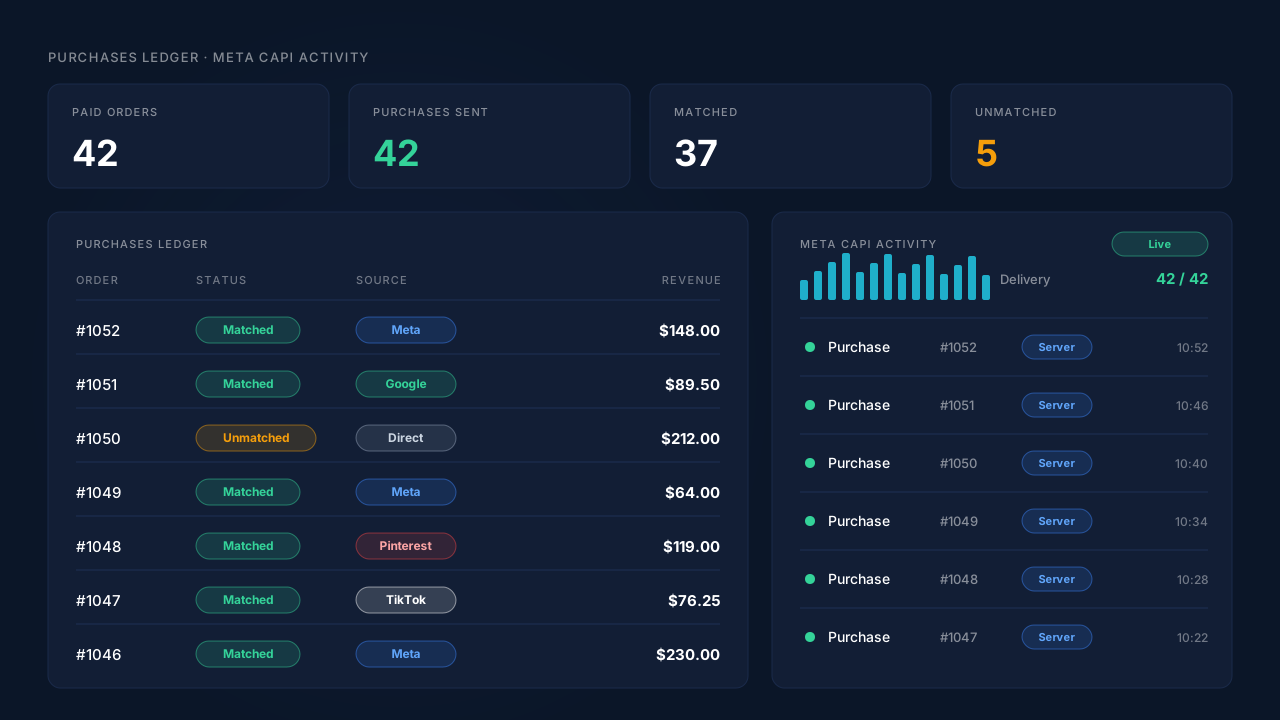
Where you see it working. Every paid order appears in the Purchases ledger as matched or unmatched. The Meta CAPI activity log shows the server-side Purchase sent for it, and the Leads list has an API column showing which conversion APIs each lead was sent to. Reconcile a week’s paid WooCommerce orders against those sends. Turning Delay JavaScript on or off doesn’t change that count.
The honest constraints. The PartialLeads plugin’s browser script is still JavaScript. It records the visitor’s landing source, and it sends view product, add to cart and begin checkout, which are forwarded server-side to Meta, Pinterest and TikTok, not Google. Delay it and those events wait for interaction too, so add it to the exclusion list. Keep one source per event: PartialLeads never double-sends, but it doesn’t deduplicate against another plugin’s browser Purchase. If PixelYourSite or Meta for WooCommerce also sends Purchase, switch that one off.
| What breaks | The mechanism | Where you see it in the dashboard |
|---|---|---|
| Purchase script delayed until an interaction that never comes | Purchase sent server-side from the paid-order webhook, nothing on the thank-you page | Meta CAPI activity log, one Purchase per paid order |
| Mobile buyer closes the order page untouched | Order record, not page load, triggers the event | Purchases ledger, every paid order listed |
| Split pixel snippet throws an error | No browser Purchase to keep in sync | API column in the Leads list |
| Delayed page view loses the ad click | Landing source recorded by the tag once it runs; order matched by visitor id, email, phone or IP | Attribution report, first and last touch |
| Two plugins both send Purchase | One source per event, with PartialLeads’ own event ids | Meta CAPI activity log alongside Events Manager |
Tell us what's broken. We'll fix your tracking — free.
Describe the tracking/attribution problem you're stuck on and we'll map it to a fix: server-side conversions to Meta, Google, TikTok and Pinterest, plus first-party tracking that survives Safari. No code required.
Sources
- https://raw.githubusercontent.com/wp-media/wp-rocket/develop/inc/Engine/Optimization/DelayJS/HTML.php
- https://raw.githubusercontent.com/wp-media/wp-rocket/develop/assets/js/lazyload-scripts.min.js
- https://raw.githubusercontent.com/wp-media/wp-rocket/develop/inc/Engine/Optimization/DelayJS/Admin/Settings.php
- https://raw.githubusercontent.com/wp-media/wp-rocket/develop/dynamic-lists-delayjs.json
- https://raw.githubusercontent.com/wp-media/wp-rocket/develop/inc/functions/options.php
- https://developers.facebook.com/docs/marketing-api/conversions-api
- https://developers.facebook.com/docs/marketing-api/conversions-api/deduplicate-pixel-and-server-events