Page caching leaves WooCommerce order attribution fields empty because the fields are filled in by a browser script at the last moment, not by the server. A page cache or speed plugin can serve a stale checkout page, freeze the script’s settings from an earlier visitor, or hold the script back until after the order is placed. When that happens, the fields go out empty and the order is shown as Unknown.
The symptom is easy to spot. With caching on, a growing share of orders shows no origin. With caching off, the source comes back. The ads, the UTMs and the landing pages haven’t changed.
This article walks through how WooCommerce actually fills those fields, the three ways a caching layer breaks that, the exclusions that fix most of it, and how to attribute paid orders in a way a cached page can’t blank.
How does WooCommerce fill the order attribution fields?
WooCommerce prints an empty placeholder element into the checkout form, and a JavaScript file fills it in the browser. The script reads the visitor’s source from sourcebuster.js cookies, then writes it into hidden inputs inside that placeholder. When the order is placed, those hidden inputs are submitted with it, and WooCommerce saves them as the order’s origin.
The server-side part is small. WooCommerce’s OrderAttributionController prints an empty wc-order-attribution-inputs element on the checkout’s billing hooks. It also hands the script a settings object, including cookie lifetime, session length, and an allowTracking flag.
Everything else happens in the browser. The script, order-attribution.js, keeps a set of sbjs_ cookies (sbjs_current, sbjs_first, sbjs_session and others) that remember where the visitor came from. At checkout it copies that data into the hidden inputs.
If the inputs are empty, WooCommerce saves nothing. The controller returns early when every source value is empty, so the order has no attribution data, and the admin shows its origin as Unknown. That early return is why a failed handoff produces Unknown rather than a wrong source.
So the order is only as good as three things lining up at checkout: the placeholder exists, the script runs with the right settings, and it runs before the order is submitted.
What does page caching actually do to those fields?
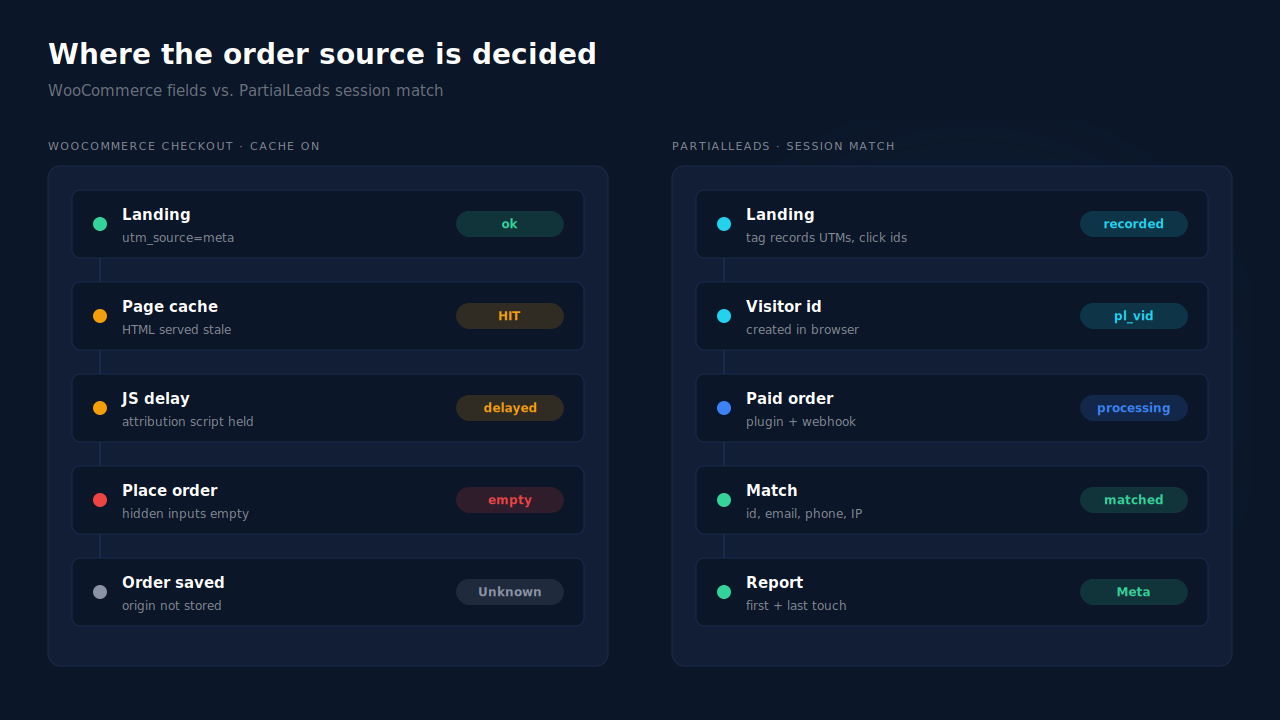
Caching breaks at least one of those three things. It can serve checkout HTML that was generated for someone else, freeze the script’s settings at the moment the page was cached, or combine and delay the script so it hasn’t run when the buyer clicks Place order. Each of those produces an order with empty fields, and WooCommerce records it as Unknown.
Stale checkout HTML
A full-page cache stores the rendered HTML and serves it to the next visitor. Checkout and cart pages are meant to be dynamic, and most cache plugins exclude them by default. Host-level caches, CDN rules and custom templates can still end up caching them anyway. A cached checkout carries whatever markup and inline script settings were rendered for the first visitor.
Frozen script settings
The allowTracking flag, cookie lifetime and session length are printed into the page by the server. If a consent tool changes that flag per visitor, a cached copy serves one visitor’s answer to everyone. A page cached while tracking was off keeps it off for every buyer who gets that copy.
Delayed, deferred or combined JavaScript
This is the most common culprit, and it often ships in the same plugin as the page cache. Speed plugins delay scripts until the visitor scrolls or clicks, defer them, or merge them into one bundle. If the attribution script is held back, or its dependency on sourcebuster breaks inside a combined file, the hidden inputs are still empty when the form submits.
The public WooCommerce bug about Unknown orders names the same family of causes. The reporter pointed at “when WooCommerce Order Attribution JS runs”, session initialization and “interaction with themes that defer WooCommerce JS”, and wrote that “attribution may be finalized before UTM data is reliably available.” WooCommerce labels the issue a confirmed bug.
How do you confirm caching is the cause on your store?
Run the same tagged test order twice, once with caching and script optimisation on and once with them off, then compare the order’s origin. If only the cached run comes back Unknown, caching is your cause. Check the hidden inputs in developer tools before you submit each order, so you can see exactly which layer left them empty.
- Open a private window and land on
yoursite.com/?utm_source=cachetest&utm_medium=cpc&utm_campaign=cache-on. - Browse to a product, add to cart, go to checkout. Before you pay, open developer tools and find the
wc-order-attribution-inputselement in the checkout form. Check whether its hidden inputs have values. - View the page source of checkout. Look for your cache plugin’s signature comment or a cache-status header in the network tab. Its presence on checkout means checkout is being cached.
- Place the order with a cheap test product, then open it in the admin and read its origin.
- Purge the cache, switch off page caching and JS delay, and repeat with
utm_campaign=cache-off.
If the inputs were empty in step 2 but the sbjs_ cookies exist, the script ran late or not at all. If the cookies are missing too, look at consent and blocking before blaming the cache.
A test order only proves the path you tested. Also compare Unknown share by day against the date you enabled or changed your caching setup; a step change on that date tells the same story at scale.
How do you stop caching from emptying the fields?
Keep checkout, cart and my-account out of every cache layer, and exclude the order attribution script and sourcebuster from JavaScript delay, defer and combine settings. Then purge everything and repeat the tagged test order. That fixes the cache-caused share of Unknown orders. It can’t fix orders from blocked browsers, declined consent, or checkouts that never load the storefront script.
Exclude the dynamic pages. Add checkout, cart and my-account to the page cache exclusions in your plugin, your host’s cache panel and your CDN rules. Check all three; a single one serving checkout is enough to break it.
Exclude the scripts from optimisation. In the JS delay, defer and combine settings, exclude WooCommerce’s order attribution script and the sourcebuster script. Search the exclusion field for the file names you saw in the checkout page source.
Don’t cache the settings object. If a consent tool toggles tracking per visitor, the pages that print the attribution settings shouldn’t be served from a shared cache.
Purge, then test again. Old cached copies stay live until they expire. Purge the page cache and any CDN cache before you judge the fix.
Keep WooCommerce current. Because the Unknown bug is confirmed, check the changelog for order attribution fixes before you rebuild anything.
The limit is that all of this still decides attribution in the browser, at the last second of checkout. You are making the handoff more reliable, not removing it. That is also why Unknown orders are a symptom worth watching after every plugin update, as the guide to why ad conversions show as Direct explains for the neighbouring failure.
How does PartialLeads attribute WooCommerce orders when caching empties the fields?
It doesn’t use those fields. The PartialLeads tag creates its visitor id in the browser and records UTMs, click ids, referrer and landing page when the visitor arrives. The paid order reaches PartialLeads through the WooCommerce plugin and webhook, and is matched back to that session by visitor id, then email, phone or IP. A cached checkout page has nothing to blank.
The visitor id is made in the browser, not printed into the page. The tag generates the id client-side and keeps it in localStorage with a first-party cookie as backup. A cached copy of your checkout can’t carry someone else’s id or a frozen empty value, because the server never wrote one into the HTML.
The source is recorded on landing. UTMs, gclid, fbclid and the other click ids, the referrer and the landing page are captured on the visitor’s first page, not carried through checkout fields at the end. If a visit has no UTMs, the referrer is used as the fallback. The explainer on first-party attribution covers why that record lives on your own domain.
The order is matched after it is paid. WooCommerce orders are sent to PartialLeads when they reach processing or completed; nothing fires on the thank-you page. The match runs in tiers: the visitor id echo first, then email, then phone, then IP. Sessions from the same person are stitched into one identity, as the explainer on how visitor identity resolution works describes.
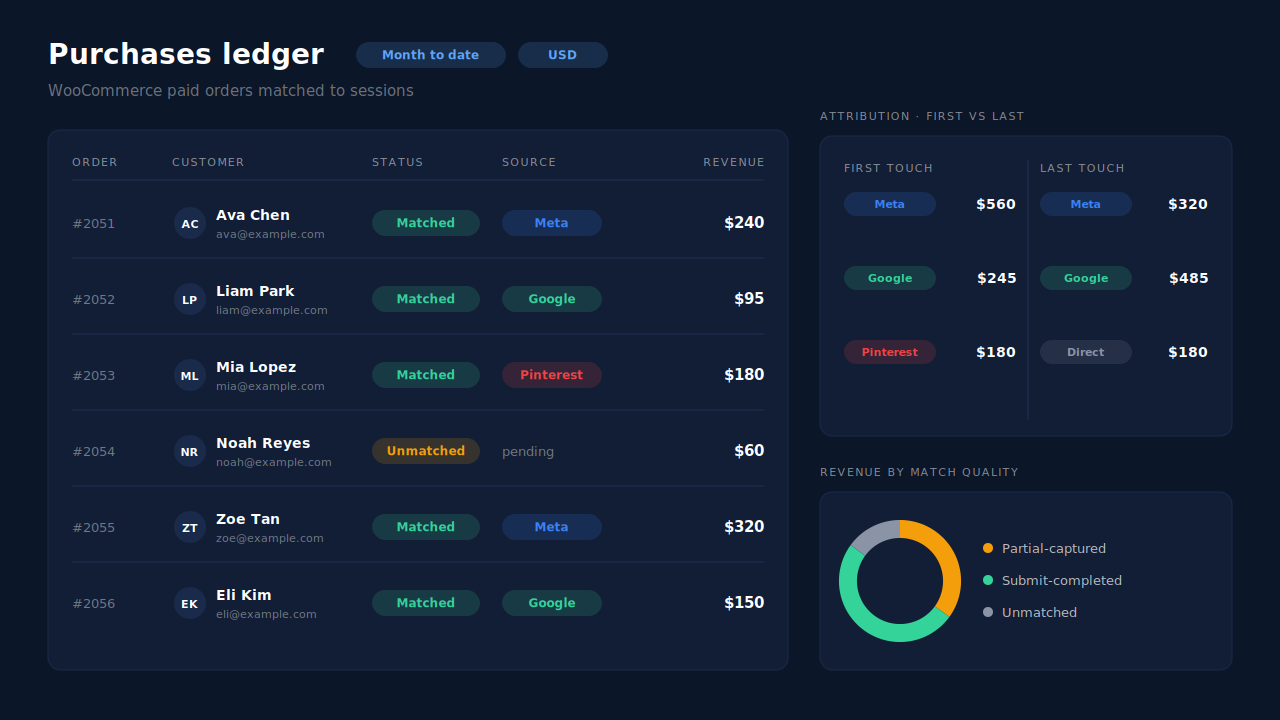
Where you see it working. Take the order numbers WooCommerce shows as Unknown and find them in the Purchases ledger. Each paid order appears there as matched or unmatched. Matched orders carry their session’s source into the Attribution report, with first touch and last touch side by side and the PartialLeads Resolved model beside them. The guide to reading an attribution report explains how to read the three together. The same matched orders can be sent on to ad platforms, as the server-side WooCommerce purchase tracking guide walks through.
The honest constraints. The PartialLeads tag is JavaScript too. Keep it out of your speed plugin’s delay list, or a buyer who never scrolls may not be recorded until later in the visit. A browser that blocks the tag has no session to match by visitor id, so the order matches only if that person’s email or phone is already known. Unmatched orders stay in the Purchases ledger and can be matched later when identity arrives. Only paid orders are recorded. PartialLeads doesn’t write the source back into WooCommerce’s own fields, so WooCommerce’s origin column still shows what it shows.
| What breaks | The mechanism | Where you see it in the dashboard |
|---|---|---|
| Cached checkout serves empty or stale attribution fields | Paid order matched to the landing session via the WooCommerce plugin and webhook, not the checkout form | Purchases ledger, matched rows |
| Speed plugin delays the attribution script past submit | Source recorded by the tag when the visitor lands, not at checkout | Attribution report by source, medium, campaign |
| Frozen consent or tracking settings in cached HTML | Visitor id created client-side, never rendered into the page | Journey timeline on the lead |
| No visitor id echo on the order | Tiered fallback match by email, then phone, then IP | First-touch and last-touch tables side by side |
| No session found at all | Order kept as unmatched, re-matchable when identity arrives | Revenue by Match Quality donut, unmatched slice |
Tell us what's broken. We'll fix your tracking — free.
Describe the tracking/attribution problem you're stuck on and we'll map it to a fix: server-side conversions to Meta, Google, TikTok and Pinterest, plus first-party tracking that survives Safari. No code required.
Sources
- https://github.com/woocommerce/woocommerce/issues/62508
- https://raw.githubusercontent.com/woocommerce/woocommerce/trunk/plugins/woocommerce/client/legacy/js/frontend/order-attribution.js
- https://raw.githubusercontent.com/woocommerce/woocommerce/trunk/plugins/woocommerce/src/Internal/Orders/OrderAttributionController.php