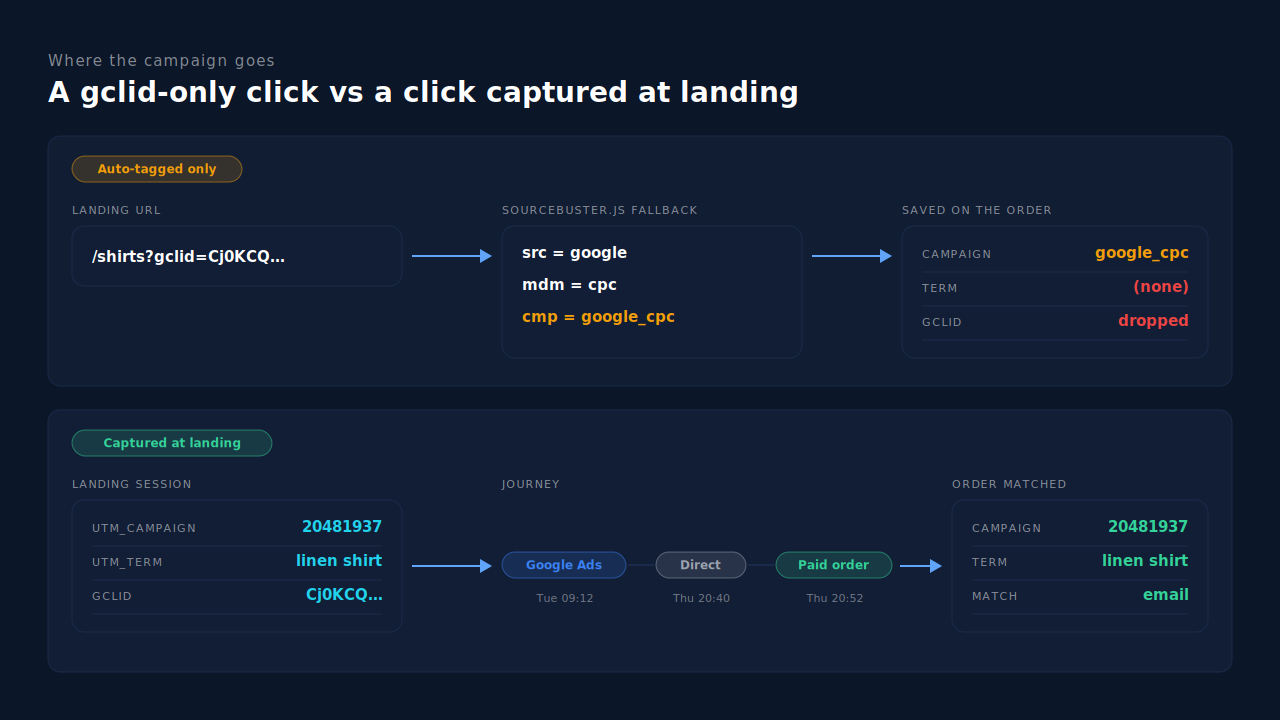
WooCommerce labels Google Ads orders “google_cpc” because that is a placeholder, not your campaign. WooCommerce’s order attribution runs on a script called sourcebuster.js. When a visitor lands with a Google click id (gclid) in the URL but no UTM parameters, the script fills in source google, medium cpc and campaign google_cpc by default. The real campaign never reaches the order.
So the report isn’t broken. It is doing exactly what the code says when the landing URL carries a click id and nothing else. Google’s auto-tagging adds that click id to every ad click, which is why nearly every Google Ads order looks the same.
It matters because you can’t move budget on “google_cpc”. Below: where the label comes from, why the gclid can’t be decoded on your side, the URL change that fixes most of it, and how to see campaign-level revenue for every paid order.
What does “google_cpc” mean on a WooCommerce order?
It means the buyer’s landing URL had a Google click id and no campaign tags. WooCommerce knew the visit came from a Google ad, but not which one. The order’s attribution panel shows “Source: Google”, medium “cpc” and campaign “google_cpc”. All three are fixed defaults written by the tracking script. None of them came from your Google Ads account.
The difference matters when you diagnose it. An order saved as Unknown means no attribution data arrived at all. An order saved as google_cpc means the data arrived and was correct as far as it went. The visit really was a Google ad click. The script just had nothing more specific to record.
WooCommerce’s order attribution is a first-party feature. It never talks to Google Ads, so it can’t ask Google which campaign a click belonged to. It only records what the visitor’s browser can see in the URL and the referrer.
Why does WooCommerce fill in google / cpc / google_cpc?
Because the fallback is hardcoded. WooCommerce’s order attribution depends on its own fork of sourcebuster.js, pinned in its build files. In that fork, when the URL has a gclid and no utm_source, the source is set to google. With no utm_medium, the medium is cpc. With no utm_campaign, the campaign is the literal string google_cpc.
The same file has no fallback for utm_term or utm_content from a Google click. Those fields stay empty, shown as “(none)”, unless the URL carried them. So keyword and ad come through blank on every auto-tagged click.
The gclid itself isn’t kept either. The fields WooCommerce saves on each order are: source type, referrer, the UTM set (utm_campaign, utm_source, utm_medium, utm_content, utm_id, utm_term, utm_source_platform, utm_creative_format, utm_marketing_tactic), session entry page, session start time, pages viewed, session count and user agent. There is no gclid field. Once the order is saved, the one value that could identify the click is gone.
Two related quirks are worth knowing:
- gbraid and wbraid don’t trigger the Google fallback. The fork’s campaign check looks for
gclidand UTM parameters, not the privacy-preservinggbraidorwbraidids Google uses for some iOS traffic. A click that carries only one of those falls through to referrer-based checks, so it can be filed as organic Google or a referral instead of a paid click. - Only one visit is saved. The fields read the script’s current-visit values, so each order records a single touch. It can’t tell you that the buyer first found you through a different campaign.
Why can’t you read the campaign from the gclid?
Because a gclid is opaque. It’s a click identifier that only Google Ads can decode. Google uses it to credit a conversion back to the right campaign, ad group and keyword inside its own account. Your store, WooCommerce and any analytics tool just see a long random string. There is no public formula for turning it into a campaign name.
That’s the difference between a click id and a UTM parameter. A click id is a key into the ad platform’s records. A UTM parameter is a label you write yourself, readable by anything. The comparison of gclid, fbclid and UTM parameters covers the split in more detail.
In practice you need both. Keep the gclid so Google can match offline conversions back to the click. Add UTMs so everything else can name the campaign.
How do you get the campaign, keyword and ad into WooCommerce’s order attribution?
Add UTM parameters to every Google Ads landing URL. When utm_source, utm_medium and utm_campaign are present, sourcebuster reads them instead of the fallback, and WooCommerce saves what they say. The simplest place is the account-level Final URL suffix, using Google’s ValueTrack placeholders so each click fills in its own campaign, ad group and keyword.
A suffix that works for most stores:
utm_source=google&utm_medium=cpc&utm_campaign={campaignid}&utm_content={adgroupid}&utm_term={keyword}
Google replaces {campaignid}, {adgroupid} and {keyword} at click time. Check Google’s ValueTrack reference for which placeholders your campaign types support, since some campaign types have no keyword to insert.
Four details decide whether it holds up:
- Keep auto-tagging on. UTMs name the campaign for your store. The gclid is still what Google Ads needs for conversion imports.
- Expect ids, not names.
{campaignid}inserts a number, which survives campaign renames. Map it to names from the campaign id column in Google Ads, or writeutm_campaignby hand in each campaign’s own suffix. - Check the URL survives. Redirects, geo or currency switchers and some caching setups strip query strings. The guide to why gclid goes missing on landing pages lists the usual culprits; the same ones strip UTMs.
- Place a test order. Click a live ad or use the ad preview, buy something cheap, and open the order’s attribution panel. You should see your campaign id and keyword instead of google_cpc.
Why doesn’t adding UTMs fix every order?
Because WooCommerce still records attribution in the browser, at checkout, from one visit. UTMs fix the label on orders where the tagged visit and the purchase happen in the same browser and the script runs in time. Buyers who come back days later on another device, block scripts, or reach checkout by a path that skips the form still arrive without the campaign.
The common gaps:
- Return visits. A buyer clicks a Performance Max ad on their phone on Tuesday and buys from a laptop on Thursday. Thursday’s browser never saw the UTMs.
- Blocked or delayed scripts. If the attribution script is blocked, delayed by an optimisation plugin, or waiting on consent, the order is saved with nothing.
- One touch only. Even when it works, the order holds one campaign. Prospecting campaigns that start journeys get no credit when a brand search closes them.
- Old orders stay as they are. Orders already saved as google_cpc can’t be relabelled, because the campaign was never stored.
Your store’s count and Google’s count also won’t match exactly. Google Ads applies its own attribution model and conversion window. A persistent gap in one direction is worth investigating; a small one is normal.
How does PartialLeads show the campaign behind each WooCommerce Google Ads order?
By recording the click and its UTMs when the visitor lands, then matching each paid order back to that visit. The PartialLeads tag captures the gclid, gbraid and wbraid, the full UTM set, the landing page and the referrer on arrival. When WooCommerce reports a paid order, PartialLeads matches it to the buyer’s sessions and writes first-touch and last-touch rows with the campaign attached.
The visit is recorded on landing. Nothing has to survive the trip into hidden checkout fields. If the buyer came back later, the order still meets the tagged visit, because sessions are stitched into one person by visitor id, email, phone and other signals. The explainer on how visitor identity resolution works covers the tiers.
The order is matched after it is paid. WooCommerce sends the order through its webhook when it reaches processing or completed. The match runs in tiers: the visitor id echoed from the site first, then email, then phone, then IP. Unpaid, pending and cancelled orders are not recorded. If your checkout runs on a separate page or domain, attributing WooCommerce orders when the checkout is on another page covers that setup.
First and last touch are both kept. Each matched order writes a first-touch and a last-touch row that snapshot the UTMs, click ids, referrer and landing page. The Attribution report groups them by source, medium, campaign, content or term, side by side with a PartialLeads Resolved model. In the Channels table, paid channels expand to their campaigns. The guide to reading an attribution report explains how to read the models together.
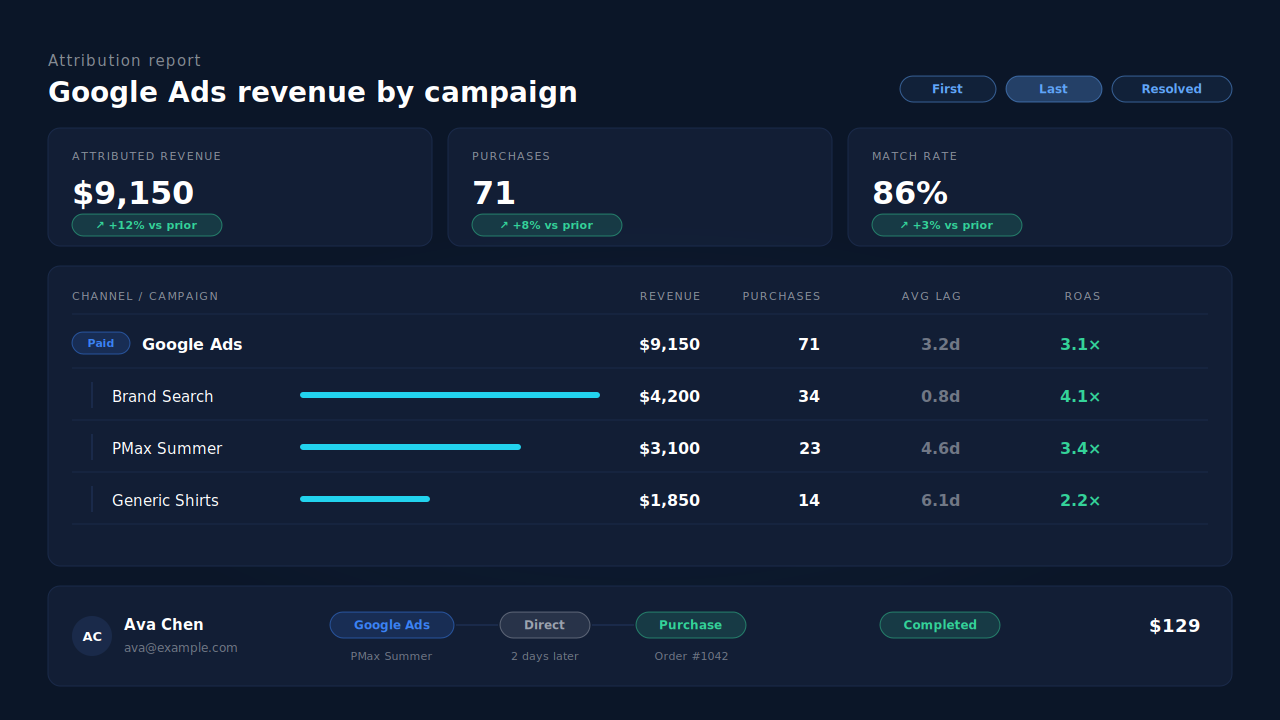
Where you see it working. Open the Attribution report, group by campaign, and expand Google Ads. Each campaign carries its own revenue, purchases and ROAS. For a single order, the buyer’s Journey ribbon on the Leads list shows the Google Ads touch, any later direct visits and the purchase. When the matched session carries a gclid, gbraid or wbraid, the paid order is also written as a row to the Google Sheet your Google Ads account imports on a schedule, with the click id, hashed email and phone, value and currency.
The honest constraints. PartialLeads can’t decode a gclid into a campaign name either. A visit that arrives with a click id and no UTMs is still recognised as Google Ads, but the campaign only appears if the URL carried it, so the Final URL suffix above still matters. A buyer whose browser blocked the tag, and whose email or phone was never seen, lands as an unmatched order that can be matched later if their identity turns up. The campaign view lives in the PartialLeads report; WooCommerce’s order screen keeps whatever it saved. If Google for WooCommerce or another plugin already sends purchases to Google Ads, keep one source for that conversion. If your Google Ads import rows aren’t matching, the guide to offline conversions not matching the gclid walks through the causes.
| What breaks | The mechanism | Where you see it in the dashboard |
|---|---|---|
| Google Ads orders all saved as google / cpc / google_cpc | gclid and full UTM set captured by the tag on landing | Attribution report grouped by campaign |
| Keyword and ad content blank on the order | utm_term and utm_content snapshotted on first- and last-touch rows | Attribution report grouped by term or content |
| Buyer returns later on another visit or device | Paid order matched by visitor id, then email, phone, IP; sessions stitched | Journey ribbon on the Leads list |
| One touch per order hides the opening campaign | First-touch and last-touch rows kept side by side | First-touch vs last-touch tables, Resolved model |
| gclid dropped from the order record | Click id kept on the session and written to the Google Sheet import | Google Sheets integration rows |
Tell us what's broken. We'll fix your tracking — free.
Describe the tracking/attribution problem you're stuck on and we'll map it to a fix: server-side conversions to Meta, Google, TikTok and Pinterest, plus first-party tracking that survives Safari. No code required.
Sources
- https://github.com/woocommerce/woocommerce/blob/trunk/plugins/woocommerce/client/legacy/package.json
- https://github.com/woocommerce/sourcebuster-js/blob/d7f4616d5a17e17db925ca1842457f309379d861/src/js/init.js
- https://github.com/woocommerce/woocommerce/blob/trunk/plugins/woocommerce/src/Internal/Traits/OrderAttributionMeta.php