WooCommerce shows more Google Shopping orders than Google Ads conversions because the two count different things. WooCommerce labels each order with the source of the visit that led to checkout, paid or not. Google Ads counts only purchases its tag or an import tied to a paid ad click, inside your conversion window, reported against the click date.
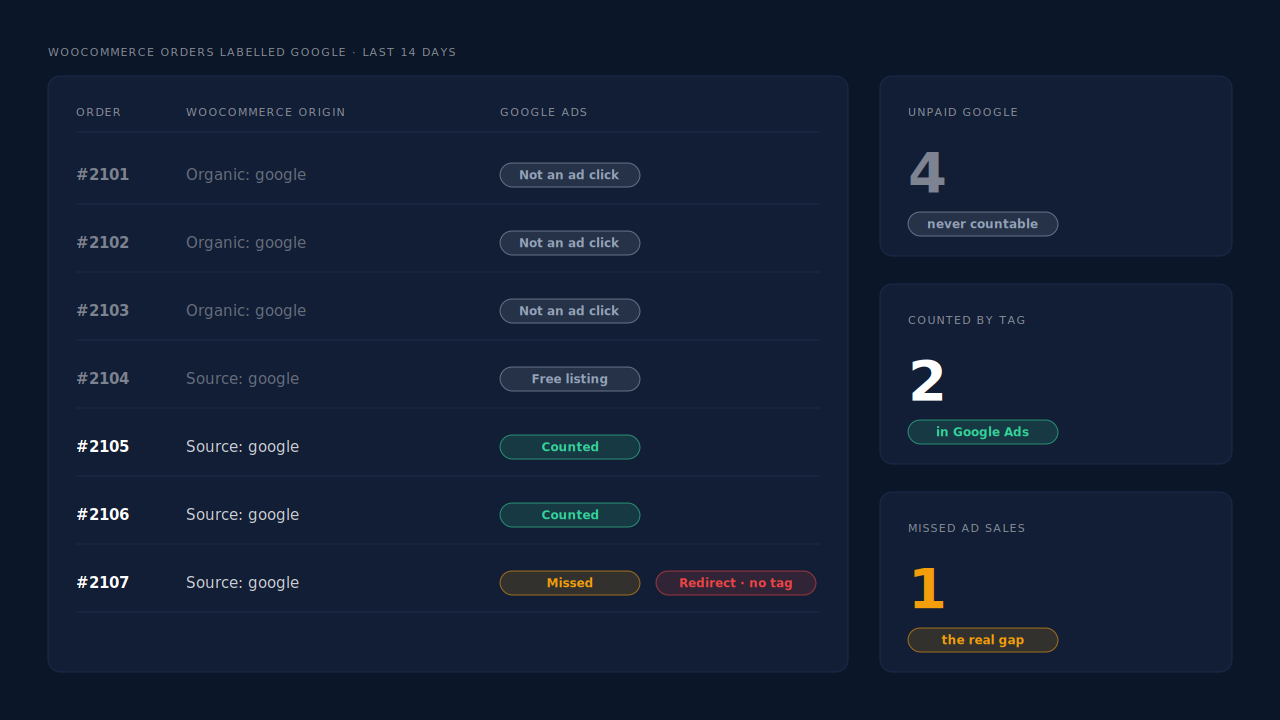
So “7 orders from Google, 2 conversions in Google Ads” usually hides two separate gaps. One part was never an ad sale: free Shopping listings and organic search also say “Google”. The other part is real: orders that came from an ad click but never reached Google Ads. Only the second part costs you money, because Smart Bidding can’t learn from sales it never sees.
Why do WooCommerce and Google Ads count Google orders differently?
WooCommerce records where the visit came from. Google Ads records whether a paid click it can identify led to a purchase it was told about. A WooCommerce order labelled Google needs only a Google-looking referrer or UTM tag. A Google Ads conversion needs an ad click, a click id, a conversion event and a match. Different questions, different totals.
WooCommerce’s built-in order attribution, added in version 8.5, reads the visit’s source in the browser with a bundled library called Sourcebuster and saves it on the order. Its code stores the current touch: the source type, referrer and UTM fields of the visit that checked out. The admin then shows a label per order by type, such as “Source: google” for a UTM-tagged visit, “Organic: google” for search, “Referral: …” or “Direct”.
Google Ads works from the other end. It counts a purchase only when the conversion tag fires or an offline import row arrives, and only when it can tie that purchase to one of its own ad clicks.
Two consequences follow:
- WooCommerce counts orders Google Ads never can. Anything that arrived from Google without being a paid click still gets a Google label.
- Google Ads can miss orders WooCommerce saw. If the tag never fired, or the click id was lost, the order stays in WooCommerce and nowhere else.
If some of your orders don’t get a label at all, why WooCommerce order attribution says “Unknown” for so many orders covers that separate problem.
Are all of those “Google” orders actually from your ads?
Often not. Google sends shoppers to your store through paid Shopping and Search ads, but also through unpaid product listings and plain organic search. WooCommerce gives all of them a Google label in one form or another. Google Ads will only ever count the paid clicks, so the unpaid ones are a gap you can’t and shouldn’t close.
Before you treat the difference as lost conversions, split the WooCommerce side:
- Organic: google — a search visit with no campaign tags. Not an ad click.
- Source: google with a paid medium (for example
cpc) — a tagged ad visit. This is the pool Google Ads should be counting. - Source: google with any other medium — often a feed or free-listing link you tagged yourself. Check what your own UTM template says before counting it as paid.
This one filter often explains most of the gap. A store with seven “Google” orders might find three were organic search and one was a free listing. That leaves three paid-click orders against two recorded conversions: a much smaller, and much more useful, number to chase.
There’s a timing layer too. WooCommerce stores the source of the visit that checked out, and its session setting defaults to 30 minutes. A shopper who clicked a Shopping ad on Monday and came back through organic search on Friday is “Organic: google” in WooCommerce, even though Google Ads may still count Friday’s order against Monday’s click. The two systems can disagree in both directions on the same buyer.
Why does Google Ads miss purchases that really came from an ad click?
Because Google Ads only counts what reaches it. The browser tag has to fire on the order confirmation page, the click id has to survive from the landing page to checkout, and the purchase has to fall inside your conversion window. Every buyer who breaks one of those links is a real ad sale that exists in WooCommerce and not in Google Ads.
The common causes, roughly in the order they bite:
- The thank-you page never loaded. Payment gateways that redirect off-site, express wallets and closed tabs all mean the page carrying the purchase tag may never render. No page, no conversion.
- The tag was blocked or not allowed to fire. Ad blockers and consent choices can stop the browser tag entirely. How ad blockers break conversion tracking explains the mechanics.
- The click id never arrived or didn’t survive. Redirects and some cache or consent setups strip the query string before any script reads it. Why the gclid goes missing on landing pages walks through each case.
- The buyer changed device. A shopper who clicked on a phone and paid on a laptop can leave Google with nothing to tie the purchase to.
- The order fell outside the conversion window. A purchase long after the click, beyond the window set on your conversion action, is not credited.
- The wrong action is counting. If the purchase action isn’t set as primary, or two actions split the same sale, the “Conversions” column won’t show what you expect.
Why don’t the dates line up either?
Google Ads’ standard Conversions column reports a sale against the day of the ad click, not the day of the order. WooCommerce reports by order date. If you compare “orders this week” with “conversions this week”, late buyers from last week’s clicks land in different rows, so a short date range can make the gap look bigger or smaller than it is.
How do you reconcile WooCommerce orders with Google Ads conversions?
Compare like with like. Count only paid WooCommerce orders whose source is a tagged Google ad visit, use the same date range and timezone, and compare them against the purchase conversion action alone. Whatever gap remains is the real one, and it’s usually lost tags or lost click ids rather than missing orders.
A practical order to work in:
- Filter by paid status. Keep
processingandcompleted. Droppending,on-hold,failedandcancelled; those aren’t sales and Google shouldn’t count them. - Filter by source. Keep only orders labelled as a Google source with your paid medium. Park “Organic: google” and referrals.
- Match the calendar. Use a longer range than a week, set both systems to the same timezone, and remember Google’s default column is by click date.
- Check the conversion action. One primary purchase action, with the value set from the order. Two tools firing the same purchase will double-count instead of under-count.
- List the remaining orders. For each paid-click order Google didn’t count, ask: did the thank-you page load, and does the order carry a click id?
That last step is where most stores stop, because WooCommerce doesn’t store Google’s click id on the order. The fix is to send the missing orders to Google yourself, with their click id, through an offline conversion import. Google matches each row by gclid, gbraid or wbraid, so all three need capturing; capturing gbraid and wbraid covers why iPhone traffic needs the last two. If uploaded rows then fail to match, why offline conversions don’t match the gclid lists the usual causes.
How does PartialLeads send Google the orders its tag missed?
It builds the Google side from paid orders instead of from the thank-you page. The PartialLeads tag records gclid, gbraid and wbraid on the visitor at landing. When a paid WooCommerce order arrives by webhook, it’s matched back to that visitor, and a row with the click id, hashed email and phone, value and currency is written to a Google Sheet your Google Ads account imports on a schedule.
Nothing depends on the thank-you page. The WooCommerce purchase is webhook-owned. A gateway redirect, a blocked tag or a closed tab doesn’t stop the order from being recorded and matched.
The click stays with the person, not the checkout request. Sessions are stitched into one person across visits, and an order is matched by visitor ID first, then email, then phone, then IP. A shopper who clicked a Shopping ad on Monday and came back through organic search on Friday still carries Monday’s click. The same logic is laid out in the pillar on attributing ecommerce revenue to the ad click.
Only paid orders become rows. processing and completed orders are written; pending, on-hold, failed and cancelled aren’t. For WooCommerce Subscriptions only the first payment is sent, never renewals. The value is the full order total, including tax and shipping, after discounts, and each order is recorded once.
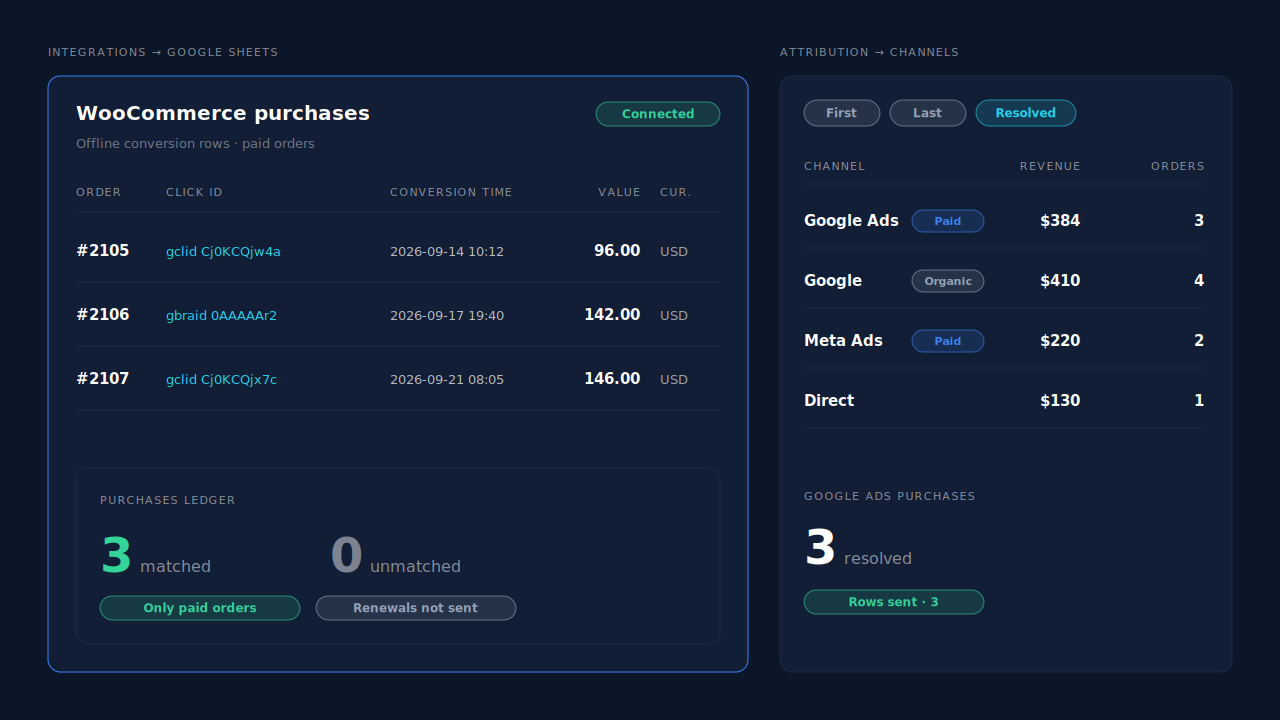
Where you see it working. Integrations → Google Sheets shows the rows written for paid orders, one per order, with their click ids. The Attribution report’s Channels table lists Google Ads and organic Google as separate channels with revenue and purchases, and toggles between first touch, last touch and the PartialLeads resolved model. That’s the split you did by hand above, already made. The Purchases ledger lists every paid order, matched or unmatched, so you can reconcile against WooCommerce’s order list.
The honest constraints.
- A Google Sheet, not an API. PartialLeads writes rows. You create the import conversion action in Google Ads and schedule the import. Orders reach Google after the next import runs.
- No click, no credit. An organic or free-listing buyer has no click id, so their row gives Google nothing to match. The unpaid gap stays unpaid.
- Keep one source per purchase. PartialLeads uses its own event ids and does not deduplicate against Google for WooCommerce or another plugin’s tag. Pick one primary purchase action, or you’ll trade an under-count for a double-count.
- Purchases only, for Google. There’s no GA4 integration, and WooCommerce funnel events (view product, add to cart, begin checkout) go to Meta, Pinterest and TikTok, not Google.
- We control the row; Google controls the match. Every paid order is written. Whether Google ties it to a click is Google’s side.
| What breaks | The mechanism | Where you see it in the dashboard |
|---|---|---|
| Organic and free-listing orders look like ad sales | Channels resolved per order, with Google Ads and organic Google kept apart | Attribution report, Channels table |
| Thank-you page never loads, so the tag never fires | Purchase taken from the paid-order webhook, not the page | Purchases ledger |
| Click id lost between landing and a later visit | gclid, gbraid and wbraid stored on the visitor; order matched by visitor ID, email, phone or IP |
Leads list, Journey column |
| Google Ads never hears about the missed orders | One row per paid order, with click id, value and currency | Integrations → Google Sheets |
| Two tools count the same purchase | Own event ids, no cross-tool dedup, so one primary action | Leads-list API column |
Tell us what's broken. We'll fix your tracking — free.
Describe the tracking/attribution problem you're stuck on and we'll map it to a fix: server-side conversions to Meta, Google, TikTok and Pinterest, plus first-party tracking that survives Safari. No code required.
Sources
- https://raw.githubusercontent.com/woocommerce/woocommerce/trunk/plugins/woocommerce/src/Internal/Traits/OrderAttributionMeta.php
- https://raw.githubusercontent.com/woocommerce/woocommerce/trunk/plugins/woocommerce/src/Internal/Orders/OrderAttributionController.php
- https://raw.githubusercontent.com/woocommerce/woocommerce/trunk/plugins/woocommerce/client/legacy/js/frontend/order-attribution.js