Apple Pay and Google Pay orders show “Unknown” origin in WooCommerce because the wallet button can create the order without submitting the checkout form. WooCommerce reads each order’s source from hidden attribution fields on that form. When the express checkout path skips the form, or builds the order without those fields, the order is saved with no source data and filed as Unknown.
That’s why the pattern is so clean on affected stores. Card orders placed through the regular checkout form carry their origin. Wallet orders from the same campaigns, on the same day, don’t.
It matters more than it looks. Express wallets are popular on mobile, and mobile is where a lot of paid social traffic lands. If every wallet order is Unknown, your paid channels look weaker than they are, and you may cut a campaign that’s working. Below: why it happens, how to confirm it, what a gateway update fixes, and how to attribute wallet orders without depending on the form.
Why do express wallet orders lose their origin?
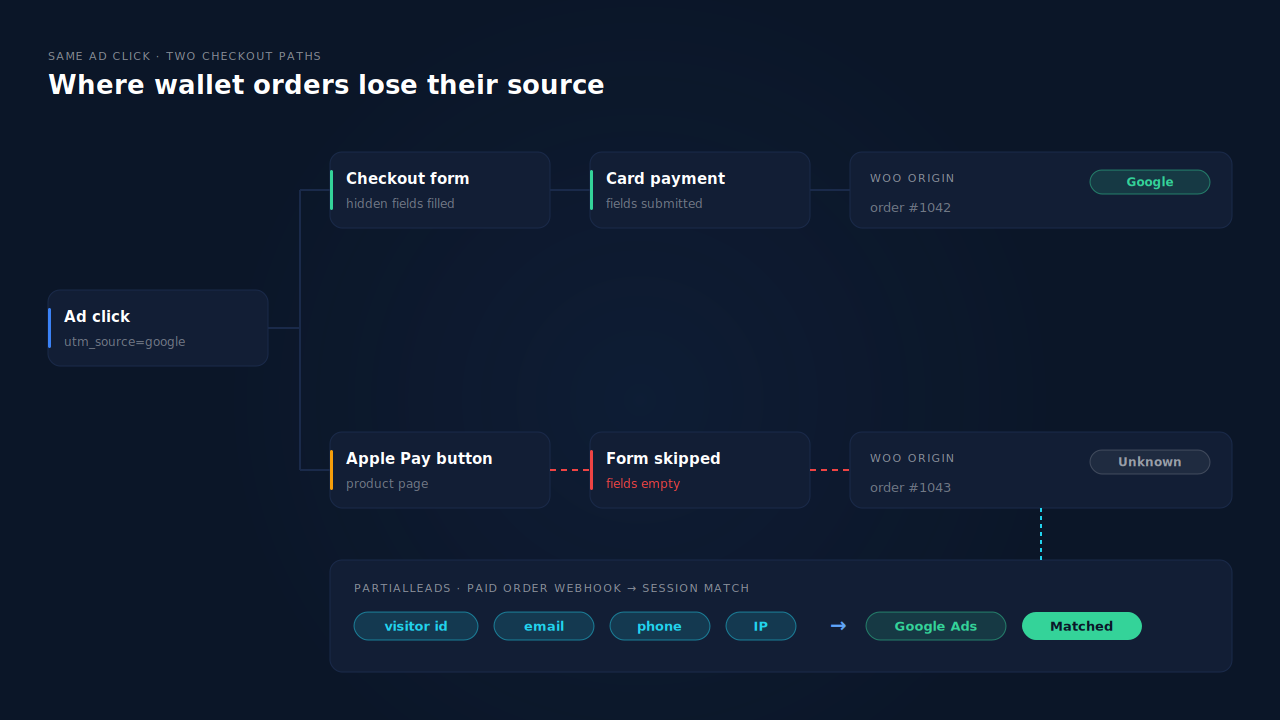
Because WooCommerce’s order attribution is handed to the order through hidden inputs on the checkout form, and express wallet buttons don’t always go through that form. The buyer taps the button on a product, cart or checkout page, the wallet sheet returns payment, email and address details, and the gateway creates the order directly. If the attribution inputs weren’t sent along, the order has nothing to record.
Here’s the sequence on a store where it breaks:
- A buyer clicks your Google or Meta ad. The landing URL carries UTMs, and WooCommerce’s attribution script records the source in the browser.
- The buyer taps Apple Pay on the product page instead of going to checkout.
- The wallet sheet confirms payment. The gateway receives the wallet’s payment and contact details and creates the order.
- The hidden attribution fields were never part of that request. The order is saved as Unknown.
A card buyer on the same visit goes through the checkout form, the fields are submitted with the order, and the origin shows correctly. Same visitor, same ad, different checkout path.
This isn’t a theory. A public issue on the WooCommerce Stripe gateway repository, titled “Express Checkouts break order attribution metadata”, reported exactly this: “all of our Apple Pay and Google Pay orders show Unknown (empty) metadata” on a store using the Checkout Block, while card orders showed proper origins. It was closed by a pull request titled “Fix missing order attribution metadata when using ECE” (Express Checkout Element), merged in December 2024. Wallets aren’t the only cause of Unknown orders. Script delays, consent timing and blockers produce them too, on any payment method.
Why doesn’t Google Ads count Apple Pay and Google Pay orders either?
Because browser-side conversion tracking has the same weak spot. A Google Ads purchase tag usually fires in the buyer’s browser when the order confirmation page loads. If the express flow doesn’t land the buyer on a page where the tag runs as expected, or the tag loses the click id along the way, the conversion never reaches Google Ads, and nothing warns you.
The two symptoms often show up together, which is why store owners report them in the same breath. Both depend on the browser carrying data through a checkout path that wasn’t the one it was built for.
The honest version: whether your Google Ads tag misses wallet orders depends on your theme, your gateway, and which plugin places the tag. Don’t assume. Test it (next section). If the tag does miss them, the fix is the same idea as for attribution: record the conversion from the order itself, not from a page load. The guide to Google Ads offline conversions not matching the gclid covers what a server-side import needs to match.
How do you confirm wallet orders are your Unknown problem?
Export recent paid orders with origin and payment method, then compare the Unknown share between wallet orders and card orders. If wallet orders are nearly all Unknown and card orders mostly aren’t, the express checkout path is your leak. Then place one tagged test order with each method and read the attribution panel on both.
- Export 30 days of paid orders. Include origin, payment method title, and the created date. Leave pending, failed and cancelled orders out.
- Split by payment method. Most gateways record Apple Pay and Google Pay in the payment method title, even when the gateway itself is Stripe or another card processor.
- Compare the Unknown share. Wallet orders at or near 100% Unknown while cards sit far lower points straight at the express path.
- Check where the wallet button sits. Buttons on product and cart pages bypass the checkout form entirely. Buttons on the checkout page may or may not, depending on the gateway and whether you use the Checkout Block or the classic shortcode.
- Place two test orders from a private window with a URL like
yoursite.com/?utm_source=test&utm_medium=cpc&utm_campaign=wallet-check. Pay once with a card, once with a wallet, then refund both. Open each order in the admin and compare the attribution panels. - Check Google Ads too. Tag the test visit with a test click in a campaign you control, or use Google’s tag diagnostics, and see whether the wallet order records a conversion.
If the wallet test order comes back Unknown and the card order doesn’t, you’ve confirmed it.
Does updating the payment gateway fix it?
Often, yes, for new orders. The WooCommerce Stripe gateway changelog lists “Fix order attribution metadata not included in PRBs or Express Checkout Element” in version 9.0.0 (December 2024) and a follow-up fix for the Express Checkout Element with the Blocks API in version 9.2.0 (February 2025). Other gateways have their own wallet code, so check their changelogs separately.
What an update does and doesn’t do:
- It fixes the handoff going forward. Once the gateway sends the attribution inputs with wallet orders, new wallet orders can carry their source.
- It doesn’t fix old orders. Orders already saved as Unknown never received the data. There’s nothing in them to repair.
- It doesn’t fix the browser half. The attribution inputs are still filled by a script in the buyer’s browser. Delayed scripts, declined consent and blockers still produce Unknown orders, wallet or not.
- It only covers that gateway. WooPayments, PayPal Payments, Square and others run their own express checkout code. A fix in one says nothing about the rest.
So update first. Then retest with the two test orders above. If wallet orders still come back Unknown on current versions, the problem is somewhere else on the path, and the gateway’s support forum is the right place to report it.
How does PartialLeads attribute Apple Pay and Google Pay orders?
It doesn’t use the checkout form at all. The WooCommerce order webhook still fires for express wallet orders, so every paid wallet order reaches PartialLeads. It’s matched to the buyer’s earlier ad session: first by the visitor id echoed from the site, then, when that echo is missing, by the email, phone or IP the wallet supplied. The source comes from the session.
The session is recorded on landing. The PartialLeads tag captures UTMs, click ids like gclid and fbclid, the referrer and the landing page when the visitor arrives. Nothing has to survive the trip through a wallet sheet or a hidden checkout field. The explainer on how visitor identity resolution works covers how separate sessions become one person.
The wallet’s own details become match keys. Apple Pay and Google Pay hand the store the buyer’s email and usually a phone number. When the visitor id echo is missing, PartialLeads falls back to that email, then phone, then IP. A buyer who typed their email into a form on an earlier visit still matches, even if this order came from a one-tap wallet.
Google Ads gets a server-side row. When the matched session carries a gclid, PartialLeads writes the paid order to the Google Sheet your Google Ads account imports on a schedule: the click id, hashed email and phone, value and currency. No confirmation page has to load. You set up the scheduled import in Google Ads once.
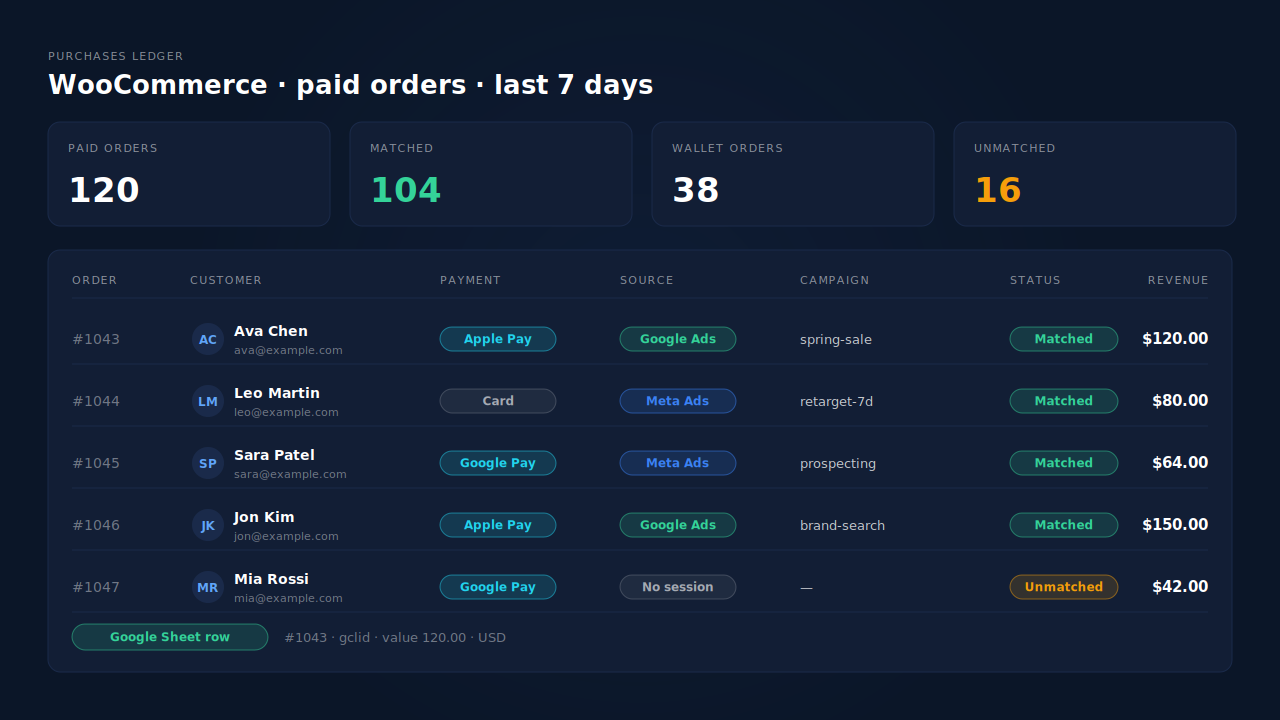
Where you see it working. Take the wallet order numbers from your WooCommerce export and find them in the Purchases ledger. Each paid order shows as matched or unmatched. Matched wallet orders carry their session’s source into the Attribution report, beside first-touch and last-touch views. The guide to reading an attribution report explains the models side by side.
The honest constraints. Only paid orders are recorded: WooCommerce processing or completed. A buyer whose browser blocked the tag, and whose email or phone was never seen before, has no session to match, so the order lands as unmatched and can be matched later if that person’s identity turns up. The Google Sheet row only exists when the matched session has a gclid (or gbraid or wbraid). If Google for WooCommerce or another plugin also sends purchases to Google Ads, keep one source for that conversion so you don’t count it twice. PartialLeads doesn’t write the source back into WooCommerce’s own Origin column. The guide to tracking WooCommerce purchases server-side covers the same orders going to Meta.
| What breaks | The mechanism | Where you see it in the dashboard |
|---|---|---|
| Wallet button skips the checkout form, order saved as Unknown | Paid order arrives through the WooCommerce webhook, matched to the landing session | Purchases ledger, matched rows |
| No visitor id echo on the wallet order | Fallback match on the wallet-supplied email, then phone, then IP | Purchases ledger, matched or unmatched status |
| UTMs present on landing, lost by checkout | UTMs, click ids and referrer recorded by the tag when the visitor lands | Attribution report by source, medium, campaign |
| Google Ads tag misses wallet purchases | gclid-matched paid order written to the scheduled Google Sheet import | Google Sheets integration |
| No session found for the buyer | Order kept as unmatched, re-matchable when identity arrives | Purchases ledger, unmatched rows |
Tell us what's broken. We'll fix your tracking — free.
Describe the tracking/attribution problem you're stuck on and we'll map it to a fix: server-side conversions to Meta, Google, TikTok and Pinterest, plus first-party tracking that survives Safari. No code required.
Sources
- https://github.com/woocommerce/woocommerce-gateway-stripe/issues/3022
- https://github.com/woocommerce/woocommerce-gateway-stripe/pull/3629
- https://raw.githubusercontent.com/woocommerce/woocommerce-gateway-stripe/trunk/changelog.txt