Google Ads misses WooCommerce orders paid with Apple Pay or Google Pay because its purchase tag only fires when the buyer’s browser loads the order-received page. Express wallet buttons create the order through the payment gateway’s own code, not the checkout form. If the buyer doesn’t land on that page afterwards, or the tag there can’t run, the order exists and Google Ads never hears about it.
The pattern is easy to spot once you look. Card orders from a campaign show up as conversions. Wallet orders from the same campaign, on the same day, don’t.
It costs more than it looks. Wallet buttons are most popular on phones, which is where a lot of paid traffic lands. Below: how the tag decides when to fire, why wallet flows miss it, how to confirm it on your store, and how to report wallet orders from the order itself.
Where does the Google Ads purchase tag actually fire in WooCommerce?
On one page: the order-received page, the “thank you” URL that looks like /checkout/order-received/1234/?key=wc_order_…. In Google for WooCommerce, the purchase snippet is attached to WooCommerce’s woocommerce_before_thankyou hook and exits early unless is_order_received_page() is true. No page load, no purchase event. Most other Google Ads tag setups on WooCommerce work the same way.
You can read this in the plugin’s own source. The function that prints the purchase event is documented as “Display the JavaScript code to track purchase on the order confirmation page”, and its first check is literally “Only display on the order confirmation page.”
There’s a second detail worth knowing. Before printing the script, the plugin marks the order as tracked, “to avoid double-reporting if the confirmation page is reloaded.” That’s sensible, but it means the order is flagged when the page is built on your server, not when Google receives anything. If the script is then blocked in the browser, a reload won’t send it again.
So the purchase conversion depends on three things in a row:
- The buyer’s browser reaches the order-received page for that order.
- The page is built fresh, with the order’s data, not served from a cache.
- The browser is allowed to run Google’s script and send the request.
Wallet checkouts put pressure on the first one.
Why do Apple Pay and Google Pay orders skip the Google Ads purchase tag?
Because the express flow is run by the payment gateway, not by WooCommerce’s checkout form. The buyer taps the wallet button on a product, cart or checkout page. The wallet sheet returns payment and contact details, the gateway’s script creates the order, then the gateway sends the browser to the next URL. The tag fires only if that URL is the order-received page and it loads normally.
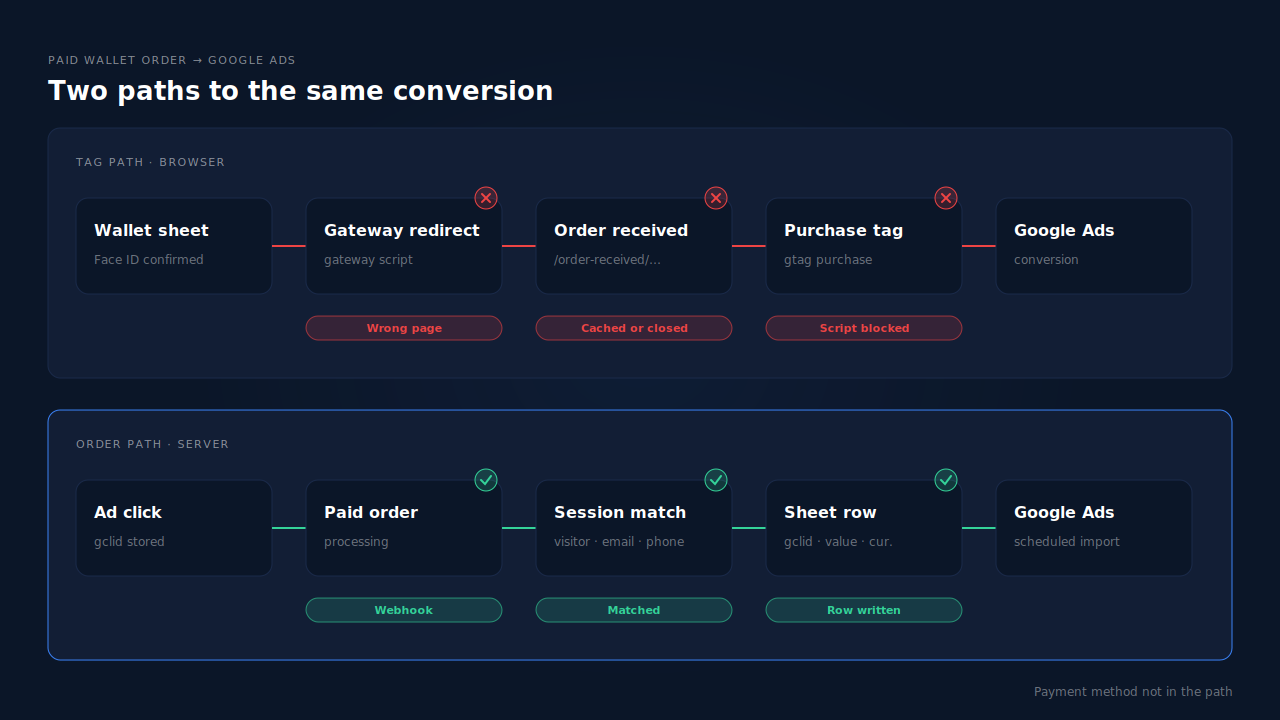
That last hop is gateway code, and gateway code changes. The WooCommerce Stripe gateway’s changelog shows it plainly. Version 4.1.5 fixed a bug where “Payment request payments were redirected to Pay Order when it should be Order Received”. Payment request buttons are the older name for its Apple Pay and Google Pay buttons. Buyers sent to the wrong page never trigger a tag that only runs on the right one. Version 10.1.0 still carried a change to the redirect: “Remove redirect_url parameter from Express Checkout payment flow.”
Express flows skip checkout-form data in other ways too. Version 9.0.0 of the same gateway fixed “order attribution metadata not included in PRBs or Express Checkout Element”, so wallet orders were saved without the source data WooCommerce’s checkout form normally submits. Different symptom, same root: the wallet path doesn’t carry everything the card path does.
Other reasons a wallet order goes missing:
- The buyer never finishes the trip. They confirm with Face ID, see the payment go through, and close the tab or switch apps before the next page loads. The order is paid. The tag never ran.
- The page is cached or its scripts are delayed. Optimisation plugins that delay JavaScript or cache checkout pages can serve an order-received page without the purchase script.
- The click is gone by the time the tag runs. Google’s tag credits a click it can find in the browser. On iPhones, where Apple Pay lives, some Google ad clicks arrive with
gbraidorwbraidinstead of agclid, and consent or privacy settings can stop the click being stored. - An ad blocker drops the request. How ad blockers break conversion tracking covers why there’s no error to see.
How do you confirm wallet orders are what Google Ads is missing?
Compare by payment method. Pull a week of paid WooCommerce orders, split them into wallet and card, and hold each group against Google Ads conversions for the same days. If card orders roughly line up and wallet orders don’t, the wallet path is your leak. Then place a real wallet order and watch where the browser lands.
- Export a week of paid orders. Keep order ID, date, total and payment method. Wallet orders are usually named in the order’s payment method details; the exact label depends on your gateway.
- Match them against Google Ads. In the conversion report, add the transaction ID if your action records it, or compare daily counts if not.
- Place a real Apple Pay order on an iPhone and a Google Pay order on Android. Use the button placements your customers use: product page, cart and checkout can each behave differently.
- Check the URL you land on. It should be the order-received URL for that order. A different page, an error or a blank screen is your answer.
- Check the request. With remote debugging or Google’s Tag Assistant, confirm a request to Google Ads’ conversion endpoint leaves the browser on that page.
- Repeat with caching and script optimisation off, then with consent accepted. The change that brings the request back is your cause.
If every test passes and wallet orders still go missing in real traffic, the gap is buyers who never reach the page at all. No tag fix touches those.
Does updating the payment gateway or the Google plugin fix it?
Sometimes. If a gateway release sent wallet buyers to the wrong page, the update that fixes the redirect brings those conversions back. Update both plugins, then rerun the wallet test orders above. What an update can’t fix is the underlying design: a purchase that only counts if a browser reaches one page will always miss buyers who close the tab, block Google or never load it.
That’s why stores with a lot of wallet traffic stop relying on the page. Instead they report paid orders to Google Ads as offline conversions. You store the click identifier when the visitor lands, attach it to the order on your server, and upload the order against that click. Capturing gbraid and wbraid for offline conversions covers the iPhone side of that, and attributing WooCommerce orders when the checkout is on another page covers the join from click to order.
If you keep the plugin’s tag running as well, make one purchase action primary. Two primary purchase actions counting the same order means Google counts it twice.
How does PartialLeads get Apple Pay and Google Pay orders into Google Ads?
By reporting from the paid order, not the page. When a WooCommerce order reaches processing or completed, PartialLeads matches it to the visitor who placed it and writes an offline-conversion row to your Google Sheet: gclid, gbraid or wbraid, hashed email and phone, value and currency. Google Ads imports that sheet on a schedule. How the buyer paid, and which page they saw next, doesn’t matter.
The click is stored at landing, not at checkout. The PartialLeads WooCommerce plugin records the click identifiers when the visitor arrives from the ad. The Purchase is webhook-owned: nothing fires on the thank-you page. When the order arrives, it’s matched to that visitor by visitor ID, then email, then phone, then IP, so a buyer who tapped Apple Pay on a product page still carries the click from their landing. The pillar guide to attributing ecommerce revenue to the ad click walks through that join.
Only paid orders become rows. Processing and completed orders are written. Pending, on-hold, failed and cancelled orders aren’t. For WooCommerce Subscriptions, only the first payment is written; renewals are recorded in PartialLeads but never sent to the sheet.
The value is the order total. It’s the full WooCommerce order total, including tax and shipping, after discounts, in the order’s currency. There’s no subtotal option. An order is recorded once, so a later edit to it doesn’t change the row. Sending dynamic conversion values to Google Ads offline imports covers why a real per-order value matters for bidding.
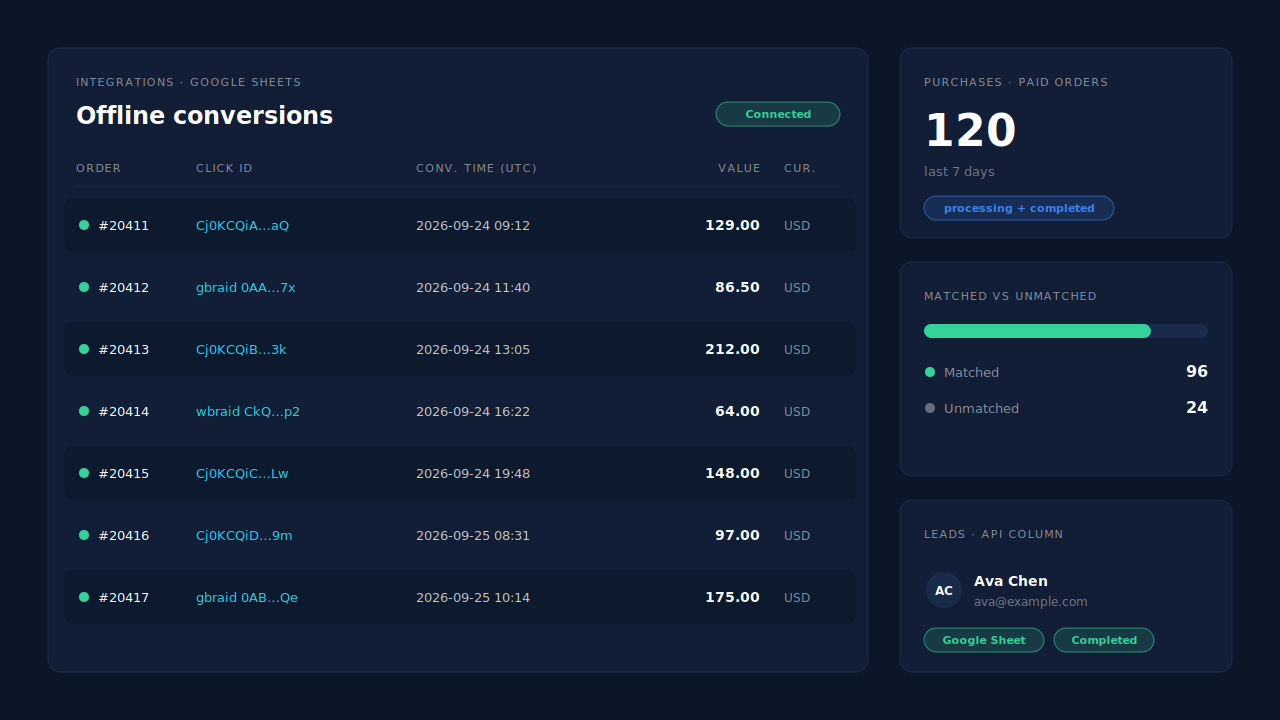
Where you see it working. Integrations → Google Sheets shows the connected sheet and the rows written for paid orders, with their click ids. The Purchases ledger lists every paid order PartialLeads recorded, matched or unmatched, so you can reconcile wallet orders against WooCommerce’s own list. On the Leads list, the API column shows which integrations each buyer was sent to.
The honest constraints.
- It’s a scheduled import, not a live send. Google credits the order after the next import runs, on the schedule set in your Google Ads account.
- A row credits a click only if a click was captured. A buyer who didn’t come from a Google ad, or whose landing didn’t carry a click id, has nothing to match. Google’s own click window still applies. Why offline conversions don’t match the gclid covers the failure modes.
- Keep one source per purchase. PartialLeads uses its own event ids and doesn’t deduplicate against Google for WooCommerce. Set the plugin’s purchase action to secondary, or turn off its purchase event.
- Purchases only, for Google. WooCommerce funnel events go to Meta, Pinterest and TikTok, not Google, and there’s no GA4 integration.
- We control the row; Google controls the match. Every paid order is recorded and written from the order, not the page. Whether Google ties a row to an ad click is Google’s side.
| What breaks | The mechanism | Where you see it in the dashboard |
|---|---|---|
| Wallet buyer is sent somewhere other than the order-received page | Purchase is webhook-owned; the paid order is written as a row, no page involved | Integrations → Google Sheets, one row per paid order |
| Buyer closes the tab after Face ID, so the tag never runs | Row written when the order reaches processing or completed | Purchases ledger |
| Cached page, delayed script or ad blocker stops the purchase request | No storefront tag in the path; Google Ads imports the sheet on a schedule | Integrations → Google Sheets |
| Wallet order carries no click data of its own | Order matched to the landing visitor by visitor ID, email, phone or IP; stored gclid, gbraid or wbraid copied to the row | Purchases ledger, matched vs unmatched |
| Plugin tag and import both count the same order | Not deduplicated across tools, so one primary purchase action | Google Ads conversion settings, Leads-list API column |
Tell us what's broken. We'll fix your tracking — free.
Describe the tracking/attribution problem you're stuck on and we'll map it to a fix: server-side conversions to Meta, Google, TikTok and Pinterest, plus first-party tracking that survives Safari. No code required.
Sources
- https://raw.githubusercontent.com/woocommerce/google-listings-and-ads/trunk/src/Google/GlobalSiteTag.php
- https://raw.githubusercontent.com/woocommerce/woocommerce-gateway-stripe/trunk/changelog.txt