Google Ads records add-to-cart but not purchases because the purchase is sent by different code, on a different page. Page views and add-to-cart come from a script that loads across the shop. The purchase is printed only on WooCommerce’s order-received page, once per order. If that page is replaced, skipped or blocked, the purchase never leaves, while every earlier event keeps arriving.
That split is good news. It means your Google tag works, your account is linked, and consent isn’t blocking everything. The fault sits on one page.
Below: where the purchase tag lives, the four causes, how to find yours in one test order, and how to report purchases without depending on that page.
Where does the WooCommerce purchase tag actually fire?
On WooCommerce’s order-received page, and nowhere else. In Google for WooCommerce, the official Google plugin, the purchase event is attached to the woocommerce_before_thankyou hook and only runs when WooCommerce confirms the visitor is on the order-received page. That means the checkout page URL with the order-received endpoint. Every other event uses separate code.
Here’s the split in the plugin’s own source:
- Page view is printed at the top of every page body.
- View item is printed after a single product.
- Add to cart and the other shop events come from a separate events script that loads on pages, shop pages and the cart.
- Purchase is printed from the thank-you hook, with the order’s value, currency and transaction id, and a
send_toof your one configured conversion ID and label.
WooCommerce’s own thank-you template calls woocommerce_before_thankyou near the top of the page. Its is_order_received_page() check is true only when the current page is the checkout page and the order-received query variable is present.
Other tracking plugins differ in detail, but most follow the same pattern: funnel events from a sitewide script, the purchase from the confirmation page. So the diagnosis below applies to them too.
Why does the purchase fail when every other event works?
Because four things can break the order-received page without touching any other page. A checkout or funnel plugin can send buyers to its own thank-you URL. A payment gateway can finish the order without bringing the buyer back. A script optimiser or blocker can stop the purchase script on that one page. Or the purchase can reach Google under a conversion action your campaigns don’t count.
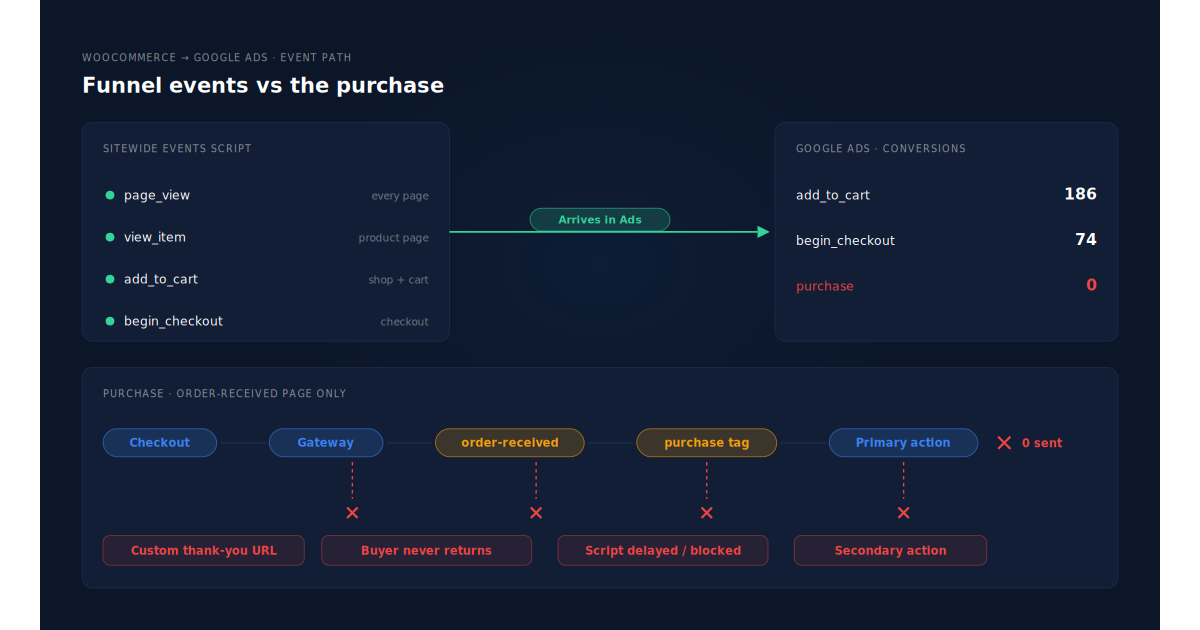
Does a custom thank-you page skip the purchase tag?
Very often, yes. Funnel builders, one-page checkouts and some themes redirect buyers to their own confirmation page, such as /thank-you/. That page isn’t the checkout page with order-received in the URL, so the order-received check fails and the purchase snippet is never printed. Nothing errors. Add-to-cart on the shop still fires.
The tell: after a test order, the address bar doesn’t contain order-received.
Does an off-site payment gateway stop buyers reaching the page?
It can. Hosted payment pages, bank redirects and 3-D Secure challenges send the buyer away from your store. The order is created and paid by a server notification from the gateway. Whether the buyer comes back to the order-received page is up to them and their browser. A buyer who closes the tab after paying never loads the purchase tag. Express wallets such as Apple Pay and Google Pay have their own version of this return-trip problem.
Why doesn’t reloading the thank-you page send it again?
Because the order is marked as tracked before the script runs. Google for WooCommerce writes a _gla_tracked flag to the order the moment it prints the purchase snippet, so a reload won’t double-count. The side effect: if the page rendered but the script was then delayed, blocked or cut off, the order is already flagged. That order will never be sent from the browser again.
So a “delay JavaScript until interaction” setting, an ad blocker, or a slow tag that loses the race with a closed tab each cost you that order permanently. Your test order may work; real buyers who leave in two seconds may not.
Is the purchase arriving under the wrong conversion action?
Sometimes the purchase fires and lands somewhere you’re not looking. The plugin sends it to one conversion ID and label. If that action is secondary, excluded from the campaign’s goal, or not the action your reports show, the purchase column reads zero. Add-to-cart events can appear under different actions, which makes the funnel look alive while purchases seem dead. Why a Google for WooCommerce purchase conversion shows Inactive covers the status side of this.
How do you find which cause you have?
Place one real order with your most-used payment method and watch what happens on the last page. The URL, the network requests and the order’s meta tell you which of the four causes you have in about ten minutes. Don’t use a test gateway if your real buyers use a redirect gateway, because the test won’t reproduce the redirect.
- Check the confirmation URL. No
order-receivedin it means a custom thank-you page. Point the funnel back at WooCommerce’s page, or add the purchase event to the custom page. - Open the browser network panel before paying. On the confirmation page, look for a request to Google carrying your conversion ID. None means the snippet wasn’t printed or never ran.
- View the page source. Search for
"purchase". Printed but not sent points at a blocker or an optimiser delaying the script. Not printed points at the hook or the URL check. - Check the order’s custom fields. A
_gla_trackedvalue of 1 on an order Google never received means the page rendered but the script didn’t finish. - Pay with your off-site gateway and close the tab on the gateway’s success screen. If the order is paid in WooCommerce but no purchase reaches Google, you’ve found the return-trip gap.
- Check the conversion action next day. In Google Ads, Goals → Conversions, confirm the test order is in a primary purchase action used by your campaign.
If step 5 is your cause, no tag fix closes it. The buyer’s browser simply isn’t there. Compare a month of paid orders from Google Ads traffic with the purchases Google received to see how big that gap is for your store.
Can you send WooCommerce purchases to Google Ads without the thank-you page?
Yes, by uploading paid orders as offline conversions into Google Ads instead of firing a tag. You keep Google’s click identifier from the landing page, attach it to the order on your server, and upload the order against that click. The order exists whether or not the buyer came back, so the thank-you page stops mattering.
The fragile part is the click identifier. Google adds a gclid to ad clicks, and gbraid or wbraid on some iOS traffic. They appear only in the landing URL, so they must be stored on the first page view and carried to an order that may come days later. Capturing gbraid and wbraid walks through that storage.
An import has trade-offs. It’s slower, because Google processes uploads on a schedule. It can only credit orders that carry a click identifier. And if you keep the tag running too, you need one purchase source for bidding, or you’ll count some orders twice.
How does PartialLeads get WooCommerce purchases into Google Ads?
It sends purchases from the paid order, not from the order-received page. When a WooCommerce order reaches processing or completed, PartialLeads matches it to the visitor who placed it and writes a row to your Google Sheet: the gclid, gbraid or wbraid, hashed email and phone, value and currency. Google Ads imports that sheet on the schedule you set.
Nothing fires on the thank-you page. The PartialLeads WooCommerce plugin captures click identifiers when the visitor lands. The purchase is webhook-owned, so a custom thank-you URL, a buyer who never returns from the gateway, or a delayed script can’t stop the row being written.
The order is matched to the original click. The order is joined to the visitor by visitor ID, then email, then phone, then IP. A buyer who clicked an ad on Monday and paid through a hosted gateway on Thursday still carries Monday’s click. The pillar guide to attributing ecommerce revenue to the ad click explains the join.
Only paid orders become rows. Processing and completed orders are written. Pending, on-hold, failed and cancelled orders aren’t. Bank-transfer and cash-on-delivery orders are written once they’re marked paid. For WooCommerce Subscriptions, only the first payment is written; renewals are recorded in PartialLeads but never sent to the sheet.
The value is the order total. Each row carries the full order total, including tax and shipping, after discounts, in the order’s currency. There is no subtotal option. An order is recorded once, so later edits to it don’t change the row.
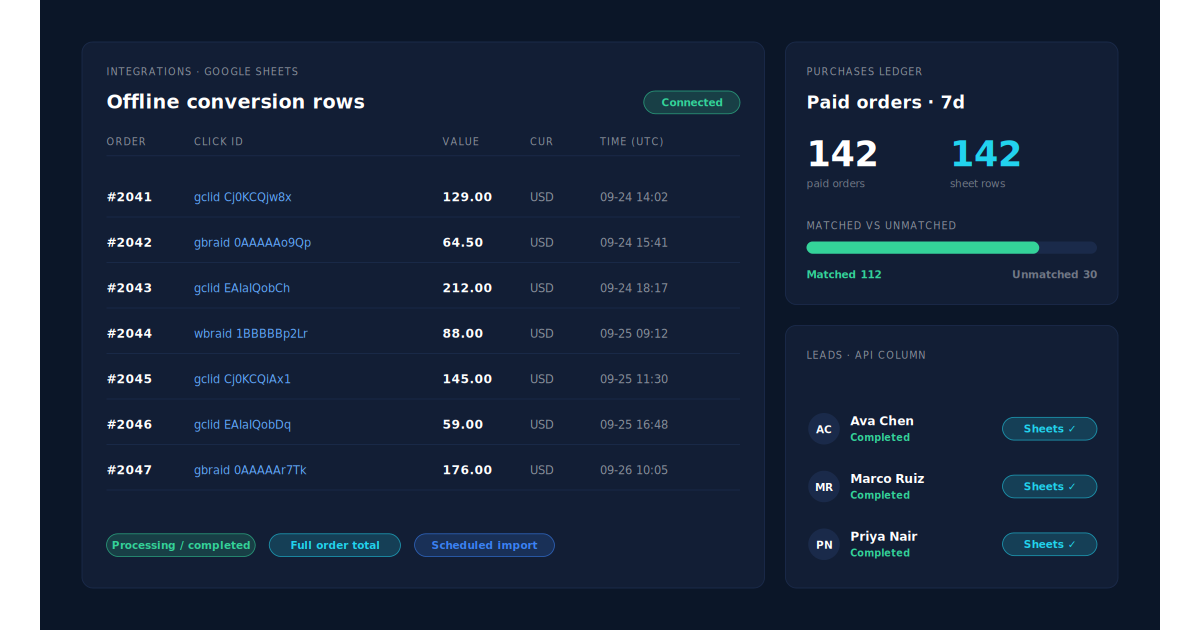
Where you see it working. Integrations → Google Sheets shows the connected sheet and a row for each paid order. The Purchases ledger lists every paid order PartialLeads recorded, matched or unmatched, so you can check paid orders against rows directly, with no thank-you page in between. The API column on the Leads list shows which integrations each buyer was sent to.
The honest constraints.
- Purchases only, for Google. WooCommerce view product, add to cart and begin checkout are forwarded to Meta, Pinterest and TikTok, not Google. Keep your existing Google tag for funnel events. There is no GA4 integration.
- It’s a scheduled import. Google credits the row when it next processes the sheet, not the moment the order is paid.
- A row credits a click only if a click was captured. Buyers from other channels, or whose click identifier never reached the site, can’t be credited to a Google ad. Why offline conversions don’t match the gclid covers the rest.
- Keep one source per purchase. PartialLeads uses its own event ids and doesn’t deduplicate against your plugin’s purchase tag. Make the import action primary and the tag’s purchase action secondary, or turn the tag’s purchase event off.
- We control the row; Google controls the match. Every paid order produces a row. Whether Google ties it to a click depends on the identifiers captured and Google’s own matching.
| What breaks | The mechanism | Where you see it in the dashboard |
|---|---|---|
| Custom thank-you page skips the order-received check | Purchase is webhook-owned; nothing fires on the thank-you page | Integrations → Google Sheets, one row per paid order |
| Buyer never returns from an off-site gateway | Row written when the order reaches processing or completed | Purchases ledger, paid orders with no page visit needed |
| Purchase script delayed or blocked, order already flagged as tracked | Row built from order data, not from a browser script | Purchases ledger vs rows in the sheet |
| Buyer returns days later with no gclid on the session | Order matched to the visitor by visitor ID, email, phone or IP; stored click id carried to the row | Purchases ledger, matched vs unmatched |
| Tag and import both count the same order | Not deduplicated across tools — one primary purchase action | Google Ads conversion settings, Leads-list API column |
Tell us what's broken. We'll fix your tracking — free.
Describe the tracking/attribution problem you're stuck on and we'll map it to a fix: server-side conversions to Meta, Google, TikTok and Pinterest, plus first-party tracking that survives Safari. No code required.
Sources
- https://raw.githubusercontent.com/woocommerce/google-listings-and-ads/trunk/src/Google/GlobalSiteTag.php
- https://raw.githubusercontent.com/woocommerce/woocommerce/trunk/plugins/woocommerce/templates/checkout/thankyou.php
- https://raw.githubusercontent.com/woocommerce/woocommerce/trunk/plugins/woocommerce/includes/wc-conditional-functions.php