FunnelKit checkout purchases go missing from Google Ads because the purchase tag waits for a page the funnel skips. Most WooCommerce Google tags fire only on WooCommerce’s order-received page. A funnel puts checkout on its own step, shows upsell offers after payment, and often ends on a custom thank-you step. The order is paid. The tag never runs.
That also explains the pattern most store owners see. Page views and add-to-cart still show up. Some purchases arrive, usually from buyers who clicked through every upsell. The rest vanish, and GA4 is often short by a similar amount.
Below: where the tag expects the buyer to finish, where a funnel breaks it, what happens to upsell revenue, and how to report purchases from the order instead.
Where does a WooCommerce purchase tag expect the buyer to finish?
On WooCommerce’s order-received page. In Google for WooCommerce, the official Google plugin, the purchase snippet is attached to the woocommerce_before_thankyou hook and returns early unless is_order_received_page() is true. WooCommerce defines that as the checkout page with an order-received value in the URL. Any other page prints no purchase event.
The check is strict. The current page must be the page set as Checkout in WooCommerce settings, and the order-received query variable must be present. WooCommerce does expose a filter, woocommerce_is_order_received_page, that other plugins can use to change the answer. Whether your funnel builder uses it, and on which step, is something to test rather than assume.
Two more details matter for funnels:
- The purchase is sent once per order. The plugin writes a
_gla_trackedflag to the order before printing the snippet, “to avoid double-reporting if the confirmation page is reloaded.” If that first render is lost, the browser never tries again. - The values come from the order at that moment. Value, tax, shipping and line items are read from the order when the page renders.
Many GTM and pixel plugins follow the same model: funnel events from a sitewide script, the purchase from the confirmation page.
Why do FunnelKit and CartFlows funnels skip that page?
Because a sales funnel replaces WooCommerce’s linear checkout with its own sequence of pages. The checkout form lives on a funnel step, one-click upsell offers sit between payment and confirmation, and the final page is often the funnel’s own thank-you step. Each of those can mean WooCommerce’s order-received page never renders for that buyer.
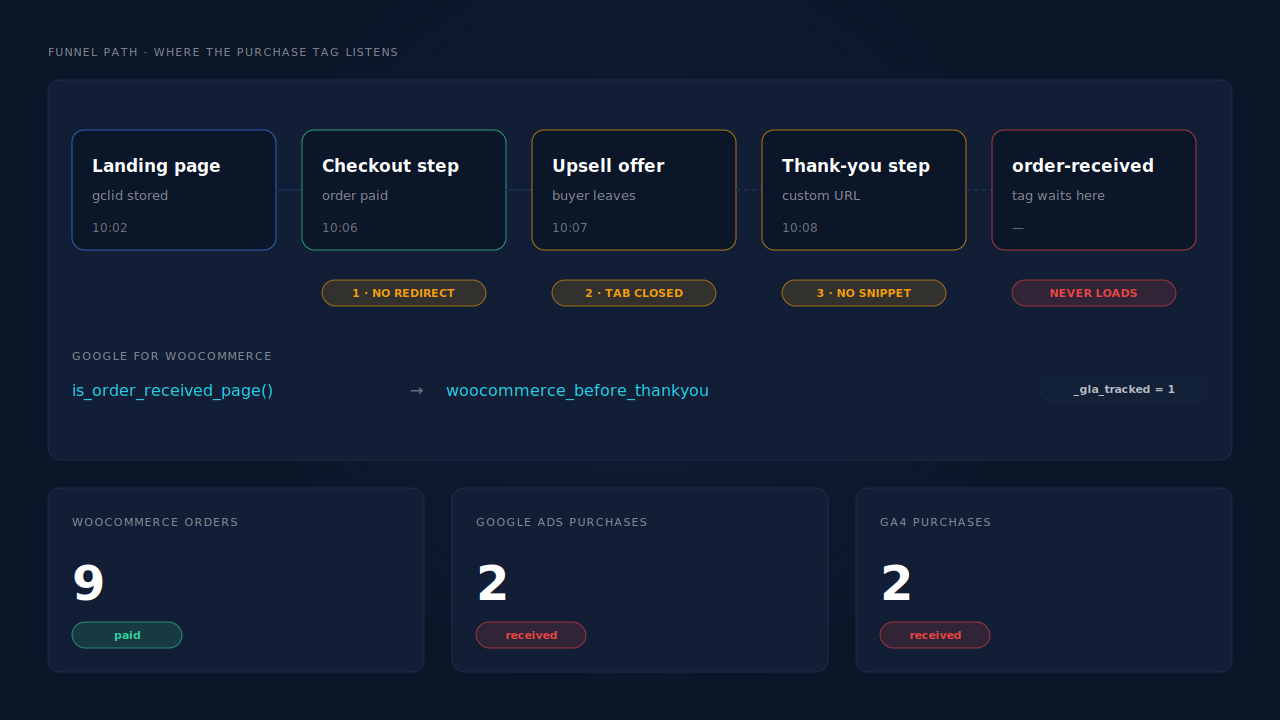
Does a funnel checkout step change where the order finishes?
It can. When checkout runs on a funnel step instead of the page set as Checkout in WooCommerce, the redirect after payment is controlled by the funnel. If it sends the buyer to the next funnel step rather than the checkout page with order-received in the URL, the order-received check fails. Nothing errors. The order is paid; the purchase snippet is never printed.
Do upsell offers stop buyers reaching the thank-you page?
Often, yes. One-click upsells appear after the card is charged, so the sale already exists. A buyer who reads the offer, decides no, and closes the tab has paid but never reaches a thank-you page. That’s the gap most funnel owners describe: purchases that took the full path arrive in Google Ads, purchases that bailed on an upsell don’t.
Does the funnel’s own thank-you step print the purchase event?
Only if something on that page prints it. A custom thank-you step is a normal page to Google for WooCommerce. If your tracking plugin doesn’t recognise it as the confirmation page, no purchase is sent, even for buyers who finish the whole funnel. Some funnel builders ship their own tracking settings for this; if you use them, make sure they don’t also run alongside another plugin’s purchase tag.
What happens to upsell revenue in Google Ads?
It depends on whether the accepted upsell becomes its own order or is added to the original one. A separate order is a separate purchase with its own value. An upsell added to the original order changes that order’s total after the buyer has already paid, so a tag that read the order earlier reports the pre-upsell value, and a tag that reads it later may not run at all.
Check your funnel builder’s setting for how accepted upsells are stored, then place a test order that accepts one. Look at two things in WooCommerce: how many orders were created, and whether the first order’s total changed. That tells you which value Google Ads should have received.
Why is GA4 missing the same sales?
Because GA4 purchase events for WooCommerce are usually sent by the same kind of browser tag, on the same confirmation page. When a funnel skips that page, both Google Ads and GA4 lose the purchase for the same reason. Fixing where the event comes from fixes both, but each tool needs its own fix: GA4 and Google Ads conversions are sent separately.
How do you find which funnel step loses the purchase?
Run three real test orders with the payment method your buyers actually use, and watch the last page of each. The URL, the network requests and the order’s custom fields tell you which break point you have in about fifteen minutes. A test gateway won’t reproduce a redirect or an upsell charge, so use the real one.
- Order one: accept every upsell and finish. Check the final URL. No
order-receivedin it means the funnel’s thank-you step is the last page, and something else must print the purchase. - Open the network panel before paying. On the final page, look for a request to Google carrying your conversion ID. None means no purchase was sent from that page.
- Order two: decline the first upsell and close the tab. If the order is paid in WooCommerce but Google Ads never receives it, the upsell step is your gap.
- Order three: accept an upsell. Count the orders it created and compare the value Google Ads receives with the final order total.
- Check the orders’ custom fields. A
_gla_trackedvalue of 1 on an order Google never received means the snippet rendered and then failed to send. - Next day, check Goals → Conversions in Google Ads. Confirm each test order sits in a primary purchase action your campaigns optimise for.
If order two is your cause, no tag change closes it. The buyer’s browser has left.
How do you get funnel purchases into Google Ads without the funnel pages?
Upload paid orders as offline conversions into Google Ads instead of relying on a tag. You keep Google’s click identifier from the landing page, attach it to the order on your server, and upload the order against that click. The order exists whatever the funnel’s pages did, so checkout steps, upsells and thank-you steps stop mattering.
The fragile part is the click identifier. Google adds a gclid to ad clicks, and gbraid or wbraid on some iOS traffic. They appear only in the landing URL, so they must be stored on the first page view and carried to an order that may come days later. Capturing gbraid and wbraid covers that storage, and sending dynamic conversion values to Google Ads offline imports covers the value column.
An import is slower, because Google processes uploads on a schedule, and it credits only orders that carry a click identifier. It’s also a second purchase source if your tag keeps running, so pick one for bidding.
How does PartialLeads get FunnelKit purchases into Google Ads?
It sends purchases from the paid WooCommerce order, not from any funnel page. A FunnelKit or CartFlows order is still a WooCommerce order. When it reaches processing or completed, PartialLeads matches it to the visitor who placed it and writes a row to your Google Sheet: the gclid, gbraid or wbraid, hashed email and phone, value and currency. Google Ads imports that sheet on your schedule.
Nothing fires on the thank-you page. The PartialLeads WooCommerce plugin captures click identifiers when the visitor lands. The purchase is webhook-owned, so a funnel checkout step, a buyer who closes the tab on an upsell offer, or a custom thank-you step can’t stop the row being written.
The same order goes to Meta, TikTok and Pinterest. The paid order is also sent server-side through each platform’s conversions API. The guide to tracking WooCommerce purchases server-side to Meta walks through that half.
The order is matched to the original click. PartialLeads joins the order to the visitor by visitor ID, then email, then phone, then IP. A buyer who clicked a Google ad on Monday and paid through your funnel on Thursday still carries Monday’s click. The pillar guide to attributing ecommerce revenue to the ad click explains the join.
Only paid orders become rows. Processing and completed orders are written. Pending, on-hold, failed and cancelled orders aren’t.
Upsells follow your order setting. The value is the full order total, including tax and shipping, after discounts. An order is recorded once. An accepted upsell placed as its own paid order becomes its own row. An upsell added to an order that was already recorded doesn’t change that row, so if upsell revenue in Google Ads matters to you, store accepted upsells as separate orders.
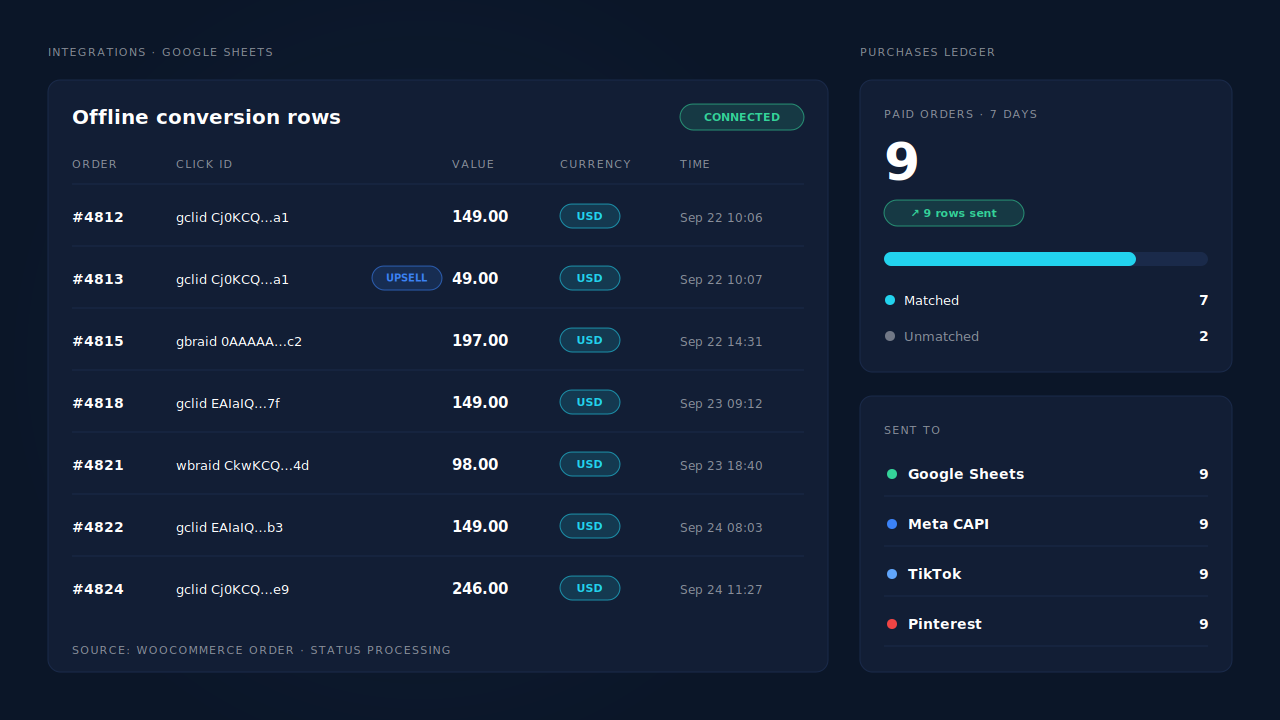
Where you see it working. Integrations → Google Sheets shows the connected sheet and a row for each paid order. The Purchases ledger lists every paid order PartialLeads recorded, matched or unmatched, so you can check funnel orders against rows directly. The API column on the Leads list shows which integrations each buyer was sent to.
The honest constraints.
- Purchases only, for Google. WooCommerce view product, add to cart and begin checkout go to Meta, Pinterest and TikTok, not Google. Keep your Google tag for funnel events. There is no GA4 integration, so GA4 still needs its own fix.
- It’s a scheduled import. Google credits a row when it next processes the sheet.
- A row credits a click only if a click was captured. Why offline conversions don’t match the gclid covers the rest.
- Keep one source per purchase. PartialLeads uses its own event ids and doesn’t deduplicate against your plugin’s or funnel builder’s purchase tag. Make the import the primary purchase action and set the tag’s action to secondary, or turn it off.
- We control the row; Google controls the match. Every paid order produces a row. Whether Google ties it to a click depends on the identifiers captured and Google’s own matching.
| What breaks | The mechanism | Where you see it in the dashboard |
|---|---|---|
| Funnel checkout step never redirects to order-received | Purchase is webhook-owned; nothing fires on any funnel page | Integrations → Google Sheets, one row per paid order |
| Buyer closes the tab on an upsell offer | Row written when the order reaches processing or completed | Purchases ledger, paid orders with no page visit needed |
| Custom thank-you step prints no purchase | Row built from WooCommerce order data, not a browser script | Purchases ledger vs rows in the sheet |
| Upsell revenue missing or on the wrong order | Each separate paid order is its own row; value is the order total | Google Sheets rows, Purchases ledger line items |
| Funnel tag and import both count the sale | Not deduplicated across tools — one primary purchase action | Google Ads conversion settings, Leads-list API column |
Tell us what's broken. We'll fix your tracking — free.
Describe the tracking/attribution problem you're stuck on and we'll map it to a fix: server-side conversions to Meta, Google, TikTok and Pinterest, plus first-party tracking that survives Safari. No code required.
Sources
- https://raw.githubusercontent.com/woocommerce/google-listings-and-ads/trunk/src/Google/GlobalSiteTag.php
- https://raw.githubusercontent.com/woocommerce/woocommerce/trunk/plugins/woocommerce/templates/checkout/thankyou.php
- https://raw.githubusercontent.com/woocommerce/woocommerce/trunk/plugins/woocommerce/includes/wc-conditional-functions.php