Pick a signal you already hold at lead time — a form answer, the landing page, the country, a work email domain — and fire the conversion event only for leads that match it. Everything else either stays home or goes under a separate event name you never optimize on. Meta’s delivery learns from whatever you call a conversion, so a smaller filtered signal usually outperforms a complete, noisy one.
The failure this fixes is specific. An account sends Lead on every form submission, delivery does exactly what it was told, and three weeks later the cost per lead is down 40% while the sales team says the leads got worse. Nothing broke. The algorithm found the cheapest people who would fill in a form, because that is the only thing it was ever shown.
What counts as a “qualified” lead for Meta?
A qualified lead is one that matches a condition you can evaluate at the moment the event fires, and that correlates with money later. That second half is the article; the first half is the constraint. Meta cannot optimize toward “closed in 60 days” unless you send it something, at some point, that says so.
So qualification has two practical tiers:
- Lead-time qualification — a filter on data you hold when the lead arrives: budget range selected, job title, service requested, country, landing page, form variant, whether a phone number was given.
- Outcome qualification — a filter on what happened afterwards: the call was booked, the deal closed, the invoice was paid. This is a separate, later event, not a delay on the first one.
Most accounts should start with lead-time qualification because it is cheap and it fires immediately. Outcome qualification is stronger signal and worth adding, but it arrives days or weeks late and comes with its own timing rules, which the seven-day section below covers.
Why does sending every lead make Meta campaigns worse?
Because delivery optimizes toward the event you defined, and an undefined event defines itself as “people who fill in forms.” If half your leads are students, tyre-kickers or bots, then half the audience the algorithm builds is a model of students, tyre-kickers and bots.
The economics make this worse, not self-correcting. Unqualified people are systematically cheaper to reach — they have lower intent, they respond to broader creative, they sit in cheaper auctions. Optimizing on raw lead volume therefore pushes spend toward them by construction. Cost per lead falls, cost per customer rises, and the reported number moves the wrong way while looking right.
There is an honest counterweight, and it is the reason “just send fewer events” is not the whole answer. An ad set that receives too few conversions stays in the learning phase, and a starved signal is its own failure mode. The fix is not to loosen the definition until volume appears. It is to choose the tightest definition that still produces enough events to teach, and to widen it deliberately if the ad set stalls — not by accident.
How do you decide the qualification rule before you build it?
Work backwards from closed deals, not forwards from your form. Export the last 100 customers, find what was true about them on the day they first became a lead, and look for a field that separates them from the leads that went nowhere.
The useful rules are almost always dull:
- A form answer. “Budget over $5k”, “needs it within 30 days”, “5+ employees”. If the field does not exist yet, adding one qualifying question to the form is the highest-leverage change in this entire article.
- The landing page. A pricing page lead and a free-guide lead are different species. The page is captured with every lead, so this rule costs nothing to write.
- Geography. If you only service three states, leads from elsewhere are not leads.
- Email shape. A work email domain versus a free mailbox is a weak signal on its own and a decent one combined with something else.
- Completeness. A lead with both email and phone is worth more than an email-only lead — to sales, and to Event Match Quality, which the next section gets to.
Then check the rule against a real window before you ship it: how many of the last 7 or 30 days’ leads would it have matched? A rule that matches three leads a month cannot optimize anything, and a rule that matches 97% of leads is not a rule. Somewhere between those, the number should make you slightly uncomfortable.
Which events should the qualified and unqualified leads fire?
Use two event names, and optimize on exactly one. The common shape is Lead for every genuine submission and a second, stricter event — SubmitApplication, Schedule, or a custom QualifiedLead — for the ones that pass the filter. Ad sets optimize on the stricter event; the looser one stays for reporting, audience building and sanity-checking against the CRM.
This matters more than the filtering itself, because it preserves the thing you need in six weeks: the ability to compare. If unqualified leads simply vanish, you can never answer “did the filter throw away business?” If they fire a reported-only event, that question is one report away. Deciding which CAPI events to send for lead gen is the same discipline applied to states rather than quality.
Two rules keep it from decaying. One event name per meaning, permanently — renaming the qualified event resets what the account learned. And never fire both events for the same person under the same ID, or you will inherit the deduplication problems that make Ads Manager and your CRM disagree by a number nobody can explain.
Does filtering leads hurt your match quality?
It should not, and if it does, the filter is not the cause — the payload is. Match quality is a property of each individual event: whether it carries a hashed email, a hashed phone in E.164, the _fbp and _fbc cookies unhashed, the client IP, the user agent and an external_id. Sending 200 well-formed events instead of 1,000 well-formed events changes volume, not match rate.
What does move match quality is filtering on a field that correlates with identity completeness. If your qualified event only fires when a phone number was given, its match quality will be higher than the unfiltered event. If it fires mostly for anonymous newsletter signups, it will be worse. Check the two event names side by side in Events Manager rather than assuming.
The one real risk is statistical, not technical: a low-volume event gives Meta a smaller sample to score, and match quality figures on small samples bounce around. Read them over a week, not a day.
How do you send qualified signals for leads that close weeks later?
Send the outcome as its own event, when the outcome happens — and respect the seven-day event-time window. The Conversions API clamps or rejects server events with an event_time older than seven days, so the pattern of “wait until the deal closes, then backdate the lead event” does not work.
The working pattern is two events at two moments:
{
  "event_name": "Lead",
  "event_time": 1757635200,
  "event_id": "lead_88421_meta",
  "action_source": "website",
  "user_data": { "em": ["<sha256 email>"], "ph": ["<sha256 E.164 phone>"] }
}
{
  "event_name": "Purchase",
  "event_time": 1759017600,
  "event_id": "order_51188_meta",
  "action_source": "system_generated",
  "user_data": { "em": ["<sha256 email>"], "ph": ["<sha256 E.164 phone>"] },
  "custom_data": { "value": 4200.00, "currency": "AUD" }
}
Same person, same identifiers, two timestamps, two IDs. Meta joins them through the user data, which is exactly why the identity payload matters more on a delayed event than anywhere else — by then the click identifiers are stale and the hashed email is doing the work.
What happens to the leads you don’t send?
They stay yours. Not sending a conversion event is a statement about what you want delivery to optimize for; it is not a decision to discard a human being who typed their details into your website.
Three things are worth doing with them anyway. Keep them in the CRM under a separate status so the filter’s effect is measurable. Nurture them — the unqualified-today lead is frequently qualified next quarter. And review the excluded set monthly, because a filter that quietly drops a whole segment is the most expensive kind of mistake: it never shows up in your reports, only in your revenue.
A partial lead — someone who typed an email or phone into the form and left before submitting — sits in exactly this category. Contactable, real, and usually the wrong thing to hand the algorithm as a conversion, unless you filter it first.
How does PartialLeads send only qualified leads to Meta?
PartialLeads treats “which leads fire an event” as a setting on the Meta CAPI config rather than a code change, so the rule can be edited and tested by whoever owns the account.
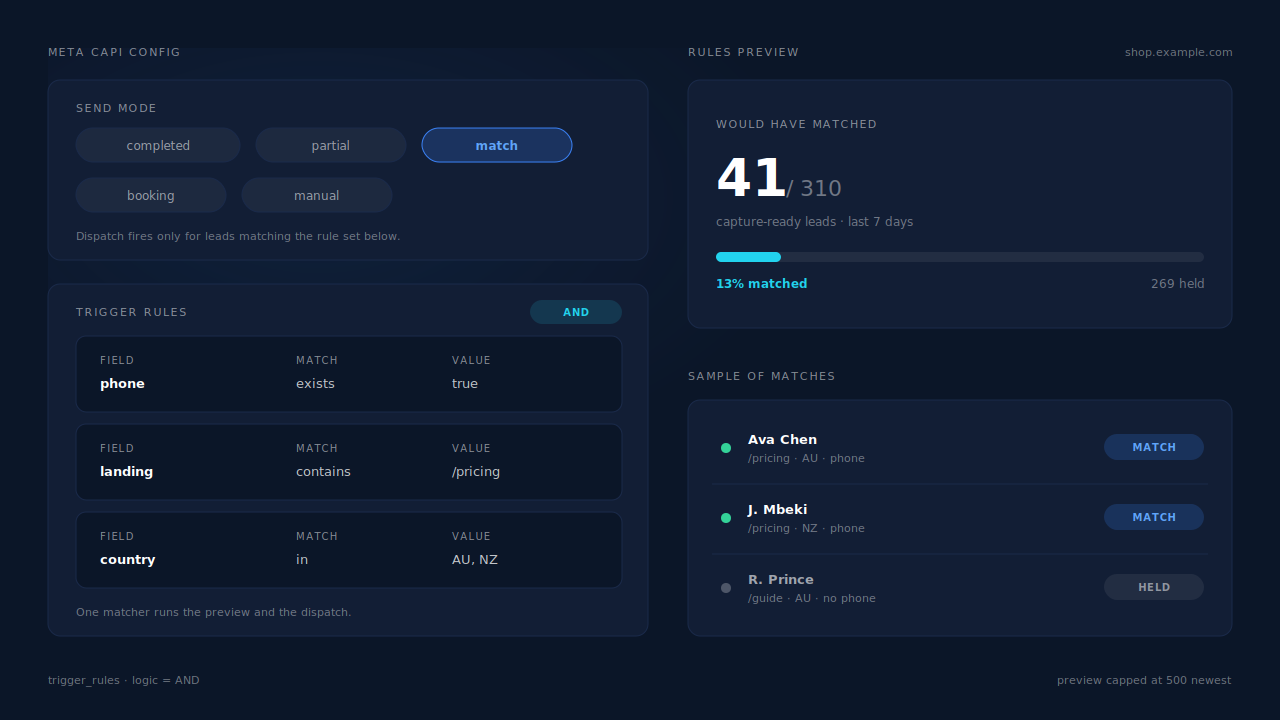
Send mode picks the population. Each config runs in one of five modes: automatic_completed (post-submit, the default), automatic_partial (fires pre-submit on partial leads), automatic_match (rule-based), a booking mode, or manual. Choosing automatic_match is what turns dispatch from “everyone” into “everyone who matches”.
Trigger rules are conditions, not deployments. A rule is a combinator over a list of conditions — AND or OR across {field, match_type, pattern} — so “phone number present AND landing page contains /pricing” is a saved setting. The same matcher runs in the dispatch path for every platform, so there is no second implementation to drift.
The preview answers the volume question before you commit. On the Microsoft CAPI config, the rules preview reports would have matched N of M capture-ready leads in the last 7 days, computed with the same matcher the dispatch uses, over the newest records rather than a sample. That is the uncomfortable-number check from the rule-building section, run against your own data.
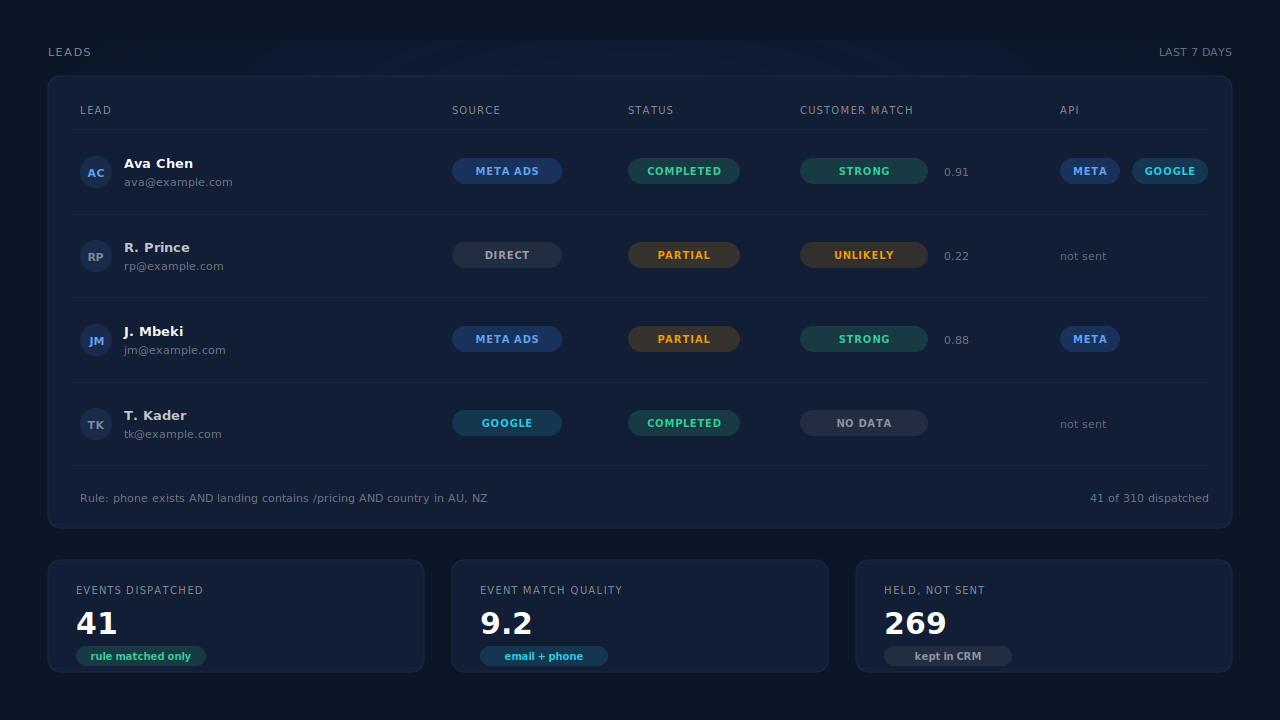
Qualification and dispatch are separate surfaces, on purpose. Two-step AI enrichment researches each lead and scores it against your ideal-customer persona, returning a verdict — strong match, possible match, unlikely match, insufficient data — with a confidence score and written reasons in the priority inbox. That is where you score leads against your ideal customer and decide what qualified means. The dispatch gate itself is the rule set: you read the verdicts, then encode what separates them into conditions the matcher can evaluate.
Match quality does not drop with the filter. Every dispatched event carries the full identity payload automatically — email lowercased and trimmed, phone normalized to E.164 with a country-code fallback from the session’s geography, _fbc reconstructed from fbclid when the cookie is missing or malformed, and _fbp/_fbc/IP/user-agent sent unhashed per Meta’s spec. With email and phone as required form fields, PartialLeads consistently delivers EMQ 9+ — observed across customer accounts.
One lead, one event, provably. Event IDs are a SHA-256 of pixel_id|event_name|record_id and dedup tables are keyed UNIQUE(config, event_id), so a retried webhook cannot turn one qualified lead into two conversions. The same filtered decision fans out to Meta, Pinterest, TikTok and Google Ads from one capture, with per-domain and per-account configs.
Honest constraints. The gate is rule-based: the AI verdict is a surface you read and act on, not a switch wired into dispatch. Event time is clamped to Meta’s seven-day window, so this is not an unlimited backfill. Keep your browser base tag installed — _fbc is reconstructed from a fbclid in the URL, but _fbp is not synthesized from nothing, and match quality falls without it. And EMQ has a platform-side component: a B2B audience of work emails can resolve lower even with a complete payload.
| What breaks | The mechanism | Where you see it in the dashboard |
|---|---|---|
| Every form fill trains delivery equally | Send mode per config: completed, partial, rule-matched, booking or manual | Meta CAPI config list, grouped by domain |
| A filter nobody can test before it ships | Trigger rules run through one shared matcher, with a preview | Rules preview: matched N of M in the last 7 days |
| No way to tell which leads were actually sent | Per-lead dispatch record for each conversion API | Leads list, API column on the lead row |
| “Qualified” defined by opinion | Two-step enrichment scored against your persona, with reasons | Customer Match card, STRONG MATCH priority inbox |
| A filtered lead counted twice on retry | Deterministic event_id + UNIQUE dedup tables |
CAPI activity log: one row per lead per event |
| Fewer events, worse matching | Full identity payload on every send, hashing handled server-side | EMQ per event, Events Manager match quality |
Write the rule down in one sentence before you build it. If the sentence needs the word “and” twice, you are describing two rules, and you should ship the one you can defend.
Tell us what's broken. We'll fix your tracking — free.
Describe the tracking/attribution problem you're stuck on and we'll map it to a fix: server-side conversions to Meta, Google, TikTok and Pinterest, plus first-party tracking that survives Safari. No code required.
Sources
- Meta for Developers — Conversions API: https://developers.facebook.com/docs/marketing-api/conversions-api
- Meta for Developers — Server event parameters: https://developers.facebook.com/docs/marketing-api/conversions-api/parameters/server-event
- Meta for Developers — Customer information parameters: https://developers.facebook.com/docs/marketing-api/conversions-api/parameters/customer-information-parameters
- Meta for Developers — Meta Pixel standard events reference: https://developers.facebook.com/docs/meta-pixel/reference
- Meta for Developers — Deduplicate pixel and server events: https://developers.facebook.com/docs/marketing-api/conversions-api/deduplicate-pixel-and-server-events