Microsoft Advertising’s Conversions API sends conversions to Microsoft from your server instead of from the visitor’s browser. Setup is three things in order: Microsoft enables CAPI access on the advertiser account, you take the ID of a UET tag that is already installed, and you paste the access token Microsoft issues for that tag. Everything after that is decisions, not plumbing.
Most of the confusion comes from people expecting this to be a setting inside the UET tag. It isn’t. The Universal Event Tracking tag is the browser-side path; the Conversions API is a second, independent path that posts events from a server. They can both be live, and in most accounts they should be.
What do you need before Microsoft will accept a single server event?
Three prerequisites, and one of them is not in your control. Microsoft has to approve and enable Conversions API access for the advertiser account. Until that happens, the access token does not exist and nothing you build can send. It is a Microsoft-side process, not a step in any vendor’s setup wizard.
The second prerequisite is a UET tag that is already installed and recording. The Conversions API is addressed by tag — the tag ID is part of the endpoint path — so a server event is always an event attributed to one specific UET tag, on one specific property. If the tag was never installed, there is nothing to attach server events to.
The third is knowing which conversion goals already exist in the account, because your server events have to arrive under names Microsoft recognises. An event name matching no goal is accepted and then does nothing useful.
Anyone selling “one-click Microsoft CAPI setup” is describing the parts after approval. Nobody can grant it or work around it.
Where does the access token come from, and what does it cover?
Microsoft issues a long-lived access token tied to a single UET tag once CAPI is enabled on the account. You paste it once. There is no OAuth consent screen, no app to register, and no agency-permission dance — which makes the modern Conversions API markedly less painful to connect than the legacy offline-conversion import path it replaces.
The shape of the call explains the blast radius of that token. Events are posted to capi.uet.microsoft.com, under a path carrying the tag ID, with the token as a bearer credential:
POST https://capi.uet.microsoft.com/v1/{tagId}/events
Authorization: Bearer <access token>
Content-Type: application/json
One token, one tag, one property. That has a real consequence for agencies: if you run five client sites, you have five tags and five tokens, and they may belong to five different Microsoft accounts. Any setup that assumes a single global token per company falls apart on the second client. Treat the config as per-domain from day one, even if you only have one domain today.
And because the token is a bearer credential, it belongs wherever your stack keeps secrets — encrypted at rest, never in a repo, never in a tag manager container anyone can read.
Which conversions should you actually send server-side?
Start with two: the lead event and the purchase event. Those are the ones bidding needs and the ones the browser is worst at reporting. Resist the urge to mirror every UET event server-side on day one — a conversion path you can’t verify is worse than one you haven’t built.
For lead-gen accounts, the lead event is the whole point. It is the event the browser most often fails to send, because form submissions live behind redirects, iframes, ad blockers and closed tabs, and because Microsoft Ads conversion counts drift from reality in exactly those places.
For ecommerce, the purchase event moves server-side first, because it can fire from your order record rather than from a thank-you page the buyer may never load.
Then map each one to the goal name the account already uses. Getting that mapping wrong is the most common reason a technically successful integration produces no reportable conversions.
When should a lead event fire — before or after the form is submitted?
That is a strategy question, not a setup question, and it has four defensible answers. Post-submit is the default and the safest. Pre-submit sends the lead as soon as the contact details exist, whether or not the visitor finishes — this is partial lead capture, and it is the aggressive setting. Rule-based sends only leads matching conditions you define. Manual sends nothing automatically and leaves each send to a human.
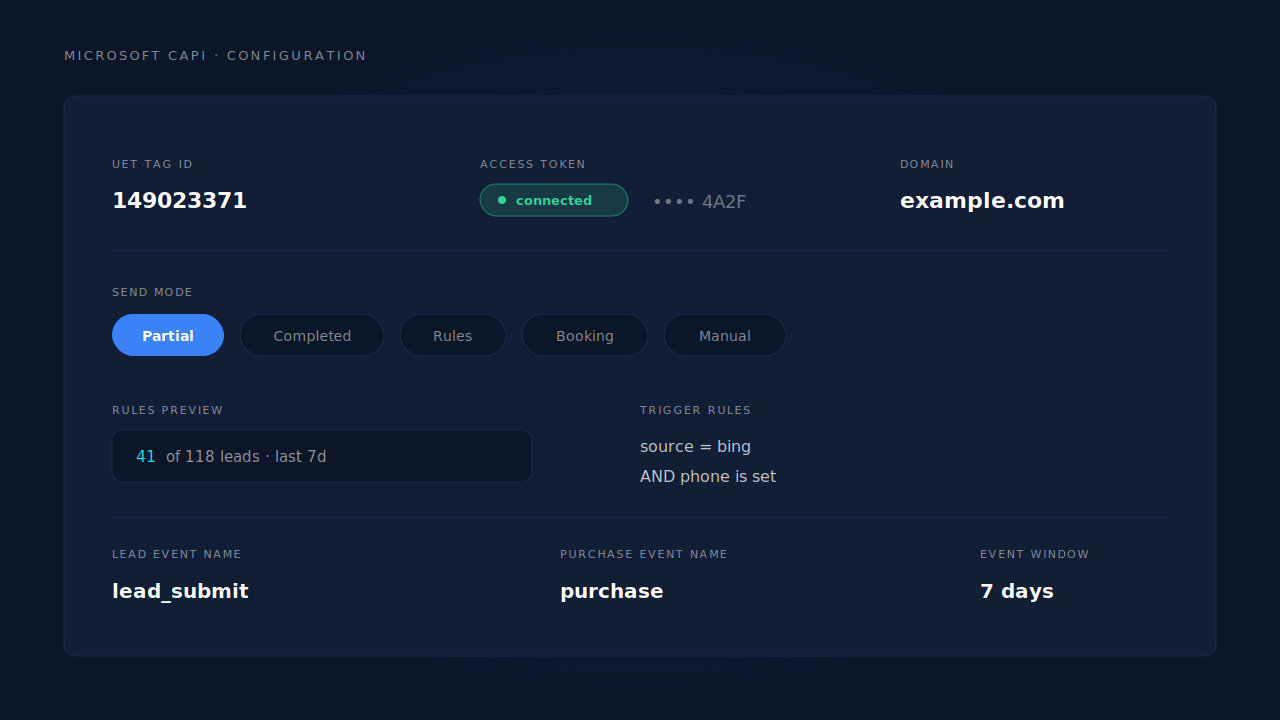
Decide before you send anything, because Microsoft’s bidding learns from what you give it. Feed it every form-starter and it optimises for form-starters. Feed it only closed deals and it may not get enough volume to learn at all. Low-volume lead-gen accounts usually want to move down this ladder toward partial leads; accounts drowning in junk want to move up toward rules.
Whatever you pick, write down why. A send mode changed six months ago and forgotten is how accounts end up bidding on a signal nobody remembers choosing.
What identifiers make a Microsoft server event match?
The click ID does most of the work. msclkid is the parameter Microsoft appends to ad-click landing URLs, and a server event carrying it can be tied back to the click directly — no probabilistic matching involved. Capture it on the landing page, store it, and attach it to the conversion whenever it happens. Every ad platform has its own click ID and they are not interchangeable.
Hashed contact details are the reinforcement: email and phone, normalised before hashing, plus the visitor’s IP address and user agent. Normalisation is where server-side setups quietly fail — Jane.Doe@Example.com and jane.doe@example.com hash to entirely different values, and one of them matches nothing. Trim, lowercase, and put phone numbers into E.164 before hashing, on every code path.
Keep the UET tag installed. A server event with no browser-side context is still a conversion, but a weaker one, and what counts as a good match rate depends on how much of that identifier set you collect. Server-side is a second path, not a replacement.
Will the Conversions API double-count against your UET tag?
Not if both paths send the same event ID and the same event name for the same conversion. Microsoft deduplicates UET and CAPI events on that pair. Send a random ID from the server and a different one from the browser and you have built a double-counting machine that looks, in the reports, like a 2× improvement.
The failure mode is subtle enough to have its own debugging guide: the two paths agree on the ID but disagree on the name, or the IDs are generated at different times from different inputs. Getting Microsoft UET and CAPI to deduplicate is worth reading before you trust the first week of numbers.
The design rule that avoids it: derive the event ID deterministically from the conversion itself, never from a random number generator. Same conversion, same ID, from either path and on every retry.
How do you know the setup is working?
By checking three things, in this order: that events are accepted, that they are accepted without warnings, and that the conversions appear against the right goal in the account.
Acceptance is binary and easy. Warnings are where the real problems hide. Microsoft can accept an event, return a success response, and quietly drop one optional field it did not like — a malformed phone number, an identifier in the wrong shape. The conversion counts; the match quality degrades. If your integration does not surface those warnings, you never see it happen.
The last check is the one people skip: open the Microsoft Ads account and confirm the conversions land against the goal you intended, in the volume you expect. A perfect delivery rate against the wrong goal name is a successful integration doing nothing for your bidding.
How does PartialLeads set up Microsoft’s Conversions API?
You paste the UET tag ID and the access token once, per domain. The token is encrypted at rest under its own key. From that point the same capture layer that already records msclkid, the _uet cookies, the landing page and the contact details a visitor types dispatches conversions to Microsoft server-side, with hashing and E.164 normalisation handled on every dispatch path rather than on some of them.
The send mode is the setting you actually choose: pre-submit on partial leads, post-submit on completed leads (the default), rule-based, booking, or manual. Rules are conditions on lead fields combined with AND or OR, and there is a live preview that answers “this rule would have matched N of M capture-ready leads in the last 7 days” using the same matcher the dispatcher uses — so you can test a condition against your real leads before committing to it. The preview is bounded to the newest 500 leads and tells you when it has hit that cap.
Configs are per client and per domain, so an agency’s sites can point at different Microsoft accounts, and a working config can be duplicated onto a new domain instead of rebuilt. Event IDs are a deterministic SHA-256 hash, unique per config, so a retried dispatch or a redelivered webhook cannot double-fire — and because Microsoft dedups on event ID plus event name, that same ID is what keeps UET and CAPI from counting one conversion twice. Individual leads can also be sent on demand from the lead record.
The honest constraints, because they change what you should expect:
Microsoft’s approval is still Microsoft’s. PartialLeads cannot grant CAPI access, speed it up, or route around it. Until the account is enabled, there is no token to paste.
Historical sends are clamped to a 7-day window. Event timestamps are floored at seven days ago and capped at the present. Leads you captured earlier than that still send, but with a clamped timestamp — this is not unlimited backfill, and nobody should sell it as such.
Warnings are shown, not swallowed. When Microsoft accepts an event but strips an optional field it rejected, that arrives back as a validation warning and is recorded as a dropped identifier on the activity row instead of vanishing into a green checkmark.
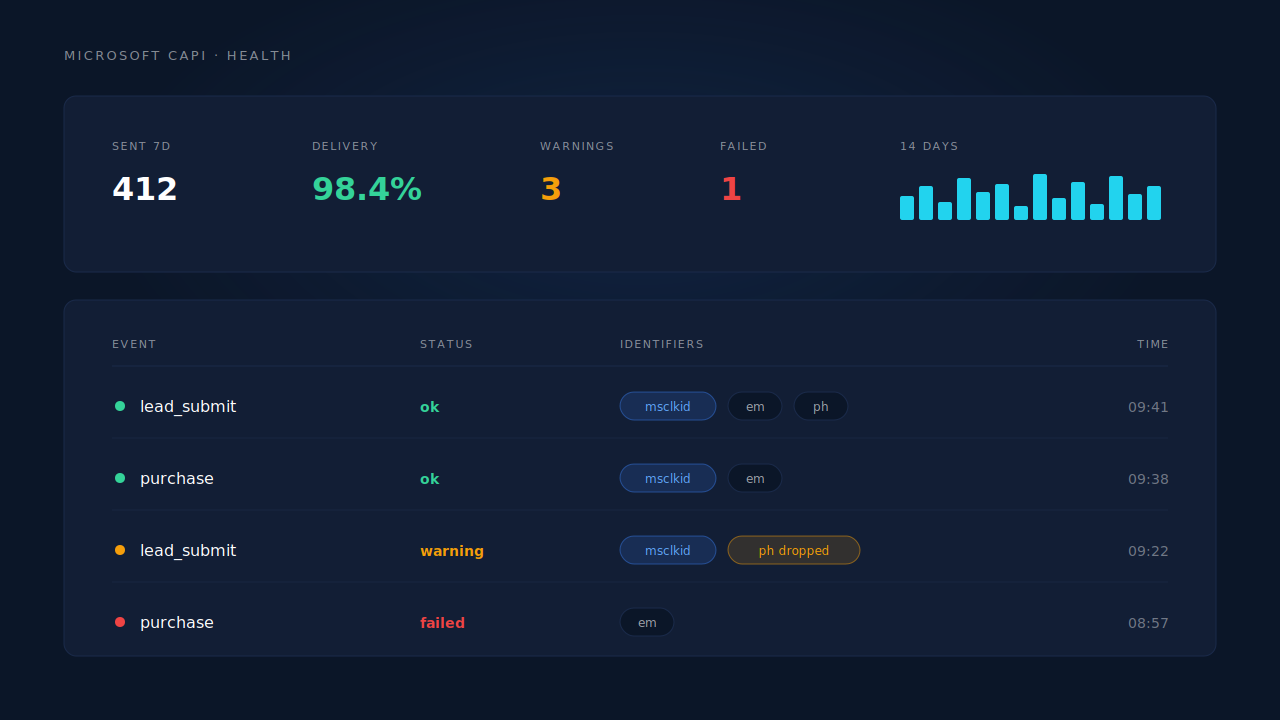
Proof lives on two surfaces. The health strip shows sends over the last 7 days, a 14-day sparkline, the delivery rate, the warning count and, before a subscription is active, how much of the 50-send trial is left — test sends excluded, so a test run never flatters the numbers. The activity log shows the individual events: name, status, timestamp, and the identifiers that made it onto the payload.
| What breaks | The mechanism | Where you see it in the dashboard |
|---|---|---|
| Conversions the browser never reported | Server-side dispatch to Microsoft’s CAPI endpoint using the tag’s own token | Microsoft CAPI activity log |
| Form-starters who never submit are invisible | Field capture on input, flushed before the page unloads, sent as a lead event in partial mode | Leads list, Partial badges |
| The click ID is long gone by conversion time | msclkid and _uet cookies captured at first touch and carried on the identity cluster |
Session click-ID columns, per-lead API column |
| Retries and redelivered webhooks double-fire | Deterministic SHA-256 event ID, unique per config, shared with the UET path | Activity log — one row per conversion |
| An optional field is silently dropped | Partial-success handling records the removed identifier as a warning | Health strip warning count |
| No idea whether events are landing at all | 7-day send count, 14-day sparkline, delivery rate | Microsoft CAPI health strip |
Two rules survive whichever tool you use: decide the send mode before you send anything, and confirm the goal names before you trust a single number in the account.