Microsoft deduplicates a browser UET (Universal Event Tracking) event against a Conversions API event only when both carry the same event ID and the same event name. Miss either half and Microsoft has no basis for treating them as one conversion, so both count. That is the whole mechanism.
What makes the Microsoft version different is where the damage lands. Microsoft’s Conversions API is addressed by your UET tag ID, so both paths write into the same tag, and your conversion goals sit on top of it. A double count does not appear in some separate server column you reconcile later. It lands inside the number your bid strategy optimises against.
What does a Microsoft UET and CAPI double-count look like?
It looks like one conversion goal in Microsoft Advertising reporting roughly twice the records your CRM or order table holds, while your other goals look correct. The ratio is the tell: a clean multiple near 2× on the events you send both ways.
Check the shape before you check any code. Say your database shows 120 leads for a week and the goal shows 228, while a second goal fed only by the browser tag reconciles fine. That is a pairing failure — arithmetic, not modelling. Those figures are illustrative; the pattern is the point. Inflated platform numbers do have a second, unrelated cause — attribution windows and view-through credit — but that mismatch wanders with campaign mix, where a dedup failure holds the same multiple every day.
The cost goes past reporting. Automated bidding treats a doubled goal as real volume, so it learns from a conversion rate that does not exist and pays accordingly.
How does Microsoft decide a UET event and a CAPI event are the same conversion?
On two fields: the event ID and the event name. Microsoft looks for a browser event and a server event that agree on both, and when it finds the pair it keeps one. It does not compare timestamps, values or hashed emails — identity data is what a platform uses to match an event to a person, not to spot duplicates.
That separation is the most common misconception in server-side tracking. Deduplication and match rate are independent systems that happen to share a payload: an event can resolve to a real user perfectly and still double count, and it can match nobody and still deduplicate cleanly.
So a lead that should report once needs both halves to emit the same event name and the same event ID, derived from something both sides can compute independently. Every platform running the Conversions API pattern uses this contract — Meta, TikTok, Pinterest, Microsoft. The field names differ. The logic does not.
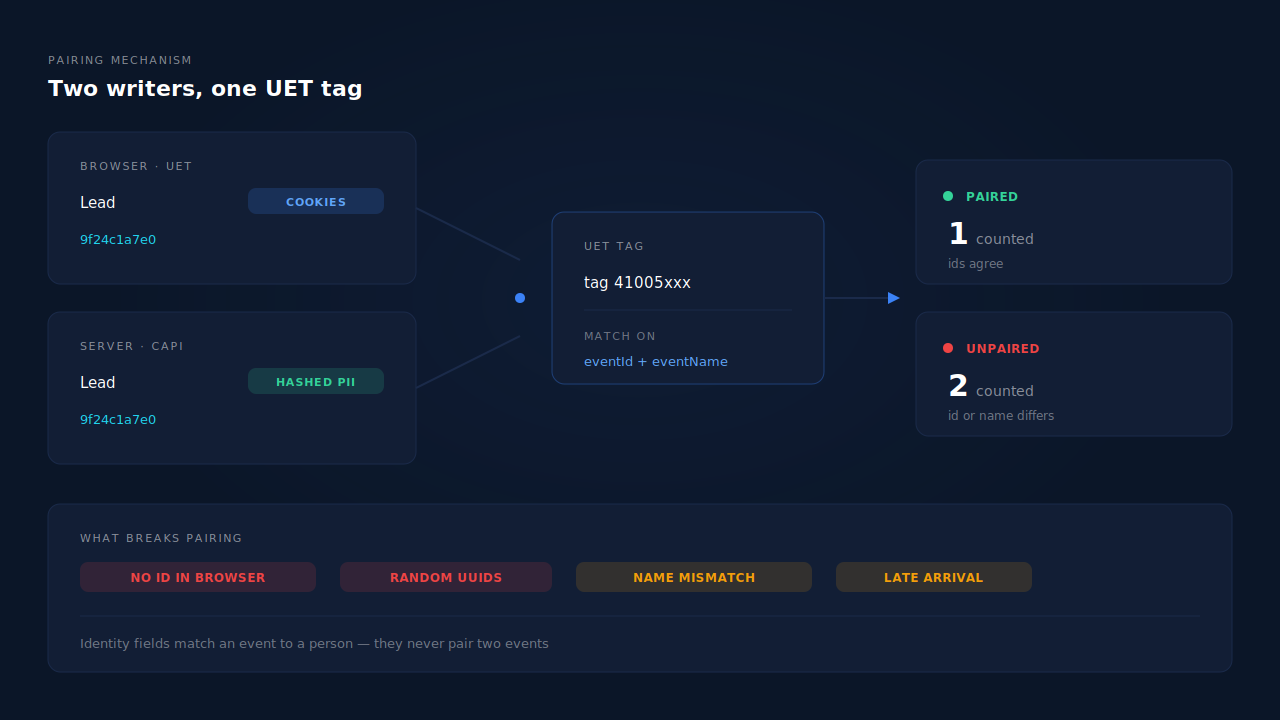
Why does one tag ID for both paths change the problem?
Because it removes the reconciliation surface other platforms give you. With Meta you have a Pixel and a server dataset and can read each side’s volume separately. Microsoft’s Conversions API endpoint takes your UET tag ID in the path, so both writers land in one tag and the goal built on it reports their sum.
Two consequences follow. You cannot diff the two paths inside Microsoft’s reporting to find the duplicate: the only independent number is your own, in your CRM or order table. And one misconfiguration damages a goal you already trusted, because adding server-side sending to a tag that has fed a goal for a year gives you no isolated goal to test in the corner — it changes the meaning of the existing one from the first event onward. If you are standing this path up for the first time, the groundwork for tracking Bing Ads conversions accurately is worth settling first.
Why doesn’t my UET tag send an event ID?
Because classic UET never needed one. Conversion goals were defined by page-load rules or by an event’s category, action and label, and none of that required a unique identifier per conversion. The ID is a deduplication primitive, and deduplication only became relevant when a second path appeared.
This is the most common cause of Microsoft double counting, and it is nobody’s bug. The server half was built to a modern API spec and carries an ID because the spec asks for one; the browser half is whatever was installed years ago and carries none. A missing ID is not a wildcard that matches anything — it removes that event from pairing consideration entirely, so it counts on its own.
The fix is to make the browser tag emit the same derived value your server computes. Read the exact property and its position from Microsoft’s current UET documentation rather than a blog post, because that detail has changed across versions. The harder half is not the syntax anyway — what the event ID should actually be is worth settling before you touch either side.
Two failure modes hide behind an ID that is present on both sides. A random value on each side — a UUID at fire time in the browser, a different one at send time on the server — is valid, unique and will never match. So is the same idea over different inputs: the browser hashing a session ID and timestamp while the server hashes the order number. Determinism only helps when both sides run the same recipe over the same source of truth.
Why does the event name break Microsoft dedup so often?
Because on Microsoft the event name does double duty: it is half the dedup key, and it is also what your conversion goal listens for. A name that is wrong for one job is wrong for both.
The usual story: a team ports a working Meta integration across and sends Purchase and Lead, because that is what their Meta payload builder emits. The API accepts them, and Microsoft’s goal — configured against the name the browser tag has always fired — never sees a match. The server events then either do not count at all, a silent under-count that looks like a delivery problem, or they land as a separate counted path, which is an over-count.
Check this before anything else: open the goal in Microsoft Advertising, read the exact name or the category and action it listens for, then read what your server actually sends. Mapping internal event names onto goal names is a per-integration job, not a default — and it is the five-minute check that saves the week-long investigation. Adding more identifiers to the payload, by contrast, changes nothing about duplicates.
Why do matching IDs still count twice sometimes?
Usually timing. Pairing works on events the platform can consider together, so the two halves of one conversion have to arrive close enough together to be treated as a pair. A webhook retried hours later, a nightly batch, a catch-up worker draining a backlog — each delivers a server event long after its browser twin was counted and settled.
Check Microsoft’s own documentation for the window that applies to your setup rather than a number from a third party. The practical rule holds regardless: send both events as close together as your stack allows, and treat a large gap as a design problem rather than acceptable lag.
This is also why backfills are risky. Replaying three weeks of history will not pair those conversions with browser events counted weeks ago — it adds them. Platforms apply event-time windows too, so old events can be clamped or rejected whatever your dedup key says.
Should you just turn off UET and send everything server-side?
No. It fixes the count and damages the matching, which is the more expensive half.
The browser tag captures what your server cannot see on its own: Microsoft’s own cookies as they are set in the browser, and the msclkid click ID as it lands on your page. Strip it out and your server events survive on hashed email, hashed phone, IP and user agent — your match rate falls exactly as you remove the signal holding it up. You have traded an inflated number for an under-matched one, and the second problem is harder to see.
The supported architecture is both paths running with a shared ID: browser events carry cookie-scoped identifiers the server never sees, server events survive ad blockers, closed tabs and payment redirects. Deduplication is what lets you run both without paying for it twice.
How do you tell a dedup failure from real over-reporting?
Count from the ground truth first: your CRM or order table is the only number here that is not a model. Pull three figures for the same range in the same timezone — conversions on the specific goal, events your server logged as sent, and real records in your database — then read the pattern. Sends roughly equal to records with the goal near double both is a pairing failure. Sends already double your records means your own dispatch is firing twice and Microsoft is reporting faithfully. A goal higher than both by an inconsistent margin is attribution modelling, and there is nothing here to repair.
Then trace one conversion end to end: find a single lead’s browser event and server event and read the two IDs and the two names side by side. It is the same walk used to debug a Meta CAPI that is not deduplicating or to work out why TikTok conversions are not deduplicating — the tooling differs per platform, the trace does not.
How does PartialLeads deduplicate Microsoft UET and CAPI events?
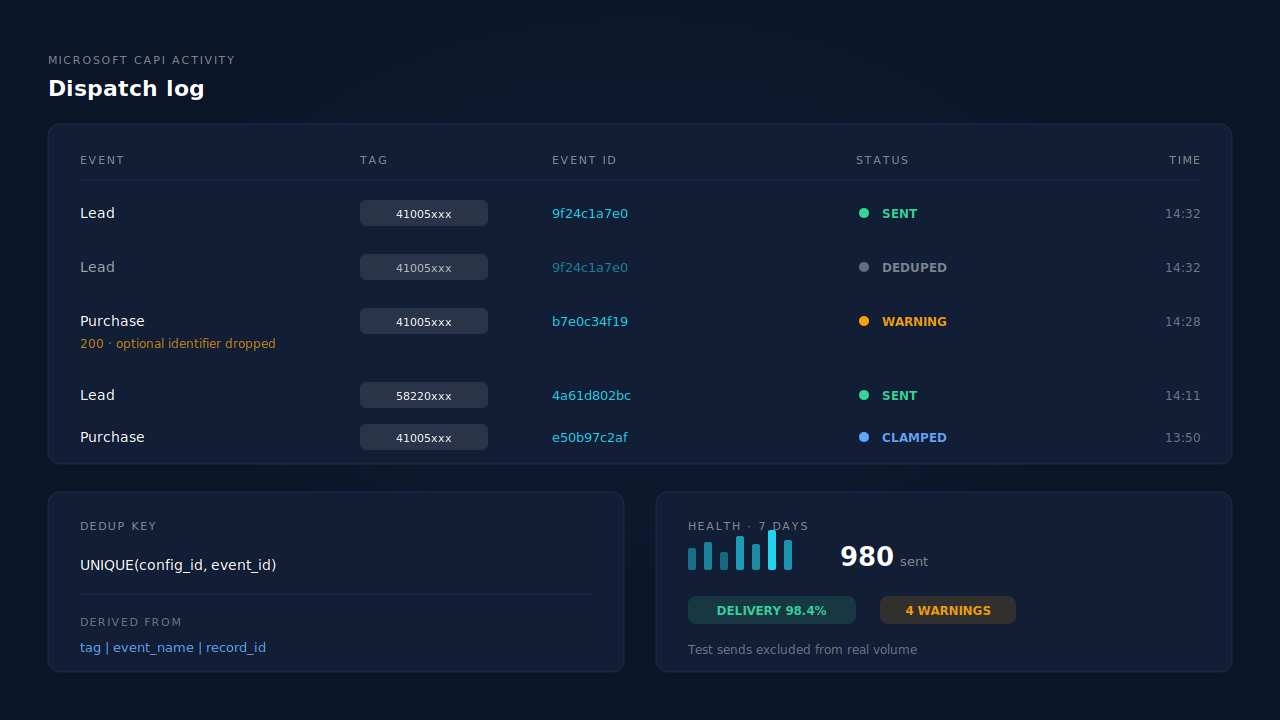
By deriving every event ID from the record instead of inventing one at send time, and by refusing the second write at the database. PartialLeads builds each outbound event ID as a SHA-256 hash of the tag, the event name and the record ID, and every dispatch table is keyed UNIQUE(config_id, event_id). Because the event name is a hash input, a lead event and a purchase event for one record stay distinct rather than colliding. Microsoft pairs UET and Conversions API events on a shared event ID and event name, so that derivation makes retries idempotent at both ends.
Three Microsoft-specific details matter more than the hashing.
Event names are mapped per config, not assumed. Each Microsoft configuration carries its own lead event name and purchase event name, so internal events are translated into whatever the merchant’s goals actually listen for. That is the name-mismatch failure handled as configuration rather than convention.
Configs are per client and per domain, keyed on the UET tag. An agency’s domains can belong to different Microsoft accounts, and each domain’s config points at its own tag with its own token, so sends never cross into the wrong tag.
Late events are clamped, not silently mangled. Event time is floored at seven days ago and capped at now, so a historical send still delivers, with a clamped timestamp. That is a delivery guarantee, not a backfill feature: a clamped event will not pair with a browser event that settled three weeks ago.
The Microsoft CAPI activity log is where you watch all of this. Rows carry the event name, the status and Microsoft’s own response — including the partial-success case where it returns HTTP 200 with an optional field removed and a validation warning, which surfaces as a dropped-identifier warning instead of passing as a clean send. Above the log, the health strip shows sends over the last seven days, a sparkline, the delivery rate and the warning count, with test sends excluded from real volume.
Three honest constraints.
PartialLeads controls its own sends, not your UET tag’s. If your browser tag fires without an event ID, or with a random one, the two events have nothing to pair on. Feed the same derived ID into the browser call, or accept that the two paths count separately.
Keep the browser tag installed. Server-side dispatch does not replace UET. Match quality depends on cookie-scoped identifiers captured client-side, which no server can synthesise.
Microsoft has to approve Conversions API access for your advertiser account before a token exists to paste. That is an external process on Microsoft’s timeline, and no vendor accelerates it.
The split worth internalising: dispatch is yours, matching is the platform’s. Server-side sending does not depend on browser cooperation, so every record in your system can produce an event — but whether Microsoft resolves it to a user and a click depends on its own graph. Deduplication sits entirely on the side you control, which is why it is worth getting exactly right.
| What breaks | The mechanism | Where you see it in the dashboard |
|---|---|---|
| Random or missing event IDs across the two paths | Event ID derived as a SHA-256 of tag, event name and record ID | Microsoft CAPI activity log, event rows |
| A redelivered webhook firing a second conversion | Dispatch tables keyed UNIQUE(config_id, event_id) | Activity log, no second row for one record |
| Server event names your Microsoft goal isn’t listening for | Per-config lead and purchase event-name mapping | Microsoft CAPI config, event names |
| An agency’s domains pointing at different Microsoft accounts | Per-client, per-domain configs keyed on the UET tag | CAPI config list grouped by domain |
| Historical sends arriving outside the event-time window | Event time floored at seven days ago, capped at now | Activity log timestamps |
| A “successful” send that quietly lost an identifier | HTTP 200 validation warnings surfaced as dropped-identifier rows | Activity log warnings, health strip warning count |
| No idea whether a given lead was sent at all | Per-lead dispatch record across every connected API | Leads list, API column |
Tell us what's broken. We'll fix your tracking — free.
Describe the tracking/attribution problem you're stuck on and we'll map it to a fix: server-side conversions to Meta, Google, TikTok and Pinterest, plus first-party tracking that survives Safari. No code required.
Sources
- Microsoft Learn — Universal Event Tracking (UET): https://learn.microsoft.com/en-us/advertising/guides/universal-event-tracking
- Meta for Developers — Deduplicate Pixel and server events: https://developers.facebook.com/docs/marketing-api/conversions-api/deduplicate-pixel-and-server-events
- Meta for Developers — Conversions API: https://developers.facebook.com/docs/marketing-api/conversions-api