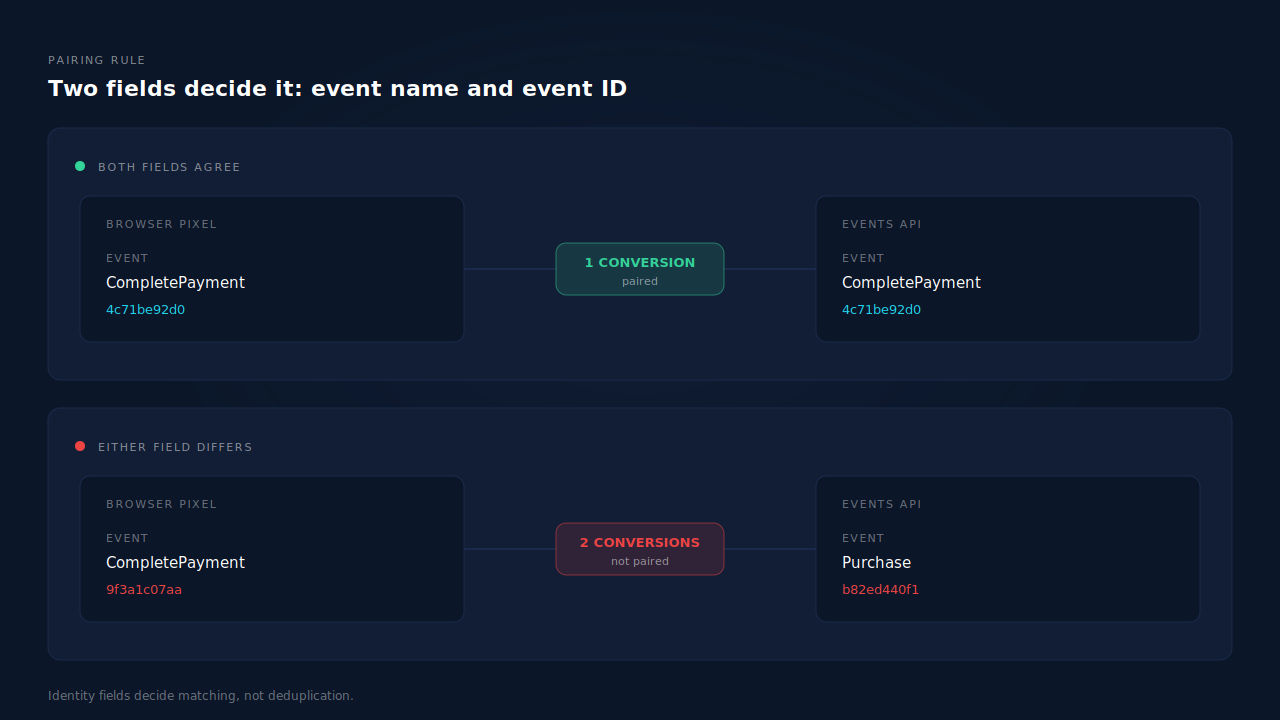
TikTok deduplicates a Pixel event against an Events API event only when both carry the same event name and the same event ID. Miss either half and TikTok has no basis for treating them as one conversion, so it counts both. That is the whole mechanism, and it is why double counting is almost never a bug in your server code.
The failure is quiet. Both events are accepted. Both return success. Your reporting is simply wrong by a factor of about two, and nothing in either system flags it.
What does a TikTok deduplication failure actually look like?
It looks like TikTok Ads Manager reporting roughly double the conversions your store or CRM recorded, on a stack where both the Pixel and the Events API are live. The ratio is the tell: an inflation that hovers near 2× on the events you send twice, while events you send only one way report correctly.
Check the shape before you check the code. If Ads Manager shows 46 purchases for a day your order table shows 24, and the events you fire browser-side only — page views, add-to-carts — look sane, you are looking at a pairing failure, not a measurement philosophy disagreement.
The distinction matters because inflated platform numbers have a second, very different cause: attribution windows and view-through credit, where TikTok counts a conversion your database attributes elsewhere. That mismatch is an inconsistent one, moving with campaign mix. Deduplication failure produces the same clean multiple every day, because it is arithmetic, not modelling.
How does TikTok decide two events are the same conversion?
On two fields: the event name and the event ID. The platform looks for a browser event and a server event that agree on both, and when it finds the pair it keeps one. It does not compare timestamps, purchase values, email hashes, or anything about the person — identity is what the platform uses to match an event to a user, not to recognise two events as duplicates.
That separation is the most common misconception in server-side tracking. Deduplication and event match quality are independent systems that share a payload. An event can match a user perfectly and still double count. An event can match nobody and still deduplicate cleanly.
So a purchase that should report once needs your browser Pixel and your server to emit the same event name — CompletePayment on both sides, not CompletePayment in the browser and Purchase from the server — and the same event ID string, generated from something both sides can independently know. This is the same contract every platform running the Conversions API pattern uses; the field names differ, the logic does not.
Why don’t my event IDs match across the two paths?
Because each side generated its own, independently, and nothing made them agree. This is the default outcome of every integration built in two places by two people, and it accounts for most TikTok double counting.
Three versions of the same mistake:
A random ID on each side. The browser tag generates a UUID at fire time. The server generates a different UUID at send time. Both are valid, both are unique, neither will ever equal the other. Randomness is the enemy here — the ID has to be derived, not invented, so that two systems computing it separately land on the same string.
An ID derived from different inputs. The browser hashes a session ID and a timestamp; the server hashes the order number. Both are deterministic, and they still disagree, because determinism only helps when both sides use the same recipe over the same source of truth. Pick the one identifier that exists on both sides — the order ID, the lead record ID — and build from that.
One side omits it entirely. The Events API payload carries an event ID and the Pixel call does not, or the reverse. A missing ID is not a wildcard; it removes the event from pairing consideration altogether, and the event counts on its own. If you are designing this from scratch rather than debugging it, what the event ID should actually be is worth settling before you write either side.
Worth noting what does not fix it: sending more identifiers. Adding hashed phone numbers and click IDs improves matching and changes nothing about duplicates, because none of those fields are what the platform compares.
Why does the event name break deduplication so often?
Because the two sides of a TikTok integration are usually built against different vocabularies, and a name mismatch fails silently in a way an ID mismatch does not.
TikTok’s standard events have their own names — CompletePayment, SubmitForm, PlaceAnOrder, InitiateCheckout — and they are not the names Meta uses for the equivalent actions. A team that ports a working Meta CAPI integration to TikTok often carries Purchase and Lead across with it. The API accepts them: custom event names are legal. They just never pair with a Pixel firing CompletePayment, and they land in TikTok reporting as separate custom events that look, at a glance, like they are working.
The Shopify case is worth calling out because it is so common. If the TikTok channel app installs its own Pixel while your server sends Events API purchases, you have two publishers you never coordinated, and the app’s event names and IDs are not yours to set. Confirm what the app fires before assuming your server is the problem.
Why do events with matching IDs still count twice?
Usually timing. Deduplication is a pairing operation on data the platform is holding at once, so two events describing one conversion need to arrive close enough together to be considered together. A server event sent days after the browser event — a delayed webhook, a nightly batch, a catch-up job draining a backlog — can arrive long after its twin has been counted and settled.
Check TikTok’s current documentation for the pairing window that applies to your integration rather than trusting a number from a blog post. The practical rule holds regardless: send both events for one conversion as close together as your stack allows, and treat a large gap between the browser event and its server twin as a design problem, not an acceptable lag.
This is also why a backfill is risky. Replaying three weeks of historical conversions into the Events API will not deduplicate against browser events that were counted weeks ago — it adds them.
Why doesn’t turning off the TikTok Pixel fix this?
It fixes the count and damages everything else. Removing the browser Pixel does guarantee one event per conversion, which is why it is the most common response to a double-counting problem and the most expensive.
The Pixel captures the cookie-scoped identifiers your server cannot produce on its own — TikTok’s browser cookie and the click ID as it lands in the browser. Strip it out and your server events survive on hashed email, hashed phone, IP and user agent, and your match quality drops just as you remove the browser signal propping it up. You traded an inflated number for an under-matched one, and the second problem is harder to see.
The supported architecture is both paths running with a shared ID. Browser events carry cookie identifiers the server never sees; server events survive ad blockers and closed tabs that kill browser events. Deduplication is the mechanism that lets you run both without paying for it twice — that is its entire purpose.
How do you tell a dedup failure from real over-reporting?
Count from the ground truth first. Your order table or CRM is the only number in this picture that is not a model; every platform figure is an estimate shaped by windows, view-through credit and identity resolution.
Pull three numbers for the same date range in the same timezone: conversions in TikTok Ads Manager, events your server logged as successfully sent, and real records in your database. Then read the pattern.
Server sends roughly equal to database records, Ads Manager roughly double both: a pairing failure. Server sends already double the database records: your own dispatch is firing twice and TikTok is reporting faithfully — a different bug, upstream of deduplication. Ads Manager higher than both by an inconsistent margin: attribution modelling, and there is nothing here to fix.
One more control worth running: compare a single conversion end to end. Take one order, find its browser event and its server event, and read the two event IDs and the two event names side by side. Five minutes of that answers the question more definitively than a week of ratio-watching. The same trace is how you debug a Meta CAPI that is not deduplicating — the tooling differs, the single-order walk does not.
How does PartialLeads deduplicate TikTok conversions?
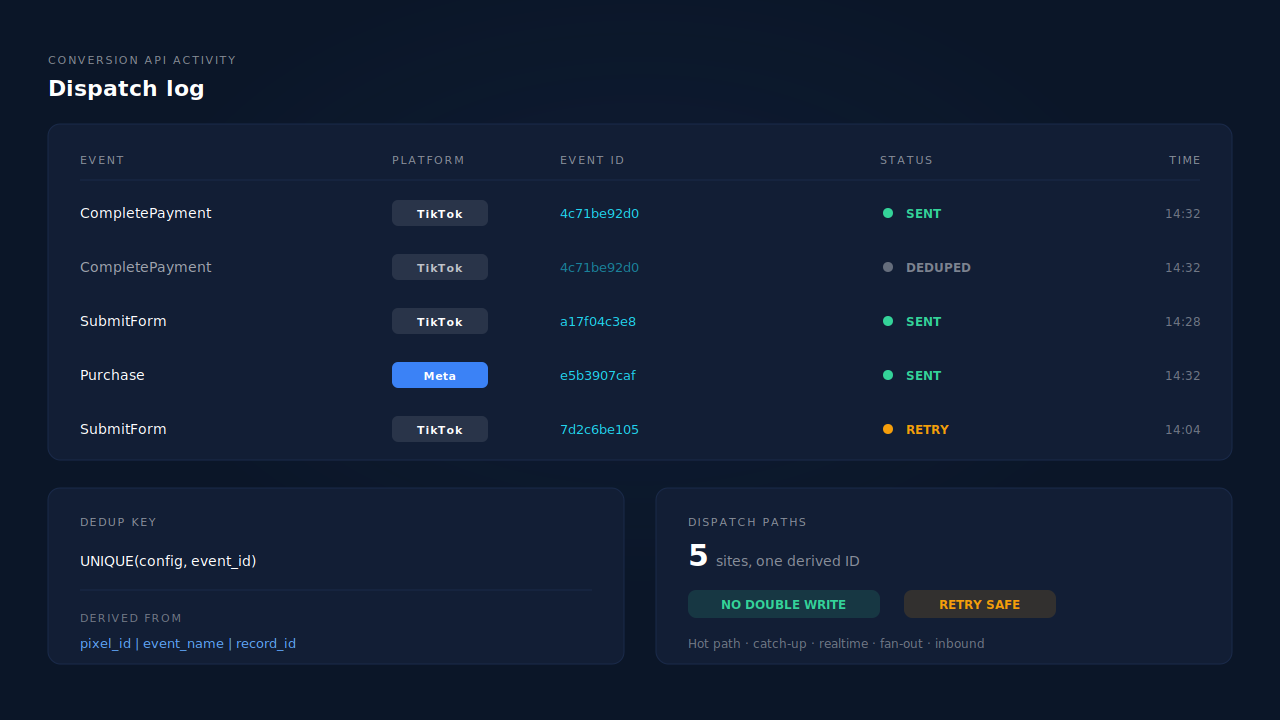
By making every event ID deterministic, and by refusing the second write at the database. PartialLeads builds each outbound event ID as a SHA-256 hash of pixel_id | event_name | record_id, and every dispatch table is keyed UNIQUE(config, event_id). Two things follow from that.
The ID is derived from the record, not invented at send time, so any path that handles the same conversion computes the same string. And because the event name is one of the hash inputs, a CompletePayment and a SubmitForm for the same record are correctly treated as different events rather than colliding.
That matters because there are five separate dispatch sites in the product — the hot path, the catch-up worker, real-time conversion, the ecommerce fan-out, and inbound purchase processing — built so no signal path silently drops a conversion. Five paths to one destination is the architecture that double-counts if IDs are not deterministic. Here a redelivered webhook, an automatic retry after a transient failure, and the catch-up worker all resolve to the same ID, and the unique constraint physically refuses the duplicate.
The CAPI activity log is where you watch it work. Each row carries the event name, the event ID, the destination platform and a status — sent, queued, deduped, or failed with the platform’s own error text. A conversion that arrived twice shows as one sent row and one deduped row against a single ID, which is the difference between dropping an event and recognising it. Per-lead, the API column on the Leads list shows which conversion APIs that specific lead was dispatched to.
Three honest constraints.
PartialLeads controls its own sends, not your Pixel’s. If your browser Pixel fires CompletePayment with a random ID from a hand-rolled tag, a GTM template or a channel app, the two events carry different IDs and TikTok has no reason to pair them. Feed the same deterministic ID into the Pixel call, or accept that the browser event and the server event will count separately.
Keep the base tag installed. Server-side dispatch does not replace the browser Pixel; match quality depends on cookie-scoped identifiers captured client-side, and no server can synthesise them. Removing the Pixel to stop double counting solves the wrong problem.
Deduplication cannot repair double-counting inside your own store. If your platform genuinely writes two orders for one sale, two distinct record IDs exist, and both are legitimately unique conversions. That is an order-data problem upstream of anything a tracking tool can see.
The split worth internalising: dispatch is yours, matching is the platform’s. Every order in your admin produces a conversion event, because purchases fire server-side from the order webhook regardless of browser cooperation. Whether TikTok resolves that event to a user depends on the platform’s own graph, which no vendor controls. Deduplication sits entirely on the side you control — which is why it is worth getting exactly right.
| What breaks | The mechanism | Where you see it in the dashboard |
|---|---|---|
| Random event IDs on the browser and the server | Deterministic SHA-256 of pixel_id, event_name and record_id | CAPI activity log, event_id column |
| A redelivered webhook firing a second conversion | Dedup tables keyed UNIQUE(config, event_id) | CAPI activity log, deduped rows |
| Several dispatch paths racing for one sale | All five dispatch sites derive the same ID from the same record | CAPI activity log, one sent row per conversion |
| Retries after a transient platform failure | Retry taxonomy: transient retried, permanent not retried, auth flagged for reconnect | CAPI activity log status and error text |
| The same order sent to several ad platforms | Destination config is part of the dedup key, so platforms never collide | Per-platform activity logs |
| No idea whether a given lead was sent twice | Per-lead dispatch record across every connected API | Leads list, API column |
Tell us what's broken. We'll fix your tracking — free.
Describe the tracking/attribution problem you're stuck on and we'll map it to a fix: server-side conversions to Meta, Google, TikTok and Pinterest, plus first-party tracking that survives Safari. No code required.
Sources
- TikTok for Business — Marketing API developer documentation portal: https://business-api.tiktok.com/portal/docs
- Meta for Developers — Deduplicate Pixel and server events: https://developers.facebook.com/docs/marketing-api/conversions-api/deduplicate-pixel-and-server-events
- Meta for Developers — Conversions API: https://developers.facebook.com/docs/marketing-api/conversions-api