“ttq is not defined” means a TikTok event snippet tried to call ttq.track() before the TikTok pixel base code had created the ttq object. On WooCommerce, the event code was either printed above the base code or the base code was delayed by a caching, optimisation or consent plugin. The browser stops that script, so the event it carried never reaches TikTok.
Below: what the error costs, why the order breaks, how to find the cause, and how to send TikTok events that don’t depend on ttq at all.
What does “ttq is not defined” actually mean?
It is a JavaScript ReferenceError. The browser was asked to use a variable called ttq that doesn’t exist yet. ttq is the object TikTok’s pixel base code creates; every event call, such as ttq.track('AddToCart', …), goes through it. If an event snippet runs first, there is nothing to call, the browser throws, and the rest of that script is skipped.
You’ll see it in the browser console (right-click → Inspect → Console) as:
Uncaught ReferenceError: ttq is not defined
The console also names the file and line that threw it. That line tells you which snippet ran too early, and it is the first clue to which plugin printed it.
The important part: the base code normally creates a small ttq queue straight away, before TikTok’s main library has even downloaded. Event calls made after that point are queued and sent later, so “the library is slow” is not the cause. The error appears only when an event call runs before the base code itself has run.
What does the error cost you?
Every event snippet that throws is lost for that page view. If the snippet carried the AddToCart, InitiateCheckout or purchase event, TikTok never receives it. The ad account sees fewer conversions than your store took, the algorithm optimises on a thinner and skewed signal, and reported ROAS drops even though sales didn’t.
It is also intermittent, which makes it hard to spot. Script order can change with cache state, a logged-in admin view, or whether consent was already given. So you can test a page as an admin, see events fire, and still lose them for most real visitors.
A quick way to measure it: compare TikTok Events Manager’s purchase count for a week with that week’s paid WooCommerce orders. A gap doesn’t prove this error is the cause (attribution windows and ad blockers also play a part), but a gap plus the console error is strong evidence.
Why does the event code run before the TikTok pixel base?
Because WordPress prints scripts in the order they are registered, unless a script declares what it depends on. WordPress lets a plugin list, per script, “an array of registered script handles this script depends on”, and then guarantees those print first. If the event snippets don’t declare the base code as a dependency, nothing stops them landing above it, and other plugins can reorder them.
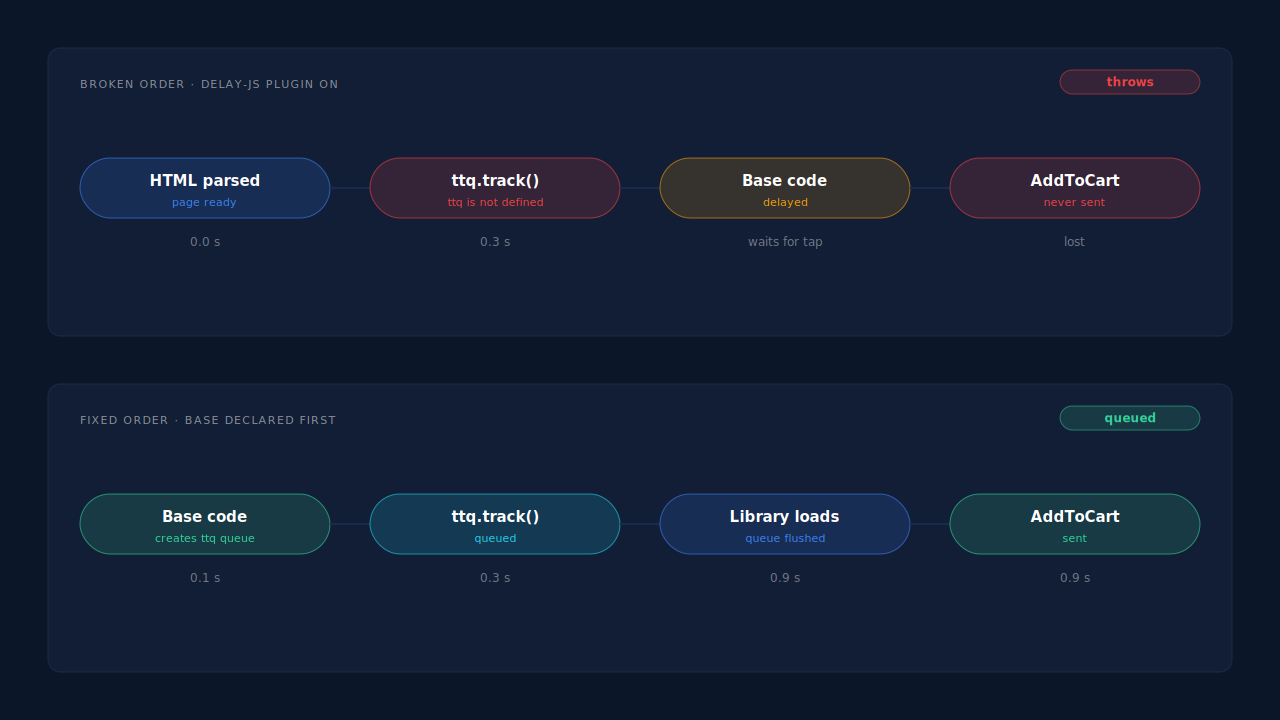
Store owners have reported exactly this on the TikTok plugin’s support forum: the pixel base and the event snippets enqueued without a dependency between them. Four things commonly turn that into the error.
Optimisation plugins that delay or defer JavaScript
“Delay JavaScript execution” features (in WP Rocket, LiteSpeed Cache, Perfmatters, FlyingPress and similar) hold scripts back until the visitor scrolls, taps or moves the mouse. If the base code is delayed and an inline event snippet isn’t, the event runs first. Combining or minifying scripts can reorder them the same way.
Consent plugins that block the base code
Cookie banners often hold the TikTok base code until the visitor accepts marketing cookies. If the plugin blocks the base code but not the event snippets, every event before consent throws, and those events are gone even after the visitor clicks Accept.
Two TikTok installs on one site
The TikTok for WooCommerce plugin, a Google Tag Manager tag and code pasted into the theme can all print TikTok code. One may fire events while another, delayed or removed, was meant to provide the base. Two sources also double-count when both work, as explained in why TikTok conversions aren’t deduplicating.
Full-page caching
A cached page is a snapshot of the HTML. If the snapshot was taken while one plugin was inactive or ordered differently, every visitor gets the broken order until the cache clears.
How do you fix “ttq is not defined” on WooCommerce?
Make sure the base code runs before any event code, every time, for every visitor. In practice that means finding which plugin moved or delayed it, excluding TikTok’s scripts from that plugin’s delay and combine features, gating base code and events on the same consent signal, and keeping exactly one TikTok install. Then test as a logged-out visitor with an empty cache.
- Reproduce it as a real visitor. Open a private window, clear consent, and walk from a product page to add to cart. Watch the console. Admin views are often excluded from caching and delay rules, so they hide the bug.
- Read the page source. Search for
ttq.load(the base code) andttq.track(events). If attq.trackappears above the base, the order is wrong in the HTML itself. - Switch off JS optimisation for one test. Disable delay, defer and combine in your caching plugin, purge every cache, and retest. If the error disappears, add the TikTok base code and event snippets to that plugin’s exclusion list instead of leaving optimisation off.
- Align consent. Configure the consent tool so the event snippets are blocked and released together with the base code, not separately.
- Remove duplicates. Pick one TikTok install. If the plugin owns the pixel, remove any GTM tag or theme code that also prints TikTok code.
- Update the plugin and check its changelog and support forum for a load-order fix.
If you maintain custom code, declare the dependency so WordPress enforces the order. Attaching inline event code to the base script’s handle prints it straight after the base:
// Illustrative — print event code only after the TikTok base script
wp_add_inline_script(
  'tiktok-pixel-base',              // the base script's registered handle
  "ttq.track('ViewContent', {});",
  'after'
);
Can you just wrap the call in “if (window.ttq)”?
You can, and the error goes away, but the events are still lost. A guard like if (window.ttq) ttq.track(...) skips the call when ttq doesn’t exist, so the console is clean and TikTok still receives nothing. It hides the symptom. Only use it as a stopgap while you fix the order, and say so in a code comment.
The deeper issue is that every browser-side event depends on the page loading correctly in the visitor’s browser. Ad blockers, consent choices and closed tabs remove events too; see how ad blockers break conversion tracking. For purchases, many buyers never even reach the thank-you page where a browser purchase event would fire, which is covered in what share of WooCommerce buyers never reach the thank-you page.
That is why TikTok offers the Events API: your server sends the event directly to TikTok, with no ttq involved. The general model is the same as Meta’s, explained in what the Conversions API is.
How does PartialLeads send TikTok events without depending on ttq?
PartialLeads sends WooCommerce events to TikTok’s Events API from its own servers. No ttq.track() call is involved, so load order, delayed base code and a missing ttq object can’t drop them.
Funnel events. The PartialLeads WooCommerce plugin’s browser script records view product, add to cart (classic AJAX, classic form and the Blocks Store API) and begin checkout, then hands each one to PartialLeads. PartialLeads forwards them server-side to TikTok, Meta and Pinterest. The script never waits for TikTok’s base code.
Purchases. The purchase is webhook-owned. When a WooCommerce order reaches processing or completed, the order webhook tells PartialLeads, which matches the order to the visitor who placed it (visitor ID, then email, then phone, then IP) and sends the purchase to TikTok with the order total and currency. Nothing fires on the thank-you page, so every paid order produces a TikTok purchase event whatever the browser did.
Identifiers. The ttclid from the TikTok ad click is captured when the visitor lands and kept with their session. Email and phone are normalised and hashed before sending; how to raise match rates further is covered in fixing TikTok Events API match quality.
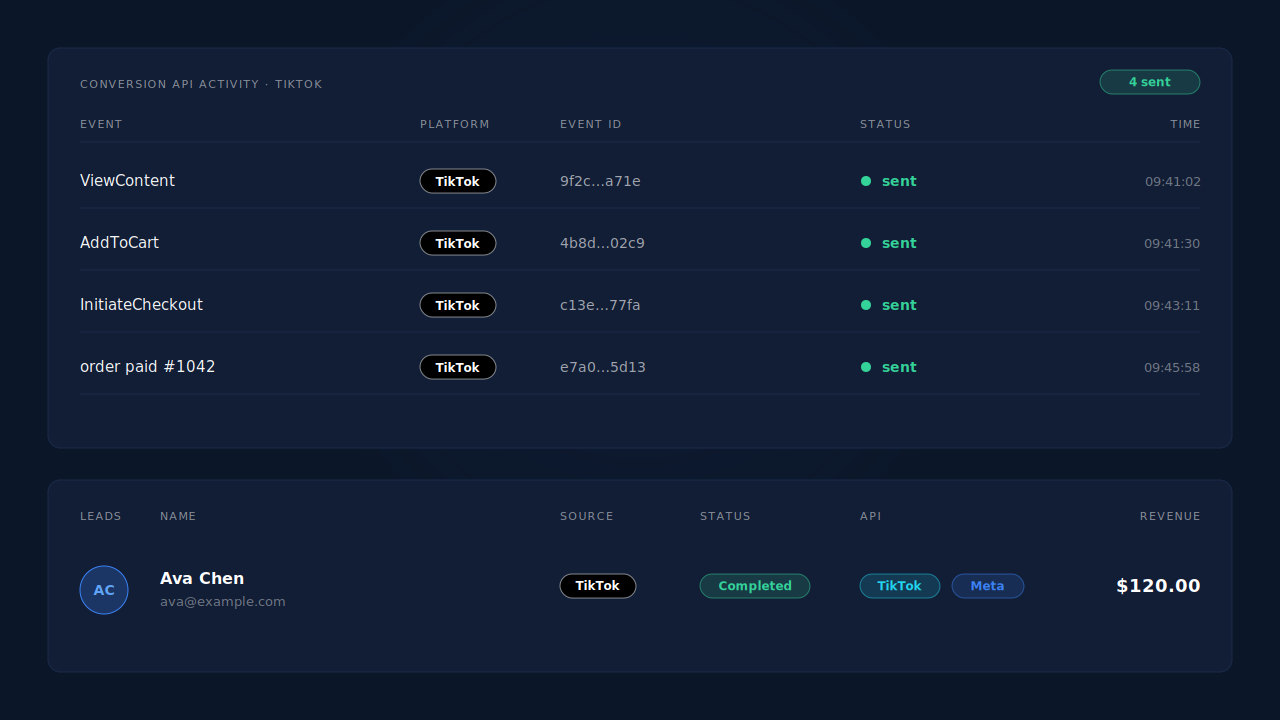
Where you see it working. The conversion API activity log lists each TikTok event with its event ID, status and timestamp, including the platform’s error text if a send fails. On the Leads list, the API column shows which conversion APIs each lead was sent to. The Purchases ledger shows every order, matched or unmatched, so you can reconcile paid orders against TikTok sends.
The honest constraints.
- Keep one source per event. PartialLeads uses its own event IDs and does not deduplicate against TikTok for WooCommerce. If both send purchases, TikTok can count each order twice. Switch off the plugin’s version of any event PartialLeads sends.
- Only paid orders. Processing and completed orders are sent; pending, on-hold, failed and cancelled aren’t. Bank-transfer and cash-on-delivery orders are sent once marked paid. For WooCommerce Subscriptions, only the first payment is sent.
- An order is sent once. Later edits, such as an upsell added to the same order, don’t change the value or re-send the event.
- Funnel events still start in the browser. If a visitor’s blocker stops the PartialLeads script, that visitor’s add-to-cart isn’t recorded. Purchases don’t have this dependency.
- Delivery isn’t matching. We control that each paid order is sent; whether TikTok ties it to a user and an ad depends on the identifiers and on TikTok.
| What breaks | The mechanism | Where you see it in the dashboard |
|---|---|---|
| Event snippet runs before the base and throws | Events forwarded server-side to the TikTok Events API, no ttq call | Conversion API activity log, TikTok rows |
| Delay-JS or consent plugin holds the base code | Funnel events recorded by the PartialLeads script, sent from its servers | Activity log, ViewContent / AddToCart / InitiateCheckout |
| Purchase snippet never runs on the thank-you page | Purchase sent from the WooCommerce order webhook for every paid order | Purchases ledger vs TikTok sends |
| The ad click is lost between pages | ttclid captured on landing and kept with the session | Leads list, API column per lead |
| Plugin and server both send the purchase | Not deduplicated across tools — keep one source per event | Activity log event IDs vs TikTok Events Manager |
Tell us what's broken. We'll fix your tracking — free.
Describe the tracking/attribution problem you're stuck on and we'll map it to a fix: server-side conversions to Meta, Google, TikTok and Pinterest, plus first-party tracking that survives Safari. No code required.
Sources
- https://raw.githubusercontent.com/WordPress/wordpress-develop/trunk/src/wp-includes/functions.wp-scripts.php
- https://developers.facebook.com/docs/marketing-api/conversions-api