TikTok for WooCommerce slows a store when it sends server-side events to TikTok’s Events API from inside the page request. WordPress waits for each outbound HTTP request to finish before it carries on building the page, for up to five seconds by default. A page making two TikTok calls waits for both.
The browser pixel is rarely the problem. The fix is to move the TikTok calls out of the page request, and below is how to confirm that’s what is happening, what your options are, and what each one costs you in tracking.
Why does TikTok for WooCommerce make my pages slow?
Server-side tracking means your server, not the visitor’s browser, sends the event to TikTok. If a plugin does that in PHP while WordPress is rendering the page, the page waits. The visitor sees a white screen for the length of the TikTok round trip, plus any retries, on every page that fires an event.
Here is the mechanism. Most WordPress plugins make outbound calls through the WordPress HTTP API (wp_remote_post() and friends). In WordPress core, two of that API’s defaults matter here:
blocking, default true. The calling code waits for the remote server’s response before moving on. Only a request explicitly set to non-blocking is sent with “processing returned to the calling code immediately”.timeout, default 5. The connection can stay open for up to five seconds before WordPress gives up.
Put those together. A blocking call to TikTok that responds in 300 milliseconds adds 300 milliseconds. A call that hits a slow network path, a DNS hiccup or a TikTok endpoint under load adds up to five seconds, and the page still has to finish rendering afterwards. Two calls per page, say ViewContent plus a page-level event, can stack.
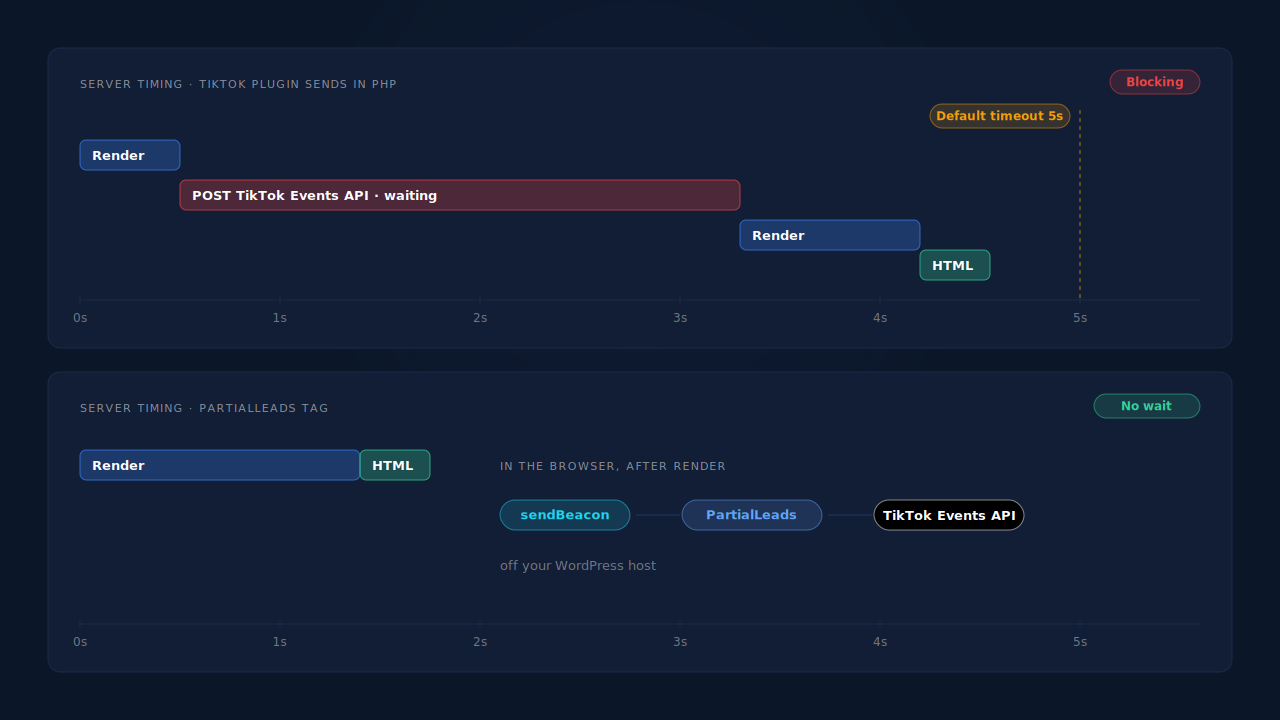
Store owners have reported exactly this on the TikTok plugin’s support forum: Events API calls blocking page load on every page, and major site slowdowns that went away when the plugin was switched off. You don’t need to take that on faith for your store. You can measure it.
Why is it worse on product and cart pages?
Those are the pages that fire funnel events: ViewContent on a product page, AddToCart when an item goes in the cart, InitiateCheckout at checkout. A plugin that sends each event server-side as it happens puts a TikTok round trip on exactly the pages that sell. Your home page may look fine while product pages crawl.
How do you confirm the TikTok plugin is the cause?
Compare time to first byte (TTFB, how long the server takes before it sends the first byte of HTML) with the plugin on and off, on an uncached product page. If TTFB drops by roughly the length of a TikTok round trip when the plugin is off, you’ve found it. Then log the outbound calls to prove which requests were waiting.
- Pick an uncached URL. Add a throwaway query string (
?nocache=123) or test while logged in, so the page is built fresh by PHP. - Measure TTFB five times with the plugin active:
# Prints time to first byte in seconds; run it five times
curl -s -o /dev/null -w '%{time_starttransfer}\n' "https://yourstore.com/product/example/?nocache=$RANDOM"
- Deactivate TikTok for WooCommerce only, purge caches, and repeat. Reactivate it afterwards.
- Log the calls. If the plugin uses the WordPress HTTP API, a temporary must-use plugin can time each request to a TikTok host using two core hooks,
http_request_argsandhttp_api_debug:
<?php
// wp-content/mu-plugins/log-tiktok-http.php — temporary diagnostic, delete after testing
add_filter( 'http_request_args', function ( $args, $url ) {
    if ( false !== strpos( $url, 'tiktok' ) ) {
        $GLOBALS['pl_http_start'][ $url ] = microtime( true );
    }
    return $args;
}, 10, 2 );

add_action( 'http_api_debug', function ( $response, $context, $class, $args, $url ) {
    if ( isset( $GLOBALS['pl_http_start'][ $url ] ) ) {
        $ms = round( ( microtime( true ) - $GLOBALS['pl_http_start'][ $url ] ) * 1000 );
        error_log( sprintf( 'TikTok call %s: %d ms, blocking=%s, timeout=%ss, page=%s',
            $url, $ms, $args['blocking'] ? 'yes' : 'no', $args['timeout'],
            $_SERVER['REQUEST_URI'] ?? 'cli' ) );
        unset( $GLOBALS['pl_http_start'][ $url ] );
    }
}, 10, 5 );
Load a product page and check your PHP error log. Each line tells you which page triggered a TikTok call, how long it took, and whether it was blocking. If nothing is logged but TTFB still drops with the plugin off, the plugin is using its own HTTP client or the delay is elsewhere in it; a profiler such as Query Monitor or your host’s APM will show where.
Doesn’t full-page caching fix it?
Partly, and it trades speed for tracking. A page served from a full-page cache never runs PHP, so no server-side TikTok call is made and the page is fast. But that also means no server-side event is sent for that view. Uncached requests, such as logged-in customers, cart and checkout pages, and any URL with a query string your cache ignores, still pay the full delay.
That split is why “it’s fast for me” and “customers say it’s slow” can both be true. You may be seeing cached pages; a shopper with items in the cart is not. Caching interacts with tracking in other ways too, as covered in why page caching leaves WooCommerce order attribution fields empty.
How do you fix it without losing TikTok events?
Get the TikTok calls off the page request. Each of the options below removes the delay; they differ in what happens to your event data. Pick the one whose tracking cost you can live with, and test TTFB again after the change.
Turn off the plugin’s server-side events and keep the browser pixel. If the plugin version you run offers a setting for this, it removes the PHP calls. The cost: you’re back to browser-only events, which lose visitors whose ad blocker or consent choice stops the pixel. See how ad blockers break conversion tracking.
Lower the timeout. WordPress lets code filter the default with http_request_timeout. A one-second cap limits the worst case. The cost: any TikTok call slower than the cap is abandoned, so you lose those events silently. It is a stopgap, not a fix.
Send in the background. The correct engineering fix is to queue the event and send it outside the visitor’s request, for example with Action Scheduler, the job queue WooCommerce itself uses, which describes itself as “a scalable, traceable job queue for background processing large sets of actions in WordPress”. That needs a code change in the plugin, so it is a request to the plugin’s developers or a custom build, not a setting.
Send from another server. Let the browser hand the event off without waiting, and have a separate service deliver it to TikTok. Your WordPress host then makes no TikTok call at all. This is the general model behind the Conversions API, and it is how TikTok’s Events API is meant to be used when you don’t want to rely on the pixel alone; the setup for a pixel-free source is in how to send lead events to TikTok without a pixel.
Whichever route you take, keep one source per event. If the plugin and another tool both send AddToCart or the purchase, TikTok can count each one twice; why TikTok conversions aren’t deduplicating explains the event-ID rules.
How does PartialLeads send TikTok events without slowing WooCommerce?
PartialLeads sends your WooCommerce events to TikTok’s Events API from its own servers, so your WordPress host never makes a TikTok call while a page is being built. The store loads one async tag; the browser hands each event to PartialLeads without waiting for a reply, and PartialLeads delivers it to TikTok.
Funnel events. The PartialLeads WooCommerce plugin’s browser script records view product, add to cart (classic AJAX, classic form and the Blocks Store API) and begin checkout. Each event leaves the browser with sendBeacon, falling back to a keepalive fetch, which are built to send without holding up the page. PartialLeads forwards them server-side to TikTok, and to Meta and Pinterest if you’ve connected them.
Purchases. The purchase is webhook-owned. When an order reaches processing or completed, WooCommerce’s order webhook tells PartialLeads, which matches the order to the visitor who placed it (visitor ID, then email, then phone, then IP) and sends the purchase to TikTok with the order total and currency. Nothing fires on the thank-you page.
No storefront calls from the plugin. The plugin’s own outbound calls, a subscription sync and an update check, run in the WordPress admin or in the background, not on storefront requests.
Identifiers. The ttclid from the TikTok ad click is captured when the visitor lands and kept with the session. Email and phone are normalised and hashed before sending; fixing TikTok Events API match quality covers what else raises matching.
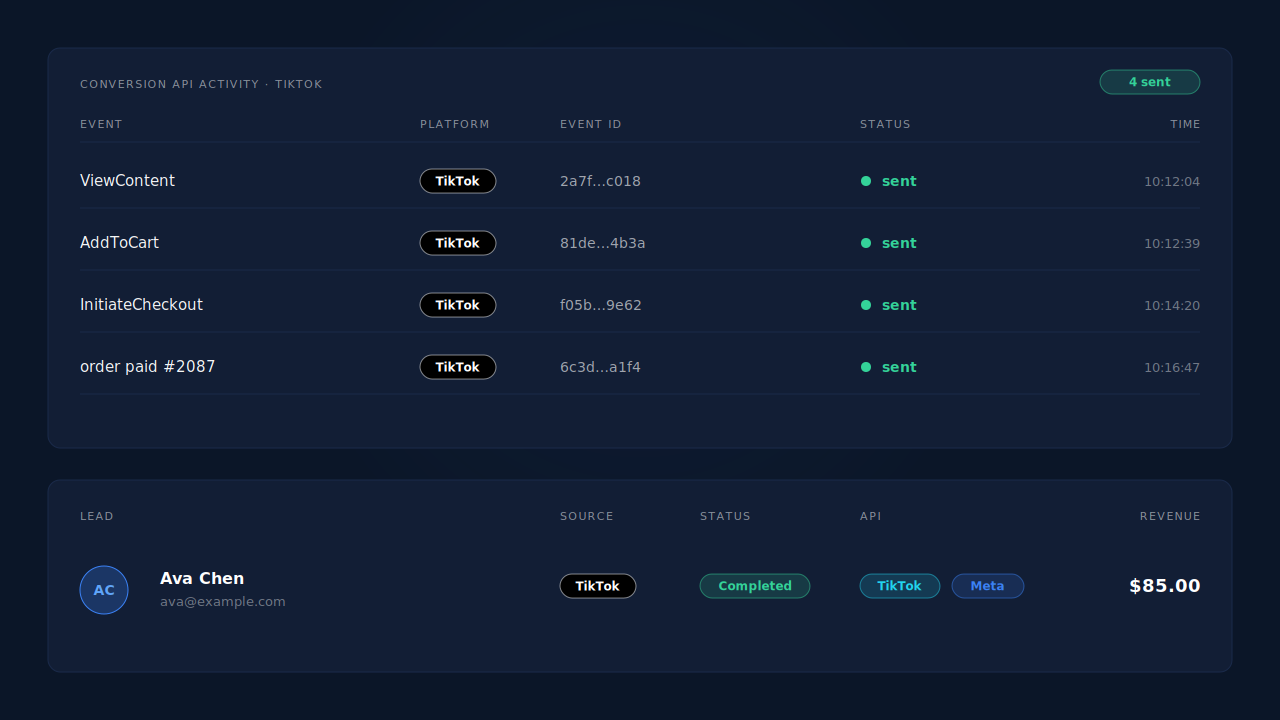
Where you see it working. The install page confirms the tag is live on the store. The conversion API activity log lists each TikTok event with its event ID, status and timestamp, including TikTok’s error text if a send fails. On the Leads list, the API column shows which conversion APIs each lead was sent to. The Purchases ledger shows every order, matched or unmatched, so you can reconcile paid orders against TikTok sends. The speed proof itself is your own TTFB test before and after; no PartialLeads screen measures your page load.
The honest constraints.
- Keep one source per event. PartialLeads uses its own event IDs and does not deduplicate against TikTok for WooCommerce. Switch off the plugin’s server events (or the plugin) for any event PartialLeads sends.
- Only paid orders. Processing and completed orders are sent; pending, on-hold, failed and cancelled aren’t. Bank-transfer and cash-on-delivery orders are sent once marked paid. For WooCommerce Subscriptions, only the first payment is sent.
- An order is sent once. Later edits to the same order don’t change the value or re-send the event.
- Funnel events still start in the browser. If a blocker stops the PartialLeads script, that visitor’s add-to-cart isn’t recorded. Purchases don’t depend on it.
- Delivery isn’t matching. We control that each paid order is sent; whether TikTok ties it to a user and an ad depends on the identifiers and on TikTok.
- It removes one cause of slowness. Other plugins, your theme and your host still decide how fast the store is.
| What breaks | The mechanism | Where you see it in the dashboard |
|---|---|---|
| PHP waits on TikTok Events API calls during page render | Events delivered to TikTok from PartialLeads’ servers, not your WordPress host | Conversion API activity log, TikTok rows |
| Funnel pages (product, cart, checkout) load slowest | Browser hands events off with sendBeacon / keepalive fetch, no reply awaited | Activity log, ViewContent / AddToCart / InitiateCheckout |
| Purchase tracking tied to a slow thank-you page | Purchase sent from the WooCommerce order webhook for every paid order | Purchases ledger vs TikTok sends |
| Turning the plugin off loses server-side events | Server-side TikTok sends continue with ttclid and hashed identifiers | Leads list, API column per lead |
| Plugin and PartialLeads both send the same event | Not deduplicated across tools — keep one source per event | Activity log event IDs vs TikTok Events Manager |
Tell us what's broken. We'll fix your tracking — free.
Describe the tracking/attribution problem you're stuck on and we'll map it to a fix: server-side conversions to Meta, Google, TikTok and Pinterest, plus first-party tracking that survives Safari. No code required.
Sources
- https://raw.githubusercontent.com/WordPress/wordpress-develop/trunk/src/wp-includes/class-wp-http.php
- https://raw.githubusercontent.com/woocommerce/action-scheduler/trunk/README.md