You send lead events to TikTok without a browser pixel by posting them to the TikTok Events API from your own server, attached to an event source you created in TikTok Events Manager. The payload has to carry what the tag would have carried: hashed email, hashed phone, the ttclid click ID from the landing URL, the visitor’s IP address and user agent, an event ID and an event time. TikTok accepts the event. Your identifiers decide what it’s worth.
This is a normal setup, not a hack. Lead-gen stacks routinely have no browser to put a tag in: leads arrive by phone, a CRM creates the contact hours later, the funnel is an API, the site is consent-gated in the EU, or the whole front end belongs to a platform you can’t edit. The mechanics below are the same ones every Conversions API uses — TikTok just makes you do more of the work yourself when the tag isn’t there.
Can you run TikTok conversions with no pixel installed?
Yes. The word “pixel” covers two different things, and only one of them is required. A TikTok pixel is (1) an event source object inside TikTok Events Manager, which holds a pixel code and an access token, and (2) a JavaScript tag that runs in your visitor’s browser. Server-side events need the first. They do not need the second.
Every event you post carries the pixel code of the event source it belongs to, which is how TikTok knows whose ad account should get credit. Create the event source, generate an access token, and you can send conversions from a server that never serves a web page.
What you can’t do is skip identity. The browser tag exists to collect identifiers cheaply. Remove it and nothing in the pipeline collects them for you.
What does the TikTok browser tag actually contribute?
Four things, and only one of them is impossible to replace server-side:
- A first-party cookie of TikTok’s own. The tag writes and reads a browser cookie tied to the visitor. Your server cannot fabricate this value — it either exists in a browser or it doesn’t. This is the real cost of going tag-less.
- Click ID capture. The tag reads
ttclidoff the landing URL when someone arrives from an ad. You can read the same query parameter yourself. - Browser-truth IP and user agent. The tag’s requests come from the visitor’s device. Your server has to record those values at the moment of the visit and replay them later, rather than sending its own.
- Automatic browser events. Page views, clicks and form submits fire without you writing dispatch code. Server-only means every event is one you deliberately send.
Three of the four are engineering. The cookie is not, and it’s the reason a pixel-less setup usually matches a little worse than a hybrid one — a point worth pricing before you commit.
What has to be inside a server-only TikTok lead event?
A usable server-only lead event carries an event name, an event time, a deterministic event ID, the event source’s pixel code, and an identity block: hashed email, hashed phone in E.164 format, the ttclid click ID if you have one, the visitor’s IP address, their user agent, and your own stable customer identifier.
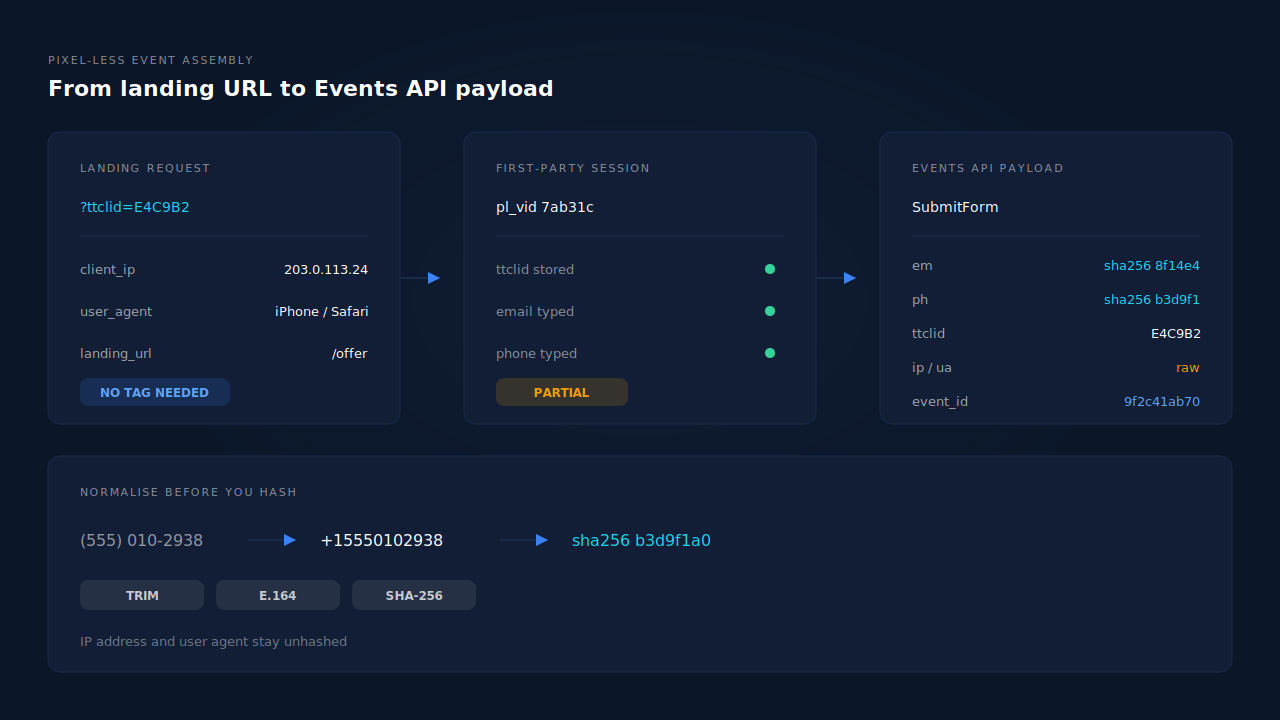
Two rules decide whether those identifiers count for anything.
Normalise before you hash. Email gets lowercased and trimmed. Phone gets reduced to E.164 — a leading +, country code, digits only, no spaces, brackets or dashes. (555) 010-2938 typed by a US visitor has to become +15550102938 before it is hashed, or the hash matches nobody. Then SHA-256, hex encoded.
Send network signals unhashed. IP address and user agent are matching signals, not PII to obscure — they go in raw. Hashing them silently destroys them. Every server-side conversion API in this family draws the same line, and Meta documents its version of the parameter set publicly if you want the shape in writing; TikTok’s own reference specifies the exact key names, casing and per-field hashing rules its endpoint expects, so read it against your payload before you ship.
The event ID matters more than people expect. Derive it from something stable — the record you’re sending, the event name, the event source — so that a retried request produces the same ID as the original. Random IDs turn every retry into a second conversion.
How do you keep the TikTok click ID without the tag?
Read ttclid from the landing URL’s query string on the first request of the session, store it against the visitor server-side, and attach it to any event that visitor produces later. The click ID is the strongest attribution signal you have in a pixel-less setup, and it is available to any web server that sees the first request.
// On the landing request: pull the click ID before anything redirects.
const url = new URL(request.url);
const ttclid = url.searchParams.get('ttclid');

if (ttclid) {
  // Persist it against your own visitor record, not TikTok's cookie.
  await sessions.update(visitorId, {
    ttclid,
    ttclid_seen_at: new Date().toISOString(),
    landing_url: url.href,
    client_ip: request.headers.get('x-forwarded-for'),
    client_user_agent: request.headers.get('user-agent'),
  });
}
Three failure modes eat click IDs, and all three are yours to prevent. A redirect that rebuilds the URL without its query string drops it. A form embedded in an iframe never sees the parent page’s parameters. And a lead created days later by a salesperson has no URL at all, so unless the ID was written to the contact record at first touch, it’s gone. ttclid behaves like every other click identifier here — the same capture-at-first-touch rule that applies to gclid, fbclid and UTM parameters applies to TikTok’s.
Capture IP and user agent on that same first request, not at send time. If you read them when your backend fires the event, you’ll send your data centre’s IP and your HTTP client’s user-agent string, which is worse than sending nothing.
What does going pixel-less cost in match quality?
It costs you the cookie-derived identifiers, and you buy the loss back with contact data. A server event carrying a hashed email, a hashed phone and a click ID typically resolves well; a server event carrying only an IP address and a user agent is an anonymous server event, and platforms treat it like one.
This is the same arithmetic behind event match quality on Meta: high-weight identifiers are email and phone, everything else is supporting evidence. If your form collects only an email, your ceiling is set by your form, not by whether a tag is on the page. Collect phone as well and a pixel-less event can carry most of what a hybrid one would.
Watch the number rather than assuming. TikTok reports its own match indicator per event source, and the honest way to read it is as a baseline you compare against yourself over time, not against someone else’s screenshot. If you’re already sending and the number is low, the diagnostic path is identifier coverage — that’s the whole subject of fixing TikTok Events API match quality.
Do you still need deduplication if there is no pixel?
Yes, but not for the usual reason. With no browser tag there is no second copy of the event coming from the page, so the classic browser-versus-server double count can’t happen. What does happen is that your own stack sends twice: a webhook redelivers, a retry queue fires after a timeout that actually succeeded, a CRM automation and a backend job both dispatch the same lead.
Deterministic event IDs solve it, which is why they belong in the payload from day one rather than being added after the first inflated week. If you later add a browser tag, those IDs are also what lets the two paths collapse into one conversion — the mechanics are in why TikTok conversions don’t deduplicate.
When should you put the browser tag back?
When you have a real browser to put it in. If your funnel is a normal website, the tag costs you one script and returns TikTok’s own cookie identifier, which you cannot reproduce server-side — that’s a straight win for match quality, and the server events still do the heavy lifting for conversions the browser misses.
Stay server-only when there genuinely is no browser in the path: leads created by phone or by a salesperson, API-only funnels, platforms whose pages you can’t edit, or traffic where consent rules keep third-party tags from loading at all. Those aren’t compromises. They’re the cases the Events API exists for.
How does PartialLeads send TikTok lead events without a pixel?
PartialLeads runs TikTok as one of its server-side conversion integrations, fed by its own first-party capture rather than by TikTok’s tag. The lead is assembled first, the event is dispatched second, and the two are joined by identity rather than by a cookie.
The capture layer stores ttclid from the landing URL along with the session’s IP, user agent, referrer and UTMs, so the click ID survives redirects and iframe embeds — the same relay that keeps attribution alive on GoHighLevel and Typeform embeds. Email and phone are captured as they’re typed, before the visitor hits submit, so a partial lead that never completes still carries the two highest-weight identifiers. Phone numbers are normalised to E.164 automatically, with the country code inferred from session geo when the visitor typed a local number. Hashing runs through one canonical builder per platform, so email casing and phone formatting can’t drift between dispatch paths, and IP and user agent go out unhashed as the spec requires.
Dispatch is idempotent by construction. Every event’s ID is derived from the event source, the event name and the record being sent, and the dedup table is unique on that ID per config, so a redelivered webhook or a retried request physically cannot write a second conversion. Failures are sorted rather than blindly retried: an auth failure flags the connection for reconnection, a transient failure retries on the next worker cycle, and a permanent payload rejection stops instead of looping.
You see all of it in two places. The conversion API activity log lists each dispatched event with its event ID, status and timestamp, and the Leads list carries an API column showing which conversion APIs that specific lead was sent to — per-lead proof that a conversion left the building, without opening TikTok.
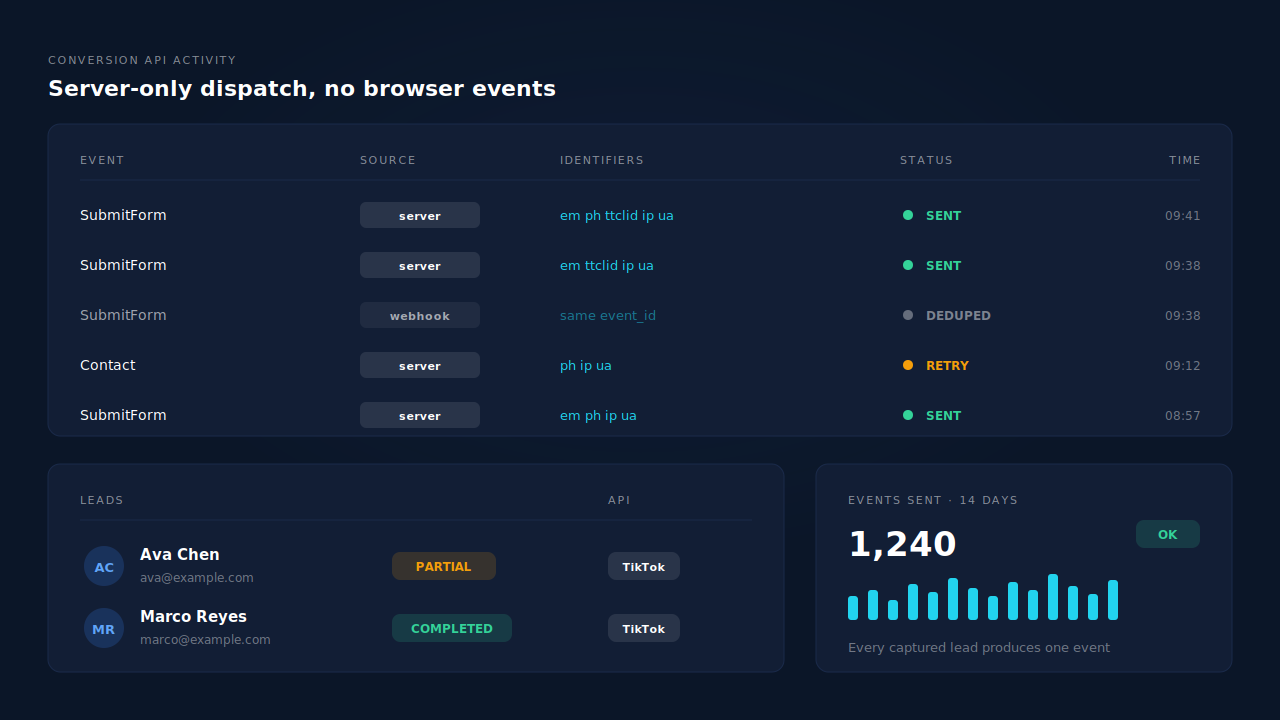
One honest constraint, because it’s the whole subject of this article: server-side dispatch is the half we control, and match rate is the half the platform controls. Every lead you capture produces an event — that part is verifiable by reconciling your lead count against the activity log. Whether TikTok resolves that event to a person depends on the identifiers you collected and on TikTok’s own graph. A setup with email and phone gives it a lot to work with. An email-only form does not, and no vendor can fix that from the server side.
| What breaks | The mechanism | Where you see it in the dashboard |
|---|---|---|
| No TikTok tag, so no click ID is ever stored | ttclid captured from the landing URL into the first-party session, surviving redirects and iframe embeds |
Lead detail — click ID and landing page on the session |
| Server events arrive anonymous | Email and phone captured before submit, normalised to E.164, SHA-256 hashed through one canonical builder | Leads list — Partial and Completed badges with contact fields |
| Data centre IP and bot user agent sent instead of the visitor’s | IP and user agent recorded at the visit and replayed unhashed on dispatch | Conversion API activity log — per-event payload status |
| Retries and redelivered webhooks double-count | Deterministic event ID plus a unique dedup key per config | Activity log — repeated IDs resolve to one send |
| No proof the conversion ever left | Per-lead dispatch record across every connected conversion API | Leads list — API column on the lead’s row |
Tell us what's broken. We'll fix your tracking — free.
Describe the tracking/attribution problem you're stuck on and we'll map it to a fix: server-side conversions to Meta, Google, TikTok and Pinterest, plus first-party tracking that survives Safari. No code required.
Sources
- TikTok for Business — Marketing API developer documentation portal: https://business-api.tiktok.com/portal/docs
- Meta for Developers — Conversions API customer information parameters: https://developers.facebook.com/docs/marketing-api/conversions-api/parameters/customer-information-parameters
- Meta for Developers — Conversions API: https://developers.facebook.com/docs/marketing-api/conversions-api