Join them on the identifier that did not change — normally the phone number — then stop trying to pick a winner. The two addresses are not duplicates of each other. The work domain tells you which company you are selling to, the personal address is usually the one the ad platform can match, and only one of them will be open on her screen tomorrow morning. Delete either and you lose something you cannot get back.
Why does one buyer show up with two email addresses?
Because the two addresses do different jobs for her, and neither is a mistake. She researches in the evening on her phone, signed into a personal account. She requests the demo from her desk under a corporate domain, because that is the address her colleagues and procurement recognise.
Three shapes cover almost all of it.
The research-then-buy split. The ad click, the comparison page and the pricing calculator happen in personal context; the commitment happens in work context. This is the common one, and the one that breaks attribution, because the click and the conversion land on different records.
The gate burner. A personal inbox for the whitepaper, the real address when she wants to talk to a human — a buying signal with a timestamp on it.
The forwarded link. Someone sends the page to a colleague, and the second address belongs to a different person at the same company. In your data that looks identical to the first two shapes, and the fix for those — merge them — is actively wrong here.
A re-fill ninety seconds apart with a typo is a different problem; one person filling the form twice with two different emails covers that.
What does the split actually cost you?
Four things, in four systems: credit splits across two rows, your conversion payloads carry half an identity, your lead scoring reads whichever address arrived, and your reporting counts contacts when the thing you are buying is accounts.
The credit split changes what you spend. The personal-context session carried the fbclid from her Meta ad click; the work-context session three days later came from a bookmark and carries nothing, so last-touch attribution finds no source on the converting row and writes Direct. The campaign that produced her looks unprofitable and you turn it off — the same failure that makes one customer count as three leads, arriving through a B2B door.
Then the payload. Hashed email is the highest-weight customer-information parameter Meta scores, and hashed phone is next (Meta, Customer Information Parameters, 2026). A corporate address is frequently not the one that person used to create their ad-platform account, so send only the work address and you have supplied the spec’s highest-weight parameter and it matches nothing. The scoring runs the opposite way: a personal address is a mailbox and nothing else, while the work domain names the company you would qualify on.
Which identifier still joins a work address to a personal one?
The one that is not an inbox: the phone number, the first-party visitor ID, or a click ID carried into both sessions. Email is the strongest join key you have right up until the person has two of them, and at that moment it joins nothing at all.
That ladder — visitor ID, phone, click ID, IP plus user agent, device fingerprint — is the ordinary machinery of visitor identity resolution. What is different in B2B is that the bottom two rungs get worse, not merely weaker.
A shared office IP is not a signal, it is a trap. Forty people behind one NAT for eight hours a day. The IP-plus-user-agent tier that is a fair tiebreaker for a consumer at home will, in an office, connect two colleagues who have nothing to do with each other.
Managed corporate machines are fingerprint twins. One hardware model, one OS image, the same locked browser and fonts. Fingerprinting degrades exactly where B2B traffic lives, and it degrades toward false merges rather than misses.
A shared email domain is the worst merge key of all. @acme.example is two hundred people. Merge for reporting and merge for identity are different verbs: an account view grouping every @acme.example contact is the right way to look at a buying committee, while merging those contacts in your identity graph manufactures one fictional employee who appears to have clicked every ad you run. If you do build the rollup, exclude free-mail domains from it — otherwise every consumer lead collapses into three enormous fake accounts — and label the grain, because “42 contacts across 19 accounts” is a true sentence while “42 leads” and “19 leads” are both defensible figures for the same month.
Which address should you hash and send to the ad platform?
Send every hashed identifier you collected, and do not choose between the two addresses if the platform accepts both. If you must choose, send the personal address to the ad platform and keep the work address for your CRM and enrichment. You are matching against a consumer account, not a corporate directory.
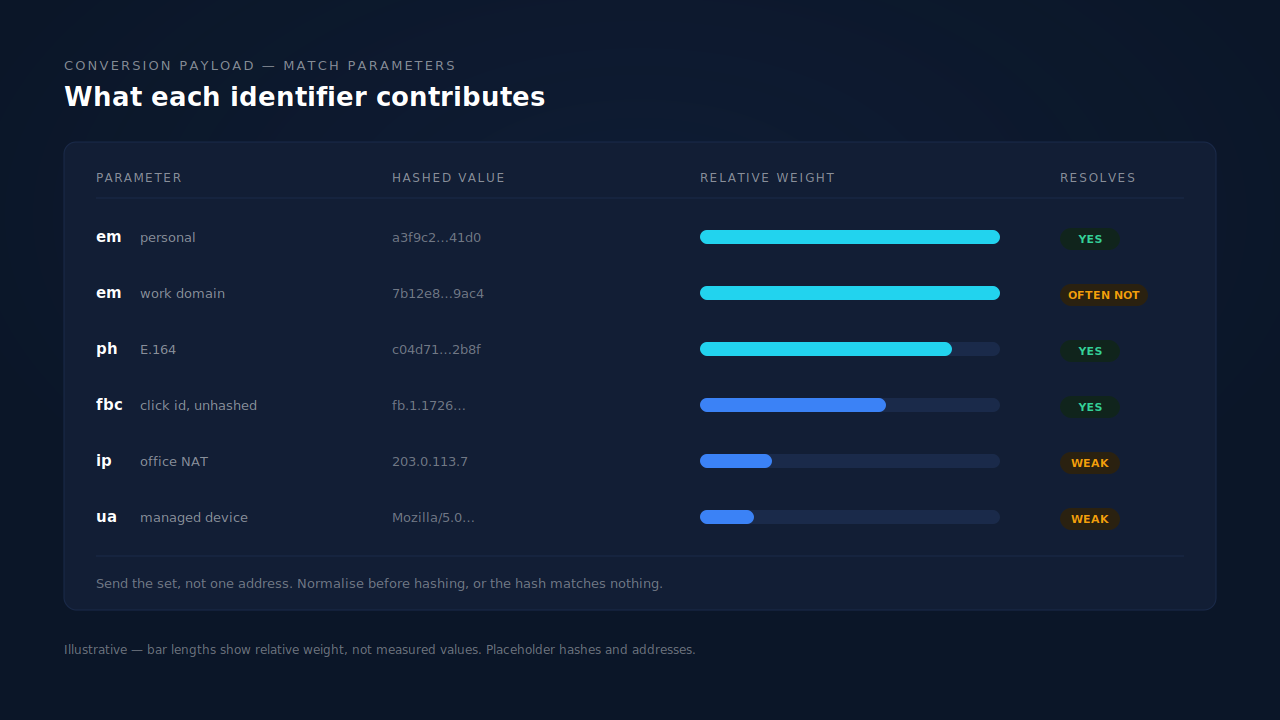
Check whether your destination accepts more than one value per field. Meta documents the customer-information parameters as a set to populate as completely as you can, and several accept more than one hashed value. The rules differ per platform and per field, so read the reference rather than assuming.
Normalise before hashing or the hash is worthless. A hash is exact-match by definition — Ava.Chen@Acme.example and ava.chen@acme.example are two different people to SHA-256. Lowercase, trim, put the phone in E.164 with a country code. Gmail’s dot-and-plus rules collapse ava.chen@gmail.com and avachen+demo@gmail.com to one inbox, but that is Gmail’s rule; apply it everywhere and you will merge people who are genuinely distinct.
The phone number does not care which inbox she used. Same string in both contexts, second-highest-weight match parameter, and the only join key that survives both a cleared cookie and a changed address.
Which gives you the honest framing: your event match quality ceiling is set by your form, not your pixel. And you control dispatch while the platform controls matching — a B2B audience of work addresses can resolve lower than a consumer one with an identical, perfect payload.
What can you do about this without buying anything?
Two fixes you can ship this week, plus one question to add to your form. Each has its limit attached.
Collect a phone number. The highest-yield change available, because it is the identifier that survives the address switch. The limit is a real trade-off: a required phone field costs some form completion — measure that on your own form rather than take a benchmark for it.
Put your own visitor ID in a hidden form field. Generate it on first visit, store it, submit it with every form. The limit is durability: an identifier written to browser storage by JavaScript is what privacy controls are built to clear.
Ask, on the step where she is already committing. “Which address should we use?” resolves it at the source — on the submissions that complete.
That is the structural limit on all three: they work on data you already hold, so none reaches a first attempt that was typed and abandoned, which is where the personal address and the click ID both live.
How does PartialLeads handle a lead who uses a work email and a personal email?
It captures both addresses as they are typed, keeps both in the identity graph, resolves them to one person on whichever identifier survived, and shows which tier did the joining.
Capture comes first, because you cannot join a record that was never created. The tag reads each field on input and blur and flushes anything pending when the page is hidden, so the evening research session that ended in an abandoned form still produces a record carrying the personal address, the phone if she typed one, and the fbclid. That is what partial lead capture is for here: the row holding the ad click is the row she never submitted.
Resolution then runs across six tiers — visitor ID, email, phone, IP plus user agent, device fingerprint and click ID — and unions the sessions any of them connect. When the email differs the other five still apply, and both addresses stay in the graph as separate entries pointing at one cluster. Phone numbers are normalised to E.164 automatically with the country code inferred from session geo, which is what makes the phone tier the one doing the work here. The fingerprint tier is deliberately bounded — ninety days, capped at 200 rows — because its job is recognising a returning device, not sweeping a floor of identical corporate laptops into one person. A purchase matches on its own ladder — visitor ID echo, then email, then phone, then IP — so a payment made under the work address lands on the cluster holding the personal-address ad click.
Enrichment is where the two addresses stop being interchangeable. It researches the lead’s email domain and the person behind it, scores the result against your ideal-customer description, and returns strong match, possible match, unlikely match or insufficient data. A work domain gives that step something to read; a personal address frequently returns insufficient data — a property of the address, not a failure of the scoring. Joining the two puts the verdict earned by the work domain on the same person the ad platform matched on the personal one, which is the same machinery behind scoring leads against your ideal customer.
With email and phone as required form fields, PartialLeads consistently delivers EMQ 9+ — observed across customer accounts. The condition carries that sentence, and the caveat matters more here than almost anywhere: match quality has a platform-side component, and a work-address audience can resolve lower even with a complete payload.
Where you see it working. The Journey column on the Leads list renders each touch as a badge and labels a multi-session person “N SESSIONS”. The ring and dash treatment encodes how that session was stitched into the cluster — visitor ID, email, phone, IP plus user agent, fingerprint or click ID — separately from the channel glyph. The API column shows which conversion APIs that lead was dispatched to, and the Attribution report puts first, last and resolved models side by side with a match rate.
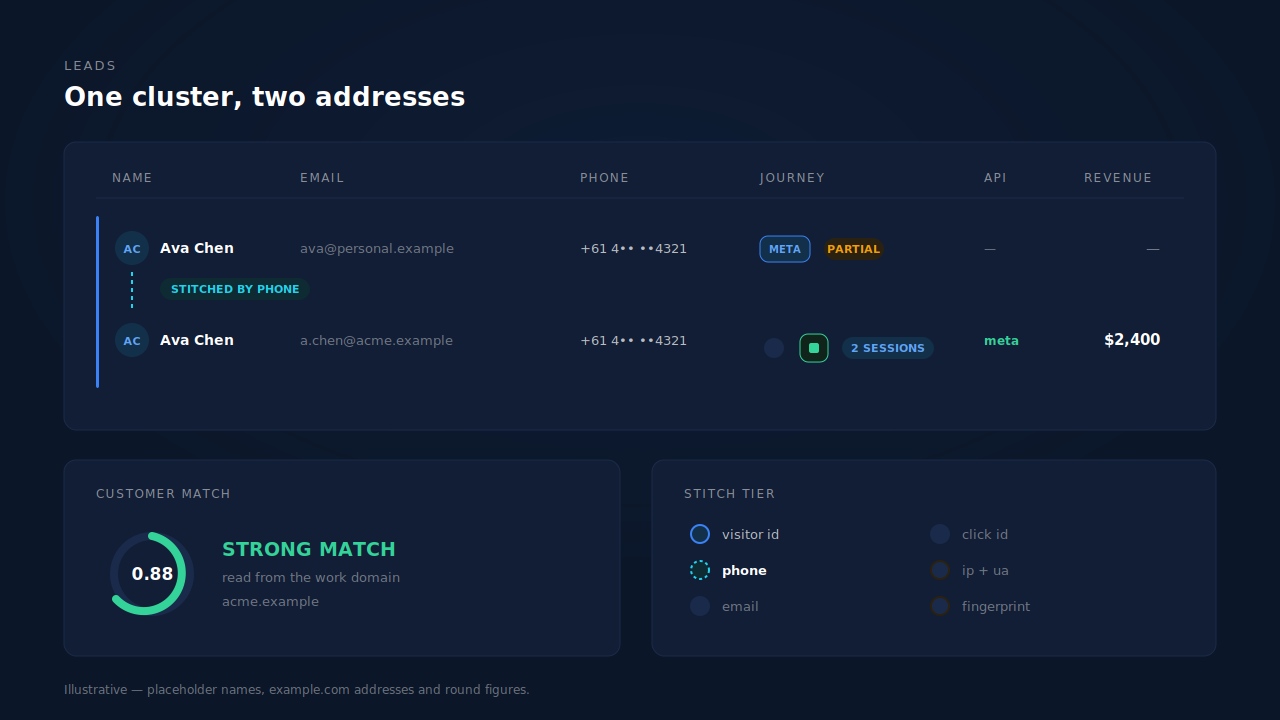
Three honest constraints. Two addresses are still two lead records: resolution decides they belong to one person, but it does not delete a row or choose which address your sequences use. The weak tiers stay weak, and office IPs and managed-device fleets are the worst inputs to them. And dispatch is verifiable where resolution inside an ad platform’s graph is not.
| What breaks | The mechanism | Where you see it in the dashboard |
|---|---|---|
| Two addresses create two lead records for one buyer | Six-tier cluster resolution unions the sessions on visitor ID, phone or click ID when the email differs | Leads list Journey column: “N SESSIONS”, with ring and dash showing which tier joined it |
| The click sits on the personal-address session, the conversion on the work-address one | First-touch and last-touch rows per matched purchase, plus the resolved model | Attribution report, three models side by side |
| The abandoned research session was never recorded, so there is nothing to join | Field capture on input and blur, flushed before the page is hidden | Leads page, Partial badge on the record she never submitted |
| The payload goes out with an address the platform cannot resolve | Email lowercased and trimmed before hashing, phone in E.164, one canonical builder per platform | CAPI activity log, per-lead API column |
| A personal address tells your qualification step nothing | Two-step enrichment reads the email domain and the person, then scores against your persona | Customer Match card, strong-match inbox |
| Two colleagues on one office IP get merged into one person | Fingerprint tier bounded to ninety days and 200 rows; IP plus user agent kept lowest-confidence | Journey ribbon stitch indicators, which show the tier |
Two addresses are not a duplicate to clean up. They are two facts about one buyer: join on the phone number, hash the one the platform can match, enrich the one that names the company.
Tell us what's broken. We'll fix your tracking — free.
Describe the tracking/attribution problem you're stuck on and we'll map it to a fix: server-side conversions to Meta, Google, TikTok and Pinterest, plus first-party tracking that survives Safari. No code required.
Sources
https://developers.facebook.com/docs/marketing-api/conversions-api/best-practices
https://www.facebook.com/business/help/765081237991954