Pinterest Conversions API events from WooCommerce arrive without order value and product IDs mostly because many of them never had any to send. Pinterest for WooCommerce sends PageVisit on non-product pages and ViewCategory with only an event ID. The real gaps are elsewhere: external_id goes only with logged-in customers, and the purchase event depends on the thank-you page loading.
The symptom usually shows up as a diagnostics warning in Pinterest Ads: server events without external ID, without a value, without product IDs. The forum threads that ask about it read like the store is broken. Usually it isn’t, or not in the way the warning suggests.
This guide sorts the warnings into three groups: events that are empty by design, identifiers that are missing for a reason you can change, and purchases that never get sent at all. The third group is the one that costs you money.
Which Pinterest events from WooCommerce carry a value and product IDs?
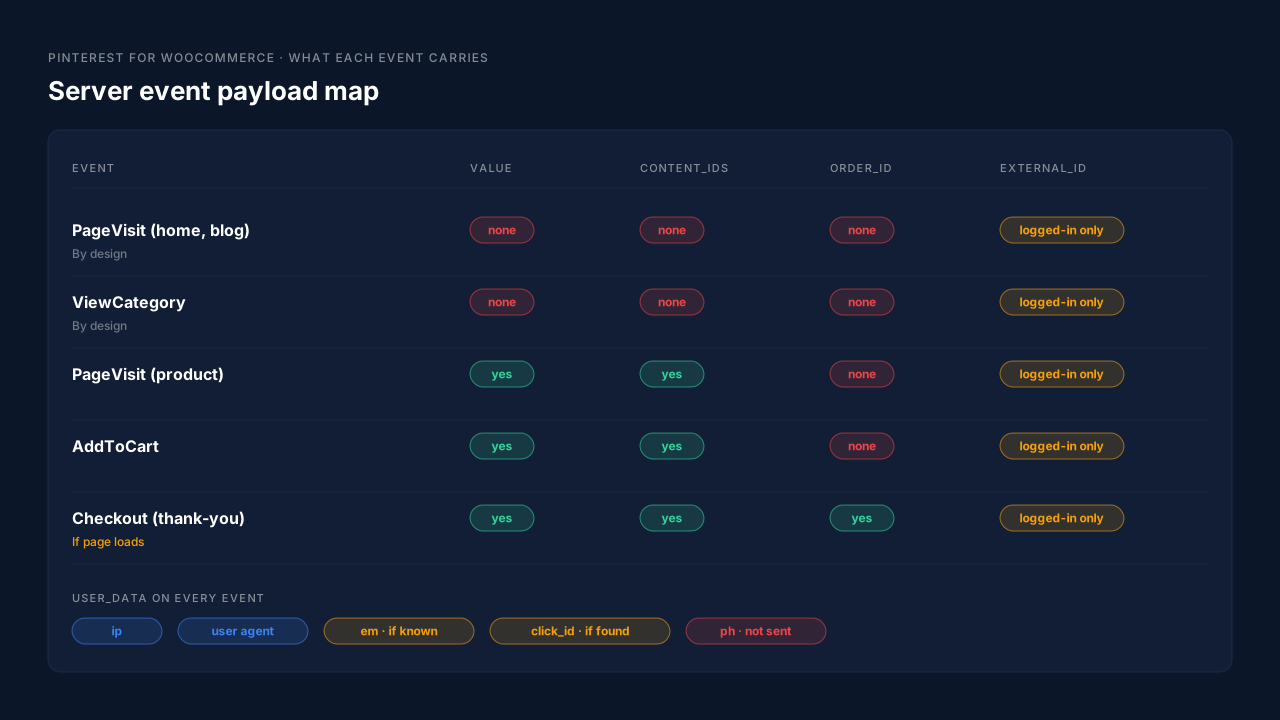
Only the events tied to products or orders do. In the plugin’s current source, AddToCart, product-page PageVisit and Checkout send value, currency, content_ids and contents. PageVisit on any other page and ViewCategory send just an event ID. Search sends the search term. A warning that counts every server event will always find some without a value.
You can read this straight from the plugin’s code on GitHub. In src/Tracking.php, the PageVisit handler starts with an empty data object (new None( '' )) and only swaps in product data when the page is a product page. In src/Tracking/Conversions.php, the method that builds ViewCategory data returns event_id and nothing else.
So split the warning by event name before you change anything:
- PageVisit on the home page, blog or cart page. No product, no value. Expected.
- ViewCategory. Category, not product. No value. Expected.
- AddToCart or product-page PageVisit without a value. Not expected. Check for a second sender, such as a tag in Google Tag Manager, sending its own copy without data.
- Checkout without a value or order ID. Not expected. This is the one to chase.
If Pinterest’s warning is mostly PageVisit and ViewCategory, you have a reporting nuisance, not a tracking failure.
Why are Pinterest events from WooCommerce missing external_id?
Because the plugin builds external_id from the WordPress user account, and most shoppers check out as guests. The function’s own description in src/Tracking/Tracker.php reads “Returns a hashed external identifier for the logged-in customer”, and it returns “false for guests”. No account, no external_id. Stores on versions older than 1.5.0 send none at all.
The 1.5.0 changelog entry (9 September 2026) is the line that added it: “Include external and Pinterest click identifiers in Tag and Conversions API events to improve event matching and attribution.” Before that release, external_id was never part of the payload.
Two things follow from this:
- Update first. If you’re on 1.4.x, the warning is accurate for every event. Version 1.5.0 or later is the minimum.
- Expect guests to stay blank. Even on the latest version, a store where nine buyers in ten check out as guests will show external_id on roughly one event in ten. That’s the plugin working as written.
The same file shows what the plugin sends for identity on every Conversions API event: IP address and user agent always, a hashed email when a logged-in user or the WooCommerce session has one, external_id for logged-in customers, and the Pinterest click ID when it can find it. There’s no phone field in that payload.
If you want external_id on guest orders, you need an identifier that doesn’t depend on a WordPress login. The same problem exists on Meta, and the published answer to why external ID isn’t being sent to Meta from WooCommerce walks through the general fix: a durable first-party ID, hashed, attached server-side.
Why is the Pinterest Checkout event missing for some WooCommerce orders?
Because Pinterest for WooCommerce sends Checkout from the thank-you page. In src/Tracking.php the checkout handler is attached to the woocommerce_before_thankyou hook, so it only runs when that page renders. A buyer who pays through a redirect and never comes back, closes the tab, or lands on a custom thank-you page produces no Checkout event at all.
This is the gap that matters, because it’s invisible in the diagnostics. A missing event can’t be flagged as missing a value. It just isn’t there, and Pinterest’s purchase count drifts below your WooCommerce order count.
Payment flows are the usual cause. PayPal, buy-now-pay-later and some card gateways send the buyer off-site and rely on them to come back. If you’ve ever compared orders to purchases on another platform, you’ve seen the same shape; the share of WooCommerce buyers who never reach the thank-you page is the number to know before you trust any thank-you-page event.
The plugin does handle one thank-you-page problem well. Since 1.4.27 the Checkout event ID is built from the order ID ('checkout_' . $order->get_id()), so a buyer who refreshes the page doesn’t create a second purchase. The comment explains it’s a “Deterministic event id so Pinterest can deduplicate Tag/CAPI Checkout events”.
Is the order value the plugin sends the same as your order total?
No. The plugin adds up the discounted line-item totals, so its value is merchandise only. Shipping and tax are left out. The 1.4.27 changelog entry describes it: “Align Pinterest checkout value with discounted merchandise line totals.” That’s a reasonable choice, but it won’t match the order total in your WooCommerce admin.
Two consequences:
- ROAS in Pinterest runs lower than “revenue” in WooCommerce. On a store with high shipping or VAT, the difference is noticeable. It’s a definition gap, not lost data.
- Mixing senders makes it worse. If a second tool sends Purchase with the full order total and the plugin sends merchandise only, Pinterest receives two different values for the same order, and only one of them survives deduplication.
Pick one definition, write it down, and compare like with like. The same thinking applies to products in the payload; why WooCommerce purchase conversions sometimes lack shopping cart data covers building content_ids and contents from the order’s line items rather than from the page.
How do you fix missing value and product IDs on Pinterest events?
Fix the purchase path first, then the identifiers, and ignore the events that are empty by design. Send Checkout from the order record rather than the thank-you page, include value, currency, order ID and product IDs from the order’s line items, add hashed email and an external ID that works for guests, and keep one sender per event.
A working order of operations:
- Update Pinterest for WooCommerce to 1.5.0 or later so external_id and the click ID are sent at all.
- Count purchases against paid orders. Take a week of paid WooCommerce orders and compare it with Pinterest’s Checkout count. A gap points to the thank-you page.
- Move the purchase off the browser. The fix is to fire it from the order itself; tracking Pinterest checkout events server-side covers the pattern.
- Check payload format. Pinterest’s API expects
custom_data.valueas a string and hashed user fields as arrays. The plugin does both. If you’ve built your own sender, the guide to setting up the Pinterest Conversions API lists the traps. - Remove duplicate senders. One tool per event. Two senders with their own event IDs can’t deduplicate against each other.
Every fix here is a Conversions API fix, not a tag fix. The browser tag stays useful for the click identifier it captures; the order data belongs on the server.
How does PartialLeads send Pinterest purchases with value and product IDs?
PartialLeads sends the WooCommerce purchase from the order webhook, not the thank-you page, so every paid order produces a Pinterest checkout event whether or not the buyer came back. The event carries the order total and order ID, product IDs taken from the order’s line items, and hashed email and phone from the order record.
What’s in the purchase event. The value is the full order total, including tax and shipping, after discounts. There’s no subtotal option, so if you compare it with a merchandise-only number, expect a difference. Product IDs are the variant ID, falling back to the product ID, which matches the g:id in the PartialLeads catalog feed. The order is recorded once; a later edit to the same order doesn’t change the value or re-send it.
Which orders are sent. Only paid ones: WooCommerce orders in processing or completed. Pending, on-hold, failed and cancelled orders aren’t sent. A bank-transfer order is sent once it’s marked paid. WooCommerce Subscriptions renewals are recorded but never sent; only the first payment goes to Pinterest.
The click identifier. The tag captures epik from the landing URL and stores it on the session, with the _epik cookie as a fallback, so the purchase can carry it even when the buyer paid days later. The order is matched to the visit by the visitor ID first, then email or phone. Matching is maximized, not guaranteed.
The funnel events. View product, add to cart and begin checkout come from the plugin’s browser script and are forwarded server-side to Pinterest with variant IDs.
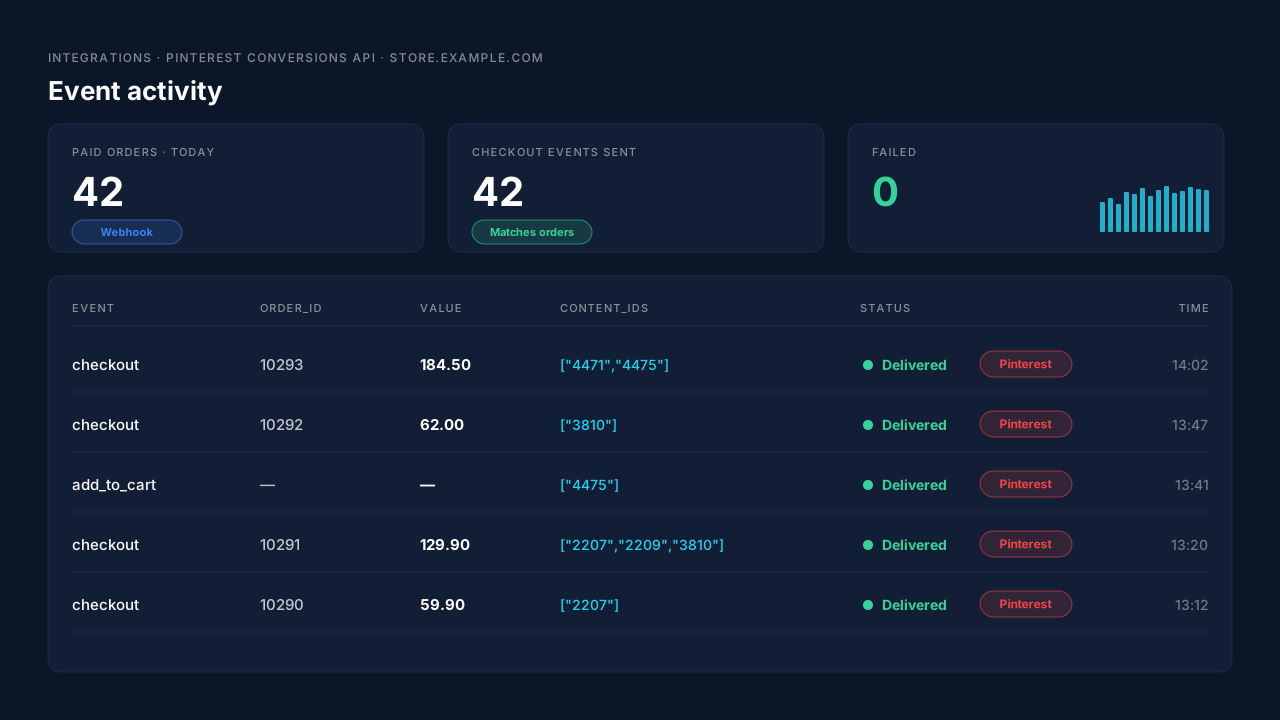
Where you see it working. The Pinterest config page lists each server send by event name, status and time. The Leads list’s API column shows which conversion APIs each buyer was sent to, and the Purchases ledger shows each paid order with its source. Count paid orders for a day and compare.
The honest constraint. PartialLeads’ event IDs are its own. It doesn’t deduplicate against Pinterest for WooCommerce. If both send purchases, Pinterest counts both, so switch one off.
| What’s missing | PartialLeads mechanism | Where you see it in the dashboard |
|---|---|---|
| Checkout never fires when the buyer skips the thank-you page | Purchase sent from the WooCommerce order webhook for every paid order | Pinterest config page vs paid orders in the Purchases ledger |
| Value differs from the order total | Full order total incl. tax and shipping, after discounts | Purchases ledger, Revenue column |
| No product IDs on the purchase | Variant IDs from the order’s line items, matching the feed’s g:id | Pinterest config page, event activity |
| No identity on guest orders | Hashed email and phone from the order record | API column on the Leads list |
| Click ID lost before payment | epik stored on the session, _epik cookie fallback | Journey timeline, Pinterest config page |
| Two tools send the same purchase | No cross-tool dedup, so keep one sender | Pinterest config page vs Pinterest event history |
Tell us what's broken. We'll fix your tracking — free.
Describe the tracking/attribution problem you're stuck on and we'll map it to a fix: server-side conversions to Meta, Google, TikTok and Pinterest, plus first-party tracking that survives Safari. No code required.
Sources
- https://github.com/woocommerce/pinterest-for-woocommerce/blob/trunk/changelog.txt
- https://github.com/woocommerce/pinterest-for-woocommerce/blob/trunk/src/Tracking.php
- https://github.com/woocommerce/pinterest-for-woocommerce/blob/trunk/src/Tracking/Conversions.php
- https://github.com/woocommerce/pinterest-for-woocommerce/blob/trunk/src/Tracking/Tracker.php