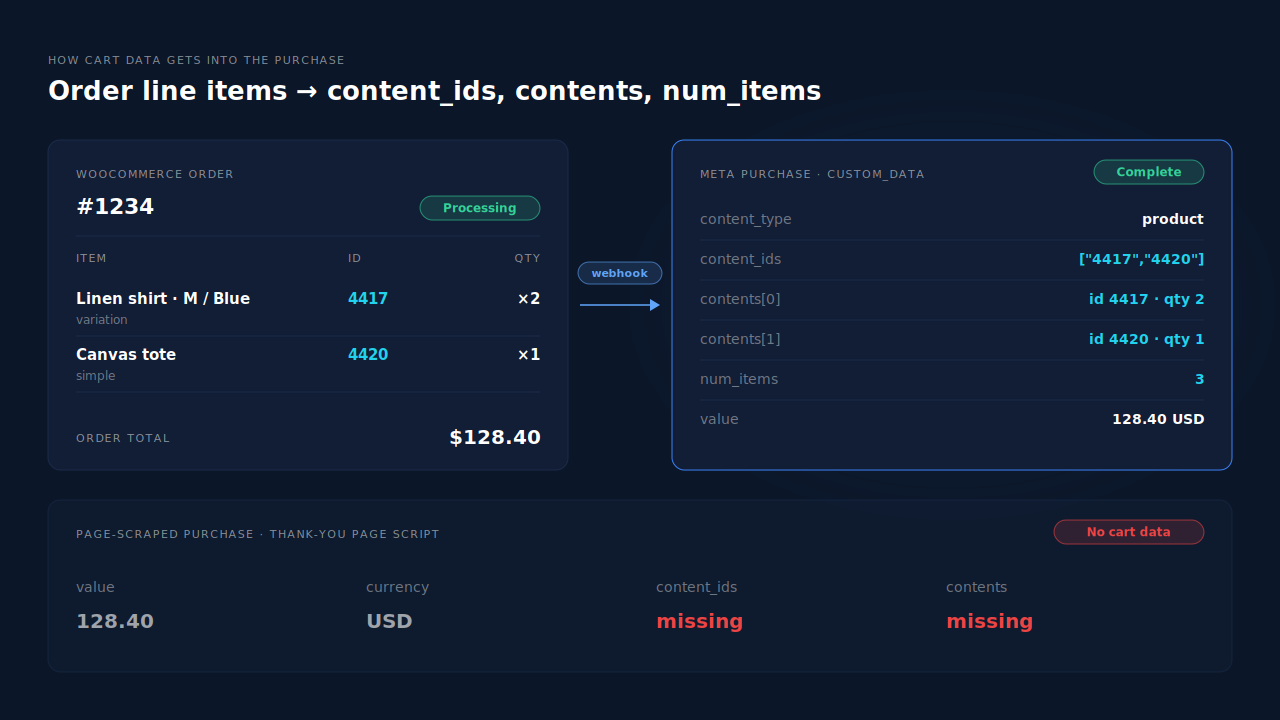
Your WooCommerce purchases arrive in Meta without shopping cart data because the tool sending the Purchase isn’t reading the order’s line items. It sends a value and a currency — enough to count a sale — but no content_ids, no contents and no num_items. Meta knows you made money. It doesn’t know which products you sold.
That gap matters more than it looks. Catalog ads decide which products to show by matching the ids in your events to the ids in your catalog. A Purchase with no ids can’t tell them what sold, and product-level reporting in Meta has nothing to group by.
Here’s where cart data comes from, the five ways it goes missing on WooCommerce, and how to send it from the order instead of the page.
What counts as “shopping cart data” in a Meta Purchase?
Shopping cart data is the product detail inside the event’s custom_data: content_ids (the product ids), contents (each id with its quantity and optionally its price), num_items and content_type. Meta documents all four as standard custom data parameters for both the Meta Pixel and the Conversions API. Value and currency tell Meta how much; these tell it what.
A complete server-side Purchase looks like this:
{
  "event_name": "Purchase",
  "event_id": "order-1234",
  "action_source": "website",
  "custom_data": {
    "currency": "USD",
    "value": 128.40,
    "content_type": "product",
    "content_ids": ["4417", "4420"],
    "contents": [
      { "id": "4417", "quantity": 2, "item_price": 39.00 },
      { "id": "4420", "quantity": 1, "item_price": 42.00 }
    ],
    "num_items": 3
  }
}
The version that triggers the complaint has the same first four lines and a custom_data block with only currency and value. Meta accepts it, counts it and reports the revenue. It just can’t connect the sale to a single product.
If value and currency are also wrong or missing, fix that first — sending purchase value and currency to Meta covers it. Cart data is the next layer down.
Where does the cart data in a Purchase event come from?
It comes from whoever builds the event, and that builder has to read the order. On WooCommerce the order object holds every line item with its product, variation and quantity. A sender that reads the order can fill contents exactly. A sender that only reads the thank-you page sees whatever the theme prints, which is often just a total.
That’s the whole problem in one line: cart data is only as good as the data source the sender reads.
Meta’s own plugin shows the right pattern. In the Meta for WooCommerce source, the Purchase handler loops over the order’s line items, adds each product’s id to content_ids, writes an id-and-quantity entry into contents, and switches content_type to product_group when a variable product is involved. The ids are the WooCommerce product or variation ids, unless a filter changes them.
Why is cart data missing from my WooCommerce purchases?
Almost always because a Purchase that doesn’t read the order is being sent — either instead of a complete one, or alongside it. The five causes below cover nearly every case. The first two account for most of them, and all five leave the same symptom: a Purchase that carries a value but no products.
1. A tag-manager or theme Purchase with value only
Someone added a Google Tag Manager tag, a theme “tracking code” box or a snippet in functions.php that fires fbq('track', 'Purchase', {value, currency}) on the thank-you page. It works, so nobody revisits it. It never had product ids to send.
2. A second tool is sending Purchase
The official plugin sends a complete Purchase, but a pixel plugin, a tag-manager container or a point-and-click event from Meta’s event setup tool also sends one with no products. Two sources, two payloads, and the thin one is the one you see.
3. Order lines whose product no longer loads
A sender that reads the order can still skip lines. In Meta for WooCommerce, a line whose product can’t be loaded — deleted, or trashed after the sale — is left out of content_ids and contents. If every line in the order is like that, the Purchase goes out with empty cart fields.
4. A server-side sender that only maps totals
Some server-side setups and middleware forward the order total and customer data but never map line items into custom_data. The event is server-side and well matched, and still has no products.
5. Cart data that’s present but doesn’t match the catalog
This is a different failure that looks similar. The ids are there, but they’re SKUs while your catalog uses product ids, or parent ids while the catalog lists variations. Meta then reports no match rather than no data. Why dynamic product ads show zero catalog match walks through that case.
How do you check which Purchase is missing its products?
Open Test Events in Events Manager, place a small test order, and expand every Purchase that arrives. Check for content_ids and contents on each, and note whether it came from the browser or the server. The copy without products tells you which sender to fix or switch off.
- Run one test order. Use Test Events for your pixel — the same view you’d use to check your Meta CAPI is working. Buy a product with a variation and one without, so both id types show up.
- Count the Purchases. One is correct. Two or more means more than one tool sends Purchase, and cause 2 is live.
- Open the parameters. On each Purchase, look for
content_ids,contents,num_itemsandcontent_type. Note the source — browser or server. - Match ids to the order. Compare the ids against the product and variation ids in WooCommerce → Orders. Missing ids point to causes 1–4. Present but unfamiliar ids point to cause 5.
- Test a server payload by hand. Meta’s Payload Helper builds a sample Conversions API payload with the custom data fields, so you can see what a complete event should look like next to the one you’re sending.
- Switch off one sender at a time. Disable Purchase in each tracking tool in turn and repeat the test. When the thin Purchase disappears, you’ve found it.
How do you get cart data back into the Purchase event?
Build Purchase from the WooCommerce order, not from the page, and send it from one place. Read each line item, send its product or variation id with its quantity, set num_items and content_type, and use the same ids your catalog uses. Then remove every other Purchase sender so the complete one is the only one Meta sees.
In rough order of impact:
- Send Purchase server-side from the order. A server event fired when the order is paid reads the line items directly. The guide to tracking WooCommerce purchases server-side to Meta walks through that setup, which uses the Conversions API.
- Keep one Purchase source. Turn off the value-only tag or snippet, or turn off the plugin’s Purchase if another tool owns it. One event, one payload.
- Use variation ids for variable products. Send the id of the variation that was bought — the same id your catalog lists — so a size-M-blue sale doesn’t read as the parent product.
- Fix the catalog to match, not the event. If your catalog uses different ids, align the catalog with the ids in your events. A product feed that stays in sync with your ad platforms makes that stick.
- Don’t delete products that just sold. Draft or hide them instead, so a sender that loads the product at send time can still read it.
How does PartialLeads send cart data with every WooCommerce Purchase?
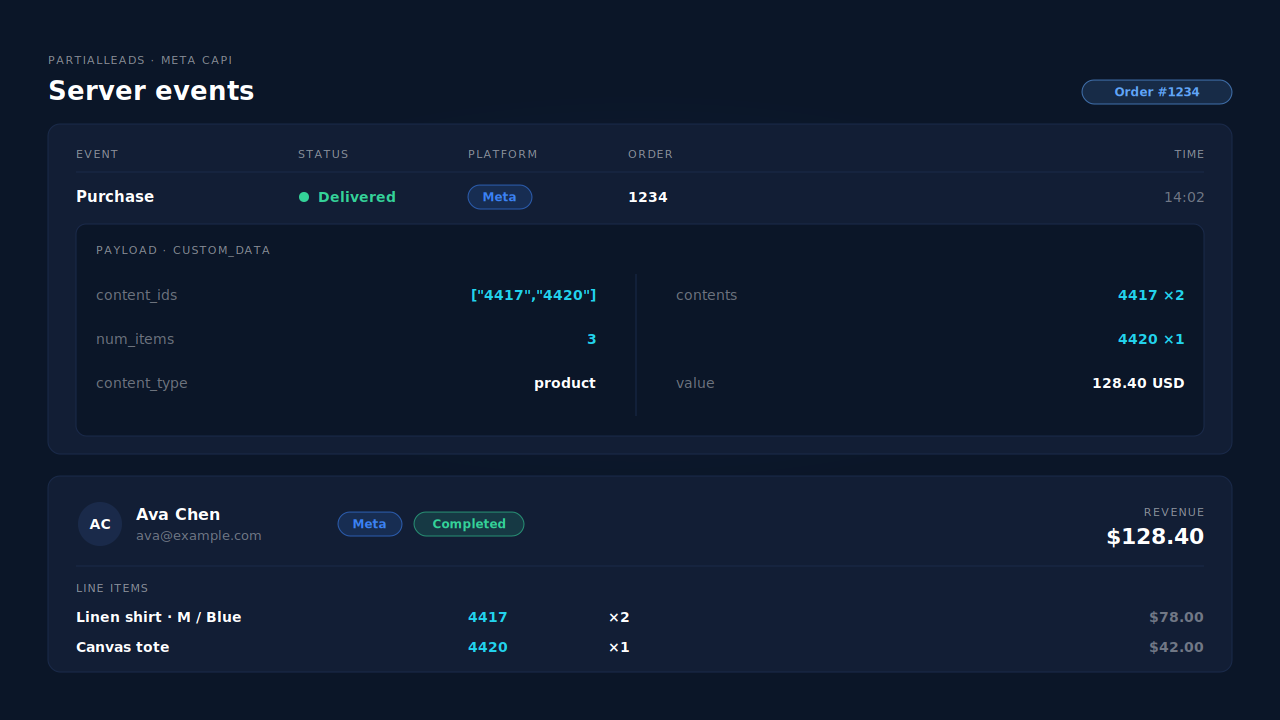
PartialLeads builds the server-side Purchase from the WooCommerce order itself. When a paid order arrives by webhook, its line items become the event’s content_ids, contents and num_items. They’re taken from the order, not scraped from the thank-you page, so a theme that prints only a total can’t strip the products out.
Where the ids come from. Each line sends the variant id — the WooCommerce variation that was bought — and falls back to the product id for simple products. If your catalog comes from the PartialLeads feed, its item ids are those same variant ids, grouped by product, so events and feed match. If your catalog comes from somewhere else, check that it uses the same ids.
What the rest of the event carries. The value is the full order total, including tax and shipping after discounts, with the order’s currency. Only paid orders are sent — Processing or Completed. Pending, on-hold, failed and cancelled orders aren’t, and a cash-on-delivery or bank-transfer order goes out when it’s marked paid, inside Meta’s 7-day event-time window.
Where you see it working. The Meta CAPI page shows each server Purchase with its status, and its payload shows the content_ids and contents that went out. Each buyer’s per-lead revenue block lists the order’s line items, so you can check the products Meta received against the products the customer bought.
The honest constraints. An order is recorded once, so a post-purchase upsell added to the same order later doesn’t update the products or re-send the event. PartialLeads’ event ids are its own. It never double-sends, but it doesn’t deduplicate against another plugin’s browser Purchase. If Meta for WooCommerce or a tag-manager tag still sends a value-only Purchase, switch that one off and keep one source per event. And PartialLeads controls what’s sent; how Meta matches it to your catalog and your ads is Meta’s half.
| What breaks | The mechanism | Where you see it in the dashboard |
|---|---|---|
| Purchase arrives with value only, no products | Purchase built from the order’s line items: content_ids, contents, num_items | Meta CAPI page, event payload |
| Thank-you page prints only a total | Event comes from the paid-order webhook, not the page | Meta CAPI page, one Purchase per order |
| Variable products sent as the parent | Variant id per line, product id for simple products | Meta CAPI page payload vs per-lead line items |
| Events and catalog use different ids | PartialLeads feed uses the same variant ids | Product Catalog, feed URL |
| A second tool sends a value-only Purchase | No cross-tool dedup — switch the other sender off | Leads-list API column vs Events Manager sources |
Tell us what's broken. We'll fix your tracking — free.
Describe the tracking/attribution problem you're stuck on and we'll map it to a fix: server-side conversions to Meta, Google, TikTok and Pinterest, plus first-party tracking that survives Safari. No code required.
Sources
- https://developers.facebook.com/docs/marketing-api/conversions-api/parameters/custom-data
- https://developers.facebook.com/docs/meta-pixel/reference
- https://developers.facebook.com/docs/marketing-api/conversions-api/payload-helper
- https://developers.facebook.com/docs/marketing-api/conversions-api/deduplicate-pixel-and-server-events
- https://raw.githubusercontent.com/facebook/facebook-for-woocommerce/1d874f8fcb68f233ed20fd14575919defd00dfce/facebook-commerce-events-tracker.php
- https://raw.githubusercontent.com/facebook/facebook-for-woocommerce/1d874f8fcb68f233ed20fd14575919defd00dfce/includes/fbutils.php