Your product catalog goes out of sync because your store changes continuously and your ad platforms only read your feed occasionally. Between those two clocks, Meta and Google are advertising a snapshot — last week’s prices, last week’s stock, products you retired in March. The fix is not a better feed file. It is a shorter gap between the edit and the read.
Most stores never measure that gap. You set the feed up once, it works, and drift arrives quietly: spend on items nobody can buy, a creep of disapprovals, a Shopping tab at the wrong price.
What Actually Goes Out of Sync Between Your Store and Your Ad Platforms?
Four things drift, in roughly this order of damage: availability, price, the existence of the item, and the fields that decide whether the item is eligible to show at all.
Availability moves fastest. A top seller sells out at 11am and the feed still says in stock until the next refresh. Every click you buy between those two moments lands on a page with a greyed-out button.
Price moves in bursts. Sales, promotions and currency changes write new prices instantly. The feed catches up later, and in between, the ad says one number and the landing page says another.
Existence moves least often and hurts longest. You archive a product, nothing in the feed pipeline necessarily removes it, and it lingers in the platform’s catalog — sometimes for weeks — collecting clicks that 404.
Eligibility fields — image, product identifier, brand, description, product type — usually break on new products rather than old ones. A variant added without an image is not stale, exactly; it was never right. Same symptom, different problem — worth checking whether your feed will be rejected before you chase a sync bug that isn’t there.
Why Does a Feed Drift Even When Nothing Is Broken?
Because there are four clocks in the chain, and you own three of them.
- Your store changes. Continuous. Every order, price edit and inventory adjustment.
- Your feed is generated. Whenever your export runs — nightly, hourly, or on demand.
- The platform fetches it. On Meta’s or Google’s schedule, not yours.
- The platform processes it. Ingestion and review take their own time.
Total drift is the sum of clocks two, three and four. A nightly export read every 24 hours can be nearly two days behind reality at the worst moment, with nothing malfunctioning. People debug the feed contents when the problem is the schedule.
The asymmetry matters. Adding a product is forgiving — worst case it appears a day late. Removing one is not, because the platform keeps serving what it last read. Stale removals cost money; stale additions cost opportunity.
What Does a Stale Catalog Feed Cost You?
Three things, and only one shows up as a red flag in the platform UI.
The visible cost is disapprovals. Google’s Merchant Center compares what your feed claims against what it finds when it crawls the product page, and disagreements about price and availability are a standard disapproval reason — Google’s product data specification is the page to read for the current rules and tolerances. Meta is more permissive at ingestion, so the same drift surfaces there as underperformance rather than an error.
The invisible cost is wasted spend. A dynamic product ad optimising toward an out-of-stock variant sends paid clicks to a dead end. The campaign looks like it’s working — impressions, clicks, healthy CTR — and the conversion rate quietly sinks. If you’re trying to attribute ecommerce revenue to the ad click, a stale catalog poisons the input before attribution gets a chance.
The third cost is trust in the numbers. When your feed and your store disagree, your ad platform’s reporting and your store’s reporting describe two different businesses — part of why Shopify attribution differs from your ad platform’s, and much harder to diagnose when the catalog underneath is also moving.
How Often Should Your Product Feed Refresh?
As often as your fastest-moving field changes — and for almost every store, that field is inventory.
A useful rule: your refresh interval should be shorter than the time between a top seller selling out and you noticing. If your best products sell out in an afternoon, a nightly feed is not a sync strategy, it’s a daily apology. If you sell made-to-order furniture with three-week lead times, daily is genuinely fine.
Two mechanics decide how tight you can get:
- Push vs pull. Most feed setups are pull: you host a file, the platform fetches it. You can make the file always current; you cannot make the platform read it more often than its settings allow. Set the scheduled fetch to the tightest option offered and treat that as your floor.
- Generation cost. A feed generated by querying your store live is current at the moment of the fetch. A nightly job’s feed is stale the second it’s written. Same URL, completely different freshness.
Get those two right and drift collapses to the platform’s fetch interval — the irreducible part.
Why Do Meta and Google Fall Out of Sync Differently?
Because they have different minimum bars for an item to be usable, so the same feed can be healthy on one platform and half-broken on the other.
Meta’s catalog is comparatively forgiving: an item with an image, a price and a link is generally workable for dynamic ads. Google Shopping leans much harder on product identifiers — GTIN, MPN, brand — because it needs to match your item against the same product sold by other merchants.
So “my feed is fine” is not a single fact. A catalog of unbranded, identifier-less products can run cleanly on Meta for a year and be largely unusable on Google Shopping the whole time. Check them separately.
How Do You Fix Feed Drift Without a New Tool?
Three options, each with a real limit.
Use the platform’s native channel app. Shopify’s Meta and Google sales channel apps sync your catalog directly — the lowest-effort path, and often the right one. The limit: two integrations with two notions of what synced means, and whatever grain and field mapping each app decides on.
Generate the feed yourself and host it. A script queries your store and renders XML or CSV at a fixed URL, and both platforms point at it. Full control, one source of truth — and someone owns that script, its schema drift and its failures at 3am.
Export manually. Fine for a fifty-product catalog that changes monthly. Unworkable above that, and the failure mode is silent — nobody notices a missed export until spend is wasted.
The honest ranking for most stores: native app, then hosted feed, then never manual.
How Does PartialLeads Keep Your Catalog Feed in Sync?
By generating the feed from your live store data on a short sweep, keeping the table keyed to the grain the platforms actually use, and removing anything the store no longer has.
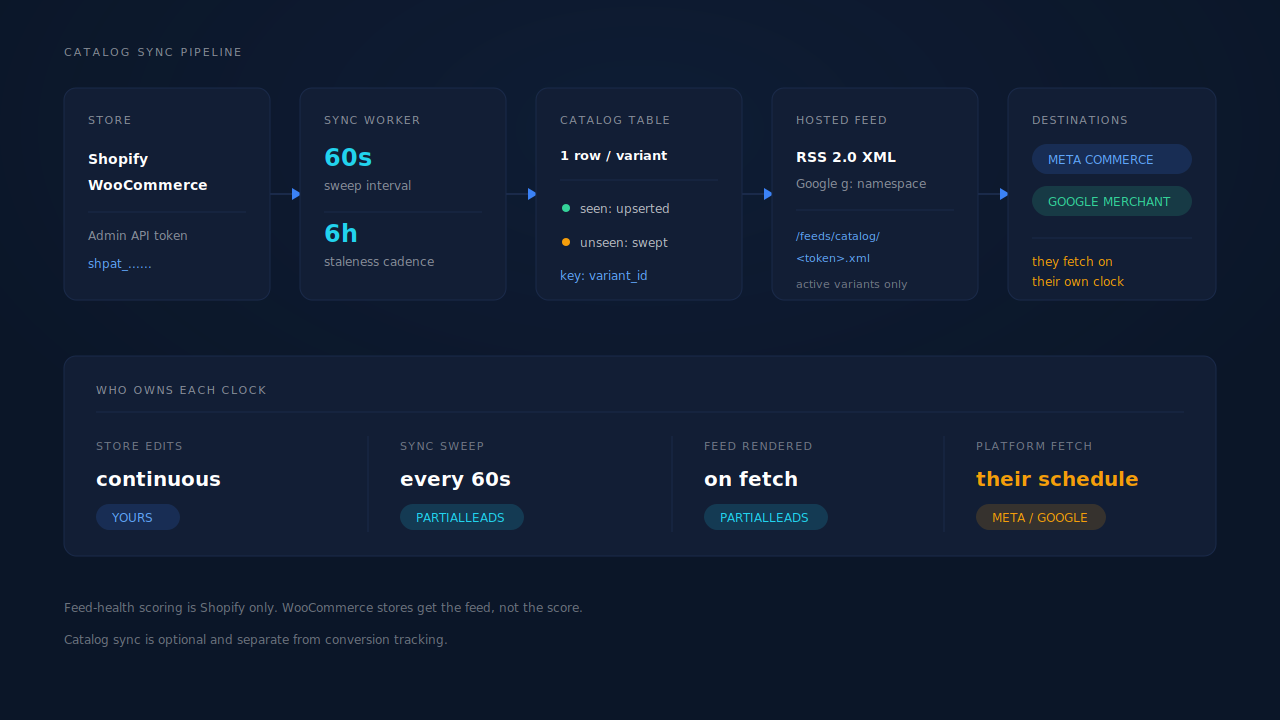
You paste a Shopify custom-app Admin API token, encrypted under its own key and probed live on save. Until that token exists, nothing happens — catalog sync is inert on connections that haven’t opted in, and entirely separate from conversion tracking. You can run the Conversions API through PartialLeads and never touch the catalog side. WooCommerce catalog sync ships too, on the same table.
Three details do the actual work against drift:
The grain is the variant, not the product. Every row is one variant, keyed on its variant ID. That’s the grain Meta and Google buy and sell at, so a size that sells out doesn’t drag its siblings out of the feed with it.
Rows not seen in a completed run are swept. This is the removal half of sync, and it’s the half most homegrown exports skip. If a variant is gone from the store when the sync completes, it comes out of the feed — no manual delist step.
One URL, two readers. The feed renders as RSS 2.0 XML with Google’s g: namespace at a per-connection URL protected by an unguessable token, and both Meta Commerce Manager and Google Merchant Center ingest that same URL. The token is rotatable, and a bad token returns a plain 404. Only active variants render. The sweep runs every 60 seconds against a 6-hour staleness threshold, so a platform fetch reads current data, not last night’s export.
What it does not do: create a Meta Shop or configure your Meta sales channel — it produces the feed, you connect it. And it cannot make Meta or Google fetch faster. Clock four stays theirs.
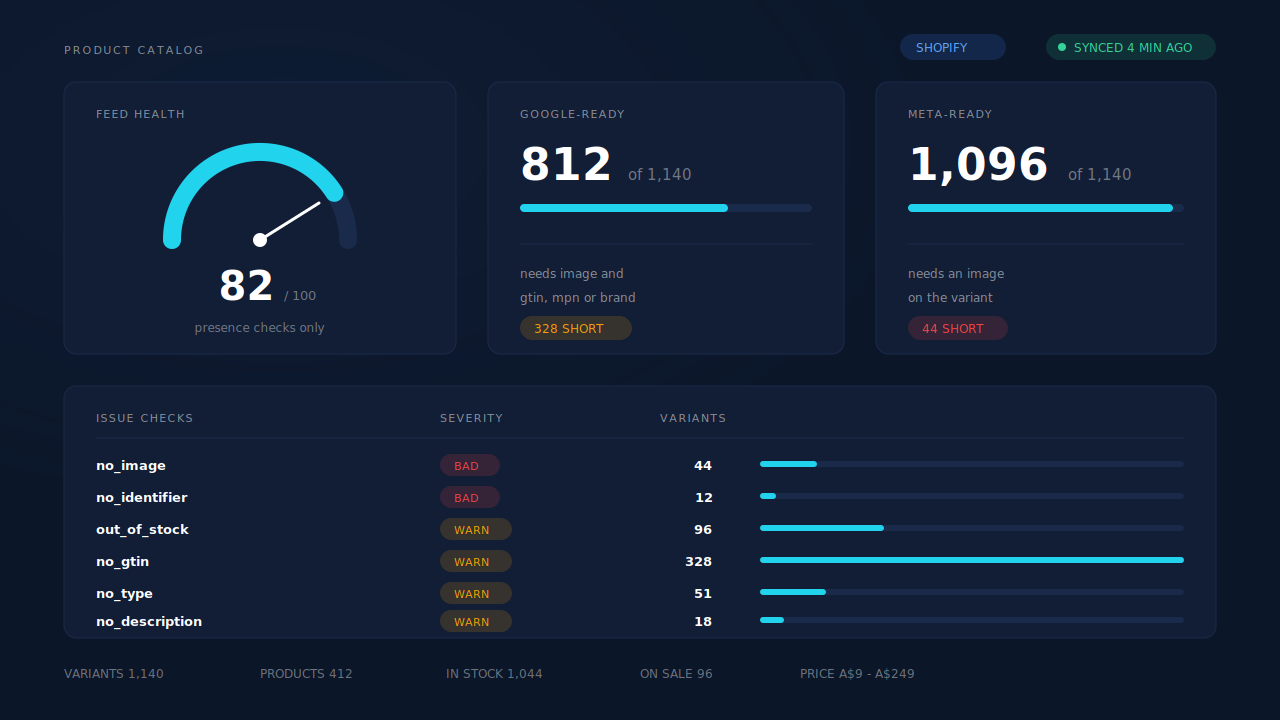
The proving surface is the Product Catalog page. It carries a feed-health score, two readiness counts that differ by destination — Google-ready requires an image plus one of GTIN, MPN or brand; Meta-ready requires an image — and six issue checks with severities: no_image and no_identifier are treated as rejections, while out_of_stock, no_gtin, no_type and no_description are warnings. Alongside that sits catalog composition (variants, products, in and out of stock, on sale, price range) and product-level sales over a rolling 90-day window, so you can see which feed items actually sell and exclude the ones that never do. The numbers in the mockup above are illustrative.
Two constraints worth stating plainly. The feed-health panel is Shopify-only — WooCommerce stores get the feed, not the scoring. And the checks test presence, not validity. They tell you a field is missing; they do not verify price formatting, image dimensions, link health or policy compliance. It is not a full Merchant Center pre-flight. For the tracking side of the same store, Meta CAPI tracking on Shopify has its own failure modes, and fixing Shopify tracking, attribution and catalog together is a larger job than any one of them.
| What breaks | The mechanism | Where you see it in the dashboard |
|---|---|---|
| Feed says in stock, store sold out | Sync sweep every 60s against a 6-hour staleness threshold, feed rendered from current data | Product Catalog, last-synced state and out_of_stock check |
| Archived products still being advertised | Rows not seen in a completed run are swept from the catalog table | Product Catalog, variant count after a sync run |
| A sold-out size drags the whole product out | One row per variant, keyed on variant ID | Product Catalog, variants vs products in composition |
| Two feeds, two truths for Meta and Google | One RSS 2.0 feed URL with the g: namespace, ingested by both |
The hosted /feeds/catalog/ URL |
| New variants silently ineligible | Six presence checks with severities, rejection rollup on missing image or identifier | Product Catalog, issue checks table |
| Same feed fine on Meta, failing on Google | Separate readiness counts — Meta-ready on image, Google-ready on image plus an identifier | Product Catalog, readiness tiles |
| Budget going to items that never sell | Product-level sales over a rolling 90-day window, non-sellers excludable | Product Catalog, top products and not-selling |
Tell us what's broken. We'll fix your tracking — free.
Describe the tracking/attribution problem you're stuck on and we'll map it to a fix: server-side conversions to Meta, Google, TikTok and Pinterest, plus first-party tracking that survives Safari. No code required.
Sources
- https://developers.facebook.com/docs/marketing-api/catalog
- https://developers.facebook.com/docs/commerce-platform/catalog/fields