Your store and your ad platform are not counting the same thing. Shopify credits the session that placed the order, based on what that session carried while it was on your domain. The ad platform credits its own clicks and impressions inside its own lookback window, for the subset of orders it was ever told about. Two different models running over two different datasets cannot land on one number.
So the interesting question is not “which report is wrong”. It is: what exactly is each one measuring, and which of them should decide a budget?
What are you comparing when the two numbers disagree?
You are comparing a store-side model against a platform-side model. The store-side model starts from the order — an object that definitely exists — and works backwards to whatever marketing evidence survived until checkout. The platform-side model starts from an ad interaction it definitely served, and works forwards to any conversion it received that falls inside its window.
Those are opposite directions of travel, and they fail in opposite ways.
The store-side view undercounts paid channels. It can only credit what the ordering session still carried, so every hop, redirect, blocked cookie or device switch quietly moves a sale into an unattributed bucket — which is why ad conversions show as Direct far more often than anyone’s media mix would suggest.
The platform-side view overcounts itself. It claims any conversion that falls inside its own window, including ones another channel actually closed, and it only ever sees conversions somebody sent it. That is the same asymmetry behind Meta showing more conversions than your CRM.
Both reports are internally consistent. They just answer different questions.
What is your store’s own attribution report measuring?
It is measuring the last identifiable marketing source attached to the session that placed the order — nothing earlier and nothing off-domain. Your store’s marketing report is built from traffic it observed on your own storefront, so the evidence it can use is limited to campaign parameters in the landing URL and the referring domain.
Three consequences follow directly, and all three are observable in your own admin:
- It is a session-scoped, last-touch view by default. A buyer who clicks a paid ad on Monday, returns by typing your URL on Thursday and buys gets credited to the Thursday session — the one with no marketing evidence on it.
- It reports on the order date. Revenue lands on the day the money moved.
- It needs the parameters to still be there. If the ad click arrived without gclid, fbclid or UTM parameters — a redirect ate them, a link was shared, a tag was misconfigured — the session has no marketing evidence at all, and the order is not paid revenue as far as your store is concerned.
Check your store’s own documentation for the exact model and window it applies; platforms change these settings without changing the report’s name. The behaviour above is what you will see regardless of the wording.
What is the ad platform’s conversion report measuring?
It is measuring conversions that the platform was told about, which it can tie back to one of its own ad interactions inside its configured attribution window. Three parts of that sentence do the damage.
“Told about.” If a conversion never reaches the platform — the browser tag was blocked, the tab closed, the payment happened on a redirect the tag never saw — the platform cannot count it at all. This is not a reporting flaw; there is simply no event.
“Its own ad interactions.” The platform sees its own clicks and impressions and nothing else. It has no idea the buyer also clicked a different channel’s ad, so it will happily claim a sale another platform is claiming too.
“Inside its window.” Lookback length and view-through settings decide how many journeys qualify. Widen either and claimed conversions rise without a single extra order existing. Read the current definitions in the platform’s own documentation before assuming what a column counts.
There is also a date-basis mismatch that catches people out in weekly reporting: ad platforms commonly report a conversion against the date of the ad interaction, not the date of the order, so the same sale can appear in a different week on each side.
Why does the checkout hop push your store’s numbers toward Direct?
Because checkout is a separate context from the storefront, and the session that pays is frequently not the session that arrived. Attribution evidence is attached to a session, so when the session boundary moves, the evidence does not automatically come with it.
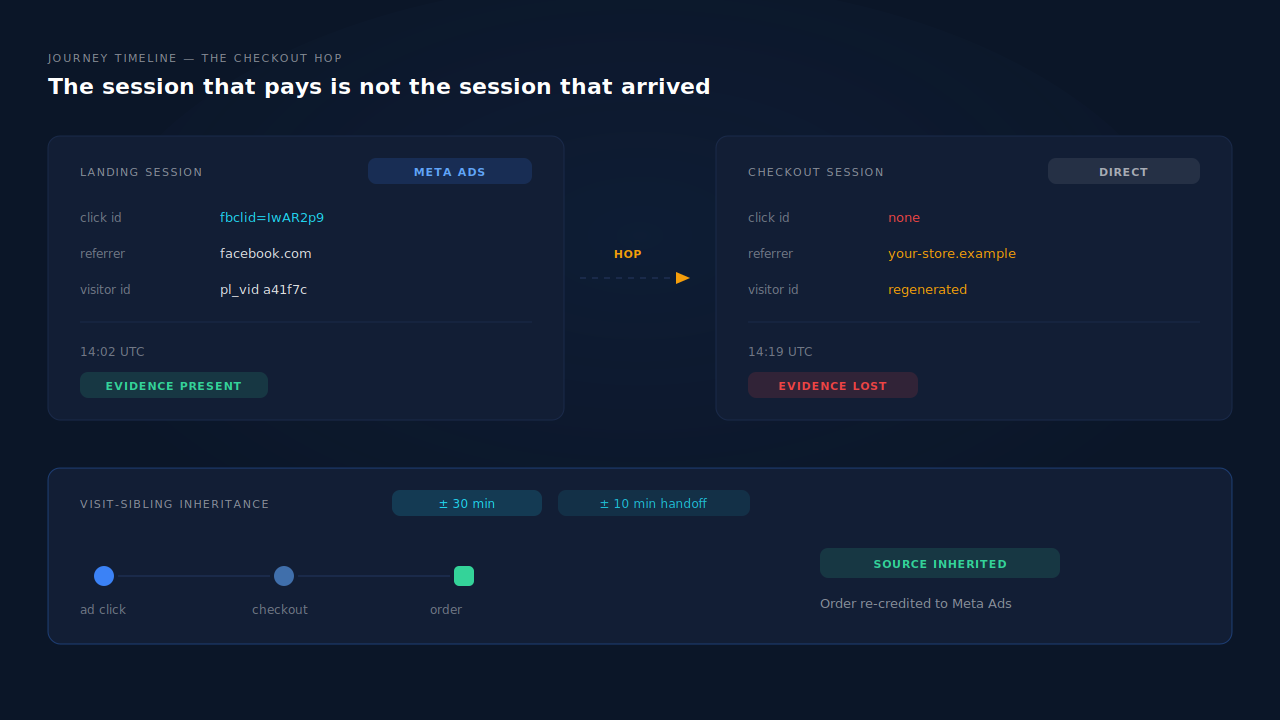
Three things go wrong at that boundary:
- Visitor identifiers can regenerate. Shopify’s Customer Events sandbox is known to hand out fresh visitor IDs, so the buyer at checkout can look like a brand-new person with no history.
- The referrer becomes you. Once a shopper moves between your own pages and hosts, the referring domain is your own site. A naive model sees a self-referral and has nothing external to credit.
- The click ID is upstream. The
fbclidorgclidwas in the landing URL an hour and six page views ago. Unless something deliberately carried it forward, the checkout context does not have it.
The result is a store report where paid channels look weak and “Direct” looks like your best-performing acquisition source — which is arithmetically impossible for a store that spends most of its money on ads. If your store numbers are broken in several places at once, the wider walkthrough of how to fix Shopify tracking and attribution covers the install-level causes; this article is about what the reports mean once they are installed correctly.
Which number should you actually put in the spreadsheet?
Neither one alone. Use each for the decision it can support, and never subtract one from the other.
Use your store’s order data as the revenue denominator. Orders and refunds are facts recorded by your commerce system. Total revenue, order count and AOV come from there, always.
Use the ad platform’s number as an optimisation signal, not as accounting. A platform’s conversion count exists to train its bidding. It is directionally useful for campaign-level decisions inside that platform, and it is not a ledger.
Use a model comparison to settle credit. Run first-touch and last-touch over the same set of orders. The spread between them is the actual answer to “how much does this channel start versus close”, which is the question you were trying to answer when you opened both reports. That comparison is the core skill in reading an attribution report without fooling yourself.
One practical rule: pick one system as the source of truth for revenue before the meeting, and state which model is being used on the same slide as the number. Most attribution arguments are two people quoting different models at each other.
How do you reconcile the two without a vendor?
You can get a long way with parameter discipline and a spreadsheet, as long as you accept its limits.
- Tag every paid link consistently. Same case, same naming, no exceptions. Any link you cannot tag is a link you cannot attribute.
- Capture the click ID at landing. Store
fbclid,gclid,msclkidand friends the moment the visitor arrives, before any internal navigation can drop them. - Carry the evidence forward. Persist it in your own storage so it survives the hop to checkout, and attach it to the order when the order is created.
- Export orders with their marketing columns and join them to platform exports on the click ID.
- Build both models by hand. Earliest evidence per customer is first touch; latest evidence per customer is last touch. Count the same orders twice, once per model.
Where it breaks: a buyer who cleared cookies, switched devices, or came back through an untagged path has no click ID to join on, so they fall out of the join entirely and land in your unattributed pile. Manual reconciliation tells you what you can prove, not what happened. The gap between those two is exactly the ecommerce revenue you cannot attribute to an ad click by hand.
How does PartialLeads make the two numbers comparable?
By building one conversion set and running three models over it, instead of comparing two vendors’ summaries.
Purchases arrive server-side from the store’s order webhook and the Customer Events pixel, so the conversion set starts from orders rather than from browser events. Because the order webhook fires server-side, every order in your store admin produces an event regardless of whether the browser cooperated — you can reconcile the count against your admin yourself. What no vendor controls is the other half: whether an ad platform can match that event to a person and a click depends on the identifiers captured and on the platform’s own graph.
Each purchase is matched back to a session through a tiered ladder — visitor ID echo first, then normalised email, then phone, then IP — and the person’s sessions are unioned by a six-tier identity cluster covering visitor ID, email, phone, IP with user agent, device fingerprint and click ID. Visit-sibling inheritance repairs the checkout hop specifically: a session inside the same visit, from the same device within a ±30 minute window, passes its click IDs and campaign parameters to the session that had none. A tighter ±10 minute rule covers a phone that switched network mid-checkout.
Every matched purchase then writes both a first-touch and a last-touch row, so the Attribution report shows FIRST TOUCH, LAST TOUCH and PARTIALLEADS RESOLVED side by side, each with its own purchase count and channel split. The resolved model can legitimately show more purchases than the other two, because it recovers orders the other two lose. The display layer uses a 28-day decay window deliberately matched to Meta’s standard, so the report argues with your ad platform less often on window length alone.
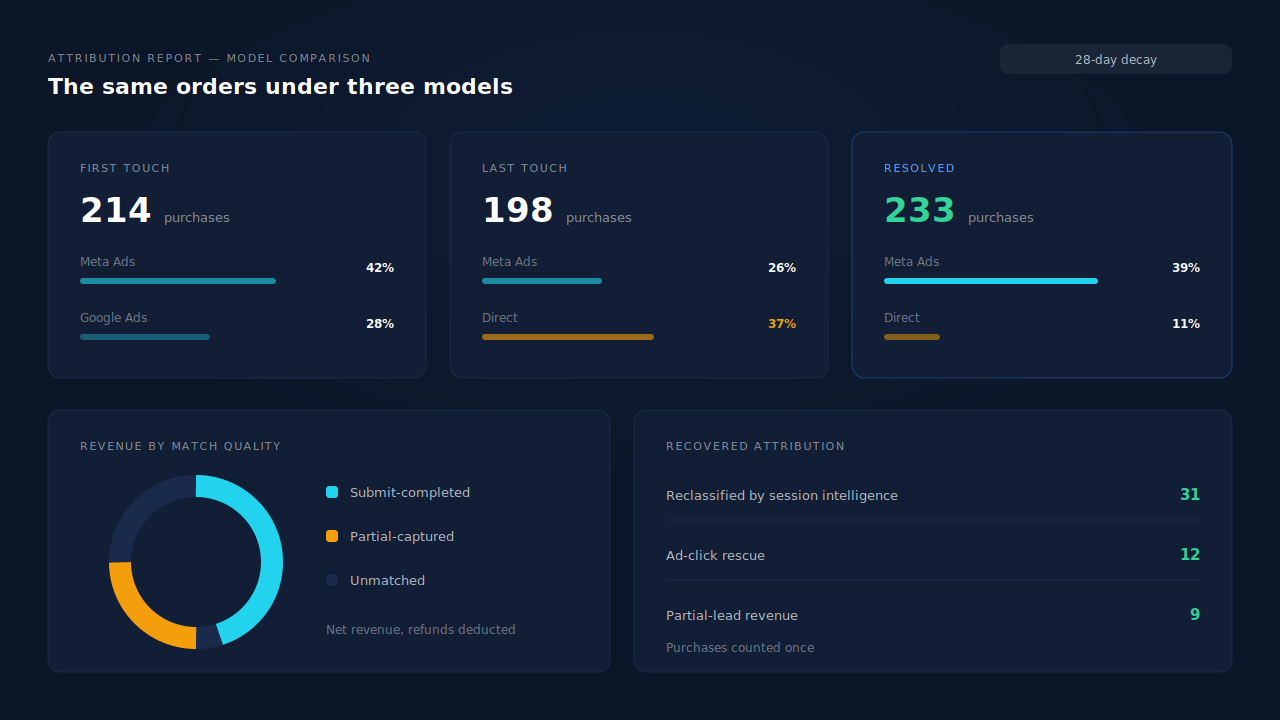
Three surfaces do the reconciling work:
- Model comparison — the same orders under three models, so you can see the disagreement instead of inheriting one vendor’s answer.
- Recovered Attribution — revenue a raw last-click view loses, itemised by the mechanism that recovered it, including sessions reclassified by the session classifier that would otherwise have read as Direct.
- Revenue by Match Quality — a donut splitting net revenue into partial-captured, submit-completed and unmatched, so the unattributed slice is a number on the page rather than a silence.
Honest constraints: PartialLeads does not change what your ad platform reports, and it will not make the two numbers equal — the platform still applies its own window and view-through rules to its own data. Unmatched purchases stay visible as unmatched rather than being assigned to a channel, and client-side platform cookies still matter for match quality on the dispatch side.
| What breaks | The mechanism | Where you see it in the dashboard |
|---|---|---|
| Store report credits Direct after the checkout hop | Visit-sibling inheritance (±30 min same-visit, ±10 min network handoff) | Journey timeline on the lead |
| Order has no click ID to join on | Six-tier identity cluster: visitor ID, email, phone, IP+UA, fingerprint, click ID | Leads list Journey ribbon |
| Two reports, two models, no common ground | First-touch and last-touch rows written per matched purchase | Attribution report, three models side by side |
| Paid revenue looks smaller than you know it is | Server-side purchase matching from the order webhook | Recovered Attribution, itemised by mechanism |
| Nobody agrees what the unattributed pile contains | Match-quality split of net revenue | Revenue by Match Quality donut |
| Window length becomes the argument | 28-day decay display window matched to Meta’s standard | Attribution report period and model controls |
Tell us what's broken. We'll fix your tracking — free.
Describe the tracking/attribution problem you're stuck on and we'll map it to a fix: server-side conversions to Meta, Google, TikTok and Pinterest, plus first-party tracking that survives Safari. No code required.
Sources
- https://developers.facebook.com/docs/marketing-api/conversions-api/
- https://developers.facebook.com/docs/marketing-api/conversions-api/parameters/server-event/
- https://developers.facebook.com/docs/marketing-api/conversions-api/deduplicate-pixel-and-server-events/