Your Pinterest tag is firing and your conversions column is empty because Pinterest does two separate things with your data: it receives an event, and it attributes a conversion. Tag health proves the first happened. The empty column proves the second didn’t. Those are different systems with different failure modes, and almost everyone debugging this is staring at the wrong one.
The fix is completely different depending on which step broke. If events aren’t arriving, you have an installation problem. If events are arriving and nothing attributes, you have an identifier problem — and no amount of reinstalling the tag will touch it.
Why does Pinterest count events but not conversions?
Because an event is a message and a conversion is a claim. The message says “somebody did this thing on my site.” The claim says “this thing happened because of your ad.” Pinterest can only make the second one if it can connect the event to a person it knows saw or clicked a Pin.
Picture two ledgers. The first is your tag’s event stream: raw counts of page visits, leads and checkouts as they arrive. The second is your campaign report: conversions credited to ad groups, with revenue and cost per action. The first fills up whether or not the second does. So when tag health looks green and the campaign report reads zero, nothing is contradicting itself — you’re reading two ledgers and expecting them to agree.
There are four reasons the second ledger stays empty, and they’re worth working in order, because each one is cheaper to check than the next:
- You’re looking at the wrong event, or the wrong report window.
- The events carry no identifier Pinterest can resolve to a person.
- The events that matter never fire at all, so only low-value ones arrive.
- The person genuinely never came from Pinterest.
The fourth is the one everybody should rule out last, not first.
Is your tag firing the event Pinterest is actually counting?
Check this first, because it costs thirty seconds and it’s the most common answer. A campaign optimises for one conversion event. If your tag fires page_visit on every page and a lead event nowhere, the conversions column for a lead campaign is correctly zero.
Pinterest’s Conversions API accepts a fixed vocabulary of event names — a short, closed list, not free text. Two failure shapes come out of that:
- Everything is
page_visit. The tag was installed once, sitewide, and nobody ever wired the specific conversion. Page visits are real events and they’ll show in your event stream all day. They are not leads or checkouts. - The right event fires, but not where the money is. A
leadevent on the newsletter modal, nothing on the quote form that actually produces revenue.
Look at your event stream broken down by event name, not at the total — a big total made entirely of page visits is the same as zero for reporting purposes. Deciding which event maps to which business outcome is the whole job, and it’s the first thing to settle when you set up Pinterest’s Conversions API.
What happens when the event arrives with no click identifier?
It lands, it counts in your event stream, and it attributes to nothing. This is the quiet one — everything looks installed, everything looks green, and the campaign report never moves.
Pinterest identifies the person behind an event using two kinds of signal. The first is the click identifier: Pinterest appends an epik parameter to the URL when someone clicks a Pin through to your site. The second is hashed user data: email and phone, normalised and SHA-256 hashed before they leave your server. Send neither and you have sent an anonymous event. Anonymous events are real data about your site and useless data about your ads.
The epik parameter behaves exactly like the other platform click identifiers — gclid, fbclid, ttclid: it’s only in the URL on the landing hit. If nothing reads it and stores it at that moment, it’s gone by the second page. A visitor who lands on /rug-guide?epik=…, reads for a minute, clicks through to /collections/rugs, then converts, converted on a URL with no epik in it. The click identifier existed. Nobody captured it.
Hashed user data fails the same way in the other direction. Your checkout knows the buyer’s email; if the event fires from a browser script that was never handed it, the event goes out without the strongest matching signal you own.
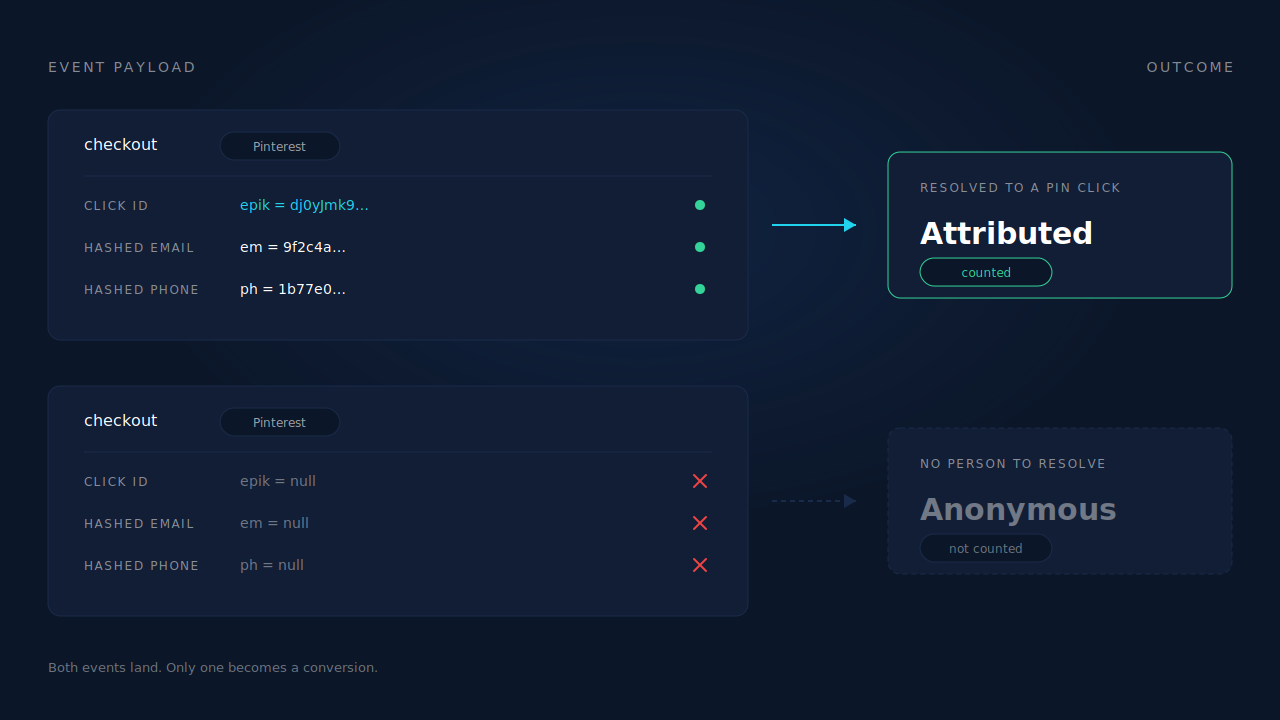
This is also why “my match rate is fine” isn’t reassurance: match rate describes the events that carried identifiers, and says nothing about the ones that carried none.
Why do consent banners and ad blockers empty the column without erroring?
Because both remove the event before it exists, and a missing event never produces an error for you to find. You’re debugging an absence, which is the hardest kind of bug to see in a dashboard that only shows you what arrived.
Three versions of this, in rough order of how much traffic they eat:
Consent gating. If your banner blocks marketing tags until the visitor accepts — the correct default under GDPR — every rejecting visitor is invisible to a browser-fired event. That’s working as designed and you still need to know the size of it, because it directly scales your conversions column.
Blocking. A filter list that matches the script filename removes it at the network layer, which is why ad blockers break conversion tracking without ever touching your code. Nothing throws. The tag simply isn’t there.
The mobile tab problem. Pinterest traffic skews heavily mobile, and mobile is where browser-fired conversion events die: the buyer approves payment, sees their bank’s confirmation, and closes the tab before your thank-you page loads. No page load, no event.
All three are failures of the browser as a witness. None of them affect the order sitting in your admin. Your revenue is intact; only the report is missing — which is the entire argument for firing conversions from your server through the Conversions API instead of from a page load.
Are you reading the right window and the right report?
Attribution windows and reporting lag account for a surprising share of “empty” columns that aren’t actually empty. Conversion reporting does not update instantly, and a conversion is only credited if it falls inside the attribution window your report is configured with.
Two practical rules. First, check the window your columns use before concluding anything — a long consideration cycle reported against a short click window will legitimately show near-zero, and Pinterest is a discovery surface where purchases often happen days after the Pin was seen. Second, give a change time to land; judging a fix an hour after deploying it is how people “fix” a working setup twice.
Also confirm the tag you’re checking belongs to the ad account running the campaign. Multi-brand and agency setups routinely have a working tag reporting into an account nobody is reading.
How do you debug this in order?
Work from cheapest to most expensive and stop at the first thing that’s wrong. The order matters more than the individual checks.
- Name the event your campaign optimises for. Everything below is about that event, not your total event count.
- Confirm that exact event fires on the exact page where the outcome happens. Not a similar event. Not a sitewide page visit.
- Inspect one real event’s payload. Does it carry a click identifier? Does it carry a hashed email or phone? If neither, you’ve found it — stop here.
- Land on your own site from a Pin and watch the
epikparameter. Does anything store it, or does it vanish on the next click? - Check the report window and wait out the reporting lag before concluding a change did nothing.
- Reconcile counts. Orders in your admin versus conversion events dispatched. That gap is your browser-loss rate, and it’s the number that tells you whether to move dispatch server-side.
Step 6 ends the argument. If your admin says 180 orders and your dispatched events say 96, no amount of tag debugging closes that gap. The event has to come from somewhere that doesn’t depend on a browser being alive.
How does PartialLeads fix empty Pinterest conversions?
By capturing the identifier at the moment it exists and firing the event from the order record instead of the page. Those are the two halves of the problem, and they’re handled in different layers of the product.
On the capture side, the PartialLeads tag reads epik from the landing URL and stores it on the session, alongside gclid, gbraid, wbraid, fbclid, msclkid and ttclid. It doesn’t matter what the visitor clicks afterwards — the click identifier is already attached to the session, so an event fired an hour and four pages later still carries it.
On the identity side, the six-tier cluster resolver unions a person’s sessions by visitor ID, email, phone, IP and user agent, device fingerprint and click ID. So when a checkout session carries no Pinterest identifier at all, visitor identity resolution walks back to the session that did. That’s the case that looks unfixable from inside a tag: the converting session genuinely has nothing, and the answer lives in another session belonging to the same person.
On dispatch, Pinterest Conversions API v5 is one of the four server-side integrations. Purchases arriving from Shopify, WooCommerce, Stripe, GoHighLevel or a universal webhook are matched to a session and fanned out server-side — so the conversion comes from the order, not from a page the buyer may never have loaded. Every event gets a deterministic event_id derived from the pixel ID, event name and record ID, with a UNIQUE dedup table behind it, so a redelivered webhook physically cannot double-fire.
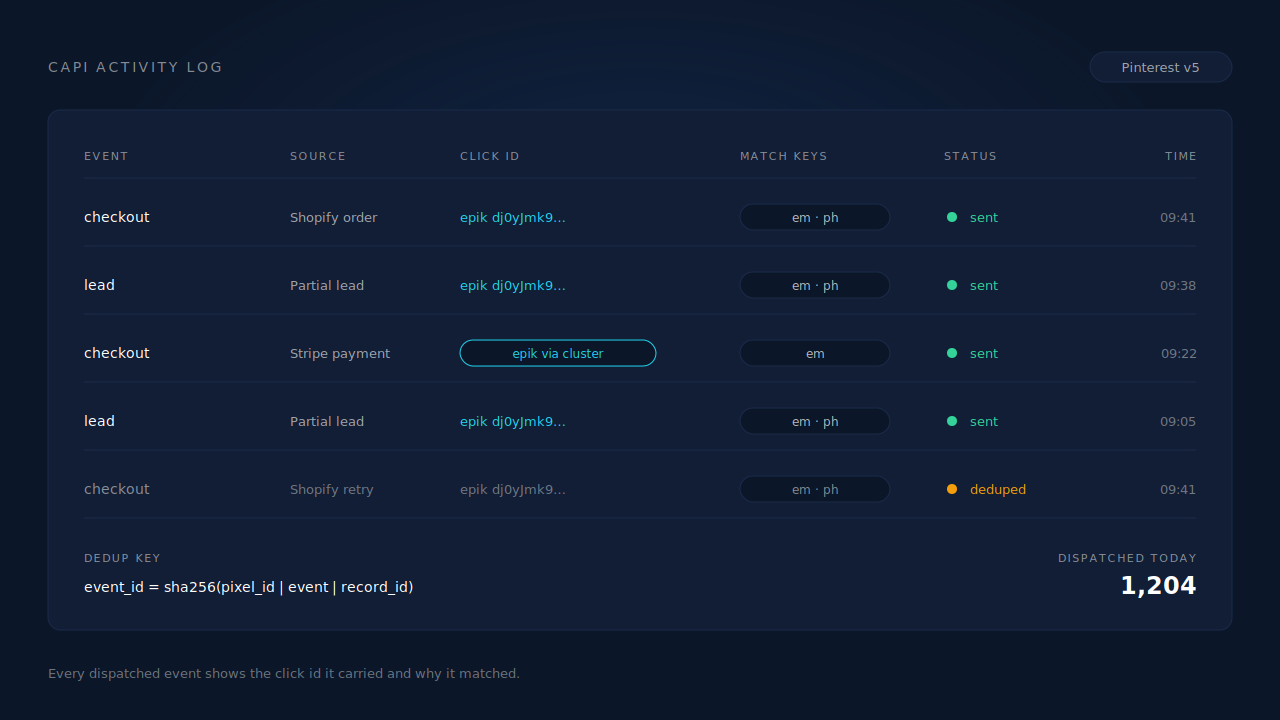
Two honest constraints. First, keep your client-side Pinterest tag installed — server-side dispatch does not replace it. The _epik cookie it maintains is one of the identifiers that makes matching work, and PartialLeads does not synthesise identifiers it never saw. Second: dispatch completeness is controllable, attribution matching is not. Every order in your admin can produce an event, verifiable by reconciling the two counts. Whether Pinterest then resolves that event to a Pin click depends on its own graph, the identifiers you collected and what the person consented to. Any vendor promising you the second half is selling something they don’t own.
| What breaks | The mechanism | Where you see it in the dashboard |
|---|---|---|
| Event lands with no click identifier | epik captured from the landing URL at first touch and stored on the session |
Session click-ID columns, CAPI payload |
| Converting session has no Pinterest identifier | Six-tier identity cluster resolves the person across sessions before dispatch | Customer Journey timeline |
| Browser event lost to a blocker, a closed tab or consent | Purchase matched server-side from the order record, then fanned out to Pinterest | Purchases ledger, CAPI activity log |
| Tag and server both counted the same sale | Deterministic event_id plus UNIQUE dedup tables |
CAPI activity log |
| Wrong event type in the column | Per-config choice of which internal event maps to which Pinterest event | Pinterest CAPI config |
Fix in the order you check: get the right event firing, get an identifier onto it, then move dispatch somewhere the browser can’t break it.
Tell us what's broken. We'll fix your tracking — free.
Describe the tracking/attribution problem you're stuck on and we'll map it to a fix: server-side conversions to Meta, Google, TikTok and Pinterest, plus first-party tracking that survives Safari. No code required.
Sources
https://developers.facebook.com/docs/marketing-api/conversions-api/deduplicate-pixel-and-server-events https://developers.facebook.com/docs/marketing-api/conversions-api/parameters/customer-information-parameters https://developers.facebook.com/docs/marketing-api/conversions-api