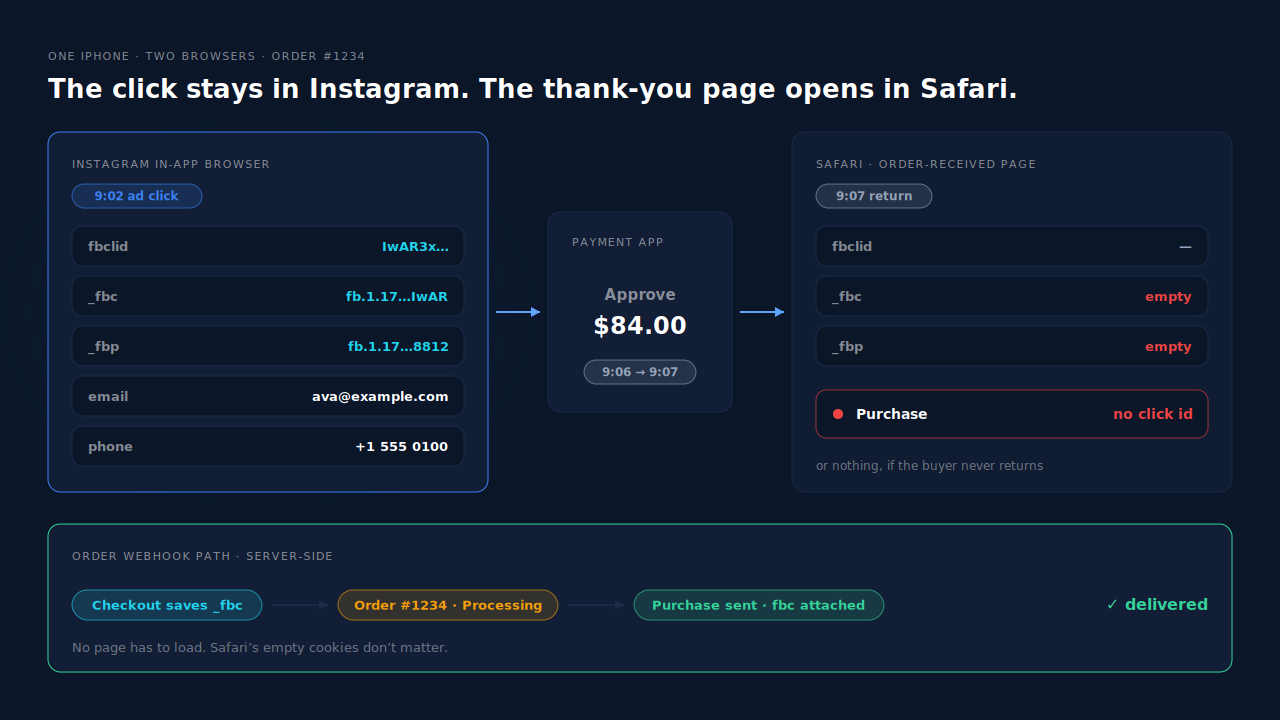
Because the purchase finishes in a different browser from the one that saw your ad. On iPhone, an Instagram ad opens your store inside Instagram’s in-app browser, which keeps its own cookies. When the buyer pays in an external app and returns in Safari, the thank-you page loads without the ad click’s _fbc cookie, or never loads at all. A Purchase tied to that page goes missing or arrives without the click.
The complaint is always the same shape: “Buyers who click my ad inside Instagram on iPhone, pay in an external app and come back in Safari never get a CAPI Purchase, so Meta can’t credit the ad.” Desktop orders look fine. The iPhone Instagram slice is where Purchases thin out.
Here’s what happens between the two browsers, how to confirm it on your own store, and how to send the Purchase from the order so the browser switch stops mattering.
What is the Instagram in-app browser, and why does it matter?
The in-app browser is the web view Instagram opens when someone taps a link or an ad. It’s not Safari. It runs inside the Instagram app with its own cookie jar and local storage, so anything your store or the Meta Pixel saves there stays there. Safari on the same iPhone can’t read it.
When the shopper taps your ad, the landing URL carries an fbclid click identifier. If the Meta Pixel loads on that page, it stores the click in a first-party cookie called _fbc, and it sets a browser id cookie called _fbp. If you’re fuzzy on what each id does, gclid vs fbclid vs UTM parameters covers the difference.
Both cookies live in Instagram’s web view. Meta’s documentation describes fbc as the parameter that ties a server event back to the ad click. As long as the shopper browses, adds to cart and checks out inside Instagram, every event can carry it.
Why does the purchase lose the ad click when the buyer comes back in Safari?
Because the payment step hands the shopper to another app, and the return trip opens in the phone’s default browser, usually Safari. The thank-you page then loads in a browser that has never seen your ad. It has no _fbc, no _fbp, and none of the session data your plugin saved in Instagram.
Walk through one order:
- 9:02 — Ava taps your Instagram ad. Your product page opens in Instagram’s web view with
?fbclid=IwAR…in the URL. The pixel sets_fbcand_fbpin that web view. - 9:05 — Ava adds to cart and fills in checkout: email, phone, address. The order is created in WooCommerce as pending.
- 9:06 — Ava picks a payment method that opens an external app: PayPal, a bank’s 3-D Secure approval or a pay-later provider.
- 9:07 — Ava approves. The provider sends the shopper back to your order-received URL, and iOS opens it in Safari.
- 9:07 — Safari loads the thank-you page with a fresh cookie jar. No
fbclid, no_fbc.
Why does the CAPI Purchase disappear rather than just lose attribution?
Because many WooCommerce Meta setups send their server-side Purchase from the same thank-you page request that prints the browser pixel. “Server-side” there still means “triggered by a page load”. If Ava closes the payment app and never comes back, no page loads and nothing is sent, browser or server. If Ava does come back in Safari, the event fires but carries Safari’s empty cookies.
So one cause gives two failures. Some Purchases never fire. Others fire with no click identifier linking them to the ad. This is a close cousin of the gateway problem in what share of WooCommerce buyers never reach the thank-you page, with an iPhone-specific twist: even the buyers who do reach it arrive in the wrong browser.
How do you confirm this is what’s happening on your store?
Place a real test order from an iPhone through an Instagram link, pay with a method that opens another app, and watch where you land. Then compare a week of paid WooCommerce orders against Purchases received in Events Manager, and check how many of those Purchases carry a click id. The gap shows up as missing events and missing fbc.
- Reproduce it. Post the product link in an Instagram story or DM to yourself, open it on an iPhone, and pay with PayPal or a card that triggers your bank app. Note which browser shows the thank-you page.
- Check Test Events. With Events Manager’s test view open, see whether a Purchase arrives, and whether its parameters include
fbc. The same steps you’d use to check your Meta CAPI is working apply here. - Reconcile a week. Count Processing and Completed orders in WooCommerce → Orders. Compare that with Purchases received in Events Manager, not Ads Manager’s attributed conversions.
- Look at click-id coverage. Events Manager’s match-quality details list the customer information parameters your Purchases carry and how often. Low coverage for the click id on Purchase while PageView and AddToCart look healthy points at the browser switch.
How do you keep the Purchase and the ad click together?
Stop tying the Purchase to the thank-you page. Save the click identifiers on the order while the buyer is still in Instagram’s browser, at checkout. Then send Purchase server-side from the order when it’s paid, reading those saved values. The return browser no longer matters, because nothing depends on it.
Step 1: save _fbc and _fbp on the order at checkout
The checkout request is sent from Instagram’s web view, so its cookies are still there. Copy them onto the order before the shopper leaves for the payment app:
// Classic checkout. Block checkout: also hook
// 'woocommerce_store_api_checkout_order_processed', which receives the order.
add_action( 'woocommerce_checkout_create_order', function ( $order ) {
    foreach ( array( '_fbc', '_fbp' ) as $name ) {
        if ( ! empty( $_COOKIE[ $name ] ) ) {
            $order->update_meta_data(
                $name,
                sanitize_text_field( wp_unslash( $_COOKIE[ $name ] ) )
            );
        }
    }
    // Keep the checkout browser's user agent for client_user_agent.
    $order->update_meta_data( '_capi_ua', wc_get_user_agent() );
} );
If _fbc is missing but you kept the landing URL’s fbclid, Meta’s docs describe how to build fbc from it: fb.1., then a millisecond timestamp, a dot, and the fbclid value. If the pixel never set _fbp, leave it empty. Don’t invent one.
Step 2: send Purchase when the order is paid, not when a page loads
Hook the order’s move to Processing or Completed and send Purchase through the Conversions API with the saved fbc and fbp, the checkout user agent, and hashed email and phone from the order. Use the order number to build the event_id. The full setup is in the guide to tracking WooCommerce purchases server-side to Meta.
Two things to get right. First, if a browser pixel still fires Purchase on the thank-you page, it needs the same event name and event id, or it double counts. Simpler: keep one source for Purchase. Second, ask for a phone number at checkout. Email and phone are the strongest match keys Meta scores, and they’re your fallback when the click id is lost, which is why your Event Match Quality ceiling is set by your checkout form.
How does PartialLeads send the Purchase when an Instagram buyer pays in another app?
PartialLeads takes the WooCommerce Purchase from the order webhook, not from any page, so a buyer who returns in Safari or never returns still produces a Purchase once the order is paid. The tag records fbclid and _fbc when the buyer lands, and the order is matched back to that session by visitor id or by the checkout email or phone.
The Purchase doesn’t wait for a page. The PartialLeads WooCommerce plugin fires nothing on the thank-you page. When an order reaches Processing or Completed, WooCommerce’s webhook delivers it, PartialLeads records it once, and sends Purchase server-side to Meta, TikTok and Pinterest. Pending, on-hold, failed and cancelled orders aren’t sent. The value is the full order total, including tax and shipping after discounts.
The click is captured where the ad landed. On the Instagram web view, the PartialLeads tag stores the landing page, UTMs, fbclid, fbc and fbp on that visitor’s session. When fbclid is in the URL but the _fbc cookie is missing or malformed, PartialLeads rebuilds fbc from it in Meta’s format. It does not create an _fbp that the pixel never set.
The order finds its way back to the click. Each paid order is matched to a session in tiers: visitor id first, then email, phone and IP. The tag captures the email and phone the shopper types into checkout as they type, so the Instagram session already carries them before the shopper leaves for the payment app. When the order webhook arrives with the same billing email, it matches the session that holds the ad click, and the Purchase goes to Meta with that click’s identifiers plus hashed email and phone.
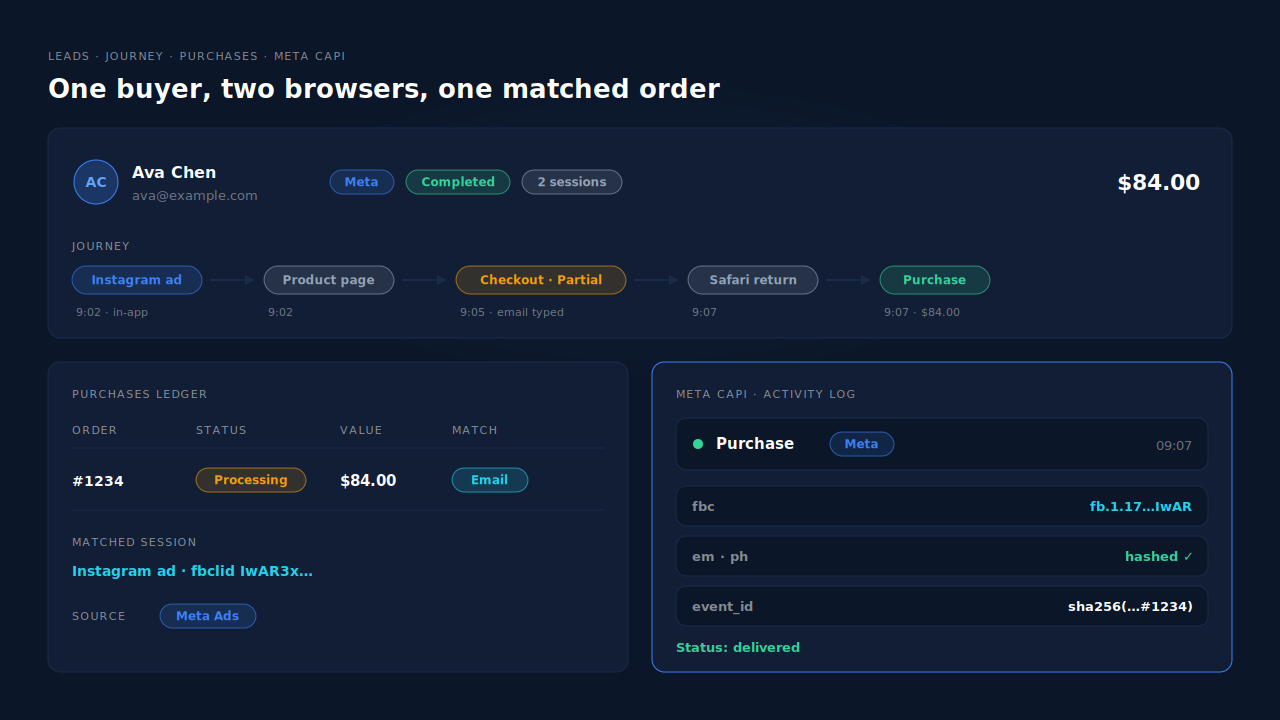
Where you see it working. The Journey timeline shows the Instagram ad session leading to the order. The Purchases ledger lists every paid order with its value, source and whether it matched a session. The Meta CAPI page lists each server Purchase with its status and time, and the Leads list’s API column shows which conversion APIs that buyer was sent to.
The honest constraints. When the purchase finishes in a different browser, the match relies on email or phone. If the shopper typed one email in Instagram’s browser and pays with a different one, or the tag never saw the checkout fields, the order can land unmatched. It’s still sent to Meta, just without the click, and it can be matched later if that person’s identity turns up. PartialLeads uses its own event ids and doesn’t deduplicate against another plugin’s browser pixel, so switch off any other Purchase source. We control that every paid order is sent; Meta controls how it attributes it. If the order is marked paid days after checkout, Meta’s 7-day event window still applies.
| What breaks | The mechanism | Where you see it in the dashboard |
|---|---|---|
| Buyer never returns from the payment app, no Purchase fires | Purchase comes from the order webhook once the order is paid; nothing fires on the thank-you page | Meta CAPI page, server Purchase per paid order |
Thank-you page loads in Safari with no _fbc |
fbclid and fbc captured on the Instagram session at landing; fbc rebuilt from fbclid when the cookie is missing |
Journey timeline, Instagram ad session to order |
| Order isn’t linked to the ad click | Order matched by visitor id, then checkout email or phone typed in the Instagram browser | Purchases ledger, matched or unmatched per order |
| Plugin’s thank-you Purchase and server Purchase both count | No cross-tool dedup; keep one Purchase source | Leads-list API column vs Events Manager sources |
Tell us what's broken. We'll fix your tracking — free.
Describe the tracking/attribution problem you're stuck on and we'll map it to a fix: server-side conversions to Meta, Google, TikTok and Pinterest, plus first-party tracking that survives Safari. No code required.
Sources
- https://developers.facebook.com/docs/marketing-api/conversions-api/parameters/fbp-and-fbc
- https://developers.facebook.com/docs/marketing-api/conversions-api/parameters/customer-information-parameters
- https://developers.facebook.com/docs/marketing-api/conversions-api/parameters/server-event
- https://developers.facebook.com/docs/marketing-api/conversions-api/deduplicate-pixel-and-server-events