Shopify purchases reach Events Manager but not Ads Manager because the two screens count different things. Events Manager counts every Purchase your store sends. Ads Manager counts only the ones Meta can link to someone who saw or clicked your ad, inside the ad set’s attribution setting. Sales from other channels never show there. Neither do Purchases that arrived without identifiers Meta can match.
So a gap is normal. A huge gap, where Events Manager shows a steady stream of Purchases and your Meta campaigns show almost none, usually means the second problem: the sale happened, the event arrived, and nothing on it pointed back to the ad.
This article walks through how to tell the two apart, why Shopify is especially prone to the second one, and what a Purchase needs to carry for Meta to credit the ad.
Why does Events Manager show purchases that Ads Manager doesn’t attribute?
Events Manager is a delivery log. Ads Manager is an attribution report. Events Manager shows every Purchase the dataset received, from any visitor, whatever brought them. Ads Manager shows a Purchase against an ad only when Meta matches the buyer to a person who interacted with that ad within the attribution setting. Everything else is received but uncredited.
Five things put a Purchase in the first screen and not the second:
- The buyer didn’t come from a Meta ad. Organic search, email, Google Ads, a returning customer typing your URL. Those Purchases belong in Events Manager and don’t belong in Ads Manager.
- Meta couldn’t match the buyer. The event reached Meta with no click id, no browser id and thin customer details, so there was nobody to link to an ad interaction.
- The purchase fell outside the attribution setting. The ad set’s click and view windows decide how long after an interaction a sale can still be credited. A buyer who clicked and came back much later falls out.
- The ad isn’t tracking that dataset. Each ad’s tracking settings name a dataset (pixel). If the ad points at an old pixel, or the store sends Purchase to a different one, the sales land somewhere the ad never looks.
- You’re comparing different days. Ads Manager ties a conversion to the ad interaction, so a narrow date range can put a sale on a different day than Events Manager does. Compare a full week or longer.
Reasons 1 and 5 aren’t problems. Reasons 2, 3 and 4 are, and reason 2 is the one Shopify makes likely.
How do you tell whether the missing purchases actually came from Meta ads?
Check where the orders came from before you check the tracking. If most of your Shopify orders arrive from email, search or repeat buyers, a small Ads Manager number may be correct. Pull the orders for one week, look at what brought each buyer in, and compare the Meta-sourced count with what Ads Manager credited for the same week.
A quick way to do it:
- Open the week’s orders in Shopify and look at each order’s conversion summary or source. Note how many first arrived from a Meta ad (the landing URL carries
fbclid, or the UTMs say facebook or instagram). - Set Ads Manager to the same week and read the Purchases column at account level.
- Compare. If Shopify shows 40 orders that started on a Meta ad and Ads Manager shows 5, the gap is a matching problem. If Shopify shows 6 and Ads Manager shows 5, your tracking is fine and Meta simply isn’t driving many sales.
Expect the two to differ even when everything works. Shopify credits the session that placed the order, Meta credits its own clicks and views, and Shopify attribution differs from your ad platform for structural reasons. You’re looking for a gap that’s large and consistent, not a perfect match.
Why can’t Meta tie a server-side Shopify Purchase to the ad click?
Because the identifiers that link a buyer to a click are captured in the browser on the landing page, and a Purchase built on Shopify’s servers doesn’t have them unless something carries them there. Shopify’s checkout runs in its own sandboxed context, so the click id seen on landing often isn’t available when the order is created. The event arrives, but the click trail doesn’t.
Meta links an event to a person with a set of identifiers:
fbc— the click id. When someone clicks your ad, Meta appendsfbclidto the landing URL, and the Meta Pixel (formerly Facebook Pixel) stores it in the_fbccookie. This is the direct link to the click.fbp— the browser id, stored in the_fbpcookie by the Meta base code.- Customer information — hashed email, phone, name and address, plus the visitor’s IP address and user agent.
A Shopify order webhook knows the customer’s email and address. It doesn’t know the fbclid from three pages ago, and it can’t read the browser’s cookies. A server-side Purchase built only from the webhook can therefore reach Meta, show up in Events Manager, and still have no click to point at. That’s the landing-to-checkout break covered in why attribution breaks between your landing page and Shopify checkout, seen from Meta’s side.
Customer details help. Meta can match a hashed email to an account and then find that account’s ad interactions. But fbc is the click itself, and a purchase that carries it is much easier to credit.
What should a Shopify Purchase event carry so Meta can credit the ad?
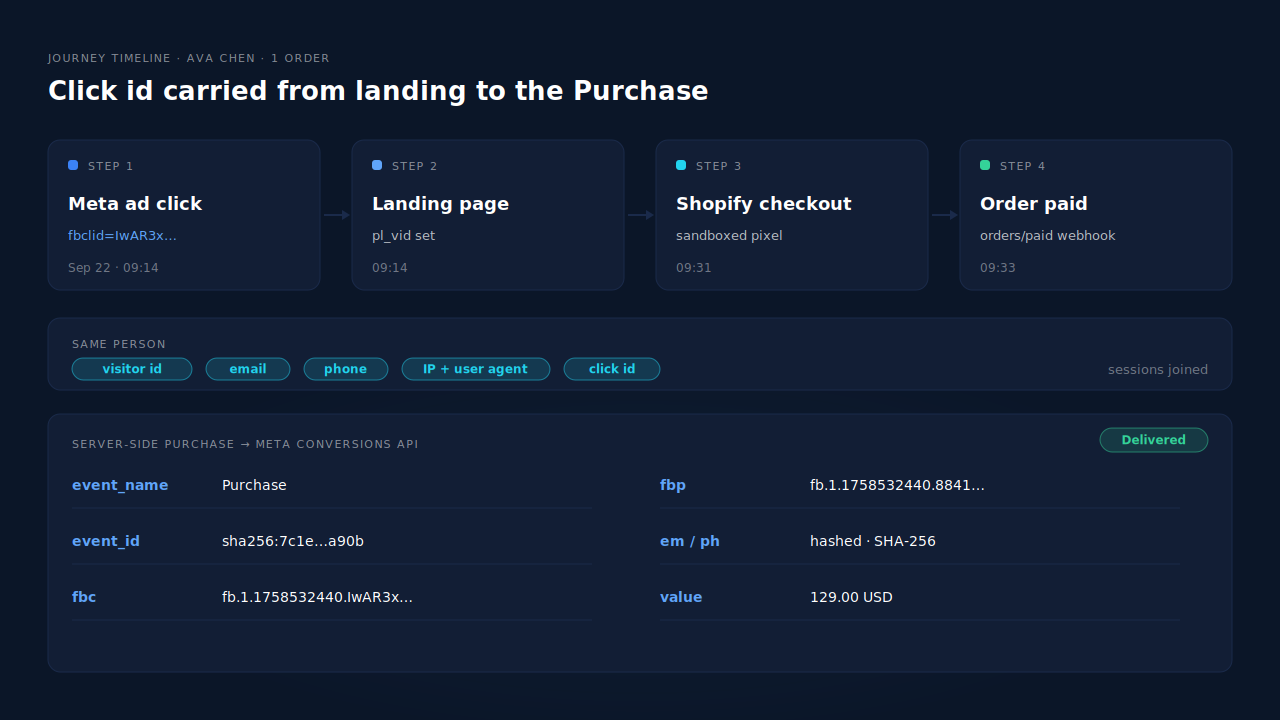
A Purchase Meta can credit carries the click id (fbc), the browser id (fbp), hashed email and phone, the buyer’s IP address and user agent, a real value and currency, and an event_id. The click id comes from the landing URL. The browser id comes from the Meta base code’s cookie. The customer details come from the order.
The practical rules:
Capture fbclid on the landing page, not at checkout. It only appears on the URL of the first page after the click. If you don’t save it then, it’s gone. When the _fbc cookie is missing, you can rebuild the click id from the landing URL, because Meta documents how _fbc is built from a timestamp and the fbclid value. You can’t rebuild _fbp that way, because no URL contains it.
Keep the Meta base code on the store. It sets _fbp. Removing it to “go server-side only” lowers matching instead of improving it.
Keep one source per Purchase. If Shopify’s Facebook & Instagram app and a server-side setup both send Purchase with different event ids, Meta counts two. Pick one sender for Purchase and switch the other off.
Check what actually arrived. In Events Manager, open the Purchase event and look at which customer information parameters it received and how often. Low coverage of click id or browser id on Purchase is the signature of this problem. Your Event Match Quality score for Purchase tells the same story as one number.
Confirm the ad is tracking the right dataset. In each ad’s tracking settings, make sure the dataset selected is the one your store sends Purchase to.
How does PartialLeads get the click id onto Shopify purchases?
PartialLeads captures fbclid, _fbc and _fbp with its Shopify Customer Events pixel at landing and through checkout, and ties them to one visitor across the checkout hop. When Shopify marks the order paid, the order webhook triggers a server-side Purchase through the Conversions API carrying those identifiers. Meta gets the click, not only the sale.
Click ids captured where they appear. The pixel reads fbclid from the landing URL and the _fbc and _fbp cookies when present. If fbclid was on the URL but _fbc is missing or malformed, PartialLeads rebuilds it in Meta’s format from the URL value. It doesn’t invent _fbp: that needs the Meta base code’s cookie, so keep the base code on the store.
The visitor followed across checkout. Shopify’s sandbox can hand the checkout a different id from the one set on the landing page. PartialLeads resolves the sessions into one person, using the visitor id, email, phone, IP address with user agent, and click id, so the order is matched to the session that carried the ad click.
Purchase sent from the order, once. Purchase fires from the Shopify order webhook when the order’s financial_status is paid, with the full order total as value, SHA-256 hashed email and phone, and a deterministic event_id. A retry or redelivered webhook can’t send a second Purchase.
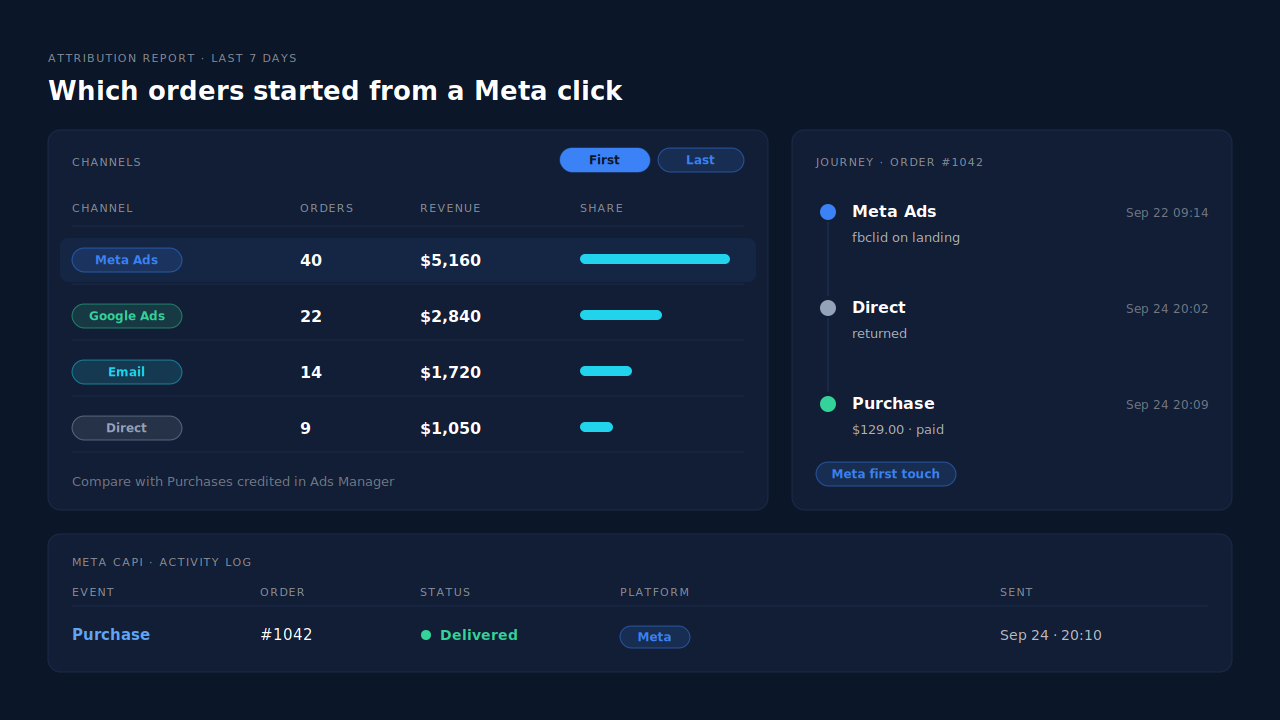
Where you see it working. The journey timeline on a lead shows the landing visit with fbclid and the order it led to. The Attribution report shows which orders started from a Meta click, in first-touch and last-touch views side by side, so you can compare that count with what Ads Manager credits. The Meta CAPI page lists each Purchase sent with its delivery status, and the Leads list’s API column shows which conversion APIs each buyer was sent to.
The honest constraints. PartialLeads controls delivery: every paid order produces a Purchase with every identifier it captured. Meta controls matching. A buyer who opted out of tracking on iOS, arrived through a link without fbclid, or clicked outside your attribution setting may still go uncredited in Ads Manager. Matching is improved, not guaranteed. PartialLeads doesn’t deduplicate against another app’s browser Purchase either, so if Shopify’s Facebook & Instagram app still sends one, switch that off, as covered in fixing Meta CAPI tracking on Shopify.
| What breaks | The mechanism | Where you see it in the dashboard |
|---|---|---|
| fbclid seen on landing is lost by checkout | Customer Events pixel captures fbclid, _fbc and _fbp at landing and through checkout | Journey timeline, landing visit with fbclid |
| Checkout gets a different visitor id | Sessions resolved into one person by visitor id, email, phone, IP with user agent, and click id | Journey timeline, order joined to the ad-click session |
| _fbc cookie missing or malformed | _fbc rebuilt in Meta’s format from the landing URL’s fbclid | Meta CAPI page, Purchase delivered |
| Purchase reaches Meta with no click trail | Server-side Purchase from the paid-order webhook carries the captured identifiers and hashed email and phone | Meta CAPI page, Purchase rows with delivery status |
| You can’t tell which orders really came from Meta | Every matched order gets first-touch and last-touch attribution rows | Attribution report, Meta Ads channel |
Tell us what's broken. We'll fix your tracking — free.
Describe the tracking/attribution problem you're stuck on and we'll map it to a fix: server-side conversions to Meta, Google, TikTok and Pinterest, plus first-party tracking that survives Safari. No code required.
Sources
- https://developers.facebook.com/docs/marketing-api/conversions-api
- https://developers.facebook.com/docs/marketing-api/conversions-api/parameters/fbp-and-fbc
- https://developers.facebook.com/docs/marketing-api/conversions-api/parameters/customer-information-parameters
- https://developers.facebook.com/docs/marketing-api/conversions-api/parameters/server-event
- https://developers.facebook.com/docs/marketing-api/conversions-api/deduplicate-pixel-and-server-events
- https://developers.facebook.com/docs/marketing-api/insights/parameters