You get UTM parameters onto orders from a headless Shopify store by capturing them on your storefront at landing and carrying them to the order yourself. Shopify’s checkout never sees your landing URL, so it can’t record the campaign. Write the UTMs into the cart as cart attributes, and keep a fallback that matches the order back to the landing session by email, phone or the same visit.
That’s the whole job. The rest of this article is where each piece breaks, because most headless builds get one piece right and assume the other two.
Why do headless Shopify orders lose their UTM parameters?
Because the page that read the UTMs and the page that created the order are different sites. The ad sends the shopper to your headless storefront, built on Hydrogen, Next.js or anything else calling the Storefront API. The UTMs sit in that URL. Checkout then runs on Shopify, from the cart’s checkout URL, and the order is created there with nothing from your landing page attached.
On a standard Online Store theme, Shopify serves the landing page itself, so it can record where the visit started. On a headless build Shopify’s first sight of the shopper is often the checkout. Whatever source the order shows is whatever that checkout session carried, which is usually nothing useful.
The cookie problem stacks on top. Your storefront’s cookies and localStorage live on your domain. Checkout lives on Shopify’s checkout domain. Storage on one isn’t readable from the other, which is the same wall described in attributing Shopify orders across two domains. Headless is that problem by default.
Which order fields are supposed to hold the source?
Shopify’s Admin REST order object has landing_site, referring_site, source_name, source_identifier and source_url. The first two describe where Shopify saw the visit start. If Shopify never saw your landing page, it has nothing meaningful to put there. The field you control is note_attributes, which is where cart attributes land.
How do you carry UTMs from a headless storefront to the order?
Use one of three bridges, and ideally two of them. Pass the UTMs into the cart as cart attributes so they travel onto the order. Match the order to the landing session by the buyer’s email or phone. Or match by the same device inside the same visit. Cookies and URL parameters are not a bridge, because neither reliably survives the move to checkout.
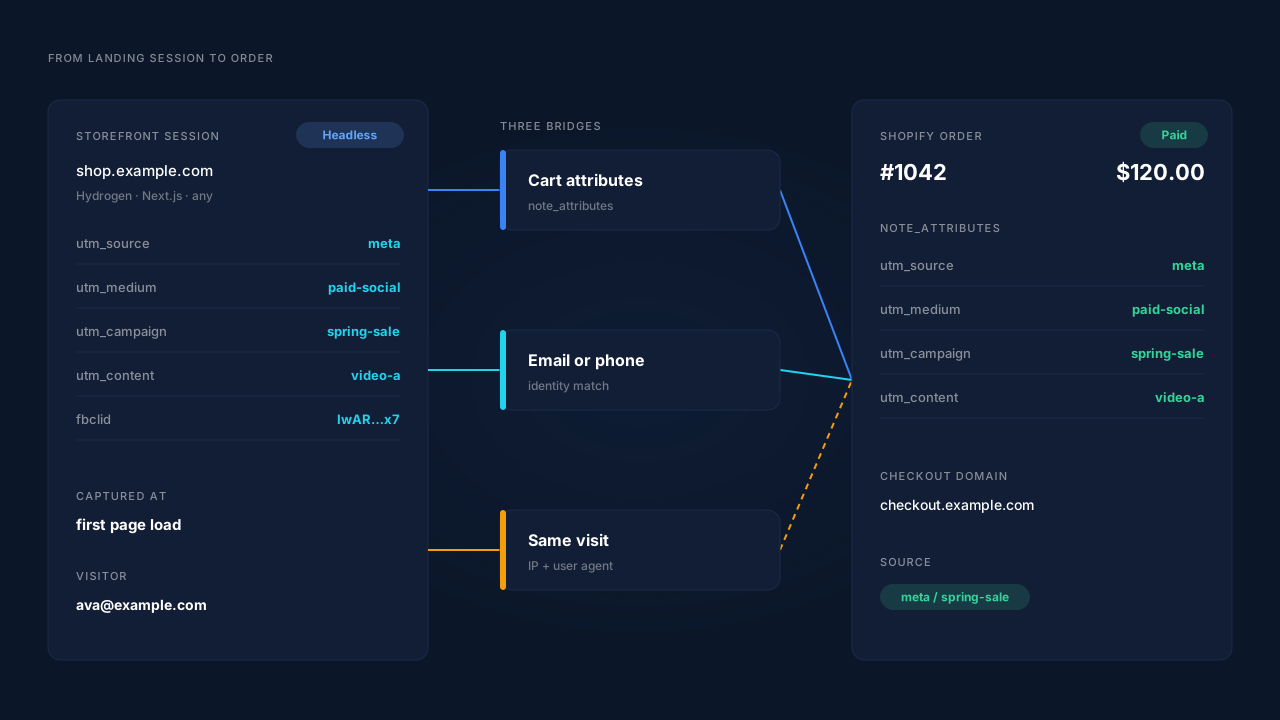
Step 1: capture the UTMs on the first page load
Read utm_source, utm_medium, utm_campaign, utm_content and utm_term from the landing URL and store them right away. Headless storefronts usually navigate client-side after the first load, so the query string is gone by the second route. Store the click ids too (gclid, fbclid, ttclid, msclkid). The difference between the two families is covered in gclid vs fbclid vs UTM parameters.
Decide on first touch or last touch now. If a shopper lands from Meta, leaves, and returns from Google, which UTMs go on the cart? Overwriting on every landing gives you last touch. Writing only when the slot is empty gives you first touch. Storing both is better.
Step 2: write them onto the cart as cart attributes
The Storefront API’s CartInput takes attributes, described in Shopify’s type definitions as “An array of key-value pairs that contains additional information about the cart.” The same definitions cap it: “The input must not contain more than 250 values.” Five UTMs and a couple of click ids fit easily.
Set them when the cart is created, then update them if the shopper arrives again with new UTMs:
// Storefront API: create the cart with the landing UTMs attached
const CART_CREATE = `
  mutation cartCreate($input: CartInput!) {
    cartCreate(input: $input) {
      cart { id checkoutUrl attributes { key value } }
      userErrors { field message }
    }
  }`;

const utms = JSON.parse(localStorage.getItem('landing_utms') || '{}');

const attributes = Object.entries(utms)
  .filter(([, value]) => value)            // skip empty values
  .map(([key, value]) => ({ key, value: String(value) }));

await storefrontFetch(CART_CREATE, {
  input: { lines, attributes },
});

// Later, if the shopper lands again with new UTMs:
// cartAttributesUpdate(cartId: $cartId, attributes: $attributes)
Shopify’s own description of cartAttributesUpdate calls attributes “custom key-value pairs that store additional information, such as gift messages, special instructions, or order notes.” UTMs are just another key-value pair. Hydrogen exposes the same thing through its cart handler’s updateAttributes.
Step 3: read them from the order
Cart attributes come through on the order as note_attributes. In Shopify’s own API test fixtures they look like [{"name": "colour", "value": "red"}]. Yours will look like [{"name": "utm_campaign", "value": "spring-sale"}]. Your order webhook handler, or your reporting job, reads them from there and writes the campaign wherever you report on revenue.
Where does the cart attribute bridge break?
It breaks whenever the order doesn’t come from the cart you wrote to. That’s more often than most teams expect. Cart attributes are the strongest DIY bridge, but they’re one path, and an order that takes another path arrives bare.
The common gaps:
- Buy-now buttons. Hydrogen React’s
BuyNowButtontakesattributes, but its type definitions describe them as “cart line attributes that belong to the item being added to the cart.” Those are line attributes, not cart attributes, so your order-level UTM read won’t find them. - Another app writes the attributes. If a gift-note or upsell app replaces the attribute list rather than merging into it, your UTMs disappear.
- A new cart. A shopper who returns on another device, or after the cart expired, builds a fresh cart. If your storage on that device has no UTMs, the new cart has none.
- The shopper never landed with UTMs. A visit from an email link with no tags, or from a bookmark, has nothing to write. That’s a tagging gap, not a carry gap.
The checkout-side version of these gaps is in why links straight to Shopify checkout lose their UTMs. Same lesson: anything that skips the page your code runs on skips the capture.
How do you attribute the orders the cart doesn’t cover?
Match them back to the landing session after the order exists. Every order carries the buyer’s email and usually a phone. If your storefront captured either one earlier, from a newsletter signup, an account login or a back-in-stock form, you can find the session that holds the UTMs and credit the order to it.
The order of trust matters. A first-party visitor id that travelled with the order is strongest. An exact normalized email is close behind. Phone comes next. Same IP address and browser user agent inside a short window is a fallback, because two people on one office network share an IP.
This is identity resolution, and the general method is in how visitor identity resolution works. For headless stores it’s the difference between “orders with UTMs” and “orders from people who happened to keep one cart on one device.”
Two rules keep the numbers honest:
- Write the source once, at the time of the order. Don’t re-credit an old order every time the buyer visits again.
- Keep unmatched orders visible. An order you can’t match isn’t Direct. It’s unattributed, and the count of those tells you how good your bridges are.
How does PartialLeads put UTMs on headless Shopify orders?
PartialLeads captures the UTMs at landing and matches the order back to them on its side. You don’t need to write cart attributes for it to work. The PartialLeads tag goes on the headless storefront and records UTMs, click ids, landing page and referrer with the visitor’s session. The PartialLeads Customer Events pixel runs on Shopify’s checkout. Both domains sit under your Authorized Domains, so the two sessions land in one account.
Orders come in from Shopify’s order webhooks, so they don’t depend on the thank-you page or on cart attributes surviving. Every paid order is matched to a session in order of confidence: visitor id, then email, then phone, then IP. The identity cluster also joins sessions on IP plus user agent, a device fingerprint and a shared click id. That’s how the storefront landing session and the checkout session become one person.
Each matched order gets two attribution rows: first touch and last touch. Each one snapshots the UTMs, click ids, referrer, landing page and time to purchase. So the order carries the campaign that started the journey and the one that closed it, side by side.
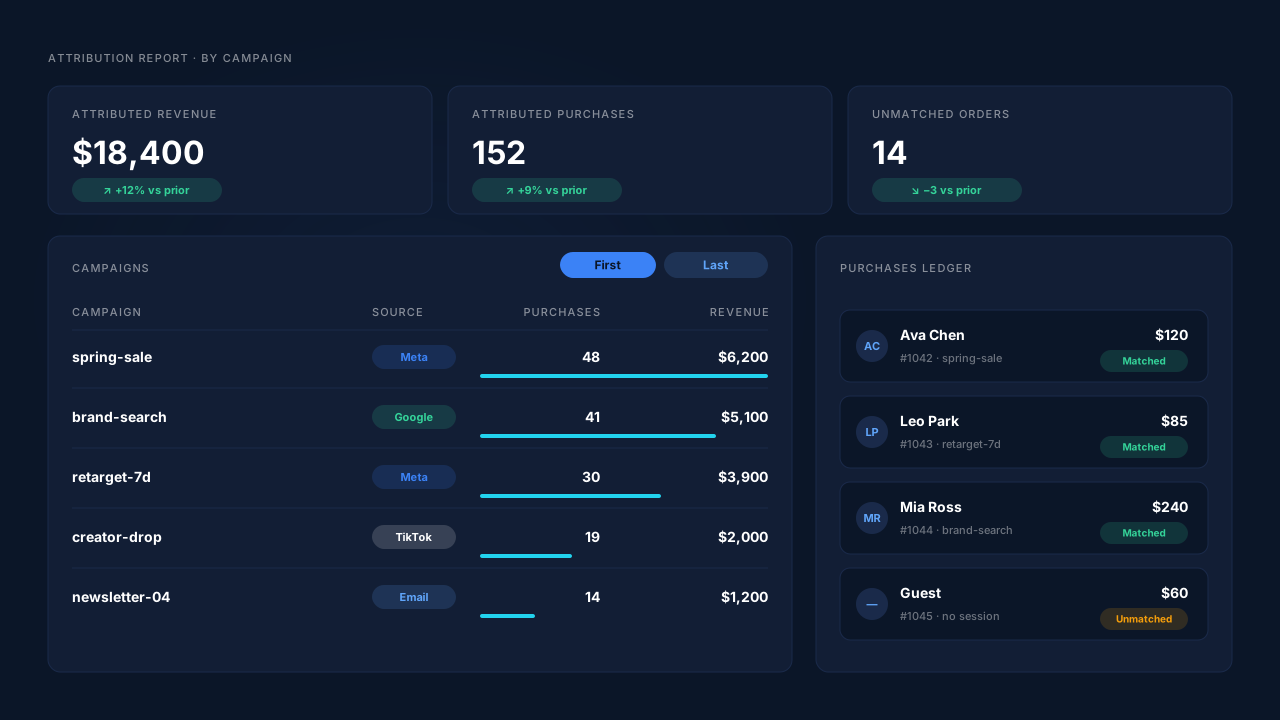
Where you check it. The Attribution report groups revenue by source, medium, campaign, content or term, with first-touch and last-touch tables side by side. The Purchases ledger lists each order as matched or unmatched. On a lead, the journey timeline shows the storefront landing URL with its UTMs, then the checkout, then the purchase. How to read those models together is in how to read an attribution report.
Four honest constraints:
Matching is maximised, not guaranteed. A guest who left no email on the storefront, came back days later on another network and paid will land unmatched. It stays in the Purchases ledger and can be re-matched if identity shows up later.
Only paid orders are attributed and sent. An order is recorded once, so a later edit to it doesn’t change the recorded value. The value is the full order total, including tax and shipping, after discounts.
PartialLeads doesn’t write your cart attributes. If you want the UTMs visible inside Shopify admin too, keep your own cart-attribute code. The two don’t conflict.
Untagged traffic stays untagged. If the ad URL never carried UTMs, there’s nothing to capture. Click ids still help classify the session. The wider setup sits under fixing Shopify tracking, attribution and catalog.
| What breaks | The mechanism | Where you see it in the dashboard |
|---|---|---|
| UTMs stay on the headless storefront | Tag captures UTMs and click ids at landing | Journey timeline, first touch |
| Checkout never sees the landing URL | Customer Events pixel on checkout; sessions joined by visitor id, email, phone, IP | Journey ribbon: storefront → checkout |
| Cart attributes missing on the order | Paid order from the webhook, matched to the landing session | Purchases ledger, matched or unmatched |
| One campaign wins, the other vanishes | First-touch and last-touch rows for every matched order | Attribution report by campaign |
Tell us what's broken. We'll fix your tracking — free.
Describe the tracking/attribution problem you're stuck on and we'll map it to a fix: server-side conversions to Meta, Google, TikTok and Pinterest, plus first-party tracking that survives Safari. No code required.
Sources
- https://registry.npmjs.org/@shopify/hydrogen-react/-/hydrogen-react-2026.4.4.tgz
- https://raw.githubusercontent.com/Shopify/shopify-app-js/main/packages/apps/shopify-api/rest/admin/2025-01/order.ts
- https://raw.githubusercontent.com/Shopify/shopify-app-js/main/packages/apps/shopify-api/rest/admin/__tests__/2025-01/order.test.ts