To track partner referrals when UTMs keep getting lost, record the partner’s UTMs or referring domain on the buyer’s first visit, tie them to a visitor ID, and match the paid order back to that visitor later. Credit the partner on first touch, not on the visit that placed the order. Discount codes stay for pricing, not tracking.
The reason this keeps failing is simple. Most setups expect the order to carry the source, and the order is created at the end of a journey that may be days long, across several visits, in more than one browser. By then the partner’s UTMs are long gone.
Why do partner UTMs get lost before the Shopify order?
Partner UTMs get lost because they only exist in the URL of one visit, and almost everything between that visit and the order can drop them. Redirects strip the query string, partner sites hide the referrer, and buyers come back later through a different door. The order then inherits whatever the last visit looked like.
The common leaks, roughly in the order you’ll find them:
Redirects and link tools. A partner wraps your link in their own short link or tracking redirect. If any hop in that chain drops the query string, the UTMs never reach your store. Click every partner link yourself and look at the URL that finally loads.
Links straight to cart or checkout. Some partners send buyers to a cart permalink to save a step. That path has its own attribution problems, covered in why links straight to Shopify checkout lose their UTMs.
The buyer doesn’t buy on the first visit. This is the big one. A shopper reads a partner’s gift guide, clicks through, browses, leaves. Four days later they type your URL or tap a retargeting ad and buy. The visit that placed the order has no partner UTMs at all.
A different browser or device. The partner link opens inside an app’s in-app browser, and the purchase happens in Safari or on a laptop. To cookie-based tracking those are two strangers.
Why aren’t partner discount codes a reliable fallback?
A discount code tells you a discount was used, not who sent the buyer. Once a partner code is public, it gets scraped onto coupon sites, auto-applied by browser extensions and tried by bots, so it turns up on orders the partner had nothing to do with. Code reports over-credit partners whose codes leaked and under-credit partners whose buyers never needed a code.
Codes still have a job. They are a clean way to give a partner’s audience a price and to calculate a commission you have agreed on. They are just a poor ledger for “who sent this buyer.” The same problem with creators is covered in telling which influencer drove sales when they share one discount code.
If a partner code shows up on far more orders than the partner’s traffic could explain, assume leakage before you assume a great partner.
What should a partner link look like?
A partner link should be your normal landing page with UTM parameters (Urchin Tracking Module tags, the utm_ values on the end of a URL) that name the partner, using one convention for every partner. Keep the medium the same so partners roll up as one channel, and put the partner’s name in the source.
https://yourstore.com/collections/gifts?utm_source=routinehub&utm_medium=partner&utm_campaign=holiday-guide
https://yourstore.com/products/serum?utm_source=kindskin-blog&utm_medium=partner&utm_campaign=evergreen
https://yourstore.com/?utm_source=studio-newsletter&utm_medium=partner&utm_campaign=oct-send
Three rules make this hold up over a year of partners:
- Lowercase, no spaces, written down.
RoutineHub,routinehubandroutine-hubbecome three sources in every report. - Send them to a real page, not checkout. A product or collection page loads your tracking. A checkout link may not.
- Test the final URL. Click the link from the partner’s actual page, not from your own spreadsheet, and confirm the UTMs are still in the address bar when your store loads.
What if the partner can’t or won’t add UTMs?
Fall back to the referrer: the address of the page that sent the visitor, which browsers pass along with the click. Modern browsers by default send only the referring site’s domain to another site, not the full page path, which is still enough to say “this visit came from routinehub.example.”
Two cases break it. A partner can mark links rel="noreferrer" or set a no-referrer policy on their site, and then nothing arrives. And traffic from apps and email clients often carries no referrer at all. When a partner’s visits keep arriving as Direct, ask them to drop the noreferrer setting on your links, or to use your tagged URLs.
Why does the partner lose credit when the buyer comes back directly?
The partner loses credit because most order-level reports credit the visit that placed the order, which is last touch. When a partner’s reader returns days later by typing your URL, the closing visit is Direct and the partner’s visit never makes it onto the order. Only a first-touch view credits the visit that started the journey.
Shopify’s own reports look at the visits Shopify itself saw, and a return visit in a new browser looks like a brand-new first visit. That is the same pattern behind analytics reporting Direct traffic that actually came from Google or an ad.
Partners are almost always first-touch channels. A review site or a newsletter introduces a buyer, then your retargeting ads, your email flows or the buyer’s own memory close the sale. If you judge partners on last touch, you will cut the ones filling your funnel.
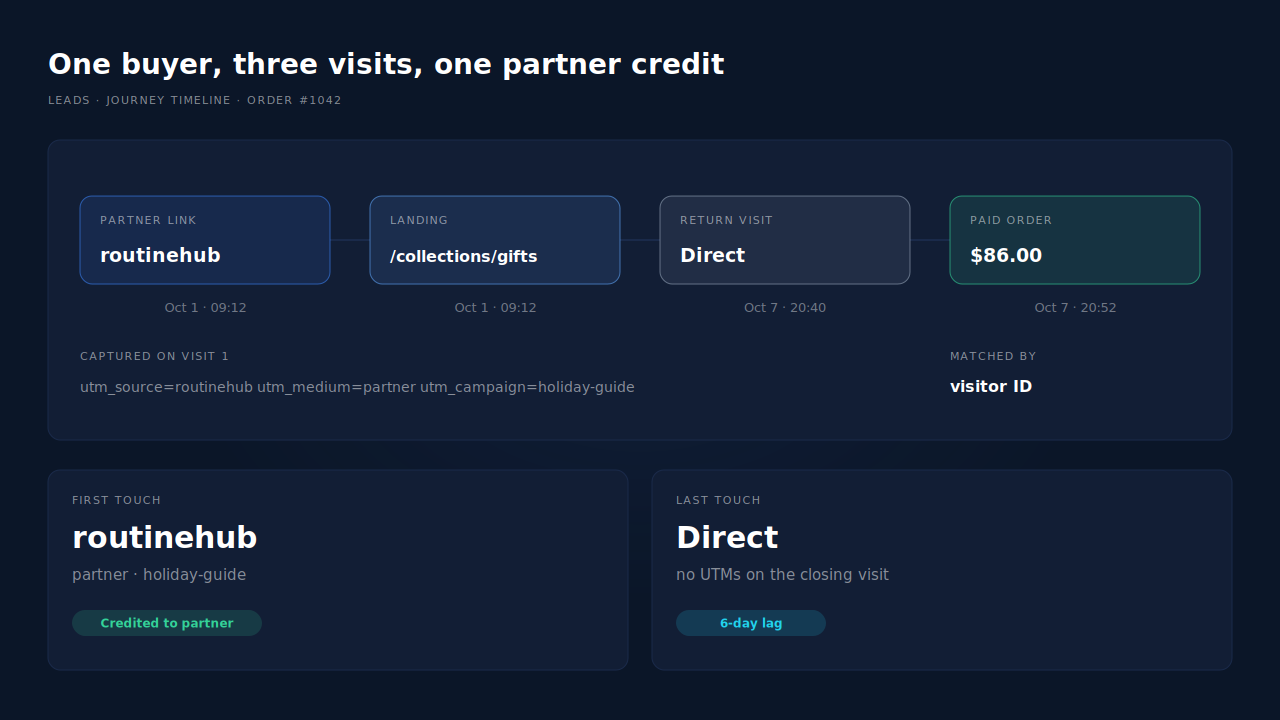
The honest answer is to read both: first touch shows which partners start journeys, last touch shows what closes them. The general rules for reading two models without double-counting are in the guide to reading an attribution report.
How do you check partner credit by hand?
For one partner and one month, a spreadsheet works. Export orders with order ID, email, date and total. Export sessions from your analytics tool filtered to utm_medium=partner with landing date and source. Join where you can, and put every order you can’t tie to a partner visit in an “unknown” row instead of guessing.
It breaks on exactly the buyers you care about: the ones who switched browsers or came back a week later, because most analytics tools don’t show buyer email next to sessions. Closing that gap takes a ledger that stitches visits into people.
How does PartialLeads keep the partner’s credit on the order?
PartialLeads records the partner’s UTMs on the visit when it happens, and falls back to the referring domain when the link has no UTMs. It stores them against a visitor ID, then matches each paid Shopify order from the order webhook back to that visitor. Every matched order gets a first-touch row, so the partner keeps credit even when the buyer returns directly.
Here’s the mechanism in order.
On the first visit, the tag captures UTMs from the URL, plus click IDs such as fbclid or gclid, the landing page and the referrer. The visitor gets an ID kept in localStorage with a first-party cookie as backup.
Across later visits, sessions are stitched into one person using visitor ID, email, phone, IP plus user agent, device fingerprint and click ID, so “read the partner’s guide, came back a week later in another browser and typed an email at checkout” can resolve to one journey. How that works is explained in how visitor identity resolution works.
When the order arrives, it comes from Shopify’s order webhook, not from a browser event, and only paid orders count. The match is tiered: the visitor ID echoed from the storefront first, then email, then phone, then IP. A matched order gets both a first-touch and a last-touch row, each snapshotting that visit’s UTMs, referrer and landing page.
The Attribution report then groups revenue by source, medium, campaign, content or term, with First, Last and the PartialLeads Resolved model side by side. Switch the Channels table to First touch and each partner is a row with revenue, purchases, AOV and average lag between visit and purchase. The Purchases ledger lists every paid order with its matched source, and the journey timeline on a lead shows each visit’s timestamp and UTMs if a partner disputes an order. The same matching sits behind the broader guide to attributing ecommerce revenue to the ad click.
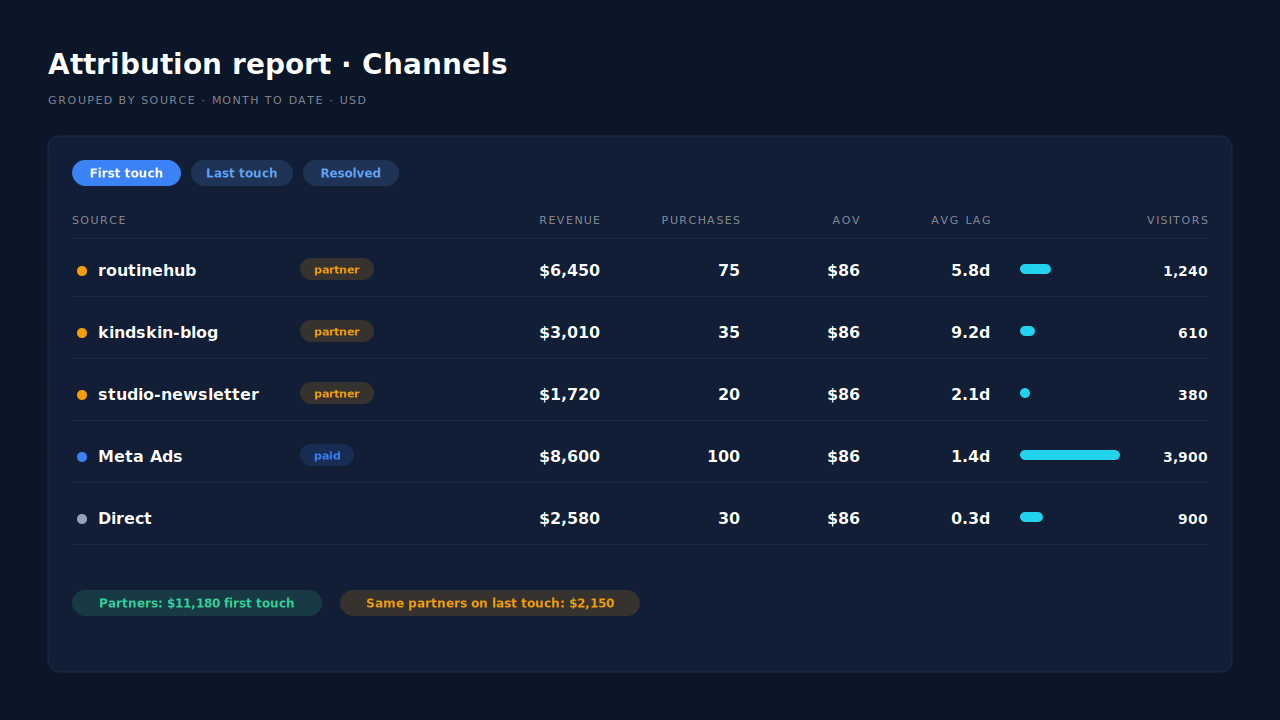
Honest limits. The visitor ID lives in browser storage, so a buyer who clears it, or who returns after browser storage has expired, is only re-linked if they give an email or phone that matches. A partner that hides its referrer and won’t tag links produces Direct visits, and nothing downstream can put the partner back. PartialLeads does not report by discount code, so keep your store’s discount report for commissions. It does not import partner fees either, so cost per partner is a calculation against your own payout sheet. Matching is maximised, never guaranteed: an order that can’t be tied to a visit shows as unmatched rather than being assigned to a partner.
| What breaks | The mechanism | Where you see it in the dashboard |
|---|---|---|
| Partner UTMs gone by the time the order is placed | UTMs, or the referrer when there are none, recorded on the first visit against a visitor ID | Journey timeline, landing visit with UTMs |
| Buyer returns Direct days later | Paid order matched to the visitor by visitor ID, then email, phone, IP; first-touch row written | Attribution report, First touch view |
| Purchase in a different browser or device | Sessions stitched per person by visitor ID, email, phone, IP plus user agent and click ID | Journey ribbon on the Leads list |
| Leaked partner codes credit the wrong partner | Credit follows visits, not codes | Channels table grouped by source |
| Partner disputes an order | Per-order source with the visit’s UTMs and timestamps | Purchases ledger, journey timeline |
Give every partner a tagged link, record the visit when it happens, and pay partners on the journeys they start. The order will never carry the partner’s UTMs by itself, so stop asking it to.
Tell us what's broken. We'll fix your tracking — free.
Describe the tracking/attribution problem you're stuck on and we'll map it to a fix: server-side conversions to Meta, Google, TikTok and Pinterest, plus first-party tracking that survives Safari. No code required.
Sources
https://developers.facebook.com/docs/marketing-api/conversions-api