Links that go straight to a Shopify cart or checkout lose their UTMs because they skip the storefront pages where most tracking runs. The shopper lands on a redirect or a checkout page, your theme’s scripts never load, and nothing stores the campaign against that person. The order then arrives with no source. Sometimes the redirect drops the query string before any page sees it.
This hits anyone who uses short paths to the sale: a “Buy now” button in an ad, a partner or influencer page linking to a pre-filled cart, an SMS with a checkout link, a landing page built outside Shopify. The session report may even show the UTMs, and the orders still don’t carry them. Below is why that happens, how to test your own links, and how to keep the source on the order.
What counts as a link “straight to checkout”?
Any link whose first Shopify page is the cart or the checkout rather than a product, collection or home page. The most common is the cart permalink, a URL shaped like /cart/VARIANT_ID:QUANTITY that builds a cart and forwards the shopper into checkout in one hop. Others are “Buy it now” links, cart links from external page builders, and checkout URLs copied from a live session.
Skipping the storefront is a legitimate conversion tactic. The cost is measurement. The pages you skip are the pages where tracking has traditionally lived.
Three things make these links different from a normal landing:
- The first request is often a redirect. The permalink URL does its work on Shopify’s servers and sends the browser somewhere else. Whether your
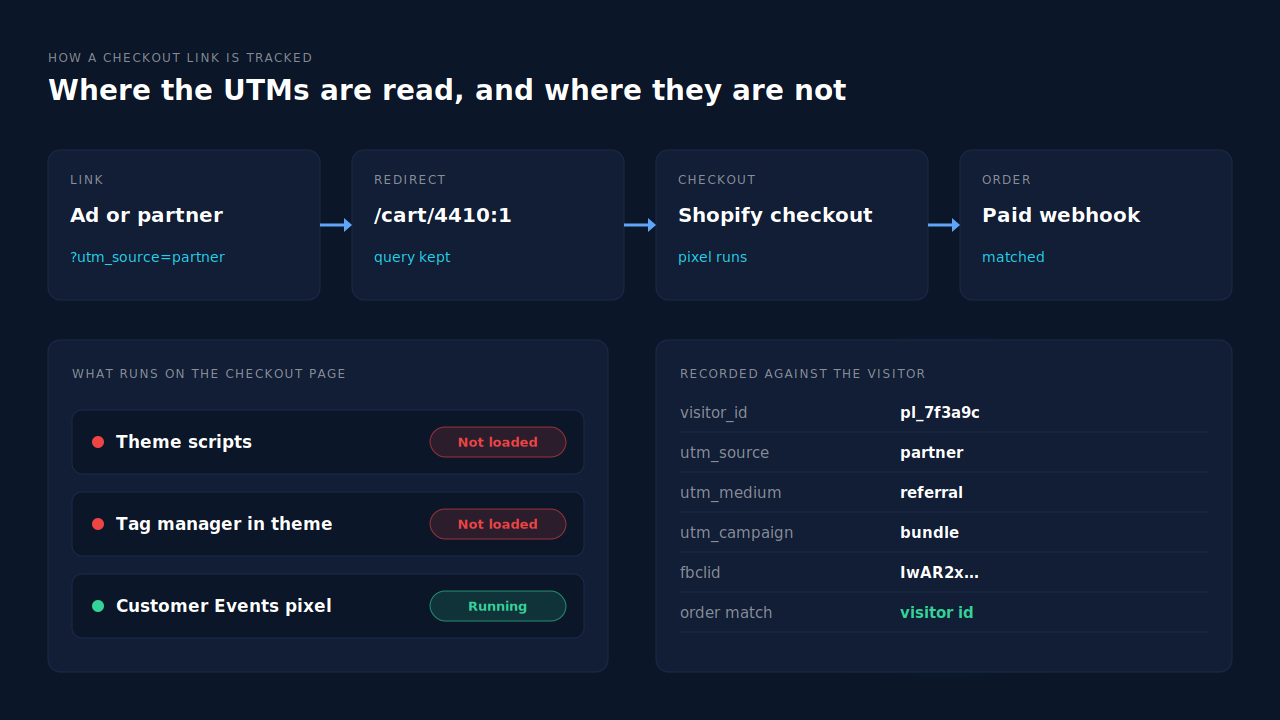
?utm_…string is carried to the next URL depends on how the link was built. - Checkout is a separate, locked-down context. Scripts pasted into your theme don’t load there. Only pixels installed through Shopify’s Customer Events (and apps using the same framework) run on checkout pages.
- There is no page view on the storefront. Anything that waits for a storefront page view to read the URL, set a cookie or start a session never gets a turn.
Where exactly do the UTMs get lost?
At one of three points: the redirect drops the query string, the checkout page loads without any tag that reads it, or it is read but stored in a browser context that the order is never connected to. Each one produces the same symptom, an order with no source, so you have to test to know which one you have.
1. The redirect drops the query string. If a partner appends UTMs to a permalink and the link forwards to checkout without them, the campaign is gone before the browser renders anything. The same happens when a link shortener, a partner’s own click tracker or a bare-domain-to-www redirect sits in front of the permalink and forwards only the path.
2. The UTMs reach checkout, but nothing reads them. This is the common one on stores that still rely on scripts in theme.liquid or a tag manager container loaded by the theme. Those scripts never run in checkout, so the UTMs sit in the address bar for a few seconds and are never recorded. If your conversions also dropped when your thank-you page changed, it is the same root cause as ad conversions dropping to zero after Shopify’s thank-you page upgrade.
3. The UTMs are read, but tied to the wrong visitor. A pixel inside checkout can see the URL, but it runs in a sandbox with its own storage. If the source it records isn’t tied to the same identifier your order or your reports use, the session says “partner / referral” and the order says Direct. That is why the complaint so often reads “UTMs show in sessions but the orders aren’t attributed”. The data exists, just not on the record that matters. The same split between a session and the order happens across domains, covered in why attribution breaks between your landing page and Shopify checkout.
How do you test whether your checkout links keep their UTMs?
Click the exact link your ad or partner uses, in a private window, and watch the address bar on every page that loads. If the UTMs are still on the checkout URL, the tags survive the redirect and your problem is recording. If they vanish, the redirect or something in front of it is stripping them.
A test run that takes ten minutes:
- Copy the live link from the ad preview or the partner’s page. Partners edit links.
- Open it in a private window so no earlier visit or saved cookie colours the result.
- Note each URL. The permalink, any intermediate redirect, the checkout. Write down where
utm_sourceand any click id (gclid,fbclid,ttclid) disappear, if they do. - Place a real, low-value order in that same tab with an email you can search for.
- Check the order in Shopify and in whatever attribution tool you use. Did it keep the source you tagged?
Repeat on a phone. In-app browsers from social apps behave differently from Safari and Chrome, and a lot of “Buy now” traffic comes from them.
What can you fix without adding a tool?
You can fix the stripped links completely, and you can make sure something runs in checkout. What you can’t do inside Shopify alone is guarantee the checkout-side source reaches the order record, or rejoin an order to a visit that happened days earlier.
The fixes, with the limit of each:
- Put the UTMs on the permalink itself, after the cart path. A tag on a wrapper link that forwards only the path never reaches Shopify. Limit: you still depend on the redirect keeping them.
- Remove or fix redirects in front of the link. Shorteners and partner click trackers that forward only the path are the usual culprit. Test after any change, because this breaks silently.
- Move tracking into a Customer Events pixel. Theme scripts don’t run in checkout, so a store tracking only from the theme records nothing for these links. Limit: the pixel runs in a sandbox, and its identifiers are not your storefront cookies.
- When attribution matters more than one saved click, link to the product page or cart page instead. A storefront page loads your normal tracking before checkout. Limit: every extra page costs some buyers.
- Give each partner its own UTM’d link. One link per partner or placement is what makes the source readable later. Limit: it does nothing if the tags are dropped on the way.
Even with all five, a buyer who clicks a partner’s checkout link, abandons, and returns two days later by typing your URL will be credited to the return visit in most reports. That part is identity work, not link hygiene, which is what the guide to attributing ecommerce revenue to the ad click covers.
How does PartialLeads keep the source on checkout-link orders?
PartialLeads installs on Shopify as a Customer Events pixel, so it runs on the pages a checkout link lands on, not only the storefront. It records the UTMs and click ids from the first page it sees, including the cart, against a visitor id, and carries that visitor into checkout. Each paid order from Shopify’s webhook is then matched back to that visitor.
Capture. The pixel reads utm_source, utm_medium, utm_campaign, utm_content and utm_term from the URL, falling back to the referrer when there are none. It also records the click ids ad platforms append: gclid, gbraid and wbraid for Google, fbclid for Meta, ttclid for TikTok, msclkid for Microsoft and epik for Pinterest. All of it is stored with a visitor id kept in local storage with a first-party cookie backup. When the raw fbclid is there but the _fbc cookie isn’t, the backend rebuilds it in Meta’s format, the same approach described in how to rebuild a lost click id from a landing URL.
Matching. The order comes from Shopify’s order webhook, so no browser has to cooperate for the purchase to be recorded, and only paid orders are sent on to ad platforms. It is matched to a session in tiers: the visitor id first, then email, then phone, then IP. The visitor id links the checkout-link visit directly. If the buyer abandoned and came back later on another device, the email on the order joins the two visits through visitor identity resolution, and the original campaign stays on the order as first touch.
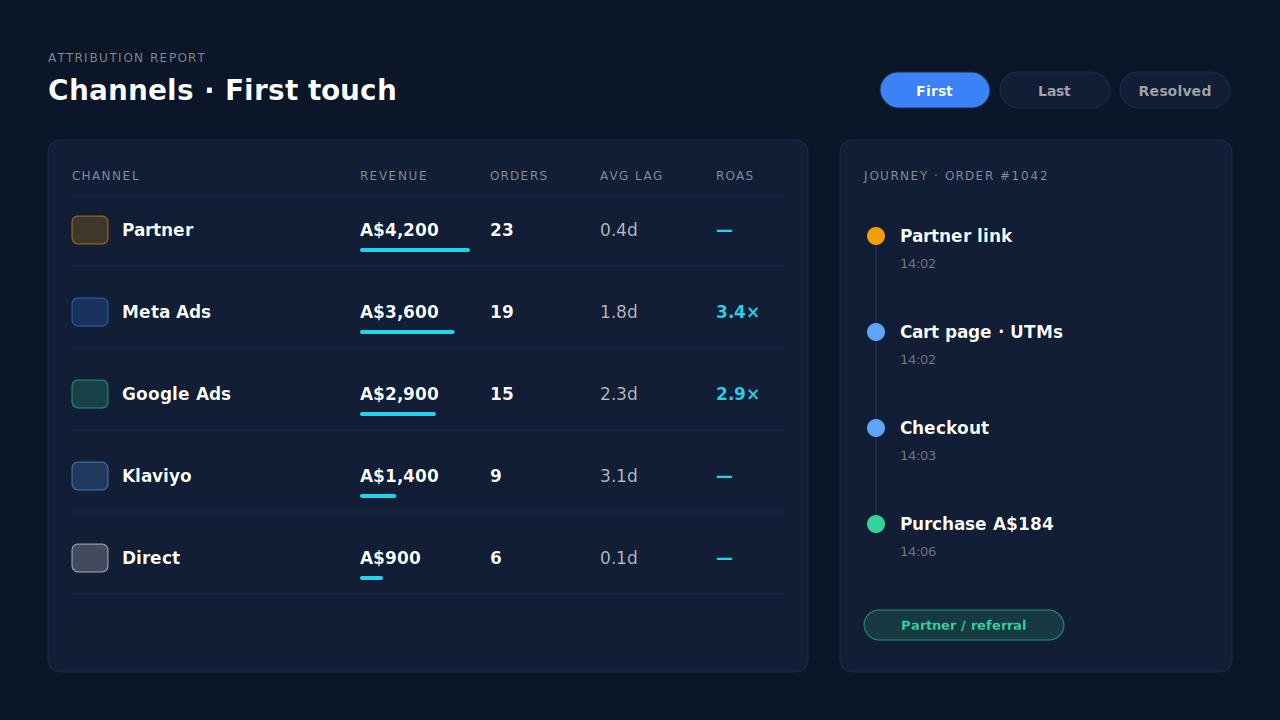
Where you see it. Open the lead’s journey timeline and the order reads as it happened: the landing on the cart page with its UTMs, then checkout, then the purchase, with timestamps. The Attribution report shows first touch, last touch and the PartialLeads resolved model side by side. Group the channels table by source or campaign and each partner link gets its own row, with revenue, purchases, average lag and ROAS. The Purchases ledger lists each paid order with its matched source.
The send to ad platforms. Every paid order produces a server-side Purchase to the platforms you connect: Meta, Pinterest and TikTok, plus a Google Ads offline-conversion row in a Google Sheet you import on a schedule. The click id captured on the checkout-link landing is what lets the platform tie that sale back to its ad. PartialLeads never sends the same conversion twice, but it does not deduplicate against another app’s browser pixel, so keep one source per event.
Honest limits. If a redirect strips the UTMs before any page the pixel runs on, there is nothing on the URL to record; fix the link first. An order whose buyer left no visit PartialLeads can tie to them shows as unmatched rather than guessed. PartialLeads doesn’t write the source back into the Shopify order, so Shopify’s own reports can still say Direct. The corrected view lives in the PartialLeads Attribution report. Matching is maximised, not guaranteed.
| What breaks | The mechanism | Where you see it in the dashboard |
|---|---|---|
| Theme scripts never run on a checkout-link landing | Customer Events pixel runs on the cart and checkout pages and reads the UTMs and click ids there | Journey timeline on the lead |
| UTMs seen in the session but missing on the order | Paid order webhook matched to the visitor id, then email, phone and IP | Purchases ledger with matched source |
| Buyer abandons the checkout link and returns later | Sessions stitched into one person; first-touch and last-touch rows on every matched order | Attribution Models panel, First/Last/Resolved toggle |
| Partners can’t be compared with paid channels | Channels grouped by source, medium and campaign in one table | Attribution report channels table |
| Ad platform never learns about the sale | Server-side Purchase with the captured click id; Google via Sheet import | Meta CAPI activity log, Google Sheets integration |
If your checkout links arrive with their UTMs and the orders still have no source, the tags aren’t the problem. Nothing recorded them against the person who paid. Fix the links you control, then track from a pixel that runs where those links land, and read the result from a ledger that sees the whole visitor. When the same orders still look like ad conversions showing as Direct, the gap is identity, not tagging.
Tell us what's broken. We'll fix your tracking — free.
Describe the tracking/attribution problem you're stuck on and we'll map it to a fix: server-side conversions to Meta, Google, TikTok and Pinterest, plus first-party tracking that survives Safari. No code required.
Sources
https://developers.facebook.com/docs/marketing-api/conversions-api
https://developers.facebook.com/docs/marketing-api/conversions-api/parameters/fbp-and-fbc