You can’t tell which influencer drove a sale from a shared discount code, because the code only records that a discount was used, not who sent the buyer. To split credit, give each creator a unique tracked link and credit each order to the visit that link produced. Orders with only a code stay “unknown”.
That sounds like a small change, and it is. The hard part is resisting the temptation to keep reading the code report as if it answered the question. It never did.
Why doesn’t a shared discount code tell you who drove the sale?
A discount code is a pricing instruction. Your store records that the order used CREATOR15, and that is all it records. There is nothing in the code about which Instagram story, TikTok video or podcast ad put it in the buyer’s head. Three creators reading out one code produce one undifferentiated pile of orders.
Even a unique code per creator only half works, for three reasons.
Codes leak. Once a code is public, it gets scraped onto coupon sites and picked up by browser extensions that auto-apply codes at checkout. A buyer who came from your own Google ad can end up with Ava’s code applied, and Ava gets the credit.
Codes get swapped. Buyers forget which creator they heard it from and type whichever code they remember, or search “yourbrand discount code” and take the first one they find.
Codes only see the last step. A code is entered at checkout. It says nothing about whether the buyer first found you through the creator three weeks ago, or through a retargeting ad yesterday. Code-based reporting quietly assumes every buyer who typed a creator’s code was that creator’s buyer, and that nobody else helped.
So a per-creator code tells you who got paid a commission. A per-creator link tells you who sent a visitor. You want the second one for budget decisions.
What does a shared code hide in practice?
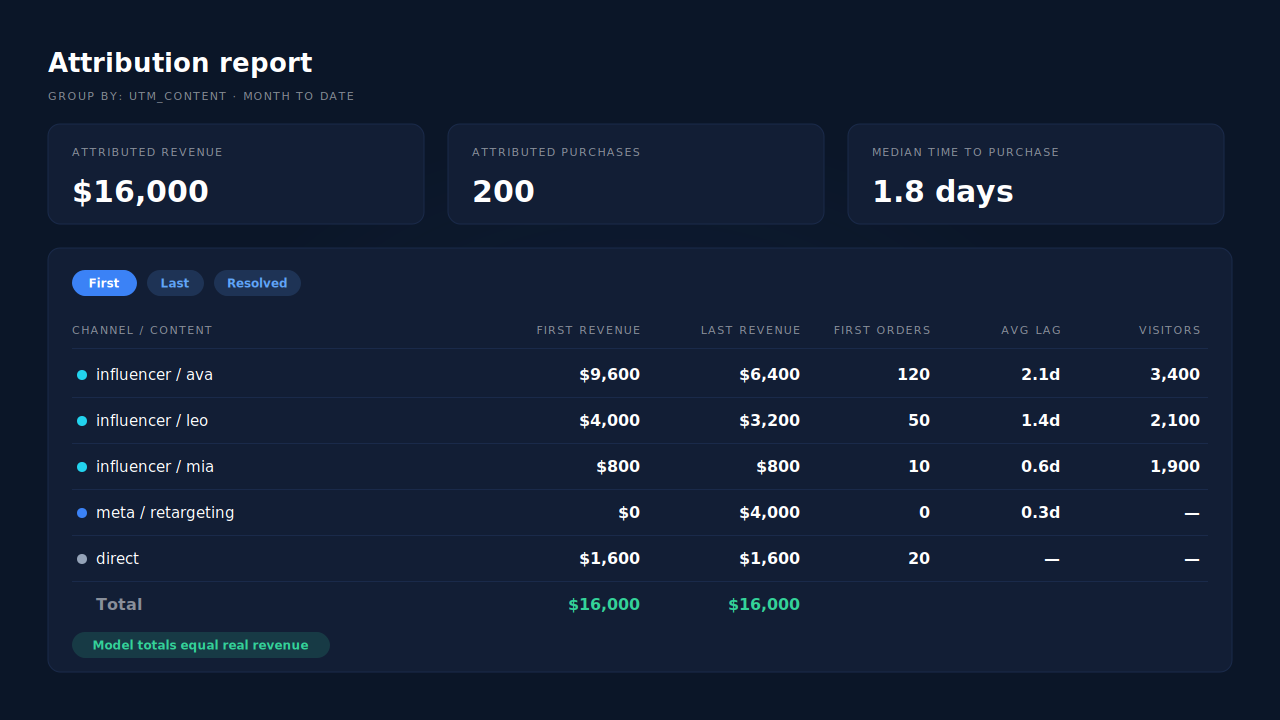
It hides the ranking. Say three creators promote CREATOR15 in the same week and the discount report shows 200 orders. You pay each creator the same flat fee and assume they did a third each.
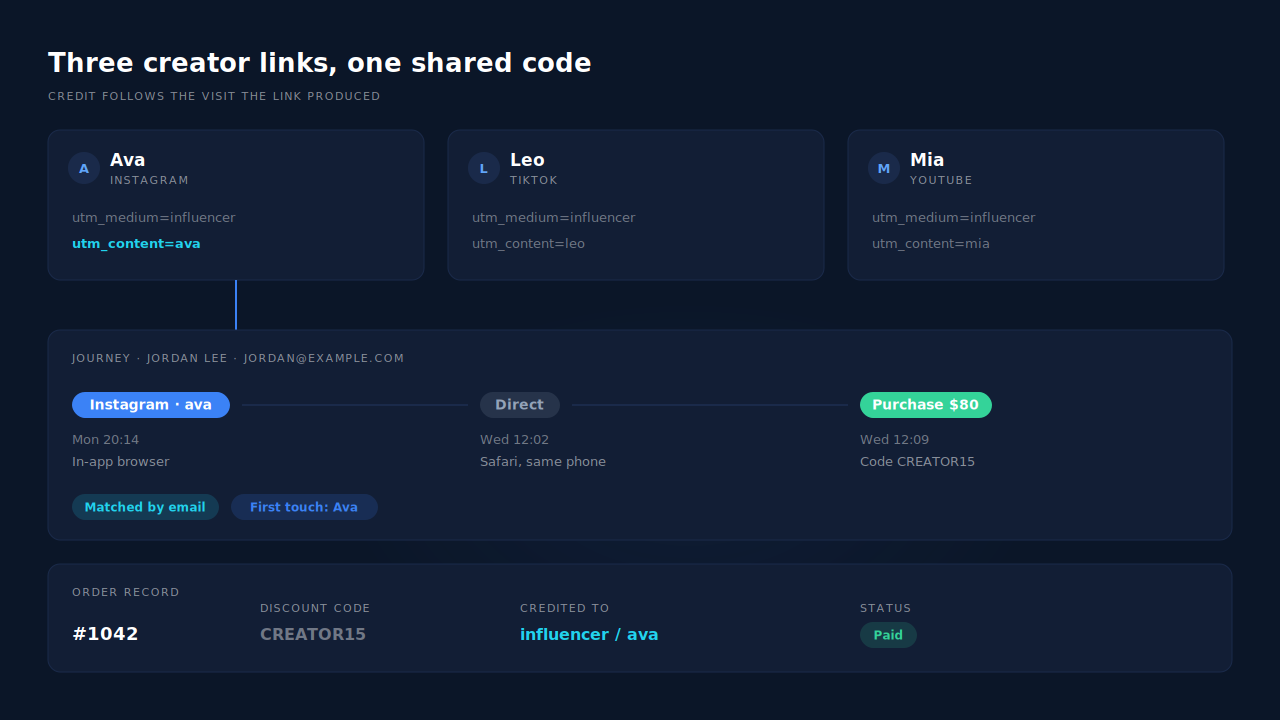
Now trace the visits. Ava’s link produced 120 of those orders. Leo’s produced 50. Mia’s produced 10. The other 20 came from buyers who typed the code with no creator visit anywhere in their history, mostly from a coupon site. Mia costs you the same as Ava for a twelfth of the sales, and you only find out if the orders are tied to visits.
The numbers are illustrative, but the shape is common: creator performance is rarely even, and a shared code averages the winners and losers into one flattering number.
How do per-creator links fix it when the code stays the same?
You can keep the shared code. What changes is that every creator gets their own link, and credit follows the link, not the code. The code becomes a detail on the order, like the shipping method.
A per-creator link is your normal landing URL with UTM parameters (Urchin Tracking Module tags, the utm_ values on the end of a link) that name the creator:
https://yourstore.com/products/serum?utm_source=instagram&utm_medium=influencer&utm_campaign=spring-creators&utm_content=ava
https://yourstore.com/products/serum?utm_source=tiktok&utm_medium=influencer&utm_campaign=spring-creators&utm_content=leo
https://yourstore.com/products/serum?utm_source=youtube&utm_medium=influencer&utm_campaign=spring-creators&utm_content=mia
Use utm_medium=influencer for all of them, so creators roll up as one channel, and put the creator name in utm_campaign or utm_content so you can split them apart. Pick one convention and never change it mid-campaign. If you are unsure how UTMs relate to ad click IDs, the difference is covered in gclid vs fbclid vs UTM parameters.
What about podcasts and videos where nobody can click?
Give each creator a short, speakable URL on your own domain, like yourstore.com/ava, and redirect it to the UTM-tagged landing page. People remember a name more easily than a code anyway. Click your own short link after setting it up and confirm the UTMs arrive on the landing page, because some redirects and link shorteners drop them.
Should you add a post-purchase survey?
Yes, as a second opinion. A “where did you hear about us?” question at checkout catches word-of-mouth and podcast listeners who typed your URL by hand. Treat it as self-reported: people misremember and pick the first option. Use it to spot creators your links are missing, not as the ledger.
Why do creator sales still show up as Direct or as a Meta ad?
Because the visit that placed the order is often not the visit that came from the creator. That is the single biggest reason influencer programmes look worse in analytics than they feel in the inbox.
The usual path looks like this. A follower taps Ava’s link inside Instagram, which opens your store in Instagram’s in-app browser. They browse, don’t buy, and leave. Two days later they open Safari on the same phone, type your URL, and check out. Or they see a retargeting ad, click it, and check out.
To your store’s last-click report, the first path is Direct and the second is a Meta ad, the same pattern behind ad conversions that show as Direct. Ava’s link did the finding and gets nothing. The in-app browser and Safari don’t share cookies, so the two visits look like two strangers. It is the same problem as a mobile ad click that turns into a desktop purchase, just with a creator at the start instead of an ad.
This is why you need two views. First touch credits the visit that started the journey, which is where creators usually earn their keep. Last touch credits the visit that closed it. Paid retargeting often closes creator-found buyers, and Meta will claim those sales in its own reporting too, since it credits purchases inside its attribution window (7-day click, 1-day view by default). Both views are true at once. If you only look at last click, you will cut the creators who fill your retargeting pools.
How do you work it out by hand?
If you are not ready to add a tool, a spreadsheet gets you most of the way for a single campaign.
- Export orders for the campaign window, with order ID, email, date, total and discount code.
- Export sessions from your analytics tool filtered to
utm_medium=influencer, with the landing date andutm_content. - Join on whatever you can. Most analytics tools don’t expose buyer email next to sessions, so you are usually matching by date and order ID from the analytics purchase event, which only works when the purchase happened in the same browser as the creator click.
- Label the leftovers honestly. Orders with the code and no matching creator session go in an “unknown” row. Do not split them evenly across creators.
The spreadsheet breaks down exactly where the interesting buyers are: the ones who switched browsers or came back days later. That gap is what an identity-stitched ledger closes.
How does PartialLeads credit the creator whatever code the buyer types?
PartialLeads records each creator link click as a visit with its UTMs, then matches every paid order back to the visits that led to it, regardless of the discount code on the order. On Shopify, the order arrives from the store’s order webhook. The match is tiered: the visitor ID echoed from the storefront first, then email, then phone, then IP.
That tiering is what rescues the in-app-browser case. The tag stitches a person’s sessions into one identity across visits and devices using visitor ID, email, phone, IP plus user agent, and click IDs, so “tapped Ava’s link in Instagram, came back in Safari, bought” can read as one journey instead of two strangers. How that stitching works is explained in how visitor identity resolution works. Every matched order gets a first-touch row and a last-touch row, snapshotting the UTMs of each visit.
The Attribution report then groups sales by source, medium, campaign, content or term. Group by campaign or content and each creator becomes a row with revenue, purchases, average lag and visitors, with first touch, last touch and the PartialLeads resolved model side by side. The general rules for reading those models without fooling yourself are in the guide to reading an attribution report.
To audit a single order, open the lead. The journey ribbon on the Leads list shows each touch as a badge from left to right, ending in the conversion, and the journey timeline shows the timestamp and UTMs of every session.
Honest limits. PartialLeads does not report by discount code, so if you need commission payouts per code, keep using your store’s discount report for that. A buyer who heard a podcast and typed the code without ever clicking a tagged link has no creator visit to credit, so that order lands wherever its visit came from, often Direct. Matching is maximised, not guaranteed: an order that can’t be tied to any visit shows as unmatched rather than being guessed. Only paid orders are sent to ad platforms, and PartialLeads imports Meta ad spend, not creator fees, so cost per creator and ROAS per creator stay a calculation you do with your own fee sheet.
| What breaks | The mechanism | Where you see it in the dashboard |
|---|---|---|
| One shared code, no idea which creator sold | Each paid order matched to the visit a creator’s UTM link produced, whatever code was typed | Attribution report grouped by campaign or content |
| Leaked codes credit the wrong creator | Credit follows visits, not codes; orders with no creator visit stay with their real source | Channels table, Direct and unmatched rows |
| In-app browser click, purchase later in Safari | Sessions stitched per person by visitor ID, email, phone and IP | Journey ribbon on the Leads list |
| Retargeting ad closes a creator-found buyer | First-touch and last-touch rows written for every matched order | Attribution Models panel, First/Last toggle |
| Can’t prove what happened on one order | Per-person journey with UTMs on every session | Journey timeline on the lead |
Keep the code for the discount and the commission. Give every creator a link, credit the visit, and let the orders nobody can place stay unplaced. That is the only version of the ranking you can pay creators against.
Tell us what's broken. We'll fix your tracking — free.
Describe the tracking/attribution problem you're stuck on and we'll map it to a fix: server-side conversions to Meta, Google, TikTok and Pinterest, plus first-party tracking that survives Safari. No code required.
Sources
https://www.facebook.com/business/help/458681590974355
https://developers.facebook.com/docs/marketing-api/conversions-api