You measure a sponsored post’s Shopify revenue by giving that post its own tracked link, recording the link’s tags when a visitor lands, and matching every paid order back to that visitor, even if they buy days later on another device. Then compare first-touch revenue with the fee you paid the creator.
Most stores skip the middle step. They tag the link, look at Shopify’s order report a week later, see a handful of sales, and conclude the post flopped. Usually the post did its job. The orders just arrived through a different door.
Why can’t you see how much revenue a sponsored post drove?
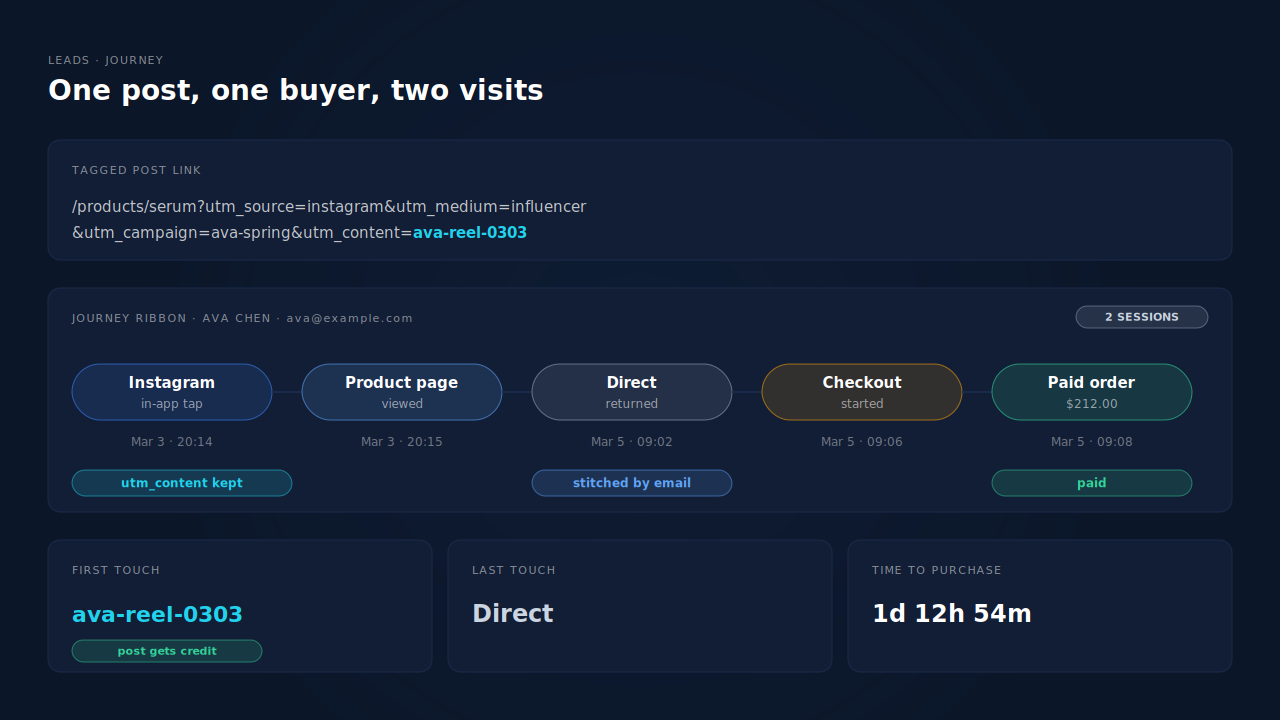
Because the visit that came from the post is rarely the visit that buys. A follower taps the link inside Instagram or TikTok, which opens your store in the app’s built-in browser. They look around and leave. Days later they open Safari, search your brand or type your URL, and check out.
Shopify’s order report reads the session that placed the order. That session has no UTMs, so the sale shows as Direct or organic search, and the creator’s post gets nothing. The in-app browser and Safari don’t share cookies, so to most tools those two visits are two different people.
There are three more leaks on top of that:
- One link for many posts. A creator’s link-in-bio points to your homepage with one set of tags, so three posts in a month all collapse into one number.
- Links that skip the storefront. A post linking straight to a cart or checkout URL can lose its UTMs before any tracking runs, a failure covered in detail in why links straight to Shopify checkout lose their UTMs.
- Discount codes standing in for links. A code tells you a discount was used, not which post sent the buyer. If that’s your current setup, read how to tell which influencer drove sales when they all share one discount code first.
How should you tag each sponsored post so its revenue can be counted?
Give each post, not just each creator, its own link. Keep utm_medium identical for every creator so they roll up as one channel, put the creator or campaign in utm_campaign, and put a unique post ID in utm_content. Then a post becomes a row you can report on.
UTM parameters (Urchin Tracking Module tags) are the utm_ values added to the end of a URL. A post-level scheme for one creator’s reel, the same creator’s story two weeks later, and a second creator’s TikTok looks like this:
https://yourstore.com/products/serum?utm_source=instagram&utm_medium=influencer&utm_campaign=ava-spring&utm_content=ava-reel-0303

https://yourstore.com/products/serum?utm_source=instagram&utm_medium=influencer&utm_campaign=ava-spring&utm_content=ava-story-0317

https://yourstore.com/products/serum?utm_source=tiktok&utm_medium=influencer&utm_campaign=leo-spring&utm_content=leo-tiktok-0305
Point each link at a real storefront page, usually the product the post shows. Click every link yourself before the post goes live and check the tags are still in the address bar when the page loads.
Write the scheme down in a sheet with one row per post: post ID, creator, platform, publish date, fee. That sheet becomes the denominator later.
What about link-in-bio pages and story link stickers?
A link-in-bio page is one more hop between the post and your store. Put a separate button on it per sponsored post, each carrying that post’s utm_content, and check the tool doesn’t strip query strings on the way through. A story link sticker takes a full URL, so give it the post’s own tagged link directly.
What changes when you boost the creator’s post as an ad?
Once you pay to run a creator’s post as an ad, that traffic is a paid Meta or TikTok click, not an organic post. Give the ad its own utm_content value so boosted reach doesn’t get mixed into the organic post’s revenue, and judge it against ad spend in Ads Manager as well as against the creator’s fee.
How long should you wait before judging a post’s revenue?
Long enough for the slow buyers to come back. A post’s first-day sales are mostly impulse buys from the people who clicked. The buyers it introduced, who think about it and return later, keep arriving for weeks. Judging a post after three days counts only the impulse buyers.
There is no universal window, because it depends on what you sell. A cheap, familiar product converts fast. A considered purchase takes longer. The practical rule: look at how long your store’s buyers usually take from first visit to order, and don’t report on a post until at least that much time has passed since it went live. Pick one window, use it for every creator, and write it in your sheet so a post from last week isn’t compared against a post from last quarter.
The same lag is why first touch matters so much here. Late buyers almost never return through the creator’s link, so a last-touch view hands their orders to whatever brought them back, which is the pattern behind why last-click attribution undervalues Meta and Pinterest.
Which number tells you whether a post paid for itself?
First-touch revenue divided by the creator’s fee. First touch credits the order to the visit that started the buyer’s journey, which is the job you paid the post to do. Last-touch revenue is the stricter number: orders where the post was also the final visit before purchase.
An illustrative example. You pay a creator a flat fee for a reel. After your chosen window:
| Post | Fee | First-touch revenue | Last-touch revenue | First-touch return |
|---|---|---|---|---|
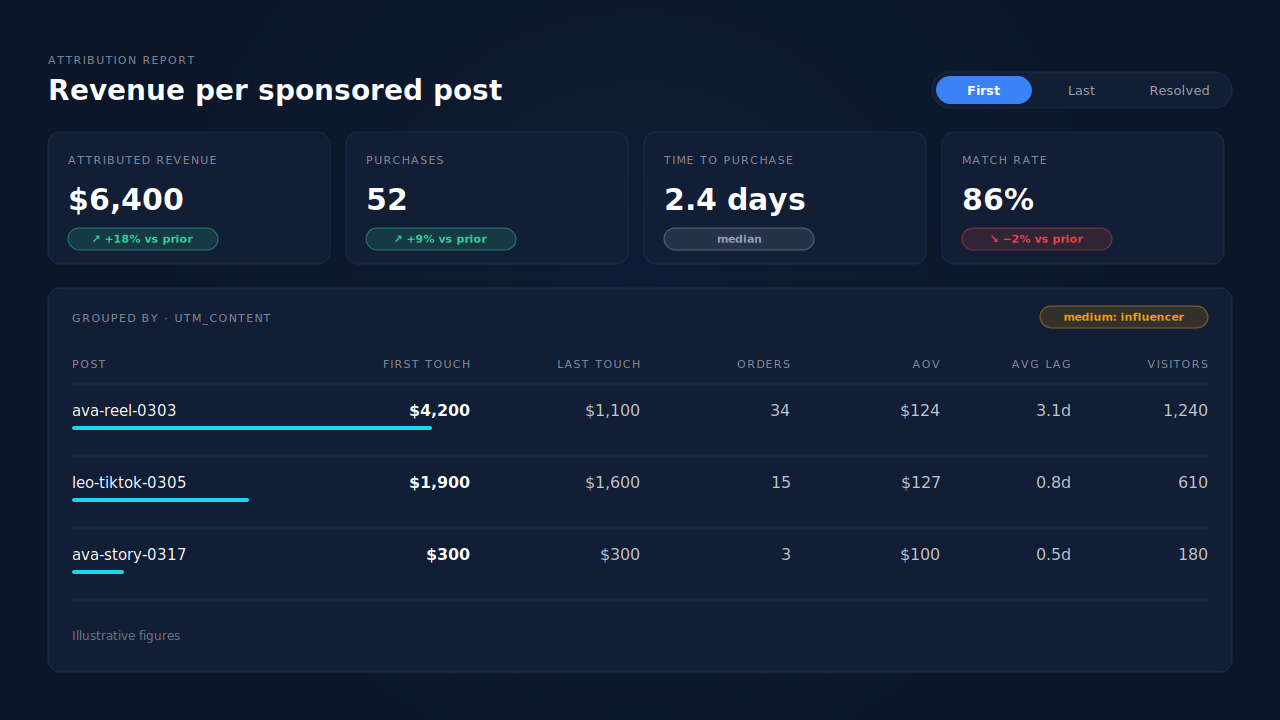
| ava-reel-0303 | 1,500 | 4,200 | 1,100 | 2.8× |
| ava-story-0317 | 500 | 300 | 300 | 0.6× |
| leo-tiktok-0305 | 1,500 | 1,900 | 1,600 | 1.3× |
Same creator, very different posts. The reel earned its fee mostly through buyers who came back later. The story barely moved anything. Leo’s TikTok converted fast but introduced fewer buyers. A creator-level total would have averaged all of that away.
Two things to keep the math honest. Decide whether revenue includes tax and shipping, and use the same basis for every post. And compare the return with your margin, not 1×: a post returning 1.3× in revenue can still lose money once product cost is taken out.
What can’t per-post tracking measure?
Anyone who saw the post and never tapped the link. A follower who watches the reel, remembers your brand and searches for it next week has no tagged visit to credit, so their order lands as organic search or Direct. Link tracking measures the clicks a post produced, not the attention.
Two habits narrow that gap without pretending to close it:
- A post-purchase question. “Where did you hear about us?” with creators as options catches viewers who never clicked. It is self-reported, so treat it as a second opinion, not the ledger.
- A before-and-after look at branded traffic. If Direct and brand-search orders rise in the days after a big post and nothing else changed, the post probably helped. That’s a judgement call, not attribution, and it should be labelled that way.
What you should not do is split unexplained orders across creators to make the totals look complete. Unknown is a real answer.
How does PartialLeads measure revenue per sponsored post on Shopify?
PartialLeads records each landing visit with its UTMs, stitches a person’s visits together, and matches every paid Shopify order back to them. Every matched order gets a first-touch and a last-touch row, so a post’s utm_content keeps its credit even when the buyer returned through Direct or search.
On Shopify, the tag runs as a Customer Events pixel and orders arrive from the store’s order webhooks. Only paid orders are sent to ad platforms as purchases (Shopify’s financial_status has to be paid), and the Purchases ledger shows whether each order is paid or still pending, so an unpaid order doesn’t get mistaken for a post’s sale. The recorded value is the order’s full total, including tax and shipping, after discounts.
The match is tiered: the visitor ID echoed from the storefront first, then email, then phone, then IP. Behind that, the tag joins a person’s sessions across visits and devices using visitor ID, email, phone, IP plus user agent and click IDs, which is what turns “tapped the reel in Instagram, bought in Safari two days later” into one journey. The approach is laid out in how to attribute ecommerce revenue to the ad click, and the stitching itself in how visitor identity resolution works.
Partial capture helps here too. If a visitor from the post types their email into a signup form and leaves without submitting, the tag still captures it. When that email later shows up on an order, the order joins back to the post’s visit.
The Attribution report groups revenue by source, medium, campaign, content or term. Group by content and each post becomes its own row with revenue, purchases, average order value and average lag, with a First, Last or Resolved toggle. The Time to Purchase panel shows first-touch and last-touch lag side by side, which is how you pick the waiting window from your own data instead of a guess. To check a single order, the journey ribbon on the Leads list shows each touch left to right, ending in the conversion.
Honest limits. Creator fees are not ad-platform spend, so return per post is a division you do with your fee sheet. PartialLeads does not report by discount code. A buyer who never tapped a tagged link has no post visit to credit. And matching is maximised, not guaranteed: an order that can’t be tied to a visit shows as unmatched instead of being guessed.
| What breaks | The mechanism | Where you see it in the dashboard |
|---|---|---|
| Post’s buyers come back days later and show as Direct | First-touch row written for every matched paid order, snapshotting the landing UTMs | Attribution report, First toggle |
| In-app tap, purchase later in Safari | Sessions stitched per person by visitor ID, email, phone, IP plus user agent and click IDs | Journey ribbon on the Leads list |
| Several posts by one creator blur into one number | Report grouped by utm_content, one row per post |
Attribution report grouped by content |
| No idea how long to wait before judging a post | First-touch and last-touch lag plotted together | Time to Purchase panel |
| Unpaid orders mistaken for a post’s sales | Purchases sent only once financial_status = paid |
Purchases ledger, paid vs pending status |
Tag every post, wait out your real buying lag, and put first-touch revenue next to the fee. That’s a number you can renew a creator on.
Tell us what's broken. We'll fix your tracking — free.
Describe the tracking/attribution problem you're stuck on and we'll map it to a fix: server-side conversions to Meta, Google, TikTok and Pinterest, plus first-party tracking that survives Safari. No code required.
Sources
https://developers.facebook.com/docs/marketing-api/conversions-api