Klaviyo email orders show as Direct in Shopify because Shopify credits the visits it can connect to the order, and the one that placed it usually isn’t the one your email created. The buyer clicks a tagged link, looks around, leaves, and comes back later by typing your address or opening a bookmark. The buying visit carries no UTMs and no referrer, so Shopify calls it Direct.
Less often the UTMs never reached your store at all: a redirect somewhere between the email and the product page dropped the query string. Both failures look identical in the Shopify order. The rest of this article shows how to tell them apart, what you can fix on your own, and where the fixes stop.
Why does Shopify file Klaviyo orders under Direct?
Shopify files an order under Direct when the visits it can connect to that order carried no UTM parameters, no click ID and no external referrer. It connects visits through its own browser-side identifiers, not through the shopper’s inbox the way an email tool does. So an email that brought someone in on Monday gets nothing if Shopify can’t tie that visit to the Thursday order.
That is a different question from the one Klaviyo answers. Klaviyo credits an order to a message the buyer engaged with inside your attribution window, whatever visit they bought from. The two numbers diverge by design, which is covered in detail in why Klaviyo reports more email revenue than Shopify. This article is about the narrower problem: you tagged the links, and the tagged orders still land in Direct.
“Direct” in almost every analytics tool means “we don’t know,” not “someone typed the URL.” The same pattern hits paid ads, which is why ad conversions show as Direct for the same structural reason.
Are the UTMs actually on the link that reached your store?
Check this first, because it is the only failure you can fully fix. Click a link in a real sent email, not the editor preview, and look at the address bar when your store loads. If utm_source, utm_medium and utm_campaign are there, your tagging works and the problem is downstream. If they are missing, something between Klaviyo and your page is stripping them.
The usual suspects, in the order I’d check them:
- UTM tracking is on for campaigns but not flows (or the reverse). Klaviyo’s UTM settings can apply differently to campaigns and flows. Welcome, browse-abandonment and cart flows often drive more orders than campaigns, so an untagged flow sends a lot of revenue to Direct.
- A redirect drops the query string. Klaviyo, like most email tools, routes each click through its own tracking redirect first. That one is fine. The problem is your redirects after it: a bare domain redirecting to
www, an old product URL redirecting to a new one, a geolocation or market-selection app, or a link shortener. Any hop that forwards the path but not?utm_…wipes the tags. - The link goes to a page that re-routes before your tag runs. Password pages, age gates and some popups reload the page. Check that the UTMs survive the reload.
- Links point somewhere other than your store. Links to a review site, a social profile or a third-party booking page carry UTMs to that site, not to Shopify.
How do you test one Klaviyo link end to end?
Send a test campaign to yourself on a phone and a laptop. Click each link type you use: a product, a collection, the homepage, a cart link. For each one, note the final URL and whether the UTMs are still on it. Then place a real low-value order from one of those sessions without leaving the tab, and check the order’s attribution in Shopify.
If that same-tab order shows email, your tagging works. Every Direct order you still see comes from the next section.
Why does a tagged Klaviyo click still end up as a Direct order?
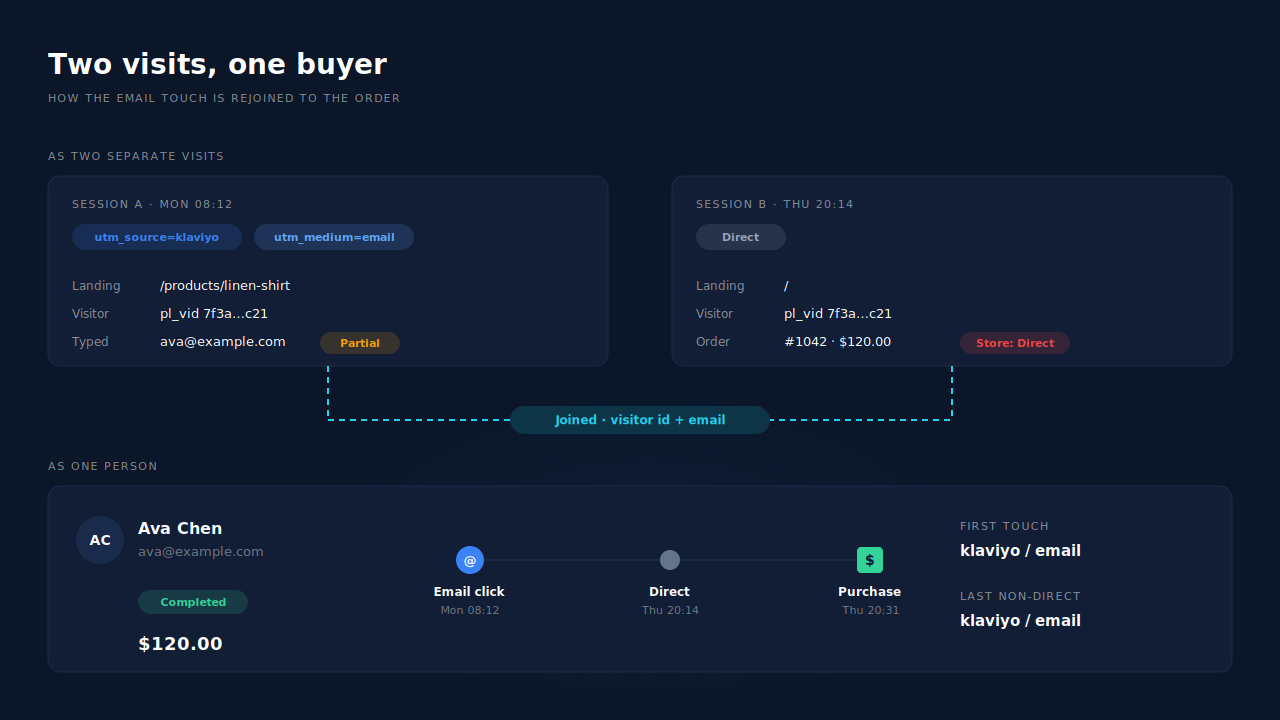
Because the purchase happened in a different visit from the click, and nothing carried the email touch across. Email is a slow channel. People open it on their phone in the morning, browse, and buy that evening on a laptop, or three days later after checking with a partner. Every one of those gaps can reset the source to Direct.
Four common splits, all with correctly tagged links:
- Later visit, same browser. The shopper clicks the email, leaves, and comes back by typing your URL. If the browser’s identifiers were cleared or expired in between, or the report you’re reading credits the converting visit, the order reads as the new visit’s empty source.
- In-app browser to real browser. Some mail apps open links inside their own browser view, which keeps its own storage. The shopper adds to cart there, then opens your site in Safari or Chrome to buy. To your store, those are two unrelated visitors.
- Phone to laptop. Opened on the phone, bought on the desktop. No shared cookies, no shared storage.
- Session restart mid-visit. A long pause, a payment redirect or a domain hop can start a new session that inherits no campaign data.
The data you need exists. The Monday visit carried utm_source=klaviyo. The Thursday order carries the buyer’s email. They are just recorded in two places that never meet. Rejoining them is identity work, and how visitor identity resolution works covers the general method.
What can you fix without adding a tool?
You can fix tagging and redirects completely, and you can narrow the return-visit gap, but you can’t close it inside Shopify’s own reports. No setting makes Shopify credit an earlier visit it did not connect to the order.
What helps, with the limit of each:
- Tag every link, in campaigns and flows. Fixes the missing-UTM case. Does nothing for return visits.
- Make redirects pass the query string. Fixes stripped tags. Test after any theme, app or domain change, because this breaks silently.
- Link email clicks to pages that keep the shopper moving. A product page with the item ready to buy shortens the gap between click and purchase. Fewer gaps, fewer resets. It won’t stop someone who wants to think about it.
- Encourage customer accounts or logged-in checkout. A logged-in buyer is recognisable across visits inside Shopify. Many shoppers still check out as guests.
- Read Klaviyo’s number as the upper bound and Shopify’s as the lower bound. The true email share sits between them. This is honest, but it isn’t a number you can put in a budget.
The lasting fix is outside Shopify: record the email touch against the person when they land, then match the order back to that person. That is the approach in the guide to attributing ecommerce revenue to the ad click, and it works the same way for an email click as for an ad click.
How does PartialLeads keep the email touch on the order?
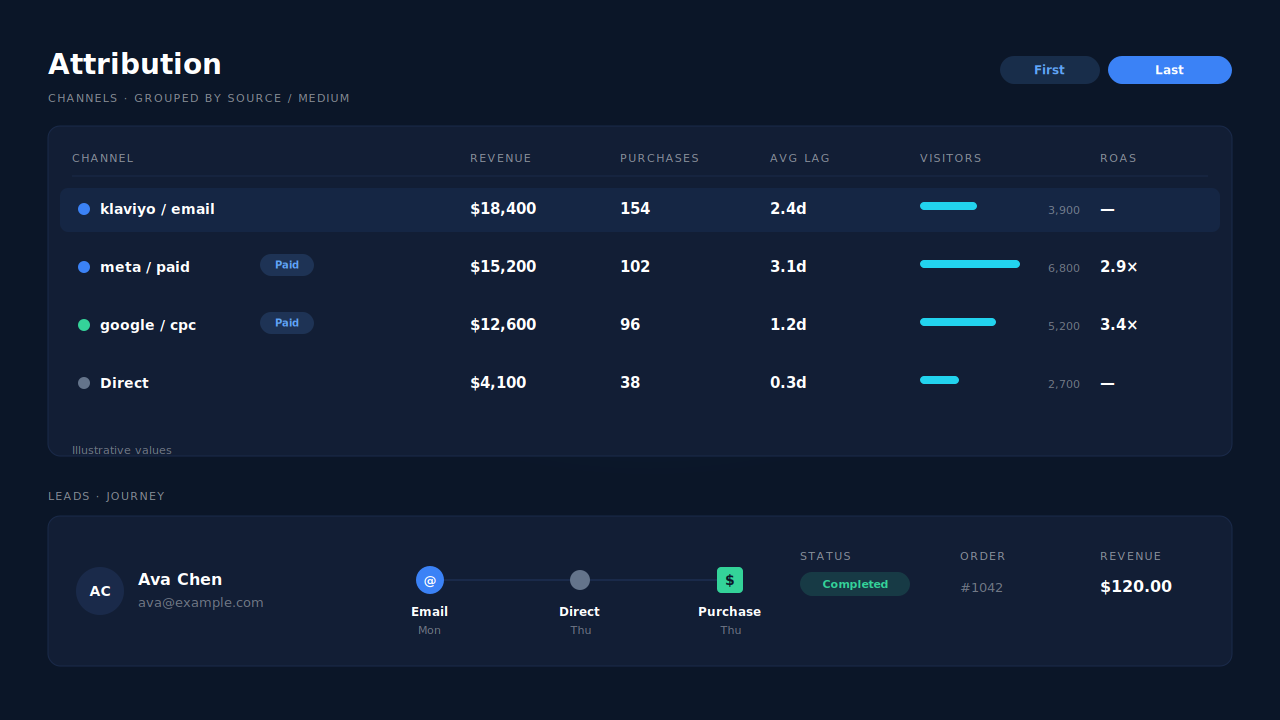
PartialLeads records the Klaviyo visit’s UTMs against a visitor, stitches that visitor’s later visits into one person, and matches each paid Shopify order back to them. The Direct return then reads as what it was: the second visit of someone email brought in. The email touch shows as first or last touch on the order, in PartialLeads’ own Attribution report.
Capture. The tag reads utm_source, utm_medium, utm_campaign and the referrer on the landing visit, and stores them with a visitor id kept in local storage with a first-party cookie backup. If the shopper types an email or phone into any form on that visit, a signup popup, a back-in-stock form, a checkout field, the tag captures it as they type, before any submit. That is what later ties an in-app-browser visit to the person. A partial lead is exactly that: contact details typed but never submitted.
Stitching. Sessions are joined into one person by visitor id, email, phone, IP plus user agent, device fingerprint and click id. The same browser coming back rejoins by visitor id. A different browser or device rejoins when the shopper’s email or phone appears on both sides, which the buying side usually carries from checkout.
Matching. Each paid order arrives from Shopify’s order webhook, so no browser has to cooperate. It is matched to a session in tiers: the visitor id echoed from the storefront first, then email, then phone, then IP. Every matched purchase gets a first-touch and a last-touch row. The display layer uses last-non-direct attribution with a 28-day window, so a Direct return inside 28 days of the email click keeps email as the credited touch instead of handing the order to Direct.
Where you see it. The Attribution report shows first touch, last touch and the PartialLeads resolved model side by side. Group the channels table by source, medium or campaign and klaviyo / email / spring-sale sits beside your paid channels with revenue, purchases, average lag and ROAS. On the Leads list, the journey ribbon shows each touch left to right: the email visit, a grey dot for the Direct return, and a green square for the purchase. Open the lead for the journey timeline with timestamps per visit, and the Purchases ledger for the order with its matched source.
Honest limits. PartialLeads does not connect to Klaviyo and does not read opens, so an email that was read but never clicked earns no credit. It does not write the source back into Shopify, so Shopify’s own reports will still say Direct; the corrected view lives in the PartialLeads Attribution report. If the email click happened in a browser where the shopper never typed an email or phone, and they bought on another device, nothing joins the two visits and the order stays credited to Direct or to whatever else the buyer touched. Matching is maximised, not guaranteed, and an order that can’t be tied to any visit shows as unmatched rather than being guessed.
| What breaks | The mechanism | Where you see it in the dashboard |
|---|---|---|
| Buyer returns later by typing the URL | Visitor id rejoins the return visit; last-non-direct display with a 28-day window keeps the email touch | Attribution report, journey ribbon on the Leads list |
| Email opened in an in-app browser, bought in Safari or Chrome | Email or phone typed on the click visit is captured before submit and joins both sessions | Journey timeline on the lead |
| Opened on phone, bought on laptop | Order matched by email or phone from the order webhook, sessions stitched into one person | Purchases ledger with matched source |
| Shopify shows only the buying visit | First-touch and last-touch rows written for every matched order | Attribution Models panel, First/Last/Resolved toggle |
| Can’t compare email with paid channels | Channels grouped by source, medium and campaign in one table | Attribution report channels table |
If your Klaviyo links arrive with their UTMs intact and Shopify still says Direct, your tracking isn’t broken. Your report is reading one visit of a journey that had several. Fix the tagging you control, then measure email from a ledger that sees the whole person, and compare it with how Shopify attribution differs from the ad platforms before you move budget.
Tell us what's broken. We'll fix your tracking — free.
Describe the tracking/attribution problem you're stuck on and we'll map it to a fix: server-side conversions to Meta, Google, TikTok and Pinterest, plus first-party tracking that survives Safari. No code required.
Sources
https://developers.facebook.com/docs/marketing-api/conversions-api