Shopify shows “pangleglobal” when an order’s session came from a TikTok ad served on Pangle, TikTok’s network of ad placements inside other companies’ apps, and that session reached your store without the UTMs you set. Shopify can only report what the session carried. Your tags didn’t arrive, so it names the network instead of your campaign.
The ad still worked. The sale is real, and it came from your TikTok spend. What broke is the label, and with it your ability to see which campaign or ad group earned the order.
What is pangleglobal, and why is it in your Shopify reports?
Pangle is TikTok’s ad network. When your ad set uses automatic placement, TikTok can show your ad in the TikTok feed and also inside third-party apps: games, utilities, news readers. “pangleglobal” is the name that traffic carries when it lands on your store from one of those apps.
So “pangleglobal” isn’t a stranger referring traffic to you. It’s your own TikTok budget, spent on a placement you may not have known was switched on.
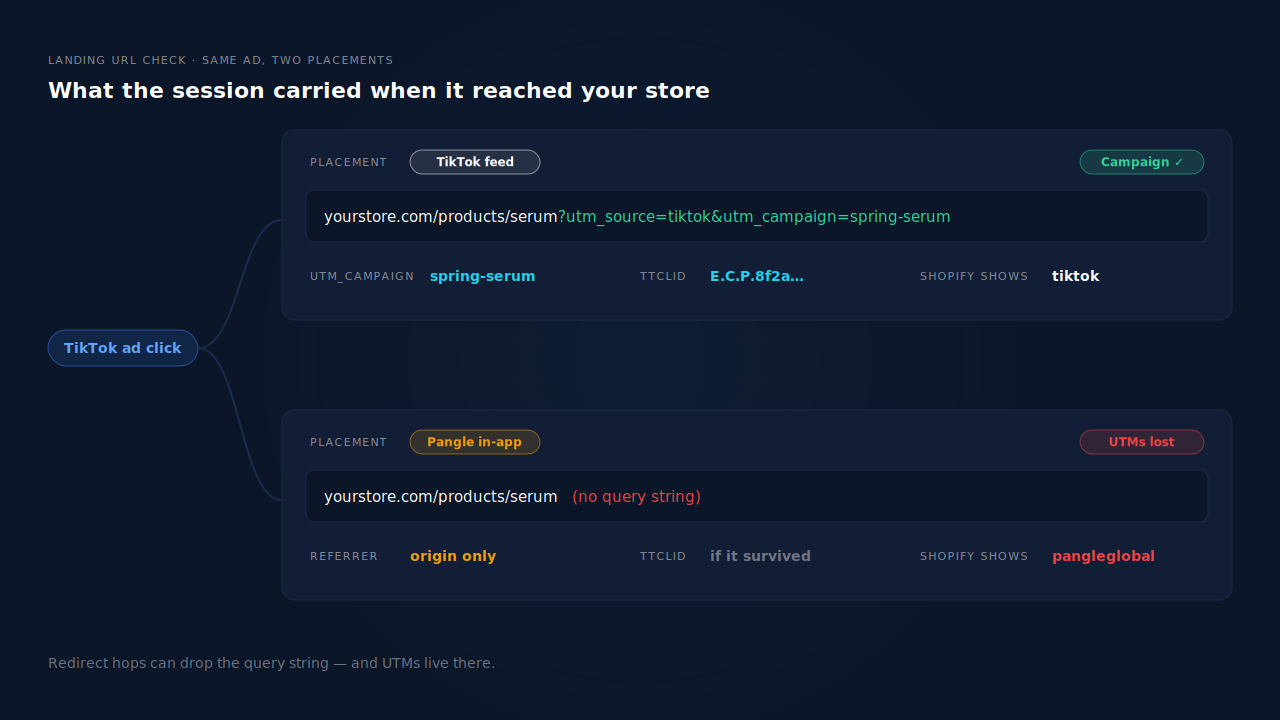
Shopify’s order attribution reads the session that placed the order: the UTM parameters on its landing URL, and failing that, the referrer header the browser sent. If the landing URL had your utm_source=tiktok&utm_campaign=..., you’d see your campaign. When those tags are missing, the next best evidence is whatever identifies the network, and that’s the label you get.
This is the same class of problem as orders tagged session from an unknown source on Meta ads: Shopify isn’t wrong, it’s reporting missing evidence.
Why do your UTMs disappear on Pangle clicks?
Because a Pangle click doesn’t travel the same road as a click in the TikTok app. It starts inside someone else’s app, passes through ad-serving redirects, and opens your page in that app’s built-in browser or hands off to the phone’s browser. Any hop that rebuilds the URL can drop the query string, and your UTMs live in the query string.
Three things commonly go wrong on that road:
- A redirect that drops the query string. An ad-serving hop, a link shortener, or a redirect on your own store (a Markets locale redirect, an old URL sent to a new one) forwards to a clean URL. Your tags were on the first URL, not the one Shopify recorded.
- UTMs set on the wrong level. Tags typed into one ad’s URL don’t cover a duplicated ad or an ad created later. The Pangle copy of a campaign is often the ad you forgot to tag.
- Only a referrer survives. Modern browsers send just the origin of the previous site on a cross-site navigation, not its full URL. The MDN reference for
Referrer-Policydescribes the default policy,strict-origin-when-cross-origin, as sending “the origin (only)” for cross-origin requests. A domain can tell Shopify which network sent the click. It can’t tell it which campaign.
That last point is why the fix is never “read the referrer harder”. The campaign name only exists in your UTMs or in TikTok’s own click record.
How do you check whether your TikTok UTMs are reaching Shopify?
Click a live ad the way a buyer would, then look at the address bar when your page finishes loading. If your utm_ values are still there, the link is fine and the problem is elsewhere. If they’re gone, follow the redirects until you find the hop that drops them.
A practical test routine:
- Open the ad’s destination URL in TikTok Ads Manager and confirm the UTMs are on it, for every ad in the ad group, not just the first one.
- Use the ad preview on a phone and tap through. Note the final URL. Do this for a product page and for your homepage, because store redirects often treat them differently.
- Paste the tagged URL straight into a mobile browser. If the tags vanish here too, the redirect is on your store, not TikTok’s side.
- Open a recent pangleglobal order in Shopify and look at its conversion details. Where Shopify shows the landing page, check whether it has any query string at all.
If the test link keeps its tags but real Pangle orders don’t, the loss is happening in the placement’s own redirect chain. You can’t fix that hop. You can only decide whether to keep buying that placement, and make sure some other identifier survives it.
How do you stop pangleglobal from hiding your campaigns?
Fix what you control, then plan for the clicks you can’t fix. Tag every ad, remove redirects on your store that drop query strings, decide deliberately whether you want Pangle placements at all, and keep a second identifier, TikTok’s click ID, that doesn’t depend on your UTMs surviving.
Should you turn off Pangle placements?
Only if the traffic doesn’t pay for itself. In TikTok Ads Manager, switching an ad group from automatic placement to selected placements lets you run the TikTok feed alone. That removes the pangleglobal label, but it also removes whatever sales Pangle was producing. Judge it on revenue, not on how tidy the report looks.
The fair test is to split it out first: run one ad group on TikTok placement only and one on Pangle only, with different utm_content values, and compare what each sold after your usual buying lag.
How should you tag TikTok ads so campaigns survive?
Set the same scheme on every ad, at creation time, and keep utm_source and utm_medium identical across all TikTok ads so they roll up as one channel. Put the campaign in utm_campaign and the ad or placement in utm_content. TikTok’s URL parameter builder can insert campaign and ad names dynamically, so a duplicated ad inherits correct tags instead of stale ones.
https://yourstore.com/products/serum?utm_source=tiktok&utm_medium=paid_social&utm_campaign=spring-serum&utm_content=pangle-video-a
If you’re unsure which parameter does what, gclid vs fbclid vs UTM parameters explains why click IDs and UTMs are separate signals. Also avoid links that jump straight to cart or checkout: they skip the pages where tracking runs, a failure covered in why links straight to Shopify checkout lose their UTMs.
Why does the ttclid matter when UTMs are lost?
The ttclid is TikTok’s click identifier. When it’s on the landing URL, it marks the visit as a TikTok ad click even if every utm_ tag was stripped. It won’t tell you the campaign name by itself, but it stops the order from reading as an unrelated source. Check your test clicks for it alongside the UTMs.
Why doesn’t the order match what TikTok Ads Manager reports?
Because the two systems count different things. TikTok credits conversions to its own ad clicks and views using its own attribution window. Shopify credits the session that placed the order on your domain. A buyer who clicked a Pangle ad, left, and came back through search counts as a TikTok conversion in Ads Manager and as search in Shopify.
That gap is normal, and it’s explained in why Shopify attribution differs from your ad platform. Pangle makes it wider, because the first visit is more likely to arrive stripped and the buyer is more likely to return through a different door.
How does PartialLeads show which TikTok campaign sold, even when Shopify says pangleglobal?
PartialLeads records every UTM, the ttclid, the referrer and the landing page on the visitor’s landing visit, then matches each paid Shopify order back to that visitor. When UTMs arrive rewritten but the ttclid survives, the visit is still marked as a TikTok ad click, so the order lands under TikTok instead of a network name.
On Shopify, the tag runs as a Customer Events pixel and orders come from the store’s order webhooks. Only paid orders count as purchases (financial_status = paid), recorded at the full order total including tax and shipping, after discounts. Each order is matched in tiers: the visitor ID echoed from the storefront first, then email, then phone, then IP.
Matching to the visitor matters because the Pangle visit is often not the visit that buys. PartialLeads joins a person’s sessions using visitor ID, email, phone, IP plus user agent and click IDs, the approach laid out in how to attribute ecommerce revenue to the ad click. Every matched order gets a first-touch and a last-touch row, so a buyer who tapped a Pangle ad and returned through Direct still credits TikTok on first touch.
The Attribution report groups orders by source, medium and campaign, with First, Last and Resolved models side by side. Its Recovered Attribution panel itemises orders reclassified by session intelligence: visits with no utm_source where the session still resolved to a real channel. To audit one order, the journey ribbon on the Leads list shows each touch left to right, ending in the conversion.
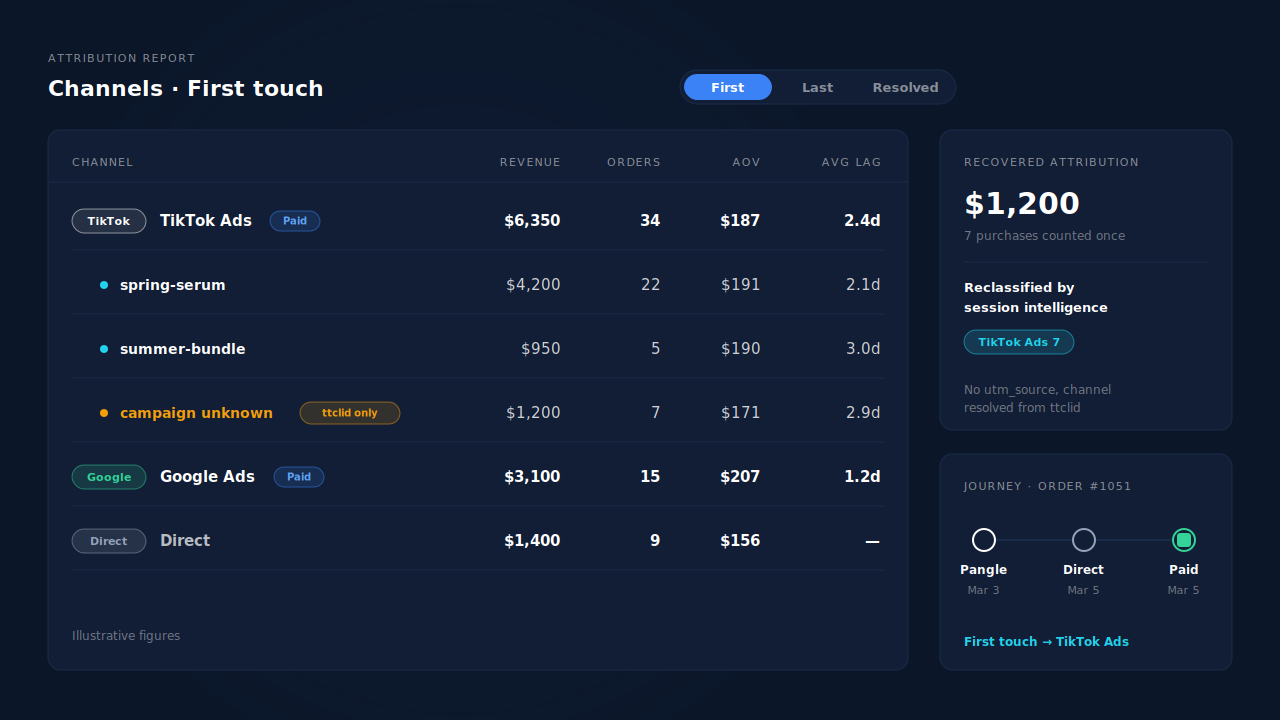
Honest limits. If a visit arrives with a ttclid but no utm_campaign, PartialLeads knows it was a TikTok ad click, not which campaign: that revenue shows under TikTok with the campaign unknown, not guessed. Placement-level reporting needs a placement value in your UTMs. A visit that kept neither UTMs nor ttclid can only be classified from what it did carry. And matching is maximised, not guaranteed: an order that can’t be tied to a visit shows as unmatched.
| What breaks | The mechanism | Where you see it in the dashboard |
|---|---|---|
| Pangle visit lands with no UTMs and Shopify shows pangleglobal | ttclid recorded on the landing visit still marks it as a TikTok ad click | Attribution report, TikTok source row |
| No utm_source, so the order would read as another channel | Session classifier resolves the real channel | Recovered Attribution, reclassified by session intelligence |
| Buyer tapped a Pangle ad, bought days later via Direct | Sessions stitched per person; first-touch row on every matched paid order | Journey ribbon on the Leads list, First toggle |
| Campaigns blur together in one label | Orders grouped by source, medium and campaign from the landing UTMs | Attribution report grouped by campaign |
| Unpaid orders inflate a campaign’s sales | Purchases counted only once financial_status = paid |
Purchases ledger |
Tag every ad, test the click on a real phone, and keep the ttclid. Then “pangleglobal” stops being a dead end and becomes a TikTok row you can act on.
Tell us what's broken. We'll fix your tracking — free.
Describe the tracking/attribution problem you're stuck on and we'll map it to a fix: server-side conversions to Meta, Google, TikTok and Pinterest, plus first-party tracking that survives Safari. No code required.