Your store is reporting missing evidence, not a missing campaign. Order-level attribution reads what the buyer’s own session carried on your domain: a referrer header, or UTM parameters on the landing URL. A Meta click often delivers neither, so the field goes blank — while Ads Manager, working from Meta’s own click data, happily reports the sale.
Two systems, two datasets, two answers. Neither is lying to you.
That is cold comfort when the Paid Social row reads zero and you are setting next month’s budget off it. So: what each system can see, what to change in your ad URLs first, and what closes the gap URL tagging cannot.
What does “session from an unknown source” actually mean?
It means the visit that placed the order arrived with no referrer and no campaign parameters, so there was nothing to classify. “Unknown” is a statement about one session’s evidence, not a channel that exists in the world. Paid Social sits empty for the same reason: nothing on that session identified it as paid social.
Session-level attribution in a store platform runs on two inputs: the HTTP referrer header the browser sends on an inbound navigation, and the query string on the landing URL — utm_source, utm_medium, utm_campaign and friends. Referrers get mapped to known channels; UTMs get read literally. With both absent, classification has nothing to work from and the honest output is “unknown”.
This is the same absence that makes ad conversions show as Direct in every other analytics tool you own — your store just labels it more honestly.
Why can Meta report the sale while Shopify reports nothing?
Because they answer different questions off different data. Meta knows which accounts clicked its ads, and credits a purchase when it can tie a conversion event back to one of those people inside its own attribution window. Your store knows which browser session submitted the order and what that session carried. Neither has access to the other’s evidence.
So a disagreement is the expected outcome, not a symptom. Meta counts view-through conversions your store has no concept of; your store counts paid orders in your admin, which Meta only knows about if a pixel or server event told it. Forcing the two to match is the wrong goal — the fuller argument is in why Shopify attribution differs from your ad platform. What you want instead is one conversion set you control, scored by more than one model.
Why does a Meta click arrive with no source in the first place?
Six causes, and most stores have several at once.
fbclid is not a traffic source. Meta decorates outbound links with a click identifier so it can match conversions back to a click. It is an opaque token for Meta’s own graph — it names no campaign, no ad set, not even the platform in a form your store parses. A store looking for utm_source sees a parameter it has no rule for and moves on.
In-app browsers break the referrer. Traffic from the Facebook and Instagram apps opens inside an embedded browser. When a shopper hands the link to their system browser, or the app opens it without a referrer, the header your store was counting on never arrives.
Browsers trim referrers on cross-site navigation by default. Outside an app too, what reaches your server on a cross-site hop is commonly reduced to an origin or dropped. Referrer-based channel mapping is best-effort, not reliable.
Redirects eat query strings. Link shorteners, geo splitters, consent gates and “pretty URL” rules each drop parameters in transit. The click carried UTMs; the landing page never saw them.
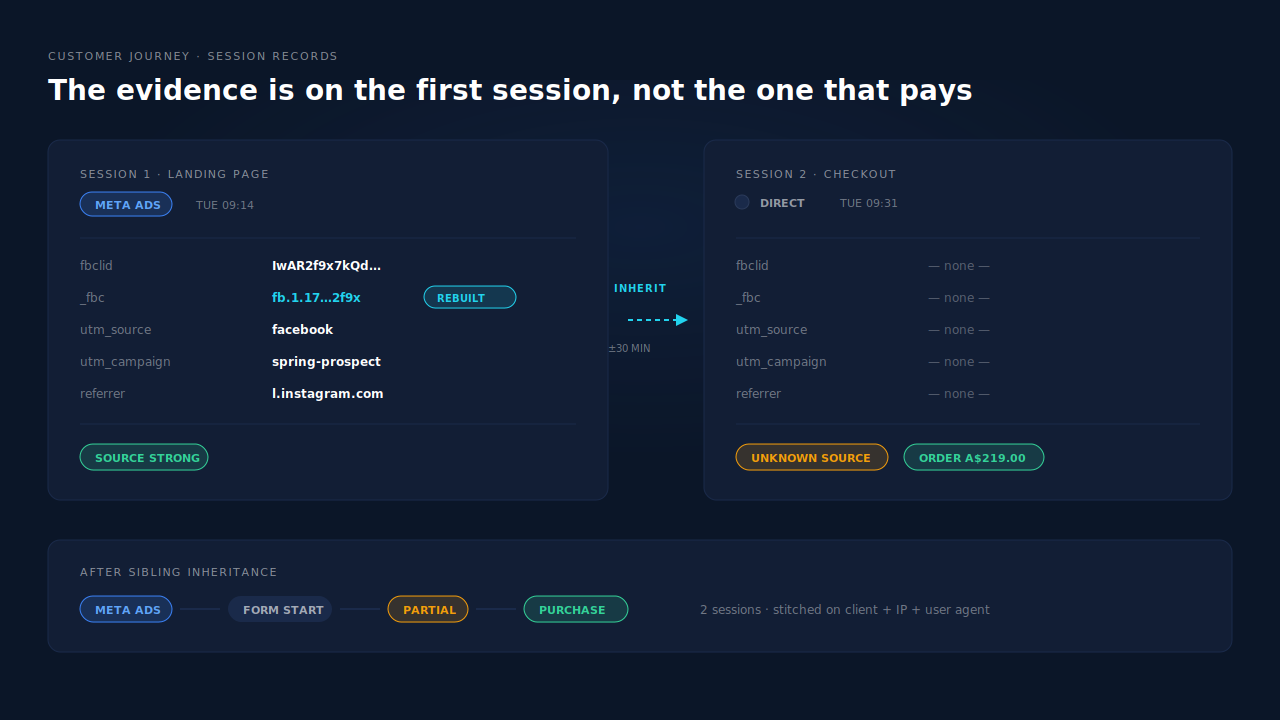
The checkout hop splits the visit. The session that received the ad click and the session that submits the order are not always the same record, because checkout runs in its own context with its own storage — specific enough to have its own article on the landing-page-to-checkout break.
Most purchases are not the first visit. Someone taps your ad on Tuesday and types your domain on Friday. That Friday session genuinely has no source — its evidence sits in Tuesday’s session, which your order page is not looking at.
What does an empty Paid Social column actually cost you?
The cost is not the report. It is the two decisions the report drives.
The first is budget. A channel showing no revenue in the system your finance conversations run on loses its case, and paid social is hit hardest because its click parameter is the one store platforms understand least. You cut spend on something that was working and could not prove it.
The second compounds. Ad platforms optimise against the conversions you send them, and an event arriving with no click identifier is a weaker training signal than one that carries it. Take an illustrative store sending 400 purchases a month with 150 unidentified: a large share of your signal reaches the auction blurred, and the algorithm answers by bidding more conservatively on the audiences you wanted more of.
How do you fix this without adding another tool?
Start with the input your store can read. Most of the gap on a Meta click closes with URL hygiene, and none of it needs a vendor.
- Put UTMs on every Meta ad URL. Set
utm_source,utm_mediumandutm_campaignat the ad level, using the platform’s dynamic placeholders for campaign and ad-set names so values stay accurate when you rename things. Highest-return move available: it hands your store an input it understands instead of one it discards. - Click your own ad and read the address bar. Not the preview — the live ad, on a phone, from the app. Whatever parameters survive to that address bar are the only ones your store will ever see.
- Audit every redirect between the ad and the landing page. Confirm each hop forwards the full query string. One shortener that strips parameters undoes step 1.
- Stop your own domains from taking referral credit. A visitor bouncing from your blog to a product page can register your own site as the referrer — a different wrong answer from “unknown”, equally useless.
- Keep your browser pixel installed. The platform-side cookies match quality depends on are set client-side. Dropping the base tag for server events only trades one gap for another.
Do these and the honest ceiling is: single-visit buyers who click straight through get classified correctly. Real improvement, not the whole problem.
Why do UTMs alone still leave orders unattributed?
Because a UTM describes one visit, and buying is rarely one visit. The parameters live in the URL of the session that arrived from the ad. They are not on the session three days later that pays, not on the desktop session when the click happened on a phone, and gone the moment the visitor navigates internally.
URL tagging fixes the classification of the arriving session and does nothing for the join between that session and the order. Closing that means treating the buyer as one person across visits — the problem visitor identity resolution exists to solve — and repairing sourceless sessions from their neighbours, which is what visit-sibling inheritance does.
How does PartialLeads fix “unknown source” on Shopify orders?
By capturing the evidence on the session that has it, then carrying it to the order.
The click evidence is captured where it exists. The PartialLeads tag reads the landing URL and stores what it finds on the session: fbclid, _fbc, gclid, gbraid, wbraid, msclkid, ttclid, epik, every UTM, the landing page and the referrer — the referrer serving as fallback when UTMs are absent. When an fbclid is present but the _fbc cookie is missing or malformed, the backend rebuilds _fbc from the URL value in Meta’s format.
Sourceless sessions inherit from their siblings. Within a visit, a session carrying no attribution can take it from another session of the same person: same client, IP and user agent within ±30 minutes, or same user agent with a matching Meta click cookie within ±10 minutes when the IP changed — a phone switching from wifi to mobile data mid-checkout. The checkout session stops being an orphan.
Across visits, sessions are unioned into one person. A six-tier resolver joins on visitor ID, email, phone, IP plus user agent, device fingerprint and click ID, with a confidence score per tier. Friday’s typed-URL purchase and Tuesday’s ad click become one journey, not two anonymous visitors.
Purchases come from the order webhook, not the thank-you page. Every paid order in your Shopify admin produces a conversion event server-side, whether or not a browser script fired, and each is matched to a session by visitor-ID echo, then email, then phone, then IP. Pending and cancelled orders are not sent. A match attaches revenue, writes both a first-touch and a last-touch attribution row, and fans the conversion out to Meta, Pinterest and TikTok server-side, plus Google Ads as rows in a Google Sheet you import on a schedule. The click ID travelling with that event is the one recovered from the landing session, not the empty one checkout had.
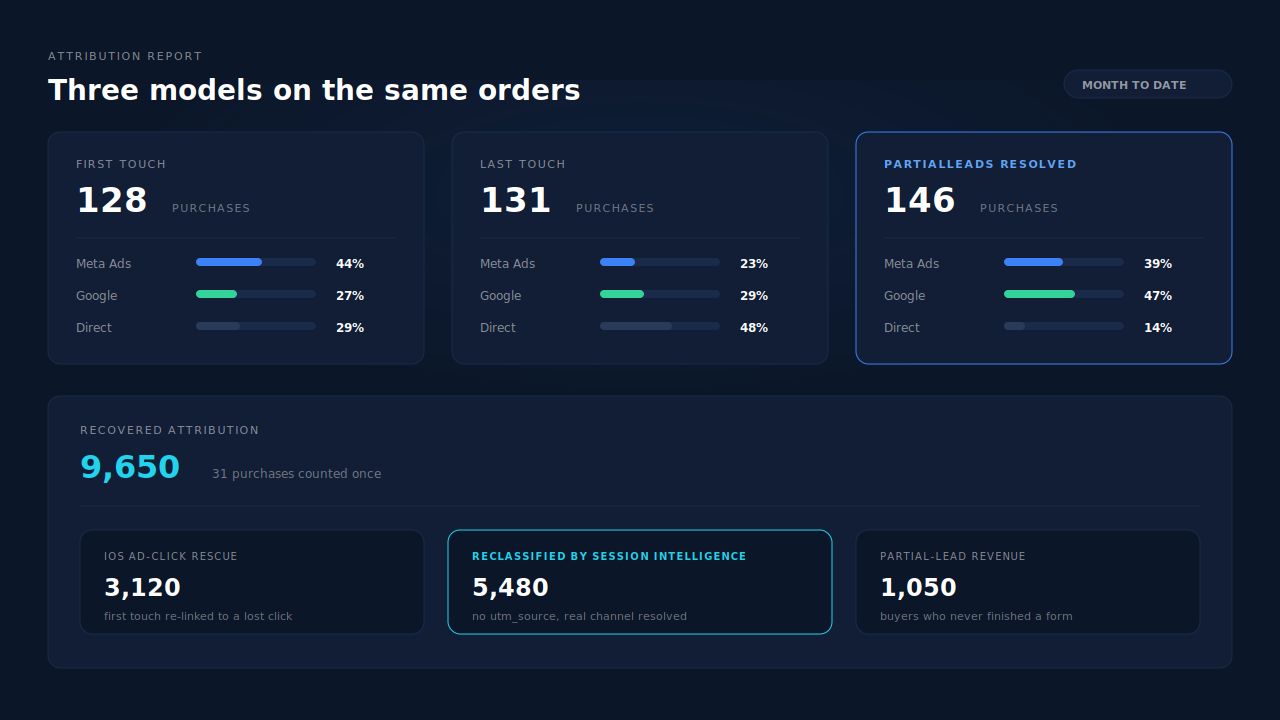
Where you see it working. The Attribution report puts first-touch, last-touch and PartialLeads-resolved side by side on the same orders, grouped by source, medium or campaign, and itemises recovered revenue by mechanism — “reclassified by session intelligence” is the bucket holding traffic that would otherwise read as Direct or unknown. The Purchases ledger separates matched orders from unmatched. In the Leads list, the Journey column draws each touch as a badge, so a multi-session purchase reads left to right without opening the record. The broader version of this join is attributing ecommerce revenue to the ad that started it.
The honest constraints. A guest buyer who leaves no email or phone anywhere, returns days later on a different network and matches no stored identifier stays unmatched — the order still lands, and becomes matchable later if identity arrives, with a manual re-match available. Whether Meta then ties your server event to a person is Meta’s half, governed by its own graph and the shopper’s tracking choices: dispatch is controllable, matching is maximised rather than guaranteed. _fbc can be rebuilt from an fbclid, but _fbp cannot be conjured from nothing, so keep your base pixel. And if you also run Shopify’s own Meta app or another pixel plugin, keep exactly one source per event — event IDs are deduplicated within PartialLeads, not against a third party’s browser pixel.
| What breaks | The mechanism | Where you see it in the dashboard |
|---|---|---|
| Checkout session has no referrer or UTMs | Visit-sibling inheritance, ±30 min on client+IP+UA, ±10 min on UA+click cookie | Customer Journey timeline showing the inherited source |
fbclid means nothing to the store |
Click IDs captured per platform and stored on the session, _fbc rebuilt from fbclid |
CAPI activity log, per-lead API column |
| Purchase happens on a later visit | Six-tier identity cluster unions sessions into one person | Journey column with session count and stitch treatment |
| Order carries no campaign | First-touch and last-touch rows written per matched purchase | Attribution report grouped by source, medium, campaign |
| Paid Social reads zero | Resolved model scored beside first and last touch on the same orders | Attribution report, recovered revenue by mechanism |
| Browser never fired a purchase event | Paid orders dispatched server-side from the order webhook | Purchases ledger, matched versus unmatched |
Tell us what's broken. We'll fix your tracking — free.
Describe the tracking/attribution problem you're stuck on and we'll map it to a fix: server-side conversions to Meta, Google, TikTok and Pinterest, plus first-party tracking that survives Safari. No code required.
Sources
- https://developers.facebook.com/docs/marketing-api/conversions-api
- https://developers.facebook.com/docs/marketing-api/conversions-api/parameters/fbp-and-fbc
- https://developers.facebook.com/docs/marketing-api/conversions-api/parameters/customer-information-parameters
- https://developers.facebook.com/docs/marketing-api/conversions-api/deduplicate-pixel-and-server-events