Run one Meta dataset on the ad account and send every store into it. Then split the three things that genuinely belong to a store rather than an account: the verified domain, the product catalog, and the order number. Sharing the dataset pools your conversion signal. Sharing the other three is what breaks the numbers.
Most multi-brand operators get this backwards. They create three datasets because there are three stores, then wonder why a single ad account optimises badly against three thin pools of purchase data.
What actually breaks when several stores share one ad account?
Not the ad account. An ad account is a billing and permissions object — it does not care how many storefronts feed it. What breaks is everything below it that Meta scopes to a domain, a catalog, or an order, because Shopify hands you a fresh copy of each per store.
Three failure patterns show up again and again:
- Double-counted purchases. Two stores send the same order number for two different sales. Anything keyed on that number treats them as one event, or as a retry of one event.
- Events attributed to the wrong storefront. The dataset receives the purchase, but the
event_source_urlpoints at a domain that was never verified, so it falls outside the configured event priority. - Dynamic ads that show the wrong product. The catalog and the event agree on an ID string, but that ID means a different item in each store.
None of these throw an error. The dataset reports events received, the campaign spends, and the number in Commerce Manager is quietly wrong. That is why they survive so long — this is the same class of silent failure that makes ecommerce revenue hard to attribute back to the ad that started it even on a single store.
Should each store have its own Meta dataset, or should they share one?
Share one dataset when the stores share an ad account and sell to a similar buyer. Split into one dataset per store when the brands are genuinely separate businesses, when a client owns the data, or when you will eventually move a store to its own ad account.
The argument for sharing is signal density. Meta’s delivery system needs a workable volume of conversion events per dataset to optimise. Three stores doing 40 purchases a month each are three weak signals when split, and one usable signal when pooled. The argument for splitting is ownership and exit: a dataset is an asset in a Business, and unpicking a shared one later is genuinely painful.
Two things are worth knowing before you decide:
An ad account can be associated with more than one dataset, so “one ad account” does not force “one dataset”. You can run three datasets against one account and select the right one per campaign. What you cannot do is make Meta compare events across two datasets — deduplication happens inside a dataset, never between two. If the browser event lands in dataset A and the server event lands in dataset B, you have two purchases, permanently.
That makes the dataset the real unit of decision. Everything you want counted once has to arrive in the same one, which is the core rule behind the Conversions API generally, not just multi-store setups.
How does domain verification work when you own three domains?
Each store is its own registrable domain, so each one verifies separately. Verification lives with the Business that owns the domain, and access is shared between Businesses through partner sharing rather than by verifying the same domain twice (Meta, domain verification docs).
The consequence that matters here is good news, and most people get it backwards: Aggregated Event Measurement’s eight-event limit is per verified domain, not per dataset or per ad account (Meta, Aggregated Event Measurement docs). Three stores under one dataset do not fight over eight events between them. Each domain gets its own eight, and you configure each store’s event priority independently.
So a shared dataset costs you nothing in event budget. Where the split does bite is if you run several storefronts on subdomains of one registrable domain — shop.brand.com and outlet.brand.com verify as one domain and do share a budget. Check which case you are in before you plan around it.
For agencies, the ordering matters: get the client’s domain verified under the client’s Business, then share the domain and the dataset into yours. Verifying into the agency Business first is the mistake that takes a support ticket to undo.
How do you stop two stores’ orders from colliding?
Stop identifying orders by their order number. Shopify numbers orders per store and starts each store at the same place, so order 1001 exists in every store you own. Any downstream system that treats the order number as the unique key will either merge two real sales or discard one as a duplicate.
Three fixes, in increasing order of reliability:
- Set a distinct order prefix per store in Shopify’s order settings —
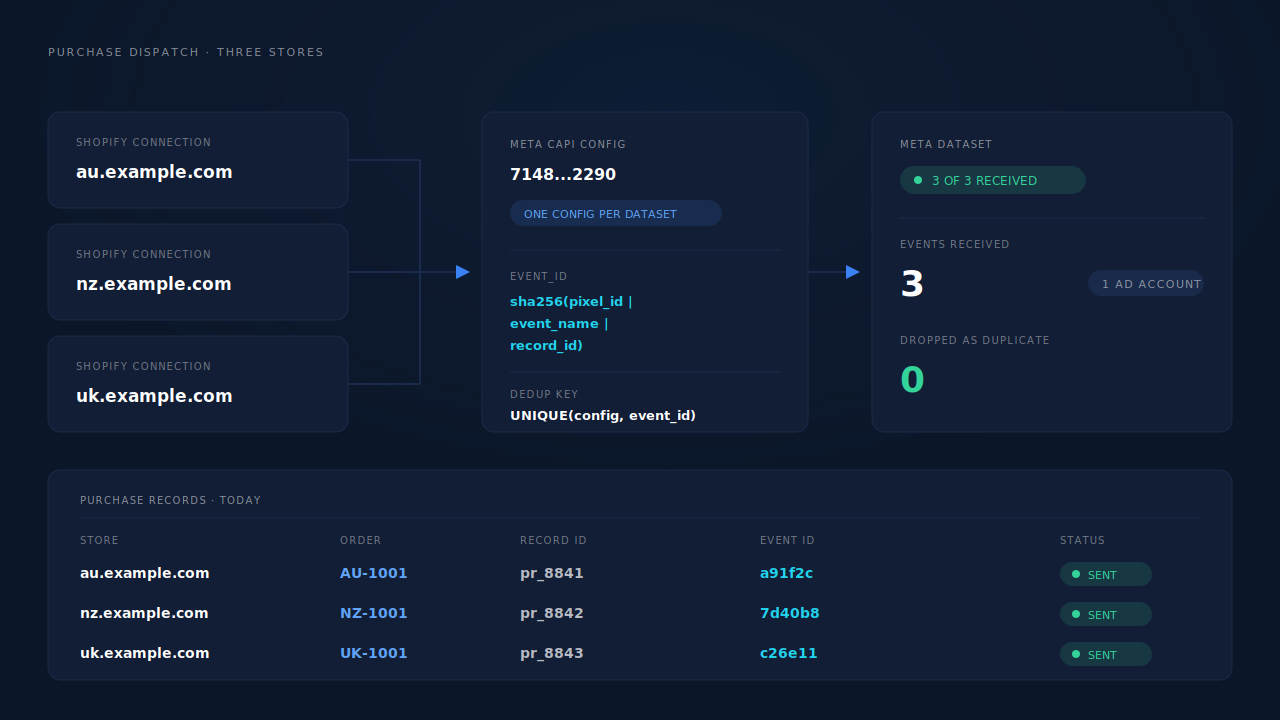
AU-1001,NZ-1001,UK-1001. Cheap, immediately readable in every report, and it fixes the human-facing half of the problem. - Key on the store’s own internal order ID, not the customer-facing order number. They are different fields, and the internal one is unique across your account.
- Derive the deduplication key from something that already contains the store, so the key cannot collide by construction.
That third one is what Meta’s deduplication actually needs. A server event and a browser event are matched on event_id plus event_name inside a dataset (Meta, deduplication docs). If your event_id is built from the order number, two stores in one dataset will produce identical IDs for unrelated sales, and Meta will drop one of them as a duplicate. Building the event ID deterministically from a value that is unique per record removes the whole class of bug.
Do the stores need one product catalog or three?
Three — one per store. Catalog item IDs are unique inside a catalog, not across your account, and every store’s feed will happily emit its own 1234567890. Merge them and dynamic ads start showing the wrong product for the right ID.
One ad account can hold several catalogs, and you point each campaign at the one that matches the store it advertises. This is the opposite call from the dataset decision, and for a different reason: pooling conversion events helps delivery, while pooling product IDs just destroys them.
Keep the feeds honest too. A feed that Meta rejects or downranks fails silently in the same way a mis-keyed event does, so it is worth knowing what gets a product feed rejected before you wire three of them up at once.
How do you report per-store performance when the ad account is shared?
Through naming, not through the ad account. Once a dataset is shared, the store is no longer a dimension Meta reports on — it is a property of the traffic, and it only exists in your reporting if you put it there.
Two habits carry the whole thing:
- Put the brand in the campaign name and in the UTM.
utm_campaign=au-prospecting-q4costs nothing at setup and is the only per-store filter you will have later. Retrofitting it is not possible; the old clicks are already recorded. - Decide the reporting currency once. Multi-brand usually means multi-country, and a shared account mixes currencies by default. Settle how you report attribution across multiple currencies before you compare two stores’ ROAS, not after.
If the stores also sit on separate landing-page domains, the same discipline applies one layer up — see attributing Shopify orders across two domains for the identity side of that problem.
How does PartialLeads track several Shopify stores into one ad account?
Each store connects as its own purchase source, and all of them feed one dispatch layer. The store stays separate where it must be; the conversion signal pools where it helps.
Each store is its own connection. Shopify connects as a purchase source through the order webhook plus the Customer Events pixel, one connection per store. Every store’s domain registers under Authorized Domains so its sessions land in the same account rather than three disconnected ones.
One CAPI config per destination dataset. The Meta config holds the dataset’s own pixel ID, its own access token, its own trigger rules and its own deduplication table. Three stores feeding one dataset means three connections and one config — which is exactly the shape you want, because the config is the thing the dataset sees.
The event ID cannot collide across stores. PartialLeads builds event_id as a SHA-256 of pixel_id|event_name|record_id, where the record ID is the internal purchase record — not the storefront’s order number. Two stores can both sell their order 1001 on the same afternoon and the two events remain distinct by construction. Deduplication tables are keyed unique on (config, event_id), so a redelivered Shopify webhook physically cannot double-fire.
One buyer across two brands is one person. The identity cluster resolves sessions per account across six tiers — visitor ID, email, phone, IP plus user agent, device fingerprint and click ID — so a customer who bought from your AU store in March and your UK store in September is one identity with one journey, not two anonymous strangers. Each matched purchase writes a first-touch and a last-touch attribution row.
Each store gets its own catalog feed. Catalog sync produces a hosted feed URL per connection, protected by that connection’s own feed token, with one row per variant. Three stores produce three feeds and three catalogs — no merging, no shared ID space.
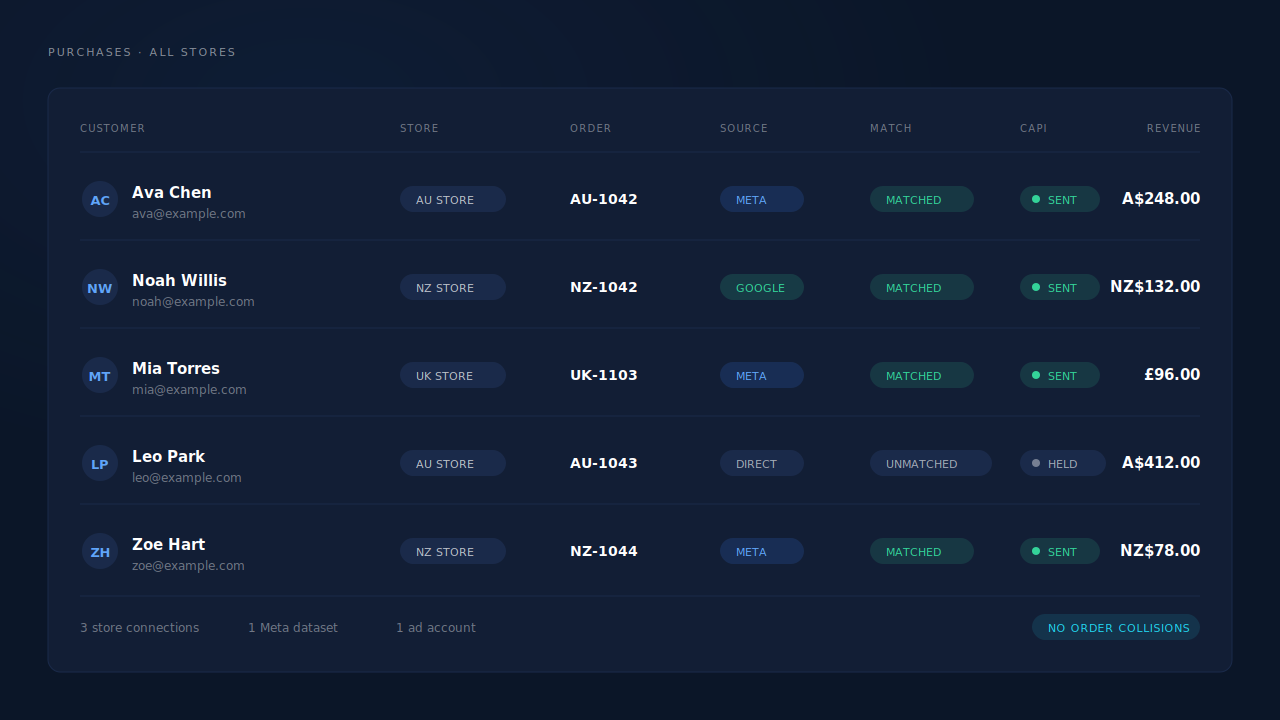
The honest constraints. The Attribution report groups by source, medium, campaign, content and term — not by store — so per-brand separation still comes from your campaign and UTM naming, the same as it does natively. Catalog feed health scoring is Shopify-only, which is fine here but matters if one brand runs on WooCommerce. And the usual split applies: every order in each store’s admin produces a dispatched conversion event, because purchases fire server-side from the order webhook. Whether Meta ties that event to a person and a click depends on the identifiers captured and on Meta’s own graph. We control dispatch. The platform controls matching.
| What breaks | The mechanism | Where you see it in the dashboard |
|---|---|---|
| Order 1001 exists in every store, so events collide | event_id derived from the internal purchase record, not the order number; dedup table unique on (config, event_id) |
CAPI activity log — two distinct events, both delivered |
| Three storefronts look like three disconnected accounts | One connection per store, every domain registered under Authorized Domains | Purchases ledger, all stores in one matched view |
| A repeat buyer across two brands counts as two strangers | Six-tier identity cluster with first-touch and last-touch rows per purchase | Customer Journey timeline on the lead |
| Product IDs mean different items in different stores | One hosted catalog feed per store connection, own feed token, one row per variant | Product Catalog, per-connection feed |
| A redelivered webhook fires the purchase twice | Idempotent dispatch — retries resolve to the same deterministic event ID | CAPI activity log, no duplicate row |
Tell us what's broken. We'll fix your tracking — free.
Describe the tracking/attribution problem you're stuck on and we'll map it to a fix: server-side conversions to Meta, Google, TikTok and Pinterest, plus first-party tracking that survives Safari. No code required.
Sources
https://developers.facebook.com/docs/marketing-api/conversions-api https://developers.facebook.com/docs/marketing-api/conversions-api/deduplicate-pixel-and-server-events https://www.facebook.com/business/help/2360940870872492 https://www.facebook.com/business/help/721422165168355