Share one Meta dataset across the ad accounts when they are allowed to share it, and split only when they are not. Either way the site keeps one capture layer, and every conversion is dispatched to each dataset separately, carrying that dataset’s own access token and its own event ID.
The duplication belongs in the dispatch. It should never reach the tracking.
Do you actually need more than one Meta pixel on this site?
Usually not. A Meta dataset — the object Events Manager still labels a pixel — can be shared with more than one ad account inside Business Manager. That is an asset permission, granted once, with no second line of code on the site and no second server-side integration.
You need separate datasets when the ad accounts live in different Businesses that will not share assets: two clients of the same agency, a white-label reseller, a joint venture whose data cannot legally pool. You also want them when one domain hosts genuinely separate brands whose audiences should stay apart.
Two reasons that look valid and are not: separate reporting, which ad account and campaign breakdowns already give you, and keeping an agency walled off from a client’s data, which asset permissions already do.
Every extra dataset splits conversion volume. A dataset receiving forty purchases a week learns faster than two receiving twenty each, and thin signal is expensive.
What happens when two Meta pixels fire on the same page?
Both datasets record the same visitor, and that is correct behaviour. Each dataset is its own ledger. A purchase worth $180 appears once in each, and only your own spreadsheet double-counts it — Ads Manager never sums across datasets.
Deduplication is where the real damage happens, because Meta compares events inside a dataset. A server event is matched to a browser event on the same event name plus the same event_id, and that comparison never crosses a dataset boundary. So reusing one event_id value in both datasets is harmless. Sending a fresh random ID from the server while the browser sent a different one is what double-counts — inside a single dataset, twice over, on every conversion you have.
That failure is silent. Nothing in Events Manager says “these two were the same purchase”; you just see a conversion count higher than your CRM’s. Why your Meta CAPI is not deduplicating walks the diagnosis, and what the event_id should be covers how to generate one that survives retries.
Match quality is also scored per dataset. The same lead, sent to two datasets with the same hashed email and phone, gets an Event Match Quality score in each one independently — and they can differ, because each dataset has its own history of browser events to resolve against.
Why does the eight-event limit belong to your domain, not your pixel?
Because Aggregated Event Measurement, the framework Meta built for iOS 14.5 and App Tracking Transparency, budgets conversion events per verified domain. Eight of them, ranked in priority order, configured against the domain rather than against a pixel or an ad account.
This is the constraint that surprises agencies. Two ad accounts driving traffic to the same website draw from the same eight slots, no matter how many datasets you create. Adding a second pixel to buy a ninth event does not work — the budget was never a property of the pixel.
Three practical consequences:
- Priority order is a joint decision. For a user who opted out of tracking, the highest-priority event that fired is the one reported. If one account prioritises Purchase and the other needs Lead, that argument happens before the configuration is saved, not after.
- Domain verification has one owner. The domain is verified inside a Business, and the event configuration lives there with it. If the agency verified the client’s domain in the agency Business, that decision follows you into every future argument about access.
- A separate domain gets its own budget. This is the honest reason to run a second landing-page domain for a second brand — and it brings its own attribution problem, which is attributing orders across two domains.
Who should own the dataset when an agency runs the ads?
The client, and the reasoning is not political.
A dataset accumulates history — conversion volume, the audiences built from it, the optimisation learning that makes week twelve cheaper than week one. Rebuilding it inside a new Business does not carry any of that across. If the dataset lives in the agency’s Business, the client is one relationship breakdown away from starting over with an empty one.
The workable structure is boring: the client’s Business owns the dataset and verifies the domain, the agency’s ad account receives asset access to it, and the server-side access token is issued by the owning Business. Offboarding is then a permission change plus a token rotation — an afternoon, not a migration.
Rotate the token on the way out regardless of how the relationship ended: a server-side integration keeps sending conversions for exactly as long as its token stays valid.
How do you stop one account’s events from landing in the other’s dataset?
By routing on something the event already carries — the domain it happened on, the path it happened under, the campaign tags on the session — and by deciding that routing server-side, after the record exists.
Client-side routing is the common approach and the fragile one. Two base codes behind conditional logic fails on exactly the traffic that matters: single-page apps that never reload, cached pages that fire the wrong branch, tag managers with a race between containers, and blockers that kill one snippet and not the other. Server-side, the record is already written before anything decides where it goes.
Routing keys that hold up in practice:
- Host. The cleanest rule available. Brand A’s domain feeds Brand A’s dataset, full stop.
- Path prefix. For brands that share a domain —
/pro/to one dataset,/home/to the other. - Campaign tagging. Workable only when UTM naming is disciplined; a
utm_sourcetyped by hand into a boosted post is not a routing key. - The offer itself. Which form, which product, which price tier — usually the most stable signal, since it changes less often than the media plan.
What does not work is the click ID. An fbclid tells you the visitor arrived from a Meta ad; it does not tell you which ad account paid for it, so it cannot separate two accounts running to the same page.
One rule to settle before you build any of this: what happens when an event matches both configs. Sending it to both is legitimate for a shared retargeting pool; doing it by accident and reconciling two sets of numbers at month end is not.
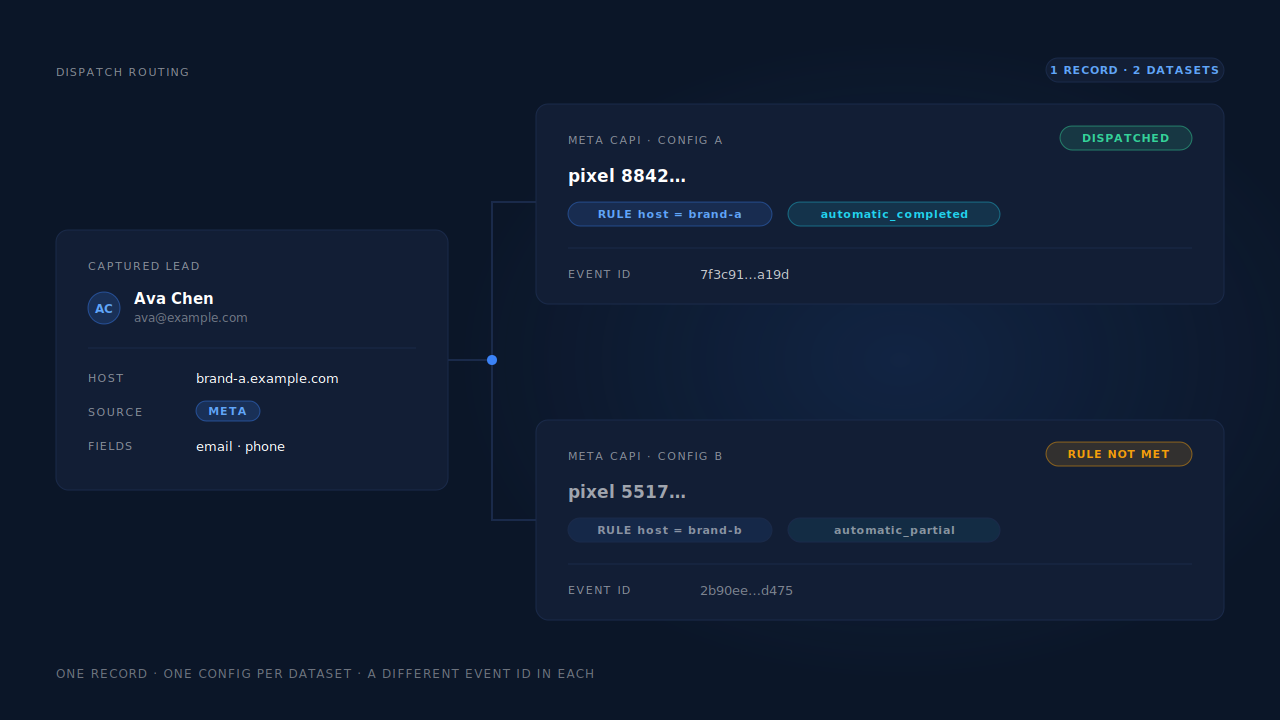
How does PartialLeads run Meta CAPI for multiple ad accounts?
One capture layer in front, one config per destination dataset behind it.
The tag captures once. Email and phone as they are typed, the UTMs and referrer, fbclid and the _fbp / _fbc cookies, the landing page and the geo — one record per session, written before anything decides where it is going. Adding a second ad account adds a config, not a second script.
Each Meta config holds its own pixel ID and its own access token, and each carries its own dispatch rules. The send mode decides when it fires — on a partial lead before submit, on a completed submission, on a rule match, on a booking, or only when an operator sends it by hand. The trigger rules decide whether it fires, as an AND/OR combination of field matches evaluated against the captured record. The same matcher runs for the Microsoft Conversions API, which is also where you will find the rules preview: it answers “this rule would have matched N of M capture-ready leads in the last seven days” using the dispatch matcher itself, so a routing condition can be tested before you commit to it.
Dedup is per config, by construction. The event ID is a SHA-256 of the pixel ID, event name and record ID, so the same conversion sent to two datasets produces two different IDs, and behind each config is a dedup table with a uniqueness constraint on that ID. A redelivered webhook physically cannot double-fire into either dataset, and a retry into one is not affected by the state of the other. That property is what makes running two datasets boring instead of nerve-racking — it is the same mechanism described in the Conversions API explainer, applied once per destination.
Failures are scoped per config too. An expired token flips that config to “reconnect needed” and leaves the other running; transient failures retry on the next worker cycle; permanent payload failures do not retry at all. One client’s lapsed access does not take the other client’s conversions down with it.
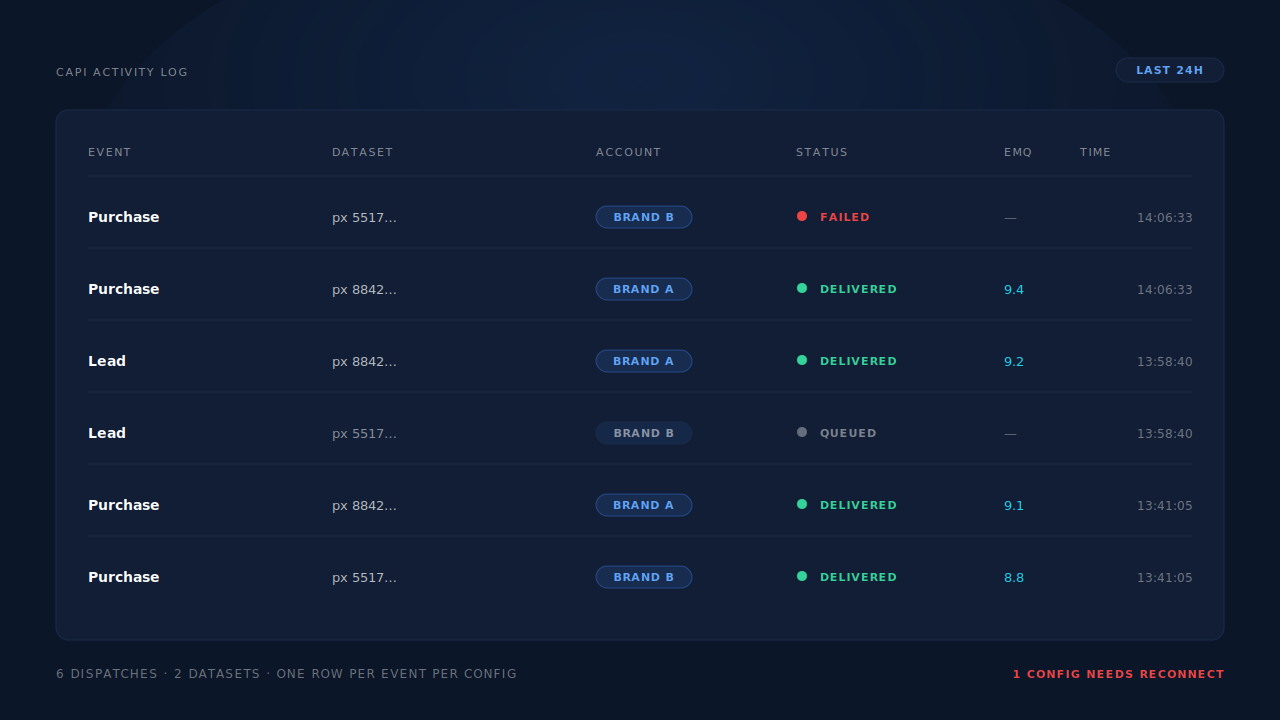
You see it in two places. The CAPI activity log carries one row per dispatch — event name, status, platform and timestamp — so two datasets receiving the same conversion read as two rows, not one ambiguous one. The Leads list adds an API column showing which conversion APIs a specific lead was dispatched to, which is the fastest way to answer “did this lead go to both accounts or one.” Both are part of knowing whether your Meta CAPI is working.
The honest constraints. Server-side dispatch does not replace the browser base tag. Match quality leans on _fbp and _fbc, which are set client-side, per dataset — PartialLeads reconstructs _fbc from a fbclid in the URL, but it does not synthesise _fbp from nothing, so each dataset still wants its own base code on the page. With email and phone as required form fields, PartialLeads consistently delivers EMQ 9+ across customer accounts, and the condition is load-bearing: the number comes from the identifiers you collect, and an audience Meta cannot resolve will score lower whatever the payload contains. Nothing here changes the eight-event budget or domain verification either — those are Meta-side decisions made by humans in Business Manager. We control dispatch. The platform controls matching.
| What breaks | The mechanism | Where you see it in the dashboard |
|---|---|---|
| A second pixel means a second script, a second integration and a new set of bugs | One capture record per session, one dispatch config per destination dataset | Integrations list, one Meta config per pixel ID |
| The same conversion double-counts inside one dataset | Deterministic event ID (SHA-256 of pixel ID, event name and record ID) with a unique dedup table per config | CAPI activity log, one row per event per config |
| Events meant for one account land in the other’s dataset | Per-config trigger rules as AND/OR field matches, evaluated server-side against the captured record | Rules preview: matched N of M capture-ready leads |
| One client’s expired token silently stops the other client’s conversions | Per-config retry taxonomy — auth failures flag that config only, transient failures retry | Config status, reconnect-needed flag |
| No way to tell which accounts a given lead was sent to | Per-lead dispatch record for every conversion API | Leads list, API column |
Tell us what's broken. We'll fix your tracking — free.
Describe the tracking/attribution problem you're stuck on and we'll map it to a fix: server-side conversions to Meta, Google, TikTok and Pinterest, plus first-party tracking that survives Safari. No code required.
Sources
- Meta for Developers — Conversions API: https://developers.facebook.com/docs/marketing-api/conversions-api
- Meta for Developers — Deduplicate Pixel and server events: https://developers.facebook.com/docs/marketing-api/conversions-api/deduplicate-pixel-and-server-events
- Meta for Developers — Conversions API server event parameters: https://developers.facebook.com/docs/marketing-api/conversions-api/parameters/server-event
- Meta for Developers — Aggregated Event Measurement: https://developers.facebook.com/docs/marketing-api/aggregated-event-measurement