“Google Shopping App Purchase” shows Inactive because Google Ads has stopped recording purchases for that conversion action. The Google & YouTube app reports a Shopify sale from the shopper’s browser at the end of checkout. If its pixel is disconnected, held back by consent, sending to a different action, or never loads because the buyer doesn’t reach the thank-you page, Google hears nothing while your orders keep coming.
The app’s settings screen and the Google Ads status are answering different questions. The app says it is set up. Google says it isn’t hearing from it. Both can be true.
Below: what the status means, why the signal goes quiet, how to find your cause, and how to report paid orders from the order record instead.
What does “Inactive” mean on the Google Shopping App Purchase action?
It means Google Ads has not recorded recent conversions for that specific action. Every conversion action in Goals → Conversions carries a status, and the status reflects whether data is still arriving. It is not a verdict on your store or on the app’s settings screen. An Inactive purchase action on a Shopify store with daily sales means the path from checkout to Google is broken somewhere.
Two things make this status misleading.
It trails the break. Google waits through a stretch of silence before it changes the label, so by the time you see Inactive, the conversions stopped a while ago. Open the conversions column by day for that action. The day it drops to zero is when it broke. Google’s help centre documents the exact statuses and the time periods behind them.
It belongs to one action, not the account. The Google & YouTube app creates its own conversion actions when you connect it. Reconnecting the app, switching the linked Google Ads account, or adding a purchase tag by hand can leave you with two purchase actions: an old one sitting Inactive and a newer one quietly recording. Count your purchase actions before you debug anything.
Why does the Google & YouTube app stop sending purchases?
Because its purchase signal depends on a browser finishing checkout with the app’s pixel allowed to run. The app reports purchases through a pixel that Shopify lists under Settings → Customer events. Anything that disconnects that pixel, blocks it, points it at another action, or keeps the buyer from reaching the end of checkout stops the conversion, while the order itself lands normally.
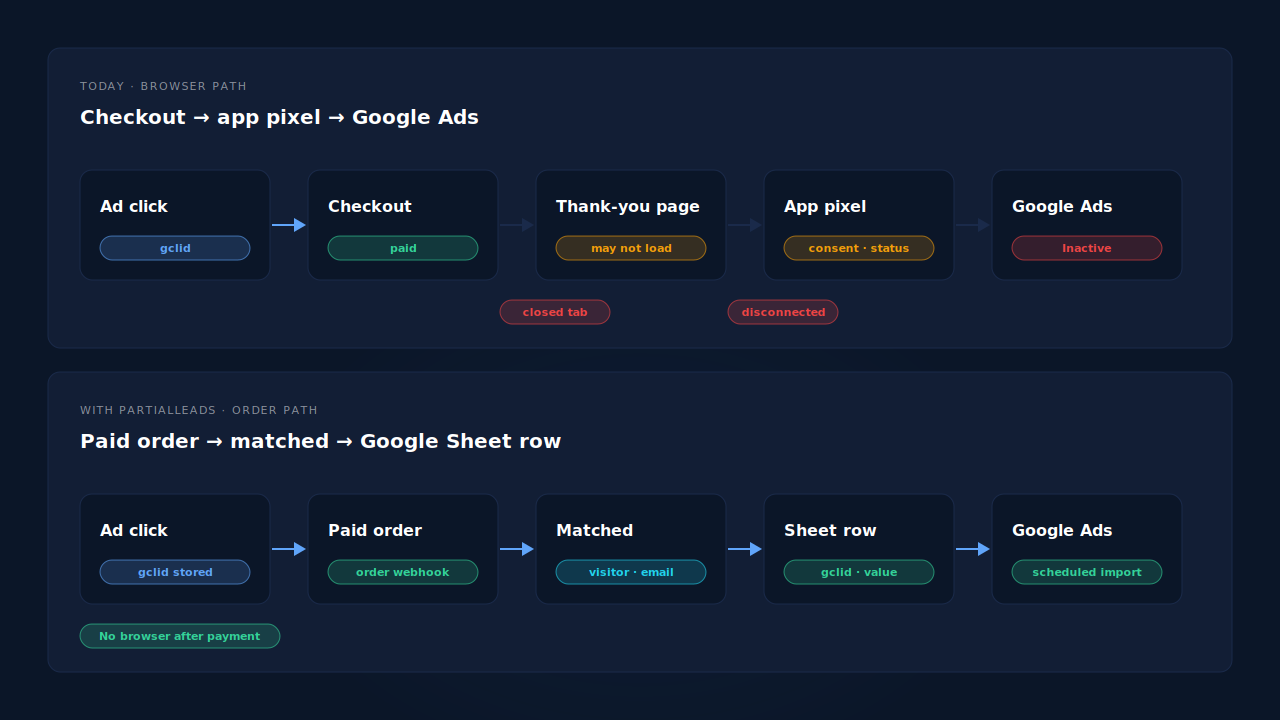
These are the five causes worth checking, roughly in order of how often they explain an Inactive action.
1. The app is linked to a different Google Ads account, or was reconnected. A reconnect can create fresh conversion actions. The app then sends to the new ones, and the action your campaigns bid on goes quiet. The app looks healthy; the old action is simply orphaned.
2. The app pixel is disconnected in Customer events. Shopify shows app pixels and custom pixels with a connection status on the Customer events page. A pixel that has been disconnected, or one blocked by its permission settings, sends nothing. It is a quick check that people skip because the app itself says “on”.
3. Consent is holding it back. If your store uses Shopify’s customer privacy settings or a consent banner, marketing pixels may wait for the visitor’s permission in regions that require it. Buyers who decline, or never answer the banner, don’t send a purchase. A new banner, or a change to its default setting, can take an action from steady to silent in a day.
4. The buyer never reaches the end of checkout. Wallets and payment redirects move the buyer off the page. If the return fails, or the buyer closes the tab once the payment clears, the order exists in Shopify and the browser-side purchase never fires. Orders you create by hand in the admin, or take outside the online store, never pass through that checkout page at all.
5. The old script is gone and nothing replaced it. If your Google Ads purchase used to come from a script in the old thank-you page settings, Shopify’s checkout upgrade removed it. That is the story behind most “ad conversions dropped to zero after Shopify’s thank-you page upgrade” threads, and it can leave a hand-built purchase action Inactive even though the app is installed.
Ad blockers belong on the list too, but they rarely explain a full stop. They explain a steady shortfall; how ad blockers break conversion tracking covers that.
How do you find which cause you have?
Start in Google Ads, not Shopify. Confirm which purchase action the app actually sends to, then check the app pixel’s status in Customer events, then place one real order and see whether a conversion reaches Google. Each step rules out one cause. None of the steps needs a developer.
- List every purchase action. In Goals → Conversions, write down each purchase action, its status and its source. Note which ones the Google & YouTube app created and whether a second, hand-made purchase action exists.
- Check which Google Ads account the app is linked to. Compare it with the account your campaigns run in. A mismatch is cause 1.
- Open Settings → Customer events in Shopify. Confirm the Google & YouTube app pixel shows as connected. If it isn’t, that is cause 2.
- Place a real order through the normal checkout, with the payment method most of your customers use, and accept the consent banner. Then repeat with consent declined. If the first order converts and the second doesn’t, consent is part of your gap.
- Compare a week of paid orders with a week of conversions. Count paid orders in the Shopify admin, then count conversions on the app’s action for the same days. The gap that survives every fix is the share of buyers a browser-side pixel cannot reach.
Keep that last number. It is the honest ceiling on anything that reports purchases from the checkout page.
Does an Inactive purchase action hurt your campaigns?
Yes, if it is the primary purchase action your bidding uses. Smart Bidding optimises toward the conversions it is fed. When that action goes silent, campaigns keep spending but stop learning which clicks became buyers, and targets such as target ROAS lose their current signal. Google Ads also reports fewer conversions than you made, so a working campaign can look like a failing one. Check Shopify’s paid orders before pausing anything.
It also matters for Performance Max and Shopping campaigns built from the app’s product feed. The feed can be healthy and the ads can serve normally while the purchase signal behind them is gone. Feed health and conversion health are separate checks.
Can you report Shopify purchases to Google Ads without the checkout pixel?
Yes, with an offline conversion import. You store the Google click identifier when the shopper lands, attach it to the paid order on the server, and upload the order to Google Ads as a conversion against that click. Nothing depends on the buyer’s browser after payment, so consent timing, redirects, closed tabs and disconnected pixels can’t stop the order from being reported.
The click identifier is the part to get right. Google adds a gclid to ad clicks and, on some iOS traffic, a gbraid or wbraid instead. These only live in the landing URL, so they must be saved at the first pageview and carried to an order that may happen days later; capturing gbraid and wbraid for offline conversions covers that step.
Three setup rules:
- Use a separate import action. An upload feeds a conversion action whose source is an import, distinct from the app’s tag-based action.
- Keep one primary purchase action. If the app starts recording again and both actions stay primary, one order can count twice. Make one primary and the other secondary.
- Get time and value right. The conversion time must come after the click and carry a timezone Google accepts. Spreadsheets drop timezone offsets more often than you’d expect.
How does PartialLeads keep Shopify purchases reaching Google Ads?
By reporting from the paid order, not from the checkout page. When Shopify marks an order paid, PartialLeads receives it from Shopify’s order webhooks, matches it to the visitor who placed it, and writes an offline-conversion row to your Google Sheet: gclid, gbraid or wbraid, hashed email and phone, value and currency. Google Ads imports that sheet on a schedule. No thank-you page tag has to fire.
The order is matched to the ad click, not to the checkout session. The PartialLeads pixel in Shopify’s Customer events stores the click identifiers when the shopper lands. When the paid order arrives, it is matched to that visitor by visitor ID, then email, then phone, then IP. A shopper who clicked a Google ad, left, and came back to buy later still carries the original click. The pillar guide to attributing ecommerce revenue to the ad click explains the join.
Only paid orders become rows. An order is written when Shopify’s financial status is paid. Pending or unpaid orders are not written; a cash-on-delivery or bank-transfer order is written once it is marked paid.
The value is the full order total. It is Shopify’s total_price, including tax and shipping, after discounts, in the order’s currency. There is no subtotal option. An order is recorded once, so a post-purchase upsell added to the same order later doesn’t change the row.
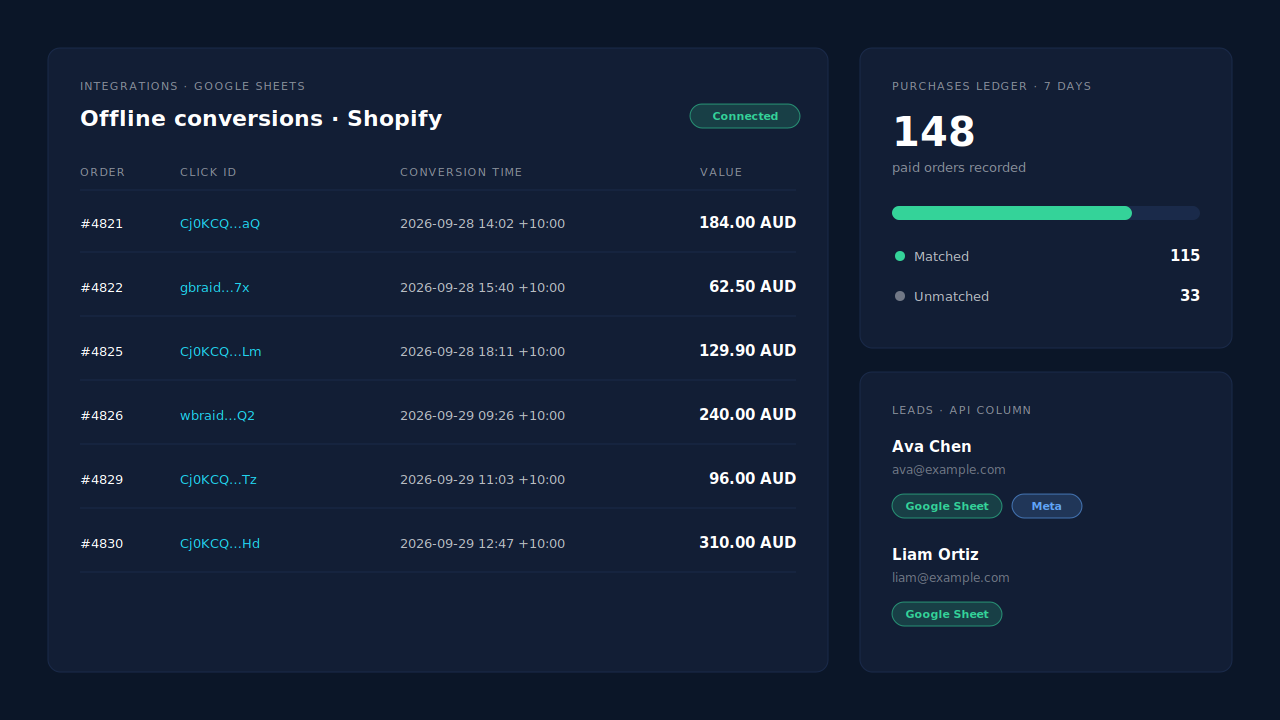
Where you see it working. Integrations → Google Sheets shows the connected sheet, and each paid order appears as a row. The Purchases ledger lists every paid order PartialLeads recorded, matched or unmatched, so you can reconcile it against the Shopify admin. On the Leads list, the API column shows which integrations each buyer was sent to.
The honest constraints.
- It is a scheduled import, not a live send. Google credits orders on the import schedule you set in Google Ads, so there is a delay between the sale and the conversion.
- A row needs a click identifier to credit a click. Buyers who didn’t come from a Google ad, or whose click wasn’t captured, have nothing for Google to match, and Google’s click window still applies. Why offline conversions don’t match the gclid covers the failure modes.
- Keep one source per purchase. PartialLeads uses its own event ids and does not deduplicate against the Google & YouTube app. If you also fix the app’s pixel, make its purchase action secondary.
- Purchases only, for Google. Funnel events are not sent to Google, and there is no GA4 integration.
- We control the row; Google controls the match. Every paid order produces a row. Whether Google ties it to an ad click depends on the identifiers captured and on Google’s own matching.
| What breaks | The mechanism | Where you see it in the dashboard |
|---|---|---|
| App pixel disconnected or held by consent, so no purchase reaches Google | Paid order written as an offline-conversion row from Shopify’s order webhook, not the checkout page | Integrations → Google Sheets, one row per paid order |
| Buyer closes the tab or never returns from a payment redirect | No browser step after payment; Google Ads imports the sheet on a schedule | Integrations → Google Sheets |
| Order session has no gclid because the shopper came back later | Order matched to the visitor by visitor ID, email, phone or IP; stored click id carried to the row | Purchases ledger, matched vs unmatched |
| Unpaid or edited orders distort the purchase value | Only paid orders written, at the full order total, recorded once | Purchases ledger |
| App action and import both count the same order | Not deduplicated across tools — keep one primary purchase action | Google Ads conversion settings, Leads-list API column |
Tell us what's broken. We'll fix your tracking — free.
Describe the tracking/attribution problem you're stuck on and we'll map it to a fix: server-side conversions to Meta, Google, TikTok and Pinterest, plus first-party tracking that survives Safari. No code required.