No, you don’t need the old script, and it isn’t doing anything anymore. Once Shopify upgrades your thank-you and order status pages, the Google Ads snippet pasted into Additional Scripts no longer runs. What you do need is one working purchase source for Google Ads: the Google & YouTube app, a custom pixel, or an offline import built from paid orders.
The trap is doing two of those at once, or none of them properly. Most “my conversions stopped” and “my conversions doubled” threads after the upgrade come down to that choice.
What happens to the old Google Ads snippet after the upgrade?
It stops executing. Additional Scripts was a box of raw HTML and JavaScript that Shopify rendered on the order status page after checkout. The upgraded thank-you and order status pages don’t render that box, so the gtag('event', 'conversion', …) call inside it never fires. The code may still sit in your settings. It just never executes.
That’s why the symptom has such a clean shape. Orders keep arriving in the admin. Google Ads purchases fall to zero, or close to it, on the date your pages were upgraded. Why ad conversions drop to zero after Shopify’s thank-you page upgrade walks through confirming that date against your order history.
Two things are worth doing before you replace anything:
- Copy the old snippet somewhere safe. You need the conversion ID and conversion label from it (the
AW-XXXXXXXXX/abcDEF123string insend_to). Those tell you which conversion action in Google Ads it was feeding. - Write down everything else in that box. Additional Scripts usually held more than the Google tag: affiliate pixels, a survey widget, a Meta call. Each one needs its own decision, and fixing Google alone won’t bring the others back.
Why did conversions stop when you moved the tag into a custom pixel?
Because a custom pixel is not a page. It’s code you save under Customer events in the Shopify admin, and it runs in a sandbox that receives a stream of named events. A snippet written for the old order status page assumes things that aren’t true in there.
The usual breakages, in the order people hit them:
- Liquid doesn’t render. Old snippets used Liquid tags like
{{ checkout.order_id }}or{{ total_price | money_without_currency }}. A custom pixel is plain JavaScript, so those arrive as literal text or break the script. - Nothing tells the code when to fire. On the old page, the snippet ran because the page loaded. In a pixel, it has to subscribe to an event. Shopify’s own type definitions describe
checkout_completedas the event that “logs when a visitor completes a purchase”, available “on the Order status and checkout pages”. Fire on anything else and you’re counting page views, not purchases. - gtag isn’t loaded. The global site tag from your theme doesn’t exist inside the sandbox. The pixel has to load
gtag.jsitself and callgtag('config', …)before sending the conversion. - The values come from a different place. In a pixel, order data lives on
event.data.checkout:totalPrice,currencyCode,email,phone, andorder.id. Shopify’s types note that the order ID “will be null for all events except checkout_completed”, which is one more reason to fire only on that event.
If you fix all four, you have a working browser-side replacement. It’s still a browser event, though, so a closed tab, a blocker, or a payment flow that never lands back on the order status page still costs you that conversion.
Does the Google & YouTube app already record purchases?
It can. If you connected Shopify’s Google & YouTube app and turned on its conversion tracking, it creates its own conversion actions in your Google Ads account and records purchases through them. In that case, a custom pixel you add on top is a second source for the same sale, not a repair.
Check it from the Google Ads side, not from the app’s settings screen:
- In Google Ads, open Goals → Conversions and list every purchase-type action.
- For each one, note its source (website tag, import, or an app) and whether it’s set as a primary action that feeds bidding.
- Place a real test order and see which action records it over the next day.
If two primary actions both record that one test order, Google Ads is counting each sale twice, and Smart Bidding is learning from inflated numbers. If the app’s action shows as inactive or records nothing, don’t paste your old snippet in as a fix before you know why, or you’ll end up with both once the app recovers.
Which Google Ads purchase source should you keep?
Keep exactly one per conversion action, and pick it by how the order reaches you. Each option below is a legitimate choice. Here’s how they compare:
| Source | What triggers it | What it misses |
|---|---|---|
| Google & YouTube app | Shopify’s own integration | Little control over payload, value or matching |
Custom pixel on checkout_completed |
The browser reaching the order status page | Closed tabs, blockers, off-site payment returns |
| Offline conversion import | A paid order in the admin, joined to a stored click ID | Orders with no click ID or contact data to join on |
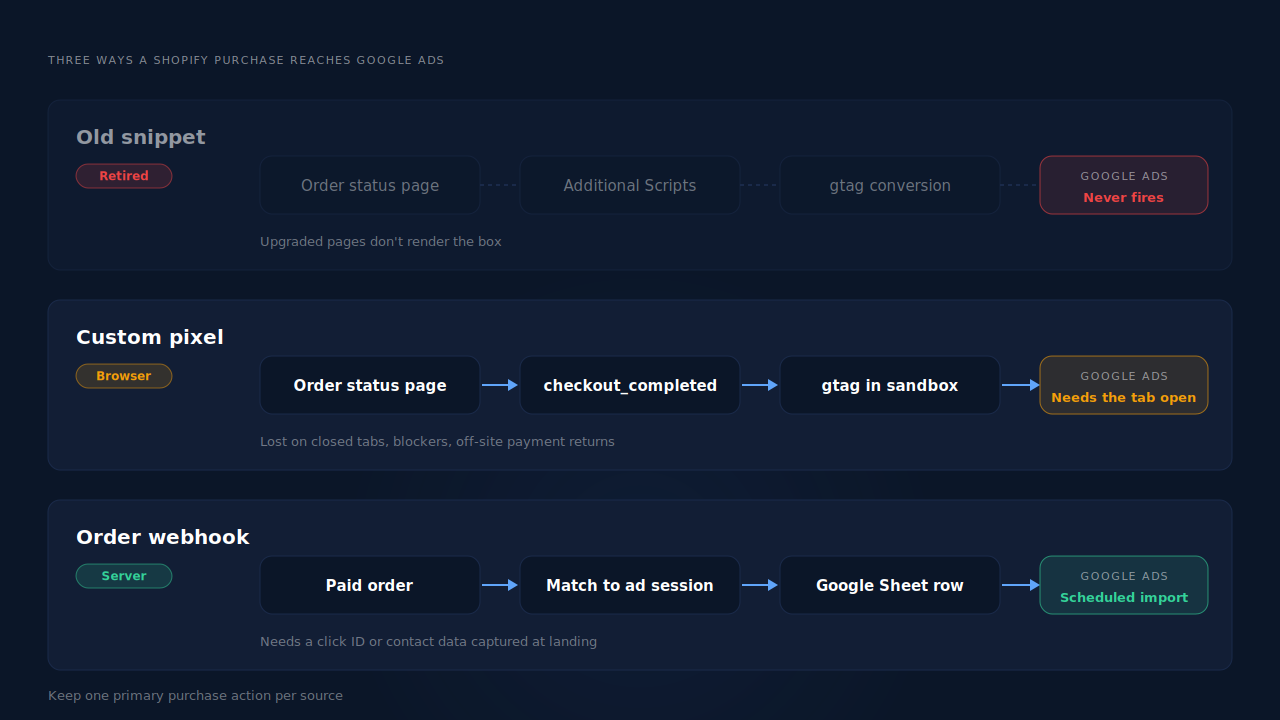
Two rules keep any of these honest.
One conversion action per source, one primary purchase action. If you run the pixel as a backup while testing an import, set one of them to secondary so it’s reported but not bid on.
Use the order ID as your de-duplication key. Google’s tag accepts a transaction_id for exactly this, and Google’s Ads API definition of an uploaded click conversion says an order ID “can only be used for one conversion per conversion action”. Send Shopify’s order ID every time, and a replayed event can’t create a second conversion on the same action.
What does a correct custom pixel look like?
If you stay browser-side, this is the shape. It subscribes to checkout_completed, loads the tag inside the sandbox, and sends value, currency and order ID:
// Shopify admin → Settings → Customer events → Add custom pixel
const AW_ID = 'AW-XXXXXXXXX';            // from your old snippet
const SEND_TO = 'AW-XXXXXXXXX/abcDEF123'; // conversion ID / label

const s = document.createElement('script');
s.src = 'https://www.googletagmanager.com/gtag/js?id=' + AW_ID;
s.async = true;
document.head.appendChild(s);
window.dataLayer = window.dataLayer || [];
function gtag(){ dataLayer.push(arguments); }
gtag('js', new Date());
gtag('config', AW_ID);

analytics.subscribe('checkout_completed', (event) => {
  const c = event.data.checkout;
  gtag('event', 'conversion', {
    send_to: SEND_TO,
    value: c.totalPrice?.amount,
    currency: c.currencyCode,
    transaction_id: c.order?.id   // null on every other event
  });
});
Test it with a real order before you trust it. And if the Google & YouTube app is also recording purchases, turn one of them off first.
When is an offline conversion import the better answer?
When the purchase event has to exist even if the browser never comes back. An offline conversion import sends Google Ads rows built from orders, not from page loads. Each row carries the click ID Google issued at the ad click (gclid, gbraid or wbraid), the conversion action, a conversion time with a timezone offset, and the value and currency.
The hard part is the click ID, because Shopify doesn’t keep one on the order. It has to be captured on the landing page and joined to the order later. Why the gclid goes missing on landing pages covers where it disappears first. Save gbraid and wbraid too, because some iPhone traffic arrives with one of those and no gclid.
Two details trip imports up. Google’s API definition says the conversion time “must be after the click time” and needs the timezone, in the format yyyy-mm-dd hh:mm:ss+|-hh:mm. And rows only match when the click ID is the exact one Google issued, which is its own debugging guide for offline conversions not matching the gclid.
How does PartialLeads send Shopify purchases to Google Ads without a checkout script?
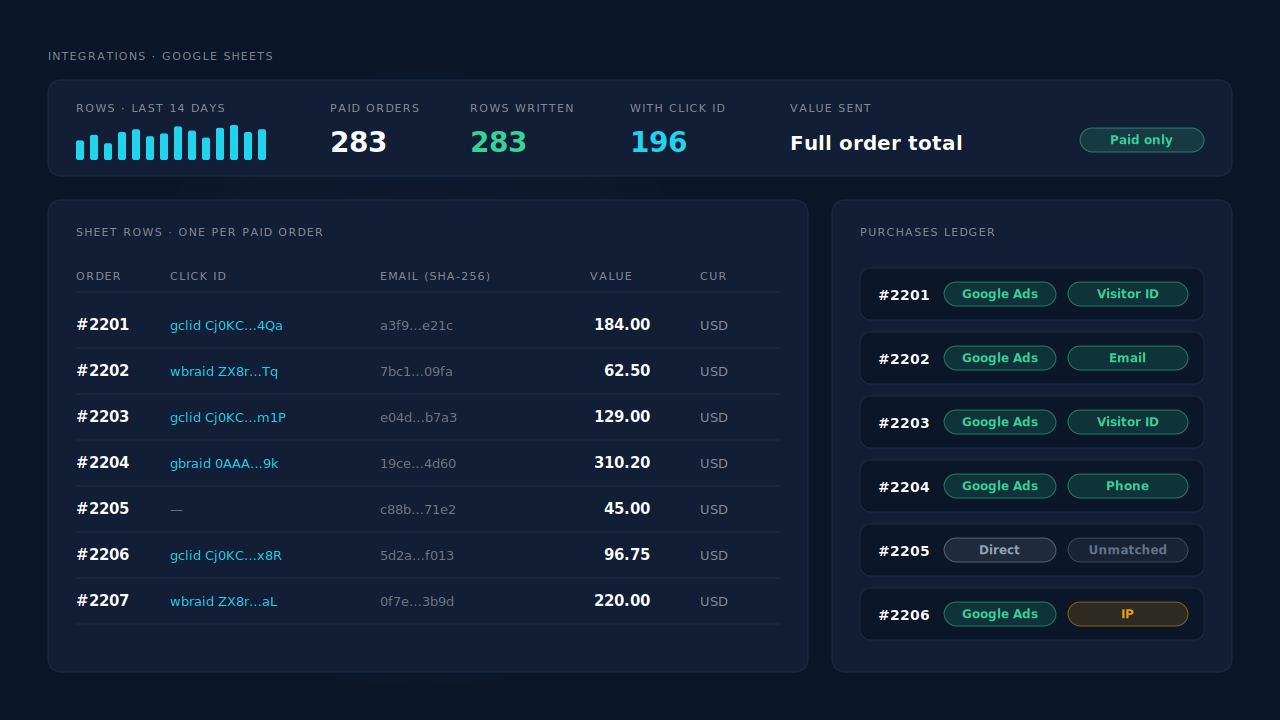
It writes one row per paid order to a Google Sheet, and you schedule that sheet as an offline conversion import in Google Ads. No script runs on the thank-you or order status page, so a checkout upgrade can’t switch it off. It isn’t the Google Ads API and it isn’t GA4, just a sheet you point an import at.
The mechanism, step by step:
- Capture at landing. The PartialLeads tag records
gclid,gbraidandwbraid, along with UTMs and the referrer, when the visitor lands from the ad. - Order from the webhook. Shopify sends the order to PartialLeads server-side. Only paid orders go further:
financial_status = paid. A cash-on-delivery or bank-transfer order is sent when it’s marked paid. - Match to the session. The order is joined to the browsing session by the visitor ID echoed from the storefront first, then email, then phone, then IP. That’s how a buyer who clicked on Monday and paid on Thursday keeps the Monday click ID.
- Write the row. Click ID, hashed email and phone, value and currency go to the sheet. The value is the full order total, including tax and shipping, after discounts. There is no subtotal option. See sending dynamic conversion values to Google Ads offline imports if that differs from what your old tag sent.
The honest constraints. Each order is recorded once, so a later edit to the same order, such as a post-purchase upsell, doesn’t update the row. PartialLeads never double-sends its own rows, but it doesn’t de-duplicate against the Google & YouTube app or a custom pixel. If you switch to the sheet import, set the old purchase action to secondary or remove it, or Google Ads counts each sale twice. And the split that matters: every paid order produces a row, but whether Google ties that row to a click depends on the identifiers captured and on Google’s own matching. PartialLeads controls the first half. Nobody controls the second.
Where you check it. The Google Sheets integration shows the rows as paid orders arrive. The Purchases ledger lists every order with its match tier, so an order that didn’t resolve to an ad session is visible rather than missing. The Attribution report shows the campaign each matched order came from, which is how you attribute ecommerce revenue to the ad click instead of trusting whichever tag fired last. It’s one piece of the wider Shopify tracking, attribution and catalog fix.
| What breaks | The mechanism | Where you see it in the dashboard |
|---|---|---|
| Old Additional Scripts snippet stops running after the upgrade | Purchases come from Shopify order webhooks, not a page script | Purchases ledger: every paid order, with its match tier |
| Click ID gone by the time the buyer checks out | gclid, gbraid and wbraid captured at landing, joined to the order by visitor ID, email, phone or IP | Google Sheets integration: click ID on each row |
| Google Ads counts one order twice | One row per paid order; retire the other purchase action as primary | Google Sheets integration: one row per order |
| Purchases credited to the wrong campaign | First- and last-touch rows written for every matched order | Attribution report, grouped by campaign |
Tell us what's broken. We'll fix your tracking — free.
Describe the tracking/attribution problem you're stuck on and we'll map it to a fix: server-side conversions to Meta, Google, TikTok and Pinterest, plus first-party tracking that survives Safari. No code required.
Sources
- https://registry.npmjs.org/@shopify/web-pixels-extension/-/web-pixels-extension-2.18.0.tgz
- https://raw.githubusercontent.com/googleapis/googleapis/master/google/ads/googleads/v22/services/conversion_upload_service.proto