Google Ads records fewer Shopify sales after you add a post-purchase upsell because the offer page sits between payment and the thank-you page. Shopify confirms the order, shows the upsell, and only then loads the thank-you page. A Google Ads tag that fires on that page misses every buyer who closes the tab on the offer. The order is paid either way.
So the sales didn’t disappear. Shopify still has every one of them. What disappeared is the page view your conversion tag was waiting for.
That also explains why the drop stacks on top of whatever under-counting you already had. Blockers, consent and lost click IDs were already costing you conversions. The upsell page adds a new, separate leak at the very last step.
Why does a post-purchase upsell make Google Ads lose sales?
Because many Google Ads purchase tags only fire when the thank-you or order status page loads, and the upsell page now stands in front of it. A buyer who reads the offer and closes the tab has paid, but the page that runs the tag never renders. Google Ads gets nothing for that order.
The buyers you lose aren’t random. They’re the people who got what they came for and left. Buyers who accept the offer, or click through to decline it, usually reach the thank-you page. Buyers who simply close the tab don’t.
That pattern makes the drop look worse on mobile, where closing a tab or switching apps is one swipe, and on high-intent traffic, where buyers know exactly what they wanted. It also makes it look like a campaign problem when it’s a measurement problem.
Where does the post-purchase page sit in Shopify’s checkout?
After the order is confirmed and before the thank-you page. Shopify’s post-purchase extension types describe the page as appearing “after the order is confirmed, but before the thank you page.” The extension’s done() call “effectively redirects buyers to the thank you page.” Until the offer finishes, the thank-you page hasn’t loaded.
Here’s the order of events for a buyer who came from a Google ad:
- They click the ad and land on your store with a
gclidin the URL. - They check out and pay. Shopify creates the order.
- The post-purchase offer appears.
- They accept, decline, or close the tab.
- Only after accepting or declining does Shopify send them to the thank-you page.
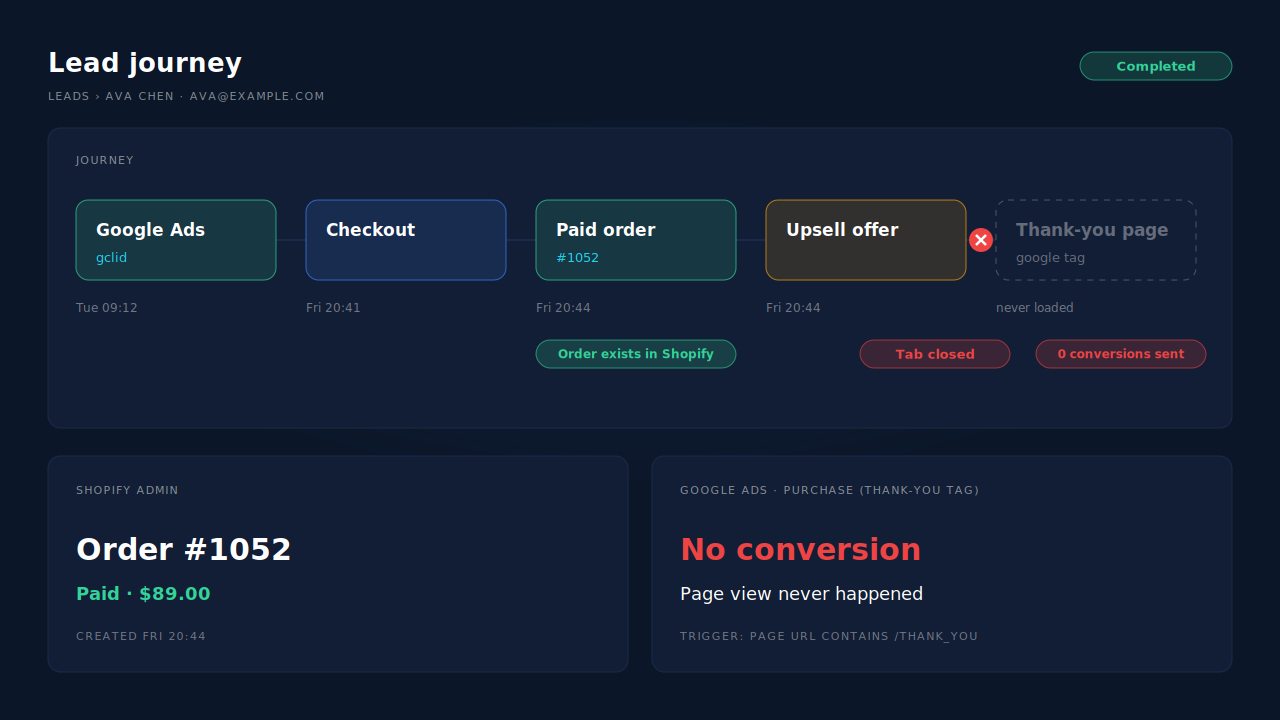
Step 2 is the one that matters for revenue. Step 5 is the one most tags were built around. The upsell app pushed them further apart.
Which Google Ads tags break when buyers leave on the upsell offer?
Any tag that needs the thank-you or order status page to load. That includes a Google Ads conversion triggered by a “Page URL contains /thank_you” rule, a snippet pasted into the old order-status scripts box, and any app or custom pixel that waits for a page view on the confirmation page. Each one sees nothing from a buyer who left on the offer.
Shopify’s pixel type definitions say page_viewed “is available on the online store, checkout, and Order status pages.” So a page-view trigger only fires when that page actually renders.
A custom pixel that subscribes to checkout_completed behaves differently. Shopify’s types describe it as the event that “logs when a visitor completes a purchase” and say it “is available on the Order status and checkout pages.” Exactly which page it fires on when an upsell sits in the flow is worth testing on your own store rather than assuming. It’s still a browser event, so a closed tab, a blocker or a dropped connection can still lose it.
If your tracking moved during Shopify’s checkout upgrade, check that too. Why ad conversions dropped to zero after Shopify’s thank-you page upgrade covers the scripts that stopped running entirely. This article is about the ones that still run, just for fewer buyers.
How do you test whether the upsell page is costing you conversions?
Place three real orders from a Google Ads click and treat each one differently on the offer page: accept, decline, and close the tab. Then check which of the three reach Google Ads. If the closed-tab order is paid in Shopify but missing in Google Ads, the upsell page is your gap.
Here’s the test in full:
- Order one: accept the offer. Note the order number and whether the order total changed.
- Order two: decline the offer. You should land on the thank-you page. Note the order number.
- Order three: close the tab on the offer. Don’t come back. Note the order number from the confirmation email.
Wait for Google Ads to process conversions, which can take several hours, then look at Goals → Conversions for your purchase action. Expect orders one and two to show up and order three to be missing if your tag is page-bound.
Then do the same comparison at scale. Take a week of paid orders in the Shopify admin, a week of purchase conversions in Google Ads, and, if your upsell app reports it, how many buyers saw the offer without accepting or declining. If the gap grew by about that many orders, you’ve found it. If you need to see which campaign each order really came from while you check, seeing which Google Ads campaign led to each Shopify order walks that join.
What happens to the upsell’s revenue in Google Ads?
It usually doesn’t arrive as its own sale. A one-click upsell adds items to the order the buyer already placed. Shopify’s extension API describes applyChangeset as a request for a change “to be applied to the initial purchase, and to charge the buyer with the difference in total price.” Same order, bigger total, after payment.
That creates two separate problems:
- The value can be the pre-upsell total. Anything that read the order before the change was applied reports the smaller number.
- The value can be missing entirely. If the buyer accepts the upsell and then closes the tab, a thank-you-page tag never runs at all.
Google Ads has a way to change a conversion’s value after the fact. Its conversion adjustment types include RESTATEMENT, which “changes the value of a conversion.” That’s useful if upsell revenue matters for bidding, but you have to identify the original conversion, for example by its order ID, and run a separate upload, so it’s real work to set up.
For most stores the better question is what Smart Bidding needs. It needs every sale counted, with the value Google can tie to the click. Getting the count back is the bigger win. Chasing the extra upsell dollars comes second.
How do you record the sale whatever the buyer does on the upsell page?
Send the purchase from the order, not from a page. An offline conversion import does this: you keep the Google click ID from the landing visit, attach it to the order on your side, and upload the paid order against that click. The order exists whether the buyer accepts, declines or closes the tab, so the upsell page stops mattering.
Each uploaded row needs the click ID Google issued at the ad click (gclid, gbraid or wbraid), a conversion time with a timezone, a value and a currency. Google’s upload API also takes an order ID, which “can only be used for one conversion per conversion action,” so the same order can’t be counted twice on one action.
The setup side is in importing conversions into Google Ads, and the value side in sending dynamic conversion values to Google Ads offline imports. The hard part on Shopify is that the order doesn’t store the click ID. It has to be captured when the visitor lands and joined to the order later.
One rule while you switch: keep one purchase source per conversion action. If the thank-you-page tag keeps feeding a primary purchase action next to the import, every buyer who reaches the thank-you page gets counted twice.
How does PartialLeads keep Shopify sales in Google Ads when you run a post-purchase upsell?
It writes Google Ads rows from Shopify’s paid-order webhook, not from the thank-you page. Nothing waits for a page to load, so a buyer who closes the tab on the upsell offer still produces a row. You point a scheduled Google Ads offline conversion import at that Google Sheet. The Purchases ledger shows the same paid orders, so you can check one against the other.
The mechanism, step by step:
- Capture the click at landing. The PartialLeads Customer Events pixel records
gclid,gbraidandwbraid, plus UTMs and the referrer, on the first visit. - Take the order from Shopify. Only paid orders continue (
financial_status = paid). Unpaid, pending or cancelled orders never become rows. - Match the order to the visit. The visitor ID from the storefront comes first, then email, then phone, then IP. A buyer who clicked on Monday and paid on Thursday keeps Monday’s click. That join is the core of attributing ecommerce revenue to the ad click.
- Write one row per paid order. Click ID, hashed email and phone, value and currency. The value is the full order total, including tax and shipping, after discounts.
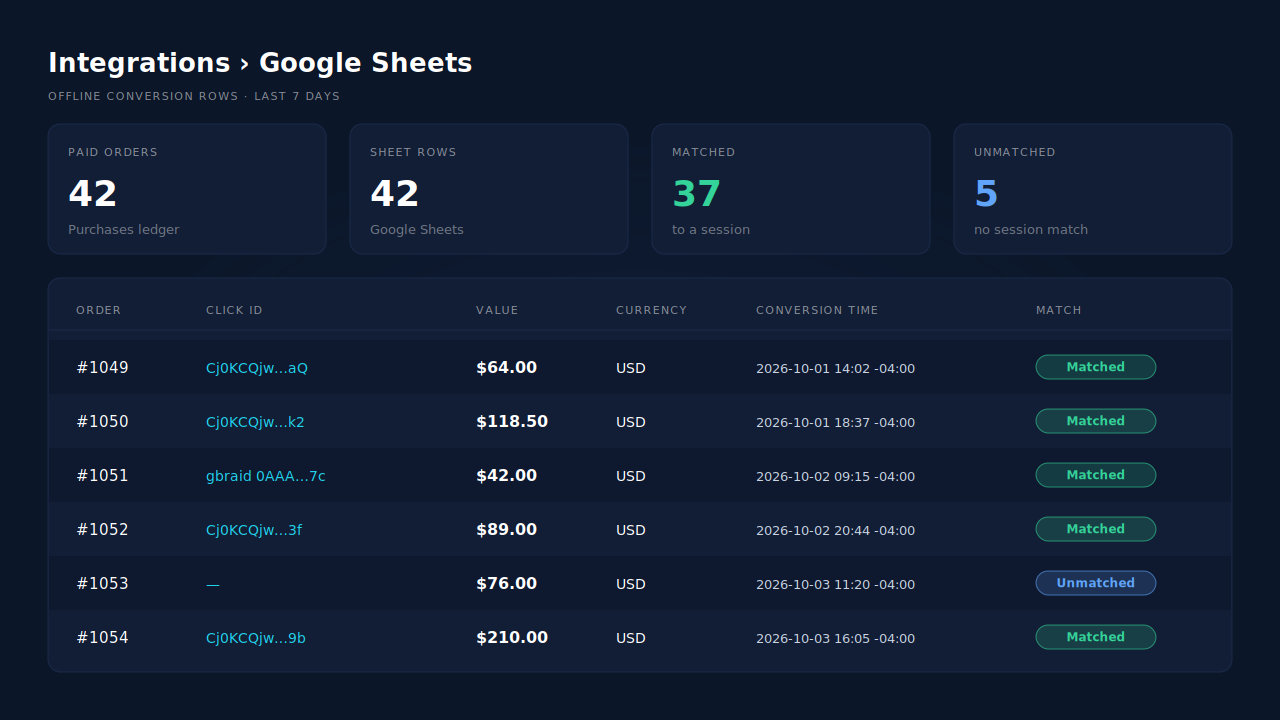
It’s a sheet you schedule as an import. It isn’t the Google Ads API, and there’s no GA4 integration. If rows land in the sheet but Google doesn’t credit them, offline conversions not matching the gclid covers the usual causes.
The honest constraints. The order count is fixed: every paid order produces a row, whatever happened on the upsell page. The upsell value is not. Each order is recorded once, so an upsell added to the same order after it was recorded doesn’t update the row or re-send it. PartialLeads also doesn’t de-duplicate against your existing Google tag, so retire the thank-you-page purchase action or set it to secondary. And whether Google ties a row to a click depends on the identifiers captured and on Google’s own matching. PartialLeads controls the sending. Google controls the matching.
| What breaks | The mechanism | Where you see it in the dashboard |
|---|---|---|
| Buyer closes the tab on the upsell offer, thank-you tag never fires | Rows come from the paid-order webhook, not a page load | Purchases ledger compared with Google Sheets integration rows |
| Click ID is gone by the time the order is paid | gclid, gbraid and wbraid captured at landing, joined by visitor ID, email, phone or IP |
Purchases ledger, matched and unmatched orders |
| Old tag and import both count the same sale | One row per paid order; you retire the page-load action as primary | Google Sheets integration next to your Google Ads conversion actions |
| Upsell added to the order after it was recorded | Order recorded once at its full total; later edits don’t update the row | Purchases ledger value per order |
Tell us what's broken. We'll fix your tracking — free.
Describe the tracking/attribution problem you're stuck on and we'll map it to a fix: server-side conversions to Meta, Google, TikTok and Pinterest, plus first-party tracking that survives Safari. No code required.
Sources
- https://registry.npmjs.org/@shopify/post-purchase-ui-extensions/-/post-purchase-ui-extensions-0.13.5.tgz
- https://registry.npmjs.org/@shopify/web-pixels-extension/-/web-pixels-extension-2.18.0.tgz
- https://raw.githubusercontent.com/googleapis/googleapis/master/google/ads/googleads/v22/services/conversion_upload_service.proto
- https://raw.githubusercontent.com/googleapis/googleapis/master/google/ads/googleads/v22/enums/conversion_adjustment_type.proto