The Meta Pixel usually does fire on Elementor-built WooCommerce product pages. What goes missing is ViewContent. Many pixel plugins, Meta for WooCommerce among them, fire ViewContent from a hook at the bottom of WooCommerce’s standard product template. An Elementor template that renders the product with its own widgets can skip that hook, so the event never runs.
The symptom is consistent. Events Manager shows PageView on every page, including product pages. ViewCategory may show from the shop grid. ViewContent is missing or thin, and it disappeared the day you switched product pages to an Elementor Pro single-product template.
Your pixel ID, your ads and your catalog are fine. The event is wired to a piece of the page that no longer exists. This guide covers how the template hook works, how to prove that’s your problem, and how to fix it so the next theme update doesn’t break it again.
Where does ViewContent normally fire on a WooCommerce product page?
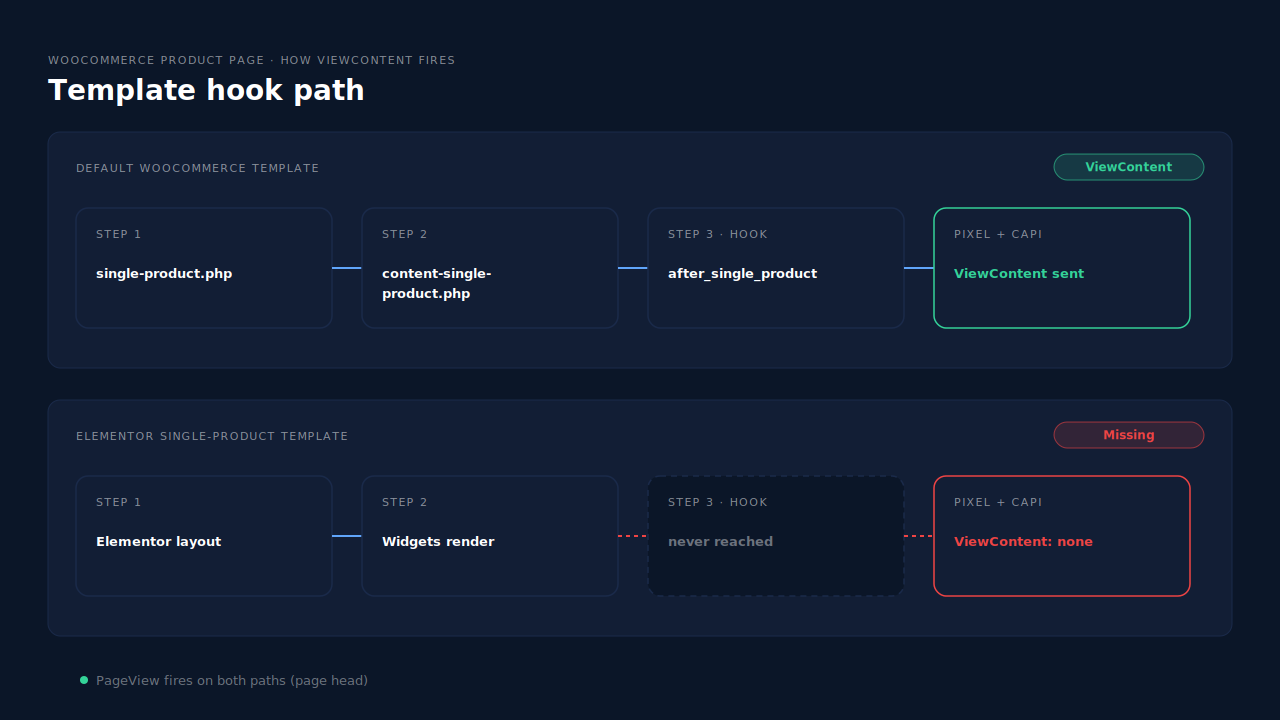
In most WooCommerce pixel plugins, ViewContent fires from a WooCommerce template hook rather than from the page itself. Meta for WooCommerce attaches its ViewContent function to the woocommerce_after_single_product action. That action runs on the last line of WooCommerce’s standard content-single-product.php template, after the product summary and tabs.
You can see this in the plugin’s source. Its events tracker registers inject_view_content_event on woocommerce_after_single_product, right next to inject_view_category_event on woocommerce_after_shop_loop for category pages.
The standard path looks like this:
- WordPress loads WooCommerce’s
single-product.php. - Inside the loop, that file calls
wc_get_template_part( 'content', 'single-product' ). content-single-product.phprenders the gallery, the summary and the tabs, then callsdo_action( 'woocommerce_after_single_product' ).- The pixel plugin’s function runs on that action and prints ViewContent.
Every step depends on the one before it. If step 2 or 3 never happens, step 4 never happens.
Why does ViewContent stop when Elementor builds the product page?
Because a page-builder template can render the product without loading WooCommerce’s own template file. When Elementor Pro’s Theme Builder takes over the single-product layout, the title, price, gallery and add-to-cart button are placed by Elementor widgets. If content-single-product.php doesn’t run, its closing woocommerce_after_single_product action doesn’t run either, and nothing tells the plugin a product was viewed.
PageView keeps working because it’s printed in the page head, which every template still outputs. That’s why the pixel looks healthy in a quick check: the base code is there, it just never hears the cue for ViewContent.
There’s a second, quieter failure. Meta for WooCommerce’s ViewContent function looks up the product from the global $post and returns early if that isn’t a WooCommerce product. A builder layout that changes the current post while it renders can make even a hook that does run send nothing.
And there’s the part that catches people out. The same function also sends the server-side ViewContent through the Conversions API. If the hook is skipped, the browser event and the server event both vanish. Turning on server-side tracking in that plugin doesn’t rescue ViewContent, because both halves start in the same place.
How do you prove the template hook is the problem?
Compare one product page rendered by your Elementor template with the same product rendered by WooCommerce’s default template, with Meta’s test events open. If PageView arrives from both but ViewContent only arrives from the default template, the missing hook is your cause. The checks take about five minutes.
- Open test events in Events Manager for your pixel and browse in a private window, so only your own activity shows.
- Open a product page built by your Elementor template. Note which events arrive. PageView yes, ViewContent no, is the pattern.
- Open a category page. If ViewCategory or PageView arrives there, the pixel and the plugin are working outside product pages.
- Switch one product to the default layout on a staging copy, either by setting the template’s display conditions to exclude it or by disabling the template. Reload it. If ViewContent now arrives, the template is the cause.
- Check the page source of the Elementor version for the plugin’s ViewContent
fbq('track', 'ViewContent', …)call. If it’s absent, the hook never ran. If it’s present but nothing reaches Meta, look at script-delay or consent plugins instead.
The test-events routine is also the first step in knowing whether your Meta CAPI is working for any event.
Why does a missing ViewContent matter?
Because ViewContent is the event that tells Meta which products a shopper looked at. Without it, product-view retargeting audiences don’t fill, dynamic product ads can’t show the item a person browsed, and catalog matching suffers. Purchases still record, so the problem can hide for weeks while retargeting quietly underperforms.
The concrete costs:
- Empty “viewed but didn’t buy” audiences. Your warmest product-level audience depends on ViewContent with product IDs.
- Weaker dynamic ads. Meta pairs the
content_idsin ViewContent with your catalog. No ViewContent means no pairing, which looks a lot like the problem in why your dynamic product ads show zero catalog match. - A broken funnel report. Add to cart can outnumber product views, which tells you the tracking is wrong, not the shoppers.
How do you fix ViewContent on Elementor product pages?
Make the event independent of the template. Either put the missing hook back into your Elementor layout, or fire ViewContent from a check that asks “is this a product page?” rather than “did this template file run?”. The second approach survives template changes; the first breaks every time someone rebuilds the layout.
Can you add the hook back to the template?
Sometimes. Some setups place WooCommerce’s standard hooks back into a builder layout with a shortcode or a hooks widget. It works until someone edits the template and deletes it. If you go this way, write down where the hook lives and retest after every template change.
Should you fire ViewContent on is_product() instead?
Yes, if you control the code. WooCommerce’s is_product() is a one-line check, is_singular( array( 'product' ) ), that’s true on any single product page whatever template draws it. Find the product from the page WordPress is showing, get_queried_object_id(), rather than from $post mid-render. That pairing is template-proof.
What about switching plugins?
Check your pixel plugin’s changelog and support forum for Elementor single-product templates. Update and repeat the test. If ViewContent still depends on the template hook, the plugin is the wrong fit for a builder-made store.
How do you avoid double counting?
Pick one owner per event. If you add a second tool to send ViewContent while the first still fires on some pages, Meta only merges a browser and a server event that share an event name and event ID, as covered in what event ID to use for Meta deduplication. Switch ViewContent off in one tool.
How does PartialLeads send ViewContent from Elementor-built product pages?
The PartialLeads WooCommerce plugin doesn’t wait for a template hook. On any page where is_product() is true, it resolves the product with wc_get_product( get_queried_object_id() ), the page WordPress is actually showing. So Elementor Pro single-product templates still produce a view-product event, which goes server-side to Meta, Pinterest and TikTok.
What gets sent. The event carries the variant ID as the content ID, falling back to the product ID. When catalog push is switched on for your store, the hosted feed uses the same variant ID as its item ID with the product ID as the group, so events and catalog line up. Add to cart and begin checkout are forwarded the same way. Google doesn’t receive these funnel events.
Purchase stays separate. Purchase comes from WooCommerce order webhooks for every paid order (processing or completed), with the full order total. The guide to tracking WooCommerce purchases server-side to Meta covers that half, and keeping your product catalog feed in sync covers the feed.
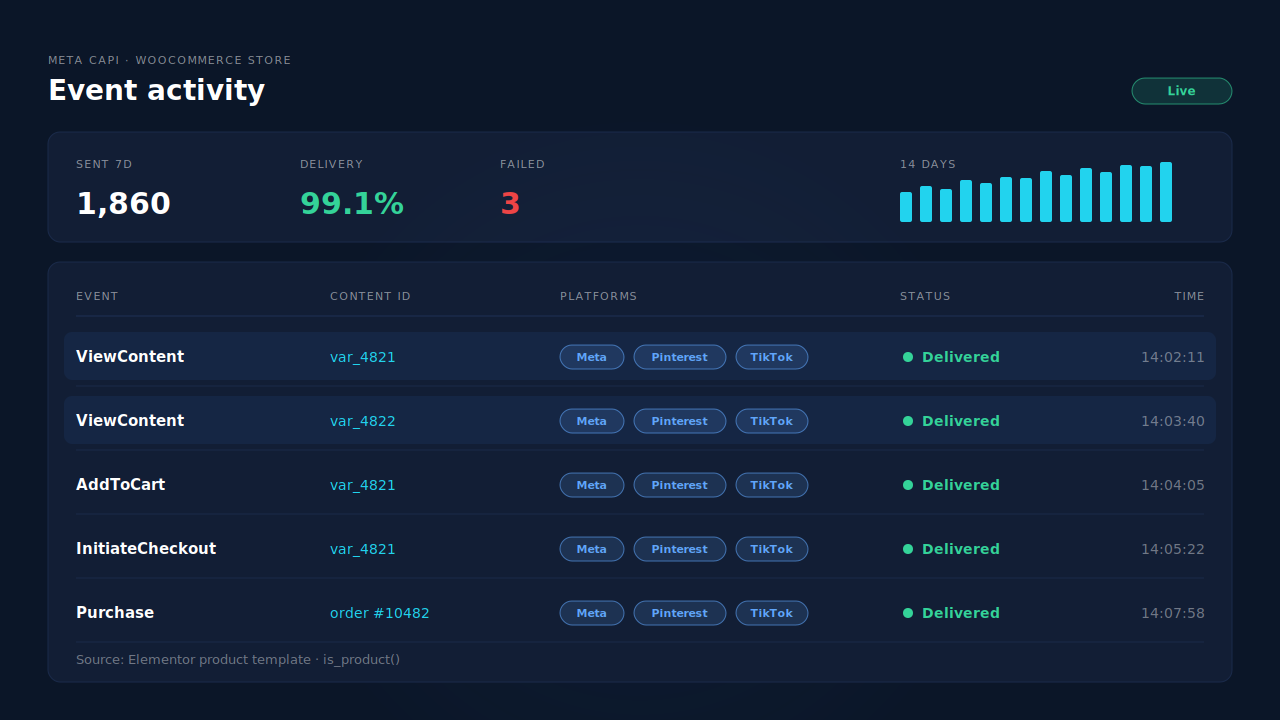
Where you see it working. The Meta CAPI page lists each server send by event name, status and time. Open an Elementor product page and a ViewContent row appears there. With catalog push on, the Product Catalog page shows the same variant IDs the events use.
The honest constraints. PartialLeads’ event IDs are its own. It never sends the same event twice, but it doesn’t deduplicate against another plugin’s browser pixel, so switch ViewContent off in Meta for WooCommerce or PixelYourSite if they still fire it anywhere. Keep the Meta base pixel on the site for the _fbp cookie, which PartialLeads can’t create from nothing. The feed-health score is Shopify-only; WooCommerce stores get the feed without it. Sending the event is the half PartialLeads controls; matching it to a person is Meta’s.
| What breaks | The mechanism | Where you see it in the dashboard |
|---|---|---|
| Elementor template skips the WooCommerce product hook | Product resolved from is_product() and the queried page, not a template hook |
Meta CAPI page, ViewContent rows |
| Plugin’s server event dies with the browser event | View product forwarded server-side to Meta, Pinterest and TikTok | CAPI activity log |
| Event IDs don’t match the catalog | Variant ID as content ID, same ID as the feed item | Product Catalog, Meta CAPI page |
| Two tools send ViewContent | No cross-tool dedup, so keep one source per event | Meta CAPI page vs Events Manager sources |
| Purchase tied to a thank-you page | Purchase from order webhooks for every paid order | Purchases ledger, Meta CAPI page |
Tell us what's broken. We'll fix your tracking — free.
Describe the tracking/attribution problem you're stuck on and we'll map it to a fix: server-side conversions to Meta, Google, TikTok and Pinterest, plus first-party tracking that survives Safari. No code required.
Sources
- https://github.com/facebook/facebook-for-woocommerce/blob/main/facebook-commerce-events-tracker.php
- https://github.com/woocommerce/woocommerce/blob/trunk/plugins/woocommerce/templates/content-single-product.php
- https://github.com/woocommerce/woocommerce/blob/trunk/plugins/woocommerce/templates/single-product.php
- https://github.com/woocommerce/woocommerce/blob/trunk/plugins/woocommerce/includes/wc-conditional-functions.php
- https://developers.facebook.com/docs/meta-pixel/reference
- https://developers.facebook.com/docs/marketing-api/conversions-api/deduplicate-pixel-and-server-events