Microsoft Ads says a UET event was fired from within an iframe because, on Shopify, it was. Shopify runs every custom pixel you add under Customer Events inside a sandboxed iframe, isolated from your storefront page. UET loads there, reads the iframe’s own address instead of your landing page, and so misses the msclkid click id it needs to tie a sale to an ad.
The warning is not a bug in UET Tag Helper, and it is not something you configured wrong. It is the sandbox doing what it was built to do.
The fix is not to fight the sandbox. It is to stop asking a browser tag inside an iframe to carry your most important conversion, and to send the purchase to Microsoft from the order itself.
What does “a UET event was fired from within an iframe” actually mean?
It means UET Tag Helper detected that the UET tag ran inside an embedded frame rather than in the main page the shopper is looking at. Microsoft treats that as a setup problem because UET is designed to read the top-level page: its URL, its query string and its first-party cookies. Inside an iframe, it sees a different page.
Since Shopify moved checkout tracking to Customer Events, the old way of adding UET to the order status page through Additional Scripts or checkout.liquid is gone for upgraded stores. The supported path for checkout tracking is a pixel, and custom pixels run sandboxed.
So the sequence most merchants hit looks like this:
- Paste the UET base code and a purchase event into a new custom pixel.
- Place a test order.
- Open UET Tag Helper and see the iframe warning, plus no
msclkidon the event. - Watch Microsoft Ads record purchases with no click attached, or record nothing against the campaign at all.
Each step is the platform working as designed. The tag runs, but in a room with no window onto the page.
Why does UET lose msclkid inside a Shopify custom pixel?
Because msclkid lives in the landing page URL, and the custom pixel’s iframe has its own URL. When Microsoft Ads auto-tagging is on, every ad click lands with ?msclkid=… appended. UET normally reads it from the address bar and stores it in a first-party cookie on your domain. In the sandbox, the address bar UET can see belongs to the iframe, not to your storefront.
That breaks two things at once.
The click id is never read. The landing URL with msclkid is the storefront page. UET in the iframe reads the iframe’s location, which carries none of your query parameters.
The cookie lands in the wrong place. Even when something does capture the click id, a cookie written from inside the sandbox is not the same as a first-party cookie on your storefront domain. A later page view or the checkout cannot rely on finding it.
The result is a conversion that arrives at Microsoft with no click id and with a page URL that is not a page your shopper ever saw. Microsoft may still attribute some of those sales through its own signals, but the deterministic path, click id to conversion, is the part that breaks. That is the half that makes reporting and bidding trustworthy.
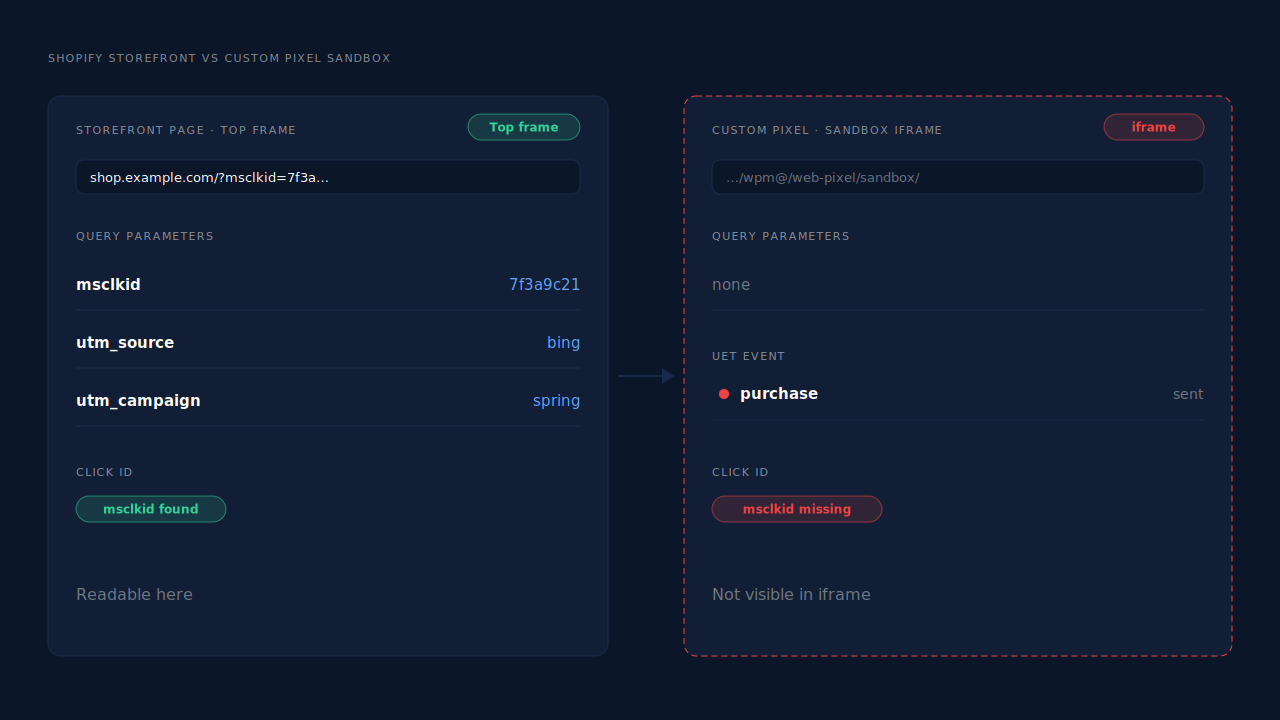
The same sandbox causes a family of related symptoms on Shopify: wrong page URLs, an empty user agent on Customer Events, and attribution that breaks between the landing page and checkout. The UET warning is just the one Microsoft chose to put in front of you.
Is the iframe warning safe to ignore?
Only if you do not care whether Microsoft can tie a sale to the click that caused it. The tag still fires and Microsoft still receives an event, so a goal can show as active. What you lose is the click id and the real page URL, which means weaker attribution, an unreliable conversion count by campaign, and bidding that learns from less than it should.
A quick way to see the damage in your own account: compare Shopify orders from visitors who arrived on a Microsoft Ads click against the purchases Microsoft attributes to campaigns for the same dates. If the gap widened around the time you moved UET into Customer Events, the sandbox is the reason.
The warning is also a sign of a second risk. If you leave a working purchase tag somewhere else and add the custom pixel, you now have two purchase senders. Microsoft only deduplicates UET and server events when they share the same event id and event name, and two independent browser tags rarely do.
How do you fix UET tracking on Shopify without a new tool?
Split the job in two. Keep UET in your theme for storefront pages, where it runs in the real page and reads msclkid itself. Then handle the purchase separately: either accept a weaker browser purchase from the custom pixel with the click id passed in by hand, or send the purchase server-side through Microsoft’s Conversions API.
Step 1: put UET back in the top frame for browsing. Add the UET base tag to your theme layout so it loads on product, collection and cart pages as a normal script. There it can read the landing URL, store the click id in a first-party cookie on your domain, and build remarketing audiences. This step alone removes the iframe warning for every storefront page.
Step 2: read the real landing URL inside the custom pixel. The sandbox cannot see the address bar, but Shopify passes the storefront’s location into each event’s context. A custom pixel can pull msclkid from there and keep it for later.
// Shopify Customer Events custom pixel (runs in the sandbox)
analytics.subscribe('page_viewed', (event) => {
  // The storefront URL, not the iframe's own location
  const href = event.context.document.location.href;
  const msclkid = new URL(href).searchParams.get('msclkid');
  if (msclkid) {
    // Keep the click id for the checkout steps that follow
    browser.localStorage.setItem('pl_msclkid', msclkid);
  }
});
Check the field names against Shopify’s current Web Pixels reference before you ship this; the shape of the event context is Shopify’s to change.
Step 3: decide where the purchase comes from. You can fire the UET purchase from the custom pixel on checkout_completed and hand it the stored click id. It will still run in the iframe and Tag Helper will still complain, but the conversion carries the click. Or you can take the purchase out of the browser entirely and send it from the order with Microsoft Advertising’s Conversions API, which needs Microsoft to enable API access on your account first.
Step 4: keep one purchase sender. Whichever route you pick, remove every other purchase tag pointing at the same goal. Two senders with different event ids count twice.
The server route is sturdier. A browser purchase depends on the shopper reaching the confirmation page with scripts allowed to run; an order-based purchase depends only on the order existing.
Why is sending the purchase server-side the more reliable fix?
Because it removes the iframe from the purchase path altogether. A server-side purchase is built from the Shopify order after payment, carries the click id you captured at landing, and is sent from a server to Microsoft. No sandbox, ad blocker, closed tab or payment redirect sits between the order and the conversion.
It also fixes the confirmation-page problem you would have had even without the iframe. Shoppers who pay through an express wallet or an off-site payment page do not always come back to the order status page, so any tag that waits for that page can miss them. An order webhook fires either way.
What the server path still needs from the browser is the click id. That is the one job the storefront tag must do well: read msclkid on the landing page, keep it, and make it available when the order arrives days or minutes later. Every ad platform has its own version of this; Microsoft’s msclkid is not interchangeable with Google’s gclid or Meta’s fbclid.
How does PartialLeads get Shopify purchases to Microsoft Ads without the iframe?
PartialLeads captures msclkid and the UTMs from the storefront landing URL, ties that visit to the shopper across the sandboxed checkout, and sends the purchase to Microsoft’s Conversions API from Shopify’s paid-order webhook. UET inside the iframe is no longer what records the sale.
The click id is read from the real page. The PartialLeads Customer Events pixel takes the landing URL from the event context Shopify provides, not from the sandbox’s own location, so msclkid, the UTMs and the _uet cookies are recorded on the landing visit.
The checkout hop is stitched. Shopify’s Customer Events sandbox regenerates visitor ids often, which is how a buyer turns into three anonymous visitors. PartialLeads joins those sessions into one person through its identity cluster: its own visitor id first, then email, phone, IP plus user agent, a device fingerprint and shared click ids. The order is then matched to the session by visitor id echo, then email, then phone.
The purchase comes from the order. When Shopify marks an order paid, the order webhook triggers a server-side purchase to Microsoft. Unpaid, pending and cancelled orders are not sent. The value is the full order total, including tax and shipping after discounts, and each order is recorded once.
Event names match your goal. Each Microsoft configuration carries its own purchase event name, so the server event lands on the goal your account already listens for. Event ids are a deterministic SHA-256 hash, unique per configuration, so a redelivered webhook cannot send twice.
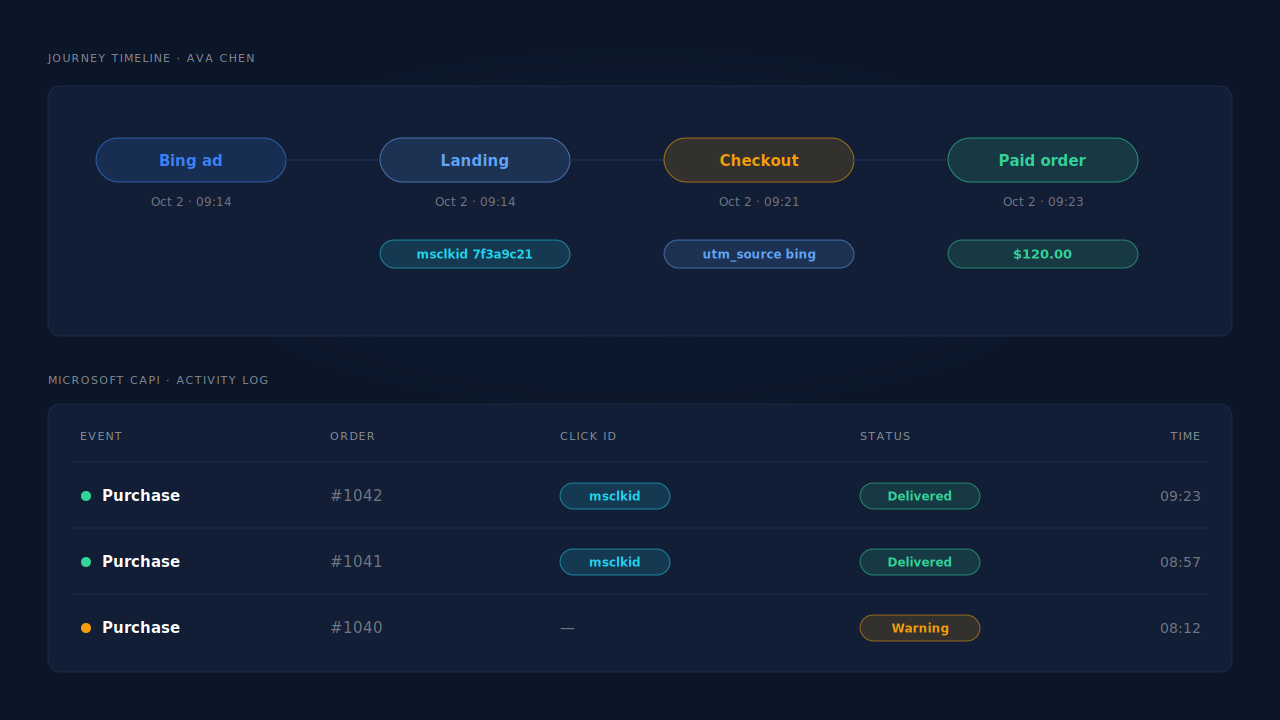
Where you see it working. The Journey timeline shows the buyer’s Microsoft Ads landing visit with its click id, followed by the checkout and the paid order. The Microsoft CAPI activity log lists each purchase sent, its status and the identifiers that made it onto the payload, and the health strip shows sends over seven days, the delivery rate and any warnings. If Microsoft accepts an event but drops an optional field, that shows up as a warning instead of a silent green tick. In the Leads list, the API column shows which conversion APIs each buyer was sent to.
The honest constraints. Microsoft must enable Conversions API access on your account before there is a token to paste; PartialLeads cannot grant or speed that up. Its event ids are its own, so it does not deduplicate against a UET purchase tag you leave running in a custom pixel: keep one purchase sender per goal, and keep UET in your theme for browsing and audiences. Event times are clamped to a seven-day window, so a bank-transfer order marked paid weeks later still sends, with a clamped timestamp. And delivery is the half PartialLeads controls: every paid order is sent, but whether Microsoft ties it to a click depends on the identifiers captured and on Microsoft’s own matching. For the wider Shopify picture, see how to fix Shopify tracking, attribution and catalog.
| What breaks | The mechanism | Where you see it in the dashboard |
|---|---|---|
| UET in a custom pixel fires from the sandbox iframe | Purchase sent server-side from the paid-order webhook, not from the iframe | Microsoft CAPI activity log |
msclkid never read from the landing page |
Landing URL taken from Shopify’s event context; click id and UTMs stored on the visit | Journey timeline, landing visit |
| Checkout sandbox resets the visitor id | Identity cluster plus visitor id, email and phone order matching | Journey timeline, one buyer across sessions |
| Server events land on the wrong goal | Per-config purchase event name | Microsoft CAPI config |
| Redelivered webhooks double-count | Deterministic SHA-256 event id, unique per config | Activity log, one row per order |
| A UET purchase tag also still fires | Not deduplicated — remove it and keep one purchase sender | Microsoft Ads goal counts vs the activity log |