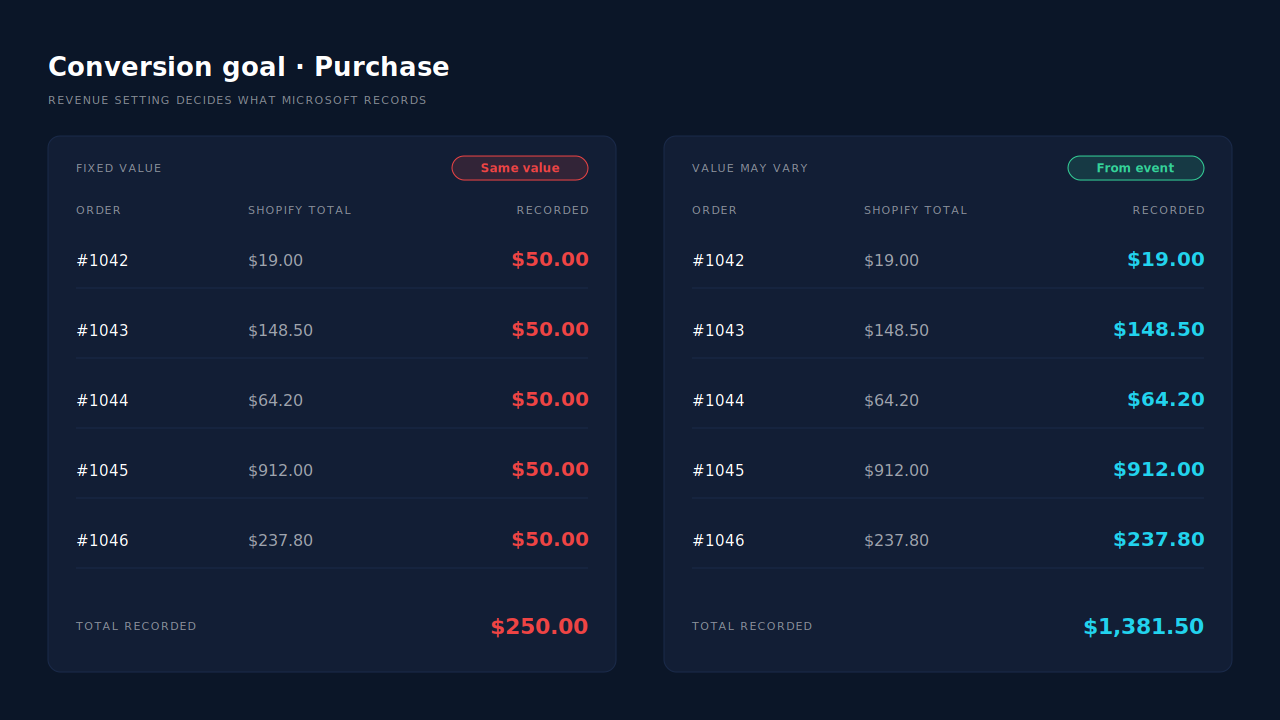
Microsoft Ads records the same revenue for every Shopify order because it never receives the order’s value. Either your conversion goal is set to count every conversion at one fixed amount, or the UET purchase event your store fires carries no revenue, or a hardcoded one, so Microsoft falls back to the number typed into the goal.
A flat figure on every conversion is a configuration signature, not Microsoft averaging your orders.
The cost is real. Revenue per conversion is what conversion-value reporting and value-based bidding learn from. If a $19 sale and a $900 sale look identical, Microsoft has no reason to prefer the campaign that sells the $900 one.
Why does every Shopify order show the same revenue in Microsoft Ads?
Because one of two settings replaces the order value with a constant. The first is the goal: Microsoft’s conversion goals let you count every conversion at a fixed value or let the value vary per conversion. The second is the tag: if the purchase event sends no revenue, there is nothing to vary, and the goal’s default amount is used instead.
Gate 1, the goal setting. In Microsoft Ads, open the purchase goal and look at its revenue setting. There is an option that gives every conversion the same value and an option that lets the value vary per conversion (the exact labels have changed between versions of the interface). On the fixed option, Microsoft records the number you typed, whatever your tag sends.
Gate 2, the event payload. On the variable option, Microsoft uses the revenue sent with each event. If the purchase event arrives with no revenue at all, the goal’s default amount fills the gap. If the event arrives with a hardcoded number, such as a 1 left over from a copied sample snippet, every order gets that number.
Both gates have to be open. Fix only the goal and a tag that sends nothing still produces flat revenue. Fix only the tag and a goal on the fixed option still ignores it.
Where does the fixed value come from on a Shopify store?
Usually from the way UET was added to checkout. On Shopify, the purchase event no longer lives in an editable thank-you page script for stores on the newer checkout. It lives in a Customer Events pixel or in an app. If that pixel or app sends the purchase without reading the order total, Microsoft has only the goal’s number to go on.
There are three common routes to a flat value on Shopify:
- A copied sample snippet. Microsoft’s example purchase event includes a revenue field with a placeholder number. Pasted into a custom pixel without swapping the placeholder for the checkout total, it sends the same number on every order.
- A pixel that sends no revenue. A custom pixel that pushes a purchase event with only an event name gives Microsoft nothing to vary.
- A migration that dropped the old code. Stores that once used Additional Scripts with a Liquid total variable lost that code when the order status page was upgraded. The goal kept counting conversions from whatever tag remained, without the value.
If an app installed your UET tag, check the app’s own settings and the goal it created before you write any code. You do not want two purchase senders on one goal, which is a separate problem with its own fix: Microsoft only deduplicates UET and server events when they share an event id and event name.
How do you check which gate is breaking your values?
Check the goal first, then a real order. Open the purchase goal in Microsoft Ads and confirm its revenue setting is the variable option. Then place a test order, open UET Tag Helper on the checkout, and read the purchase event: if its revenue field is missing or shows a fixed number, the tag is the problem.
A quick diagnostic:
- Read the goal. Fixed value set? Switch it to the variable option and note the default amount it falls back to.
- Read the event. In UET Tag Helper, find the purchase event and look for a revenue value and a currency.
- Compare against Shopify. Pick five recent orders from Microsoft Ads clicks with different totals. If Microsoft shows one number for all five, at least one gate is shut.
- Check the date. If values went flat on a specific day, look for what changed that day: a checkout upgrade, a new app, or a pixel edit.
How do you send the real order value from a Shopify custom pixel?
Read the total and currency from Shopify’s checkout-completed event and pass them on the UET purchase event. The custom pixel receives the checkout as event data, so the order total is available without parsing the page. Send the amount as a plain number and the currency as a three-letter code on the same event.
// Shopify Customer Events custom pixel (UET base code loaded above this)
analytics.subscribe('checkout_completed', (event) => {
  const checkout = event.data.checkout;
  window.uetq = window.uetq || [];
  window.uetq.push('event', 'purchase', {
    revenue_value: Number(checkout.totalPrice.amount), // the order's total, not a constant
    currency: checkout.currencyCode,                    // e.g. "USD"
  });
});
Check the field names against Shopify’s current Web Pixels reference and Microsoft’s current UET documentation before you ship this; both shapes are theirs to change.
This fixes the flat value, but it keeps the purchase in the browser. Custom pixels run inside a sandboxed iframe on Shopify, so UET there reads the iframe rather than your storefront and can miss the msclkid click id. And any browser purchase depends on the shopper reaching the confirmation page with scripts allowed to run. A purchase sent from a server does not.
Should Microsoft receive the subtotal or the full order total?
Pick one definition and keep it everywhere. A full total includes tax and shipping; a subtotal does not. Neither is wrong, but mixing them across platforms makes ROAS comparisons meaningless, and switching between them mid-campaign makes Microsoft’s history inconsistent. The same rule applies to Meta: send purchase value and currency as one number, one currency, one definition.
Three details matter as much as the definition:
Currency rides with the value. A store that sells in several currencies needs the currency the customer was charged in on every event, not the account’s default.
The value is a number. 129.00, not "$129.00" and not 12900.
Refunds are a reporting problem, not a sending one. A conversion records what was charged at the time. Refunds inflate attributed revenue unless you net them in your own reporting.
Why is a server-side purchase the sturdier way to send revenue?
Because the value comes from the order record, not from a page. A server-side purchase is built after Shopify marks the order paid, takes the total and currency straight from the order, and is sent to Microsoft’s Conversions API from a server. No sandbox, closed tab, ad blocker or payment redirect sits between the order and the value Microsoft receives.
An order webhook carries the total as a field: nothing to parse, no placeholder to forget.
What the server path still needs from the browser is the click id. The storefront tag must read msclkid on the landing page and keep it until the order arrives. The setup itself is covered in how to set up Microsoft Advertising’s Conversions API, including the account approval Microsoft requires first.
How does PartialLeads send each Shopify order’s real value to Microsoft Ads?
PartialLeads sends the purchase to Microsoft’s Conversions API from Shopify’s paid-order webhook, and the event carries that order’s value and currency.
The value is the full order total. It is Shopify’s order total, including tax and shipping, after discounts. There is no subtotal option, so if you report Meta or Google on subtotals, expect Microsoft revenue to read higher by your tax and shipping.
Only paid orders are sent, and each once. An order is sent when Shopify marks it paid. Unpaid, pending and cancelled orders are not. An order is recorded once, so a post-purchase upsell added to the same order later does not update the value Microsoft received.
The event lands on your goal. Each Microsoft configuration has its own purchase event name, mapped to the goal your account already uses. Event ids are a deterministic SHA-256 hash, unique per configuration, so a redelivered webhook cannot send the same order twice.
The click id travels with it. The pixel captures msclkid and the UTMs on the landing visit, and the order is matched back to that visitor by visitor id, then email, then phone.
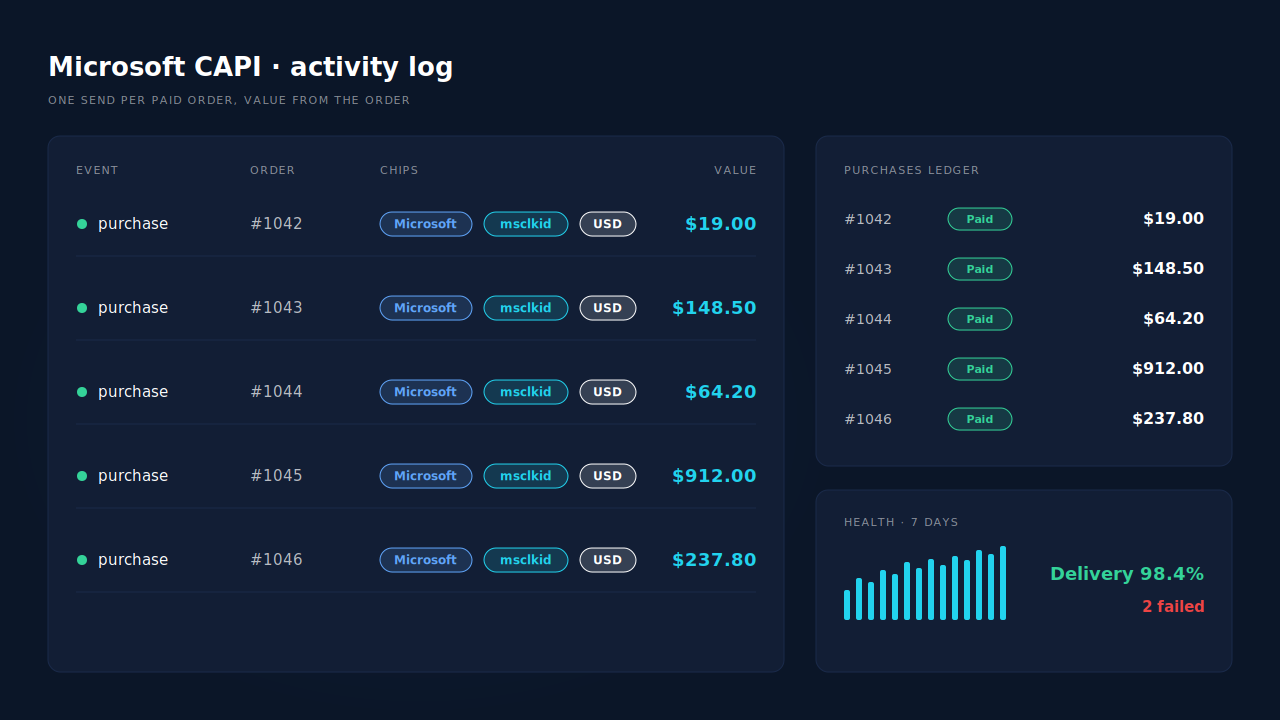
Where you see it working. The Microsoft CAPI activity log lists each purchase sent, its status and its payload, so you can read a different value on each row. The Purchases ledger shows the same orders with their totals from Shopify, which is your reconciliation: every paid order in the ledger should have a matching send. The health strip shows sends over seven days, the delivery rate and warnings; if Microsoft accepts an event but drops an optional field, it appears as a warning rather than a silent success. For the wider Shopify picture, see how to fix Shopify tracking, attribution and catalog.
The honest constraints. PartialLeads cannot change your goal: if the goal is still on a fixed value, Microsoft records that number no matter what the event carries, so set it to the variable option first. Microsoft must enable Conversions API access on your account before a token exists, and PartialLeads cannot grant or speed that up. Its event ids are its own, so it does not deduplicate against a UET purchase tag still firing from a custom pixel or an app: remove that purchase tag and keep one sender per goal. Event times are clamped to a seven-day window, so an order marked paid weeks later still sends with a clamped timestamp. And PartialLeads controls delivery, not matching: every paid order is sent with its value, but whether Microsoft ties it to a click depends on the identifiers captured and on Microsoft’s own matching.
| What breaks | The mechanism | Where you see it in the dashboard |
|---|---|---|
| Every order arrives at the goal’s default amount | Purchase built from the paid-order webhook with that order’s total and currency | Microsoft CAPI activity log, value per event |
| A copied snippet sends a placeholder revenue | Value read from the order record, not from page code | Activity log vs Purchases ledger totals |
| Custom pixel in the sandbox misses the purchase | Server-side send from the order, no confirmation page needed | Purchases ledger, one send per paid order |
| Same order sent twice after a webhook retry | Deterministic SHA-256 event id, unique per config | Activity log, one row per order |
| Event lands on the wrong goal | Per-config purchase event name | Microsoft CAPI config |
| Goal still set to a fixed value | Not fixable by any sender: switch the goal to a variable value | Microsoft Ads goal settings |