Adding to cart counts as a form submission because, on most Shopify themes, the Add to Cart button is a submit button inside a real HTML form that posts to /cart/add. GA4’s enhanced-measurement form tracking and a default Google Tag Manager (GTM) Form Submission trigger fire on every form submit, so each add-to-cart is logged as a form start and a form submission.
If that event is your lead conversion, your lead count is now partly a cart count. The fix is to filter by form, or better, to count only forms that collect an email or a phone number.
Why does Shopify’s Add to Cart button look like a form submission?
Because it is one. Shopify’s reference theme, Dawn, renders the product’s buy buttons with Liquid’s {% form 'product' %} tag, which outputs an HTML form element with an id that starts product-form- and the attribute data-type="add-to-cart-form". The variant id is a hidden input inside it, and the Add to Cart button is a type="submit" button.
When the shopper clicks, Dawn’s product-form.js listens for that form’s submit event, calls preventDefault(), and sends the form data to the cart with fetch. The page never reloads, but a genuine submit event has already fired on a genuine form.
Any tool that listens for form submits sees it. Shopify’s own Customer Events API does too: its form_submitted event “logs an instance where a form element on the page has been submitted” — any form element, with no notion of which ones matter to you.
A typical store has several forms that are not lead forms:
- the product form (Add to Cart) on every product page
- the search box in the header
- the customer login and account forms
- the cart page form and the country or currency selector
- the footer newsletter signup
Only the contact form, and possibly the newsletter box, are leads. Generic form tracking can’t tell them apart.
Why does GA4 also log a form_start for shoppers who never added to cart?
Because GA4’s enhanced measurement logs form_start when a visitor first interacts with a form in a session, and on Dawn the variant picker and quantity selector are inputs tied to the product form. A shopper who changes size or colour has, as far as GA4 is concerned, started a form. Expect form_start counts close to your product-page engagement, which is noise, not intent.
What does a fake form-submission conversion actually break?
It breaks every number downstream of “lead”. Cost per lead drops, conversion rate rises, and nobody can find the extra leads in the inbox because they never existed. The damage depends on where the event goes next.
Reporting. A store doing 40 contact enquiries and 900 add-to-carts a month (illustrative figures) would report 940 “form submissions”. The real signal is under 5% of the count.
Google Ads bidding. If the GA4 form_submit key event is imported into Google Ads as a primary conversion, Smart Bidding optimises toward add-to-cart clickers and reports a cost per lead that looks excellent. The campaign gets more budget for the wrong reason.
Meta. If a GTM tag sends a Meta Lead event on the generic Form Submission trigger, every add-to-cart becomes a Lead in Events Manager too. Meta’s delivery then learns from browsers, not enquirers.
This is one of the quieter failures covered in the broader guide to fixing Shopify tracking, attribution and catalog problems: nothing errors, the numbers just get better than they should.
How do you check whether Add to Cart is being counted as a form submission?
Add a product to the cart with your tag debugger open and watch which events fire. If a form submission appears the moment you click Add to Cart, your form tracking is not filtered. It takes two minutes and tells you exactly which form is responsible.
In GA4, open DebugView (or Realtime) with the debug extension on, click Add to Cart, and look for form_submit. Open the event and check its form id and destination parameters. A form id starting product-form- or a destination ending /cart/add is the product form.
In GTM, run Preview mode, click Add to Cart, and select the Form Submit event in the timeline. With the built-in Form ID and Form URL variables enabled, you’ll see the product form’s id and the /cart/add action. If your lead tag shows under “Tags Fired”, that’s the leak.
In a Shopify custom pixel, log the payload of form_submitted. The event’s element carries the form’s id, its action, and an elements list of inputs with their name and type. An action of /cart/add is the product form.
How do you stop GA4 and GTM counting Add to Cart as a lead?
Stop treating “any form” as a lead. In GA4 that means turning off enhanced-measurement form events, or building your lead event only from the contact form. In GTM it means switching the trigger from All Forms to Some Forms with a filter. In both cases, an allow-list beats a block-list.
GA4
Either switch off Form interactions in the web data stream’s enhanced-measurement settings, or leave it on and stop marking form_submit as a key event. Then create a dedicated lead event — from GTM, or with a GA4 “create event” rule that fires only when form_submit carries your contact form’s id. Mark that one as the key event and import it into Google Ads instead.
GTM
Change the Form Submission trigger to Some Forms and filter on the contact form: Form ID equals ContactForm on Dawn, or whatever your theme uses. Filtering on “Form URL does not contain /cart/add” works too, but it still lets search, login and newsletter forms through.
GTM’s “Check Validation” option can hide the problem by accident on Dawn, because product-form.js cancels the browser’s native submit. Don’t rely on it — another theme or app can submit differently.
Shopify custom pixel
If your form tracking lives in Customer Events, apply the allow-list in code. Count a form only when it contains an email or phone input, and skip anything posting to the cart:
// Shopify custom pixel: treat a form as a lead only if it collects contact details
analytics.subscribe('form_submitted', (event) => {
  const form = event.data.element;
  const action = form.action || '';
  if (action.includes('/cart')) return; // product form, cart form

  const fields = form.elements || [];
  const hasContact = fields.some((f) =>
    f.type === 'email' || f.type === 'tel' || /email|phone/i.test(f.name || '')
  );
  const isSearchOrLogin = fields.some((f) =>
    f.type === 'search' || f.type === 'password' || f.name === 'q'
  );
  if (!hasContact || isSearchOrLogin) return;

  // send your lead event here
});
Whichever tool you use, keep one source per event. If GTM and an app both send Lead to Meta, you’ve fixed the cart problem and created a duplication problem.
Should you still track Add to Cart at all?
Yes, as what it is: an ecommerce event, not a lead. Ad platforms use add-to-cart as a mid-funnel signal for shopping campaigns and retargeting audiences, so the goal is to label it correctly, not to delete it.
Shopify’s Customer Events API already emits a dedicated product_added_to_cart event, which “logs an instance where a customer adds a product to their cart.” Send that as GA4’s add_to_cart and Meta’s AddToCart. If Meta says it receives none at all, that’s a separate failure — see why Meta says your Shopify store sent no AddToCart events.
Keeping the two apart is also what makes form submissions without a thank-you page trackable: once you’re detecting submits rather than page loads, the filter is what separates an enquiry from a cart.
How does PartialLeads decide which Shopify forms count as leads?
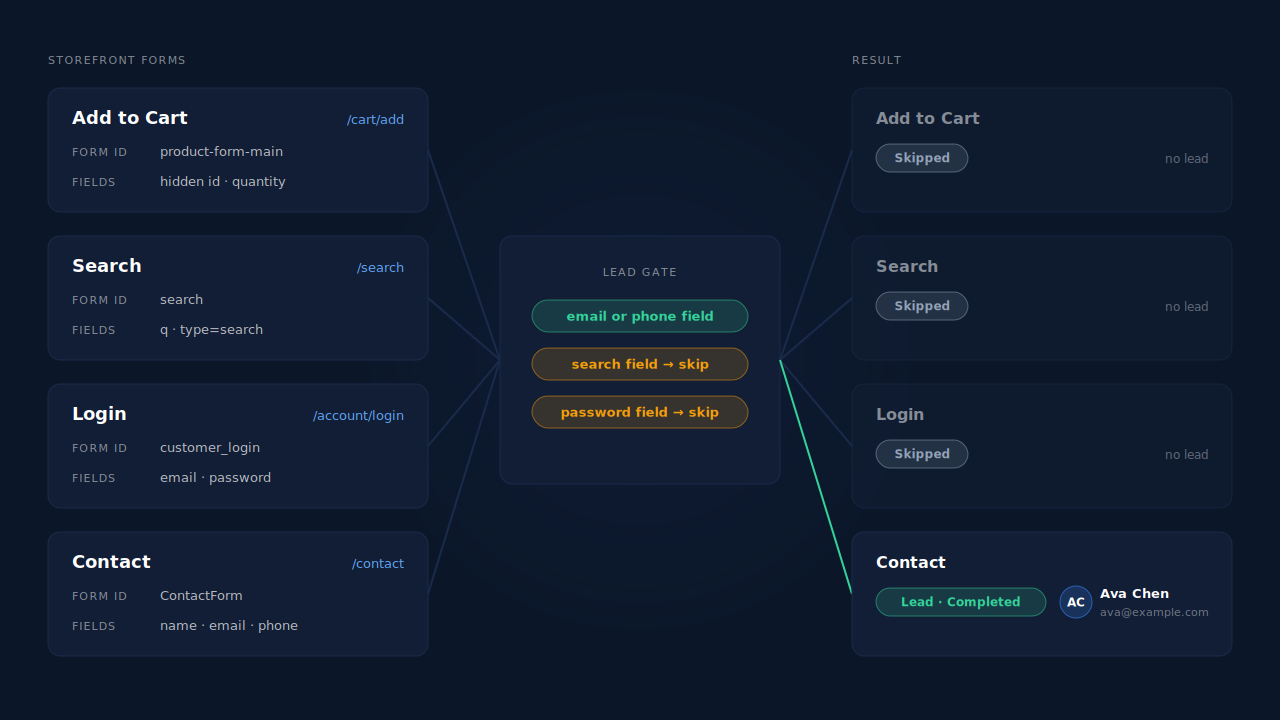
PartialLeads applies the allow-list as a rule in the tag itself. A form becomes a lead only if it has an email or phone field. Forms with a search field or a password field are skipped. So the product form, the search box and the customer login can never turn into leads, whatever a shopper clicks.
That gate is about what a lead is, not about one theme’s markup. A form with no way to contact the person isn’t a lead, even if it submits. A form that does collect an email or phone is captured as the visitor types — before they hit submit — so a contact form abandoned halfway still shows up as a partial lead with the details they typed.
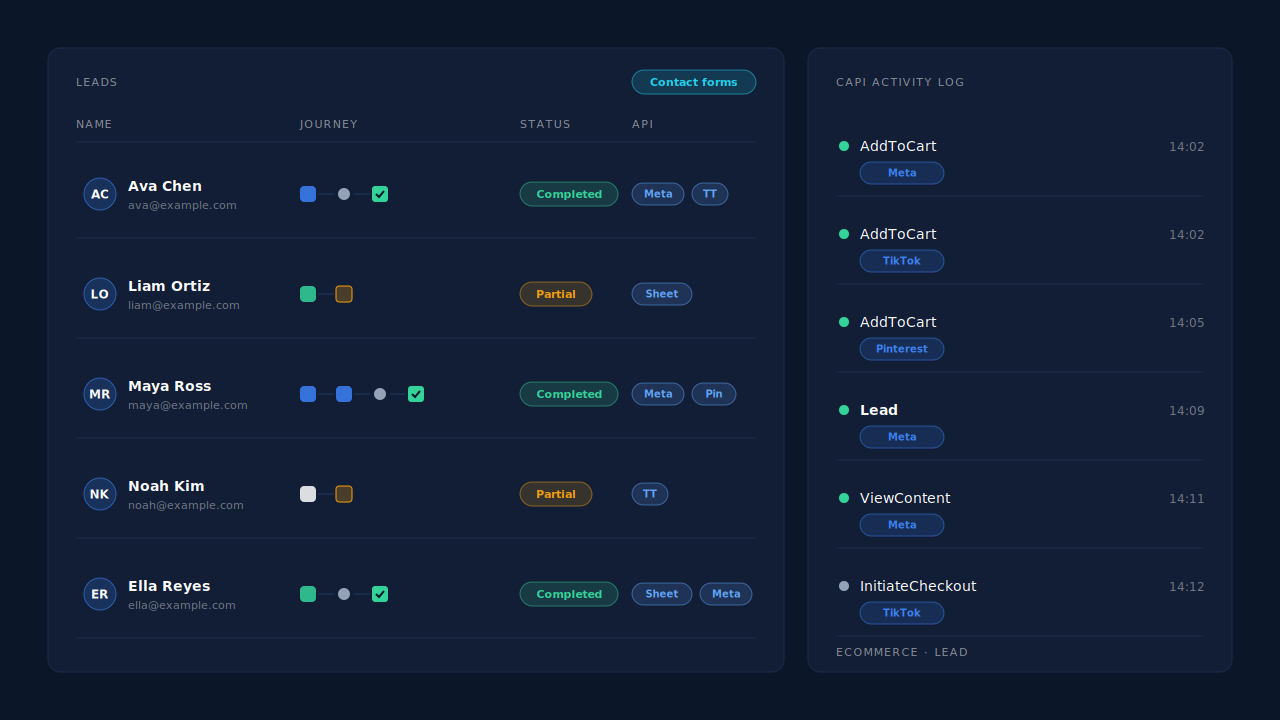
What you see is the Leads list: real enquiries only, each with a Partial or Completed badge, the Journey ribbon showing which ad or source brought them, and an API column showing which conversion APIs that lead was sent to. Add-to-carts don’t appear there. On the Shopify pixel path they’re sent as AddToCart ecommerce events to Meta, Pinterest and TikTok, alongside ViewContent and InitiateCheckout.
Three honest constraints.
It doesn’t change what GA4 counts. PartialLeads has no GA4 integration. If enhanced measurement is still logging cart clicks as form_submit, GA4 keeps doing it until you change the settings above.
A newsletter box has an email field, so it can count. That passes the gate by design. Check the Leads list after a day and decide whether newsletter signups belong in the Lead event you send to the ad platforms.
Run one source per event. PartialLeads uses its own event ids and never double-sends, but it doesn’t deduplicate against a GTM tag or another app sending the same Lead. Turn the old one off.
| The problem | The PartialLeads mechanism | Where you see it working |
|---|---|---|
| Add to Cart logged as a form submission | Only forms with an email or phone field become leads | Leads list shows contact forms only |
| Search and login forms counted as conversions | Forms with a search or password field are skipped | No search or login entries in the Leads list |
| Real enquiries abandoned before submit | Email and phone captured as typed, before submit | Partial badge on the lead |
| Add-to-cart signal lost once you stop the fake leads | AddToCart sent as an ecommerce event, not a Lead | CAPI activity log |
| Lead sent twice by GTM and an app | PartialLeads’ own event ids; keep one source per event | API column on the lead |
Tell us what's broken. We'll fix your tracking — free.
Describe the tracking/attribution problem you're stuck on and we'll map it to a fix: server-side conversions to Meta, Google, TikTok and Pinterest, plus first-party tracking that survives Safari. No code required.
Sources
- https://raw.githubusercontent.com/Shopify/dawn/main/snippets/buy-buttons.liquid
- https://raw.githubusercontent.com/Shopify/dawn/main/assets/product-form.js
- https://raw.githubusercontent.com/Shopify/dawn/main/snippets/product-variant-picker.liquid
- https://registry.npmjs.org/@shopify/web-pixels-extension/-/web-pixels-extension-2.18.0.tgz